1. บทนำ
This manual provides detailed instructions for the SYNCO G2A1 MEGA Wireless Microphone System. Please read this manual thoroughly before using the product to ensure proper operation and to maximize its performance and longevity. This system is designed for high-quality audio recording and streaming across various devices.

Image 1.1: The SYNCO G2A1 MEGA Wireless Microphone System, including the charging case, receiver, and transmitter units.
2. สินค้าหมดview
2.1 ส่วนประกอบ
The SYNCO G2A1 MEGA system typically includes the following components:
- SYNCO G2A1 MEGA Receiver (RX)
- SYNCO G2A1 MEGA Transmitter (TX)
- Portable Carrying & Charging Box
- สายเคเบิล Type-C ถึง Type-C
- Type-C to USB-A Adapter
- 3.5mm TRRS Cable for Smartphone
- 3.5mm TRS Cable for Camera
- External Lavalier Microphone
- Wind Muff for Lavalier Microphone
- Windshield for built-in microphone

Image 2.1: All included components of the SYNCO G2A1 MEGA Wireless Microphone System.
2.2 คุณสมบัติหลัก
- 8GB Onboard Recording: Each transmitter includes 8GB of internal storage, capable of recording approximately 24 hours of audio. This provides a backup in case of wireless signal interruption.
- เคสชาร์จทรงพลัง: The included charging case extends the system's operational time up to 24 hours.
- 656 ft (200m) Stable Transmission: Utilizes secure 2.4GHz digital transmission with Syncoder Tech for reliable, distortion-free audio over long distances.
- การลดเสียงรบกวน: One-touch noise cancellation minimizes background noise for clear audio output.
- Gain Control: Adjustable 0-6 level gain control allows for precise signal level optimization.
- Dual-Channel System: Supports simultaneous use of one transmitter and one receiver.
- Mono/Stereo/Safety Mode: Offers flexible output modes for post-processing, with an upgraded safety mode to prevent audio clipping.
- One-Button Muting: Quickly mute the microphone for temporary pauses.
- การตรวจสอบแบบเรียลไทม์: The receiver features a 3.5mm headphone jack for live audio monitoring.
- คลิปหนีบด้านหลังแบบแม่เหล็ก: New upgraded magnetic back clip for flexible mounting options.
3. การตั้งค่า
3.1 การชาร์จเริ่มต้น
- วางตัวส่งสัญญาณและตัวรับสัญญาณลงในกล่องชาร์จ
- Connect the charging case to a power source using the provided Type-C cable. The indicators on the units and case will show charging status.
- Ensure all units are fully charged before first use (approximately 2 hours for full charge).

Image 3.1: The SYNCO G2A1 MEGA charging case with units inserted, illustrating the contact charging mechanism.
3.2 การเปิด/ปิดเครื่องและการจับคู่
- To power on, press and hold the power button (often integrated with the mute button) on both the transmitter(s) and receiver.
- The units will automatically pair upon powering on. The display screens will indicate successful connection.
- To power off, press and hold the power button again until the units shut down.
3.3 การติดตั้งตัวส่งสัญญาณ
The transmitter can be used with its built-in microphone or an external lavalier microphone.
- ไมโครโฟนในตัว: Clip the transmitter directly onto clothing, ensuring the microphone is facing the sound source. Attach the provided windshield for outdoor use to reduce wind noise.
- ไมโครโฟนแบบหนีบปกเสื้อภายนอก: Plug the external lavalier microphone into the 3.5mm input jack on the transmitter. Clip the lavalier microphone to clothing, typically near the collar, and secure the transmitter to a belt or pocket using its clip.

Image 3.2: Options for microphone usage: internal clip-on or external lavalier microphone.
4. คู่มือการใช้งาน
4.1 การเชื่อมต่อกับอุปกรณ์บันทึกเสียง
The receiver can connect to various devices:
- กล้องถ่ายรูป/กล้องวิดีโอ: Use the 3.5mm TRS cable. Connect one end to the receiver's output and the other to the camera's microphone input.
- Smartphone (iPhone/Android): For smartphones with a 3.5mm jack, use the 3.5mm TRRS cable. For iPhones without a 3.5mm jack, an additional Lightning to 3.5mm adapter (not included) is required. For Android phones with USB-C, use the Type-C to Type-C cable.
- พีซี/แล็ปท็อป: Use the Type-C to Type-C cable or the Type-C to USB-A adapter if your computer only has USB-A ports.
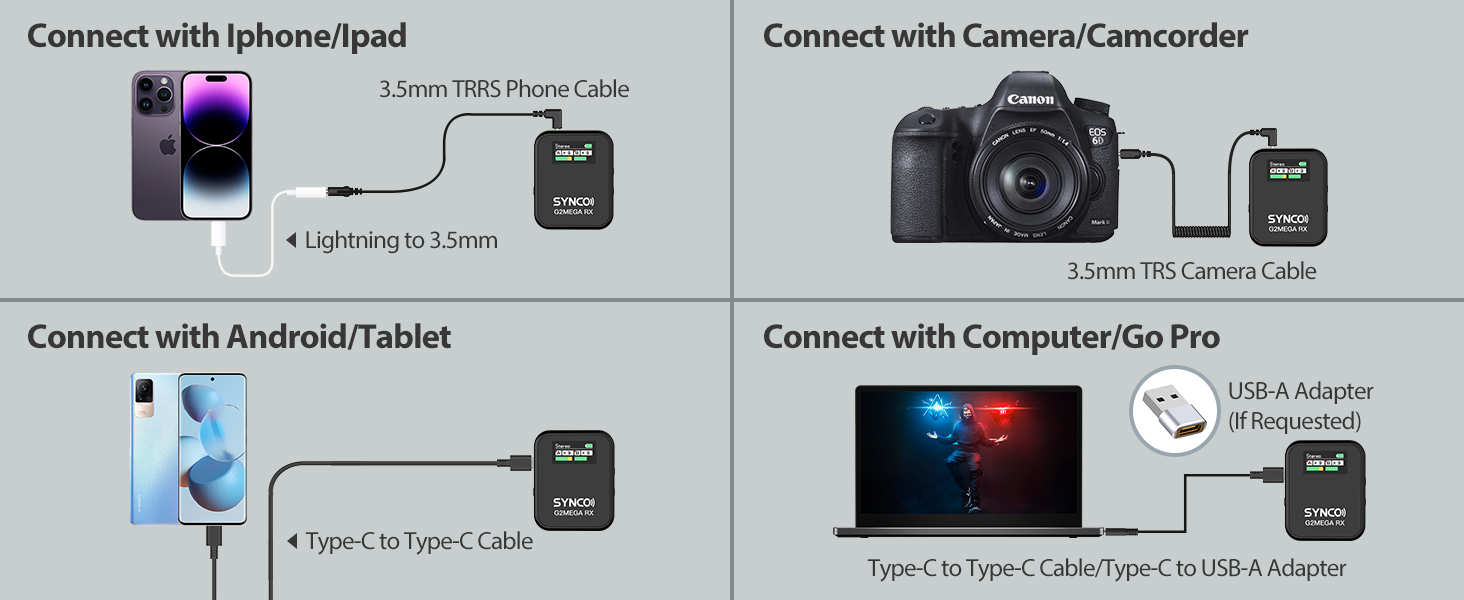
Image 4.1: Connectivity options for the SYNCO G2A1 MEGA system with various devices.
4.2 การตรวจสอบแบบเรียลไทม์
Plug headphones into the 3.5mm headphone jack on the receiver to monitor audio in real-time during recording. This allows you to verify audio quality and levels.
4.3 การปิดเสียง
Press the mute button on the transmitter to temporarily mute the microphone. The display will indicate the mute status. Press again to unmute.
5. Modes and Controls
5.1. ควบคุมกำไร
The receiver features a 0-6 level gain control. Adjust the gain to optimize the signal level, preventing audio from being too quiet or too loud. Use the '+' and '-' buttons on the receiver to adjust the gain.

Image 5.1: Visual representation of noise cancellation activation and gain level adjustment.
5.2 ลดเสียงรบกวน
Activate the one-touch noise cancellation feature on the transmitter to minimize ambient background noise. This is particularly useful in noisy environments.
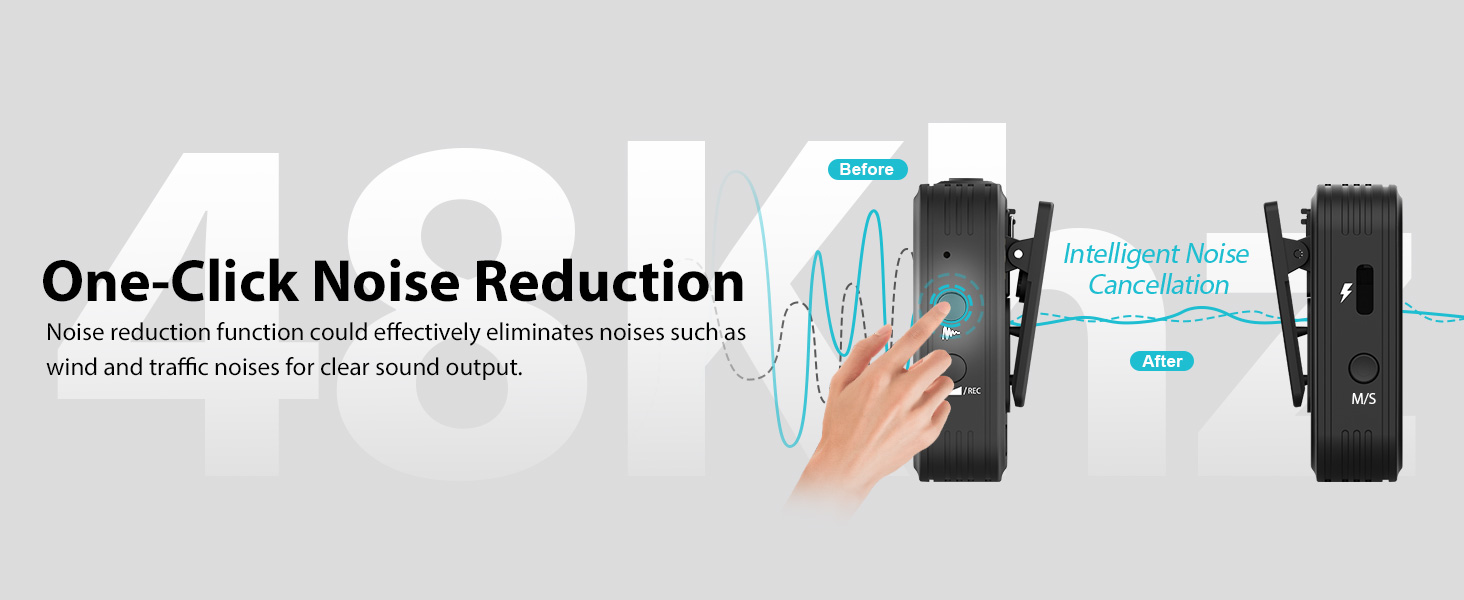
Image 5.2: The one-click noise reduction function effectively eliminates unwanted noises.
5.3 Output Modes (Mono/Stereo/Safety)
The receiver supports switching between Mono, Stereo, and Safety output modes for flexible post-processing.
- โหมดโมโน: Combines all audio inputs into a single channel.
- โหมดสเตอริโอ: Separates audio inputs into left and right channels.
- โหมดความปลอดภัย: Records a secondary track at a lower volume (-6dB) to prevent clipping or distortion from unexpected loud sounds. This provides a clean backup audio track.
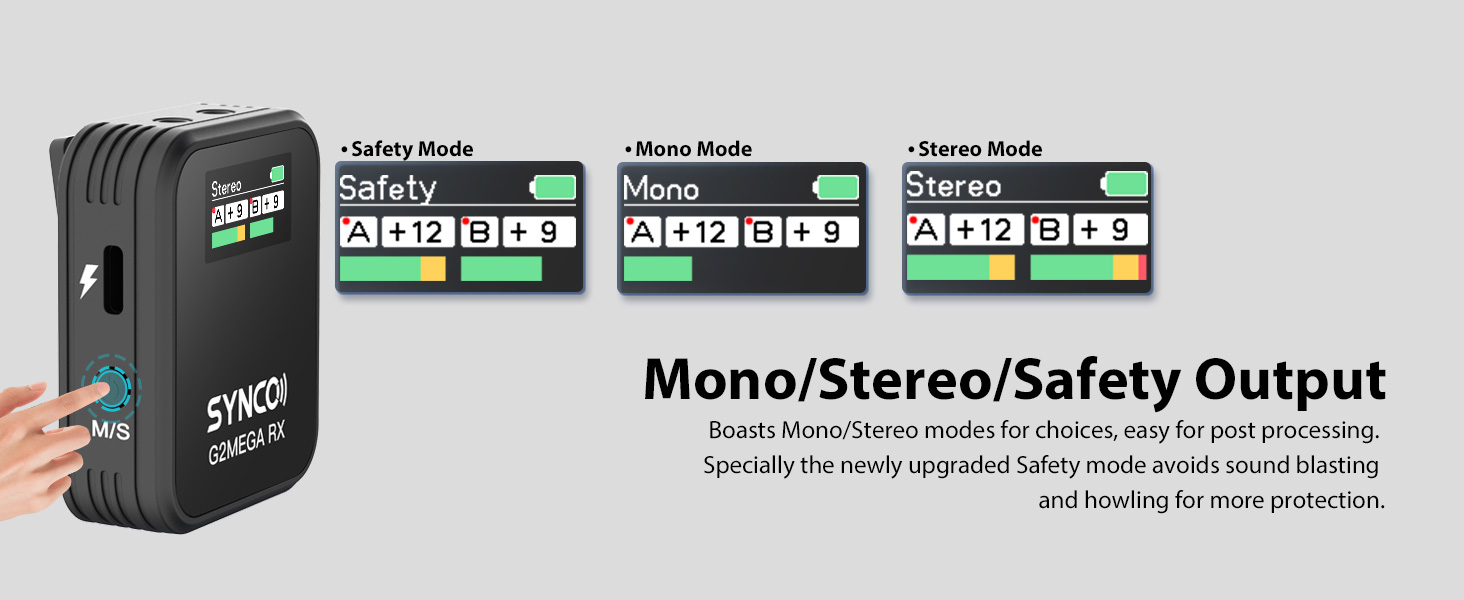
Image 5.3: The receiver's display showing options for Safety, Mono, and Stereo output modes.
6. Onboard Recording
Each SYNCO G2A1 MEGA transmitter is equipped with 8GB of internal storage, allowing for approximately 24 hours of continuous audio recording.
6.1 การเริ่ม/หยุดการบันทึก
To start or stop onboard recording, locate the dedicated record button on the transmitter. Press it once to start recording; press it again to stop. The display on the transmitter will show the recording status and time.

Image 6.1: The transmitter's display showing recording in progress and available storage.
6.2 Accessing Recorded Files
Connect the transmitter to a computer using the Type-C cable. The transmitter will appear as a removable storage device, allowing you to access and transfer your recorded audio files.
7. การชาร์จและอายุการใช้งานแบตเตอรี่
The SYNCO G2A1 MEGA system is designed for extended use with its efficient power management.
- Unit Battery Life: Individual transmitter and receiver units provide several hours of operation on a single charge.
- เคสชาร์จ: The portable charging case provides multiple recharges, extending the total working time of the system up to 24 hours.
- เวลาในการชาร์จ: A full charge for the units and case typically takes approximately 2 hours.
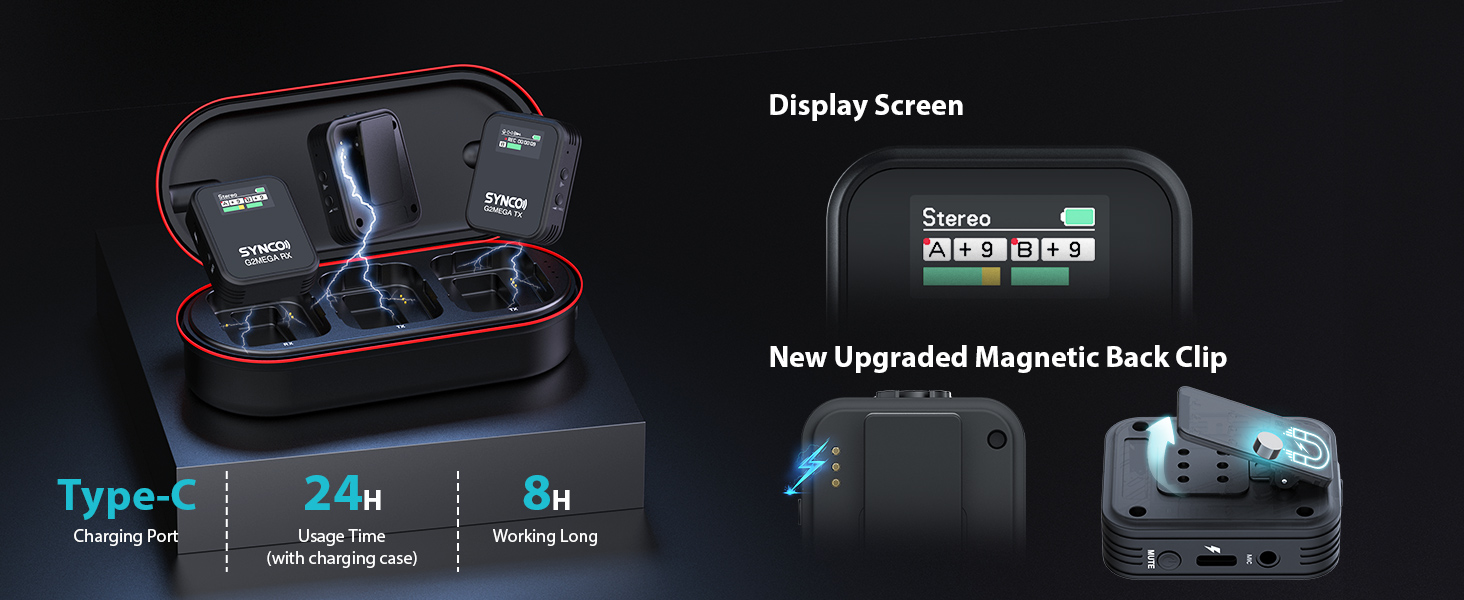
ภาพที่ 7.1: จบแล้วview of charging features and battery performance.
8. การบำรุงรักษา
To ensure the longevity and optimal performance of your SYNCO G2A1 MEGA system, follow these maintenance guidelines:
- การทำความสะอาด: Use a soft, dry cloth to clean the units and charging case. Avoid using liquid cleaners or solvents.
- พื้นที่จัดเก็บ: เมื่อไม่ใช้งาน ควรเก็บอุปกรณ์ไว้ในกล่องชาร์จในที่แห้งและเย็น
- การดูแลแบตเตอรี่ สำหรับการเก็บรักษาในระยะยาว ควรตรวจสอบให้แน่ใจว่าแบตเตอรี่มีประจุอยู่บ้าง (ประมาณ 50%) เพื่อป้องกันการเสื่อมสภาพ ควรชาร์จแบตเตอรี่เป็นระยะหากเก็บรักษาเป็นเวลานาน
- การดูแลสายเคเบิล: ควรจับสายเคเบิลอย่างระมัดระวังเพื่อป้องกันความเสียหาย หลีกเลี่ยงการดัดงอหรือการดึงอย่างรุนแรง
9 การแก้ไขปัญหา
If you encounter issues with your SYNCO G2A1 MEGA system, refer to the following common problems and solutions:
| ปัญหา | สาเหตุที่เป็นไปได้ | สารละลาย |
|---|---|---|
| ไม่มีเสียงออก | Units not powered on; Not paired; Incorrect cable connection; Low battery; Muted transmitter. | Ensure units are on and paired. Check cable connections. Charge units. Unmute transmitter. |
| คุณภาพเสียงไม่ดี / เสียงผิดเพี้ยน | Interference; Gain too high; Noise reduction off in noisy environment; Distance too far. | Move away from interference sources. Adjust gain levels. Activate noise reduction. Reduce distance between TX and RX. |
| Units not charging | Charging cable faulty; Power source issue; Units not properly seated in case. | Check cable and power source. Ensure units are correctly placed in the charging case. |
| Onboard recording not working | Recording not initiated; Storage full. | Press the record button on the transmitter. Transfer files to clear storage. |
If the problem persists, please contact SYNCO customer support.
10. ข้อมูลจำเพาะ
| คุณสมบัติ | ข้อมูลจำเพาะ |
|---|---|
| ชื่อรุ่น | SY-G2A1-MEGA |
| ยี่ห้อ | ซินโก้ |
| ปัจจัยรูปแบบไมโครโฟน | Desktop (Clip-on) |
| แหล่งพลังงาน | ใช้พลังงานจากแบตเตอรี่ |
| วัสดุ | โลหะ |
| อัตราส่วนสัญญาณต่อเสียงรบกวน | 70 เดซิเบล |
| แพลตฟอร์มฮาร์ดแวร์ | PC |
| จำนวนช่องสัญญาณ | 1 |
| การตอบสนองความถี่ | 20 เฮิรตซ์ |
| น้ำหนักสินค้า | 1.27 ออนซ์ |
| ขนาดแพ็คเกจ | 7.17 x 3.34 x 2.56 นิ้ว |
| เทคโนโลยีการเชื่อมต่อ | ไร้สาย |
| ประเภทขั้วต่อ | แจ็ค 3.5 มม., พอร์ต USB Type-C |
| คุณสมบัติพิเศษ | คลิป |
| อุปกรณ์ที่รองรับ | Camera, Smartphone, PC, Laptop |
| รูปแบบขั้ว | รอบทิศทาง |
| อิมพีแดนซ์ | 1 โอห์ม |
| ระบบจัดเก็บข้อมูลบนเครื่อง | 8GB (approx. 24H recording) |
| ช่วงการส่งผ่าน | สูงถึง 656 ฟุต (200m) |
| เวลาทำงานทั้งหมด | นานถึง 24 ชั่วโมง (พร้อมกล่องชาร์จ) |
11. การรับประกันและการสนับสนุน
สำหรับข้อมูลการรับประกันและการสนับสนุนทางเทคนิค โปรดดูที่เว็บไซต์อย่างเป็นทางการของ SYNCO webหรือติดต่อตัวแทนจำหน่ายในพื้นที่ของคุณ เก็บใบเสร็จรับเงินไว้เป็นหลักฐานการซื้อสำหรับการเรียกร้องการรับประกัน