1. บทนำ
This manual provides essential information for the proper use and maintenance of your DigiLand Android Tablet S10. Please read it thoroughly before operating the device to ensure optimal performance and longevity. The DigiLand S10 is a 10.1-inch Android 14 tablet designed for versatile use, featuring an Octa-Core processor, ample memory, and a high-definition display.
2. ข้อมูลด้านความปลอดภัย
- อย่าให้แท็บเล็ตถูกอุณหภูมิที่สูงหรือต่ำเกินไป แสงแดดโดยตรง หรือความชื้นสูง
- หลีกเลี่ยงการทำแท็บเล็ตตกหรือได้รับแรงกระแทกรุนแรง
- Use only the original charger and accessories provided with the tablet.
- อย่าพยายามถอดประกอบหรือซ่อมแซมแท็บเล็ตด้วยตนเอง โปรดติดต่อช่างผู้ชำนาญการ
- เก็บแท็บเล็ตให้ห่างจากน้ำและของเหลวอื่นๆ
- ทิ้งแท็บเล็ตและแบตเตอรี่อย่างมีความรับผิดชอบตามกฎระเบียบท้องถิ่น
3. เนื้อหาบรรจุภัณฑ์
เมื่อเปิดบรรจุภัณฑ์ โปรดตรวจสอบว่าสินค้าทั้งหมดที่ระบุไว้ด้านล่างมีอยู่และอยู่ในสภาพดี:
- DigiLand Android Tablet S10 (Blue)
- สายชาร์จแบบ USB Type-C
- อะแดปเตอร์แปลงไฟ
- คู่มือเริ่มต้นอย่างรวดเร็ว

Figure 3.1: Items included in the DigiLand Tablet S10 package. This image displays the tablet itself, its packaging box, a USB Type-C charging cable, a power adapter, and a quick start guide, ensuring users can confirm all components are present.
4. สินค้าหมดview
The DigiLand S10 tablet features a sleek design with essential ports and controls for user convenience.
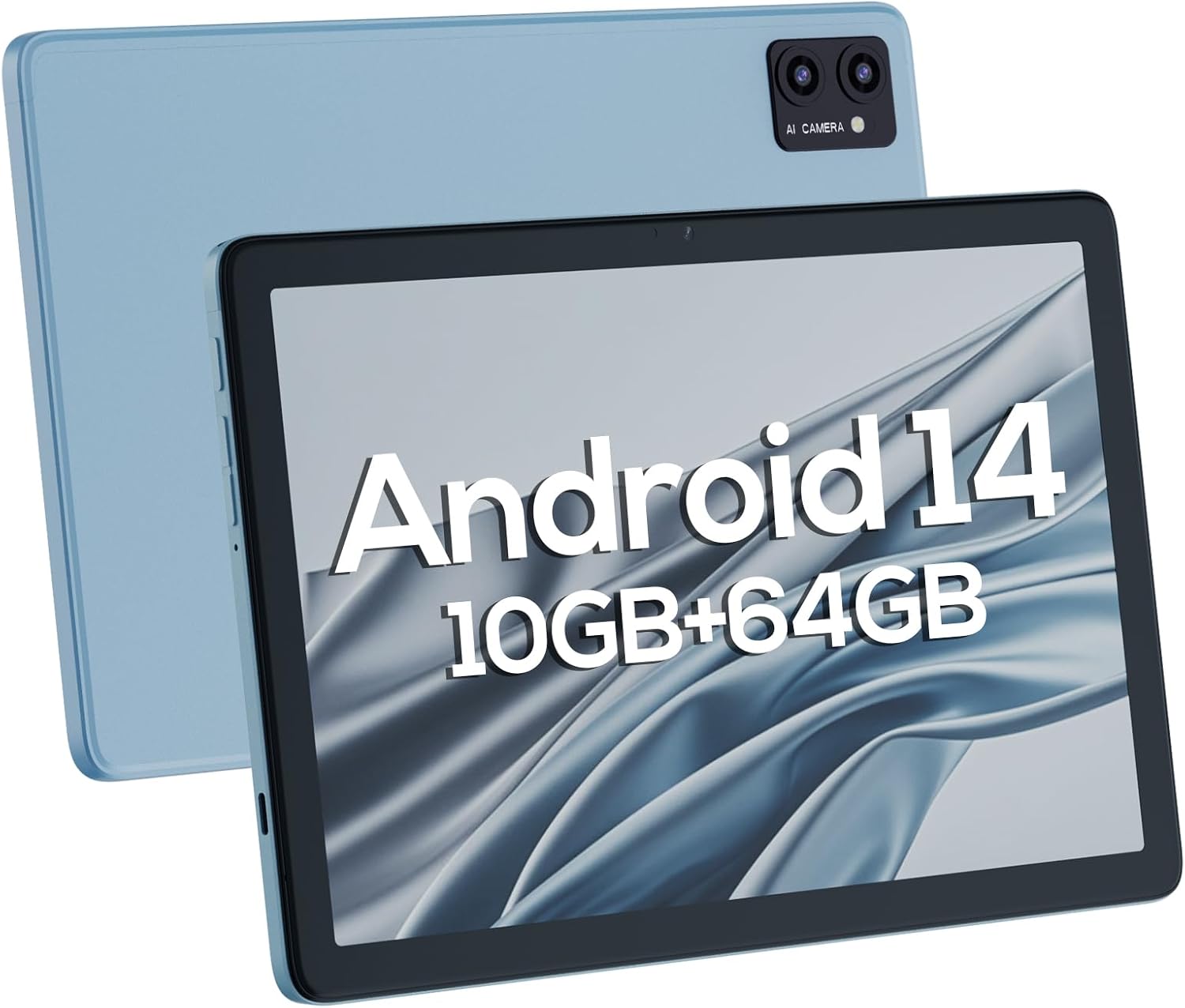
รูปที่ 4.1: ด้านหน้าและด้านหลัง views of the DigiLand Android Tablet S10. The image highlights the tablet's 10.1-inch display on the front and the dual camera module on the blue-colored back panel.
ส่วนประกอบหลัก:
- จอแสดงผล IPS HD ขนาด 10.1 นิ้ว: Provides vibrant visuals with 800x1280 resolution.
- กล้องหน้า (5MP): อยู่บริเวณขอบด้านหน้า เหมาะสำหรับการสนทนาทางวิดีโอและการถ่ายเซลฟี่
- กล้องหลัง (8MP): Located on the back, for capturing photos and videos.
- ปุ่มเปิด/ปิด: Used to turn the tablet on/off or put it to sleep/wake.
- ปุ่มปรับระดับเสียง: ปรับระดับเสียง
- พอร์ต USB Type-C: สำหรับการชาร์จและถ่ายโอนข้อมูล
- แจ็คหูฟัง 3.5 มม.: สำหรับการเชื่อมต่อหูฟังแบบมีสาย
- ช่องเสียบการ์ด MicroSD: สำหรับเพิ่มพื้นที่จัดเก็บข้อมูลได้สูงสุดถึง 256GB
- ลำโพงคู่: ให้เอาต์พุตเสียง
5. การตั้งค่า
5.1 การชาร์จเริ่มต้น
Before first use, fully charge your tablet. Connect the USB Type-C cable to the tablet's charging port and the power adapter to a wall outlet. The battery indicator on the screen will show charging status. A full charge typically takes several hours.
5.2 การเปิด/ปิดเครื่อง
- การเปิดเครื่อง: Press and hold the Power button until the DigiLand logo appears.
- วิธีปิดเครื่อง: กดปุ่มเปิด/ปิดค้างไว้จนกว่าเมนูปิดเครื่องจะปรากฏขึ้น เลือก "ปิดเครื่อง" แล้วยืนยัน
- วิธีเข้า/ออกการนอนหลับ: กดปุ่มเปิดปิดสั้นๆ
5.3 ตัวช่วยการตั้งค่าเริ่มต้น
Upon first power-on, the Android 14 setup wizard will guide you through basic configurations:
- เลือกภาษาของคุณ
- เชื่อมต่อกับเครือข่าย Wi-Fi
- ลงชื่อเข้าใช้ด้วยบัญชี Google ของคุณหรือสร้างบัญชีใหม่
- Review และยอมรับข้อกำหนดและเงื่อนไข
- ตั้งค่าการล็อคหน้าจอ (PIN, รูปแบบ หรือรหัสผ่าน)
- ตั้งค่าอื่นๆ ตามที่ระบบแจ้ง
5.4 การขยายพื้นที่จัดเก็บข้อมูล
The tablet supports MicroSD cards up to 256GB for additional storage. Locate the MicroSD card slot (often near the headphone jack or power button, as shown in Figure 4.1) and insert the card gently until it clicks into place. You may need to format the card via the tablet's settings for optimal use.
6. การใช้งานแท็บเล็ต
6.1 การนำทางพื้นฐาน
- หน้าจอหลัก: หน้าจอหลักที่คุณสามารถเข้าถึงแอพและวิดเจ็ตได้
- ลิ้นชักแอป: ปัดขึ้นจากหน้าจอหลักไปที่ view แอปพลิเคชันที่ติดตั้งทั้งหมด
- แผงการแจ้งเตือน: ปัดลงจากด้านบนของหน้าจอเพื่อเข้าถึงการแจ้งเตือนและการตั้งค่าด่วน
- แอปล่าสุด: Tap the square navigation button (or swipe up and hold from the bottom if using gestures) to see recently opened applications.
6.2 การเชื่อมต่อกับ Wi-Fi และ Bluetooth
- ไวไฟ : ไปที่ การตั้งค่า > เครือข่ายและอินเทอร์เน็ต > Wi-Fiเปิด Wi-Fi และเลือกเครือข่ายที่ต้องการ ป้อนรหัสผ่านหากจำเป็น
- บลูทูธ: ไปที่ การตั้งค่า > อุปกรณ์ที่เชื่อมต่อ > การตั้งค่าการเชื่อมต่อ > Bluetooth. เปิดบลูทูธและจับคู่กับอุปกรณ์ที่มีอยู่
6.3 การใช้กล้อง
แท็บเล็ตนี้มีกล้องหน้า 5 ล้านพิกเซลและกล้องหลัง 8 ล้านพิกเซล
- เปิดแอปกล้อง
- แตะไอคอนสวิตช์กล้องเพื่อสลับระหว่างกล้องหน้าและกล้องหลัง
- แตะปุ่มชัตเตอร์เพื่อถ่ายภาพหรือเริ่ม/หยุดการบันทึกวิดีโอ

Figure 6.1: Visual representation of the tablet's camera capabilities, showing sample images captured by both the 5MP front and 8MP rear cameras.
6.4 การจัดการแบตเตอรี่
แบตเตอรี่ 6000mAh ใช้งานได้ยาวนานยิ่งขึ้น เพื่อยืดอายุการใช้งานแบตเตอรี่:
- ลดความสว่างหน้าจอ
- ปิด Wi-Fi และ Bluetooth เมื่อไม่ได้ใช้งาน
- ปิดแอปพลิเคชันที่ไม่ได้ใช้งานซึ่งทำงานอยู่เบื้องหลัง
- เปิดใช้งานโหมดประหยัดแบตเตอรี่ในการตั้งค่า

Figure 6.2: Battery performance details for the DigiLand Tablet S10. This graphic illustrates the 6000mAh battery capacity and provides estimated usage durations for various activities like video playback (9 hours), music (14 hours), and browsing (15 hours).
7. การบำรุงรักษา
- การทำความสะอาด: Use a soft, lint-free cloth to clean the screen and body. Avoid abrasive cleaners.
- การอัปเดตซอฟต์แวร์: ตรวจสอบและติดตั้งการอัปเดตระบบเป็นประจำเพื่อให้มั่นใจถึงประสิทธิภาพและความปลอดภัยที่เหมาะสมที่สุด ไปที่ การตั้งค่า > ระบบ > อัปเดตระบบ.
- การจัดการพื้นที่เก็บข้อมูล: ล้างแคชเป็นระยะ ลบสิ่งที่ไม่จำเป็นออก fileและถอนการติดตั้งแอปที่ไม่ใช้งานเพื่อเพิ่มพื้นที่จัดเก็บข้อมูล
- ข้อมูลสำรอง: Regularly back up important data to a cloud service or external storage device to prevent data loss.
8 การแก้ไขปัญหา
| ปัญหา | วิธีแก้ปัญหาที่เป็นไปได้ |
|---|---|
| แท็บเล็ตไม่สามารถเปิดได้ | ตรวจสอบให้แน่ใจว่าแบตเตอรี่ชาร์จเต็มแล้ว กดปุ่มเปิด/ปิดค้างไว้ 10-15 วินาทีเพื่อบังคับรีสตาร์ท |
| ประสิทธิภาพการทำงานช้า | Close unused apps, clear cache, restart the tablet. Consider a factory reset if issues persist (backup data first). |
| ปัญหาการเชื่อมต่อ Wi-Fi | Restart the tablet and router. Forget the network and reconnect. Ensure Wi-Fi is enabled. |
| แอพขัดข้อง | Clear app cache/data (Settings > Apps), update the app, or reinstall it. |
| หน้าจอไม่ตอบสนอง | บังคับรีสตาร์ทแท็บเล็ต หากปัญหายังคงอยู่ โปรดติดต่อฝ่ายสนับสนุน |
9. ข้อมูลจำเพาะ
Below are the detailed technical specifications for the DigiLand Android Tablet S10:
| คุณสมบัติ | รายละเอียด |
|---|---|
| ยี่ห้อ | ดิจิแลนด์ |
| ชื่อรุ่น | DigiLand-S10 |
| ระบบปฏิบัติการ | แอนดรอยด์ 14 |
| ขนาดหน้าจอ | 10.1 นิ้ว |
| ความละเอียดหน้าจอ | 800 x 1280 (IPS HD Display) |
| โปรเซสเซอร์ | A523, Octa core, Cortex A55@1.8 GHz, 22nm |
| แรม | 10GB (4+6GB) |
| การจัดเก็บข้อมูลภายใน | 64GB |
| พื้นที่เก็บข้อมูลแบบขยายได้ | Up to 256GB via TF card (MicroSD) |
| กล้องหน้า | 5MP |
| กล้องหลัง | 8MP |
| ความจุของแบตเตอรี่ | 6000mAh |
| การเชื่อมต่อ | Wi-Fi (2.4G+5G), Bluetooth 5.0, USB Type-C, 3.5mm Headphone Jack |
| ขนาด (กxยxส) | 7 x 4 x 0.5 นิ้ว |
| น้ำหนักสินค้า | 2.42 ปอนด์ (ประมาณ 510 กรัม) |
| สี | สีฟ้า |

รูปที่ 9.1: เกินview of the DigiLand Tablet S10's core specifications. This graphic highlights features such as Android 14, MTK Helio A523 Octa-Core Processor, 10GB RAM, 64GB ROM (expandable to 256GB), 10.1-inch HD display, 6000mAh battery, 5MP front camera, 8MP rear camera, 510g weight, and 8.8mm thickness.
10. การรับประกันและการสนับสนุน
10.1 ข้อมูลการรับประกัน
DigiLand products typically come with a limited manufacturer's warranty. Please refer to the warranty card included in your product packaging or visit the official DigiLand website for detailed terms and conditions regarding warranty coverage, duration, and limitations. Keep your proof of purchase for warranty claims.
10.2 การสนับสนุนลูกค้า
For technical assistance, troubleshooting, or any inquiries regarding your DigiLand Android Tablet S10, please contact DigiLand customer support. Contact information can usually be found in the Quick Start Guide or on the official DigiLand website. When contacting support, please have your product model (DigiLand-S10) and purchase details ready.
Thank you for choosing DigiLand. We hope you enjoy your new tablet!


