1. บทนำ
This manual provides detailed instructions for the setup, operation, maintenance, and troubleshooting of your NEOSMAY KC12-F Fanless Industrial Mini PC. Please read this manual thoroughly before using the device to ensure proper functionality and longevity.
2. สินค้าหมดview
The NEOSMAY KC12-F is a high-performance fanless industrial mini PC designed for various applications requiring robust and silent operation. It features an Intel 12th Gen Core i5-1240P processor, ample memory and storage, and extensive connectivity options.
คุณสมบัติหลัก:
- โปรเซสเซอร์: Intel 12th Gen Core i5-1240P (12 Cores, 16 Threads, up to 4.4 GHz)
- กราฟิก: กราฟิก Intel Iris Xe
- หน่วยความจำ: 16GB DDR4 RAM (Dual Channel, expandable up to 64GB)
- พื้นที่จัดเก็บ: 512GB M.2 2280 NVME SSD (expandable, supports M.2 SATA SSD)
- เครือข่าย: Dual 2.5 Gigabit Ethernet, WiFi 6, Bluetooth 5.2
- การแสดงผลเอาท์พุต: Supports 4K 60Hz Quad Display via 2x HDMI 2.0, 1x DP 1.4, 1x Full Function Type-C
- พอร์ต: USB 3.2 x 4, USB 2.0 x 4, Full Function Type-C (20Gbps), RS485 COM, RS232 COM, Audio/MIC Jack
- ออกแบบ: Fanless aluminum shell with S-shaped copper sheet for efficient heat dissipation.
เค้าโครงพอร์ต:

ภาพที่ 2.1: ด้านหน้าและด้านหลัง View of the NEOSMAY KC12-F Mini PC. The front panel includes power button, USB 3.2, USB 2.0, Type-C, and audio jacks. The rear panel features DC input, dual 2.5Gbe Ethernet, HDMI, DisplayPort, additional USB ports, and COM ports.
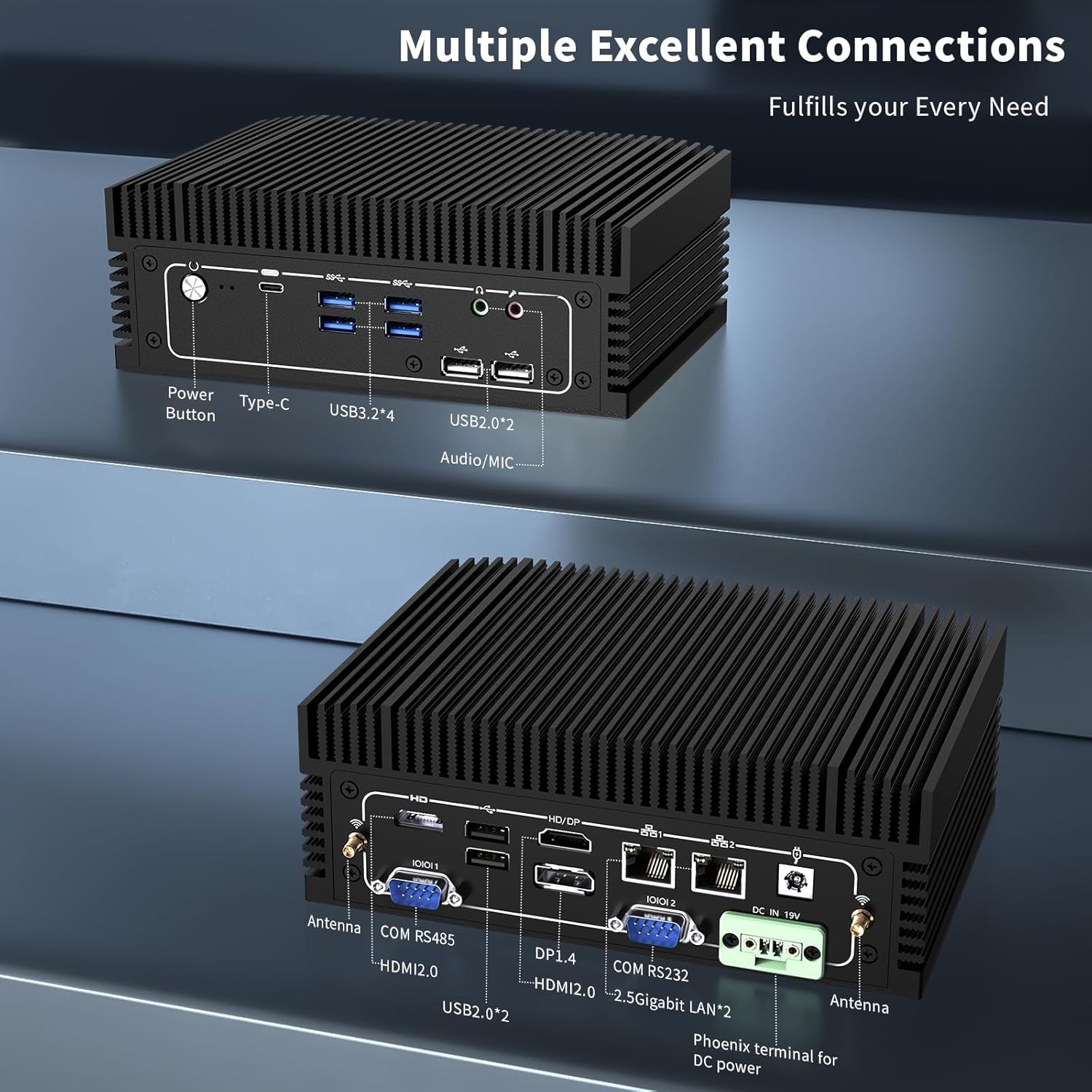
ภาพที่ 2.2: รายละเอียด view of the front and rear ports. The front includes a power button, Type-C port, 4x USB 3.2 ports, 2x USB 2.0 ports, and an Audio/MIC Jack. The rear includes 2x HDMI 2.0, 1x DP 1.4, 2x 2.5 Gigabit LAN, 2x USB 2.0, COM RS485, COM RS232, DC IN 19V, and antenna connectors.
3. คำแนะนำในการตั้งค่า
3.1 เนื้อหาบรรจุภัณฑ์
ก่อนดำเนินการต่อ โปรดตรวจสอบให้แน่ใจว่ามีรายการทั้งหมดอยู่ในบรรจุภัณฑ์:

ภาพที่ 3.1: Contents of the NEOSMAY KC12-F Mini PC package. Includes the Mini PC unit, power adapter, power cord, Wi-Fi antennas, VESA mount bracket, and screws.
- NEOSMAY KC12-F Mini PC Unit
- อะแดปเตอร์ไฟฟ้า (19V DC)
- สายไฟ
- เสาอากาศ Wi-Fi
- ขายึด VESA และสกรู
3.2 การเชื่อมต่อเริ่มต้น
- เชื่อมต่อจอแสดงผล: Connect your monitor(s) to the Mini PC using HDMI, DisplayPort, or Type-C cables. The device supports up to four displays simultaneously.
- เชื่อมต่ออุปกรณ์ต่อพ่วง: เสียบคีย์บอร์ด เมาส์ และอุปกรณ์ USB อื่นๆ เข้ากับพอร์ต USB ที่ว่างอยู่
- เชื่อมต่อเครือข่าย: For a wired connection, connect an Ethernet cable to one of the 2.5 Gigabit LAN ports. For wireless, screw in the provided Wi-Fi antennas to the antenna connectors on the rear panel.
- เชื่อมต่อพลังงาน: Connect the power adapter to the DC IN 19V port on the Mini PC, then plug the power cord into an electrical outlet.
4. คู่มือการใช้งาน
4.1 เปิด/ปิดเครื่อง
- เปิดเครื่อง: กดปุ่มเปิด/ปิดที่อยู่ด้านหน้าของมินิพีซี ไฟแสดงสถานะการทำงานจะสว่างขึ้น
- หมดแรง: To shut down the system, use the operating system's shutdown function. Alternatively, press and hold the power button for 5-7 seconds to force a shutdown (not recommended for regular use).
4.2 การกำหนดค่าการแสดงผล
The Mini PC supports up to four independent 4K@60Hz displays. After connecting multiple monitors, you may need to configure the display settings within your operating system (e.g., Windows Display Settings) to extend or duplicate your desktop.

ภาพที่ 4.1: Illustration of the Mini PC supporting a quad 4K display setup, demonstrating its capability for multi-monitor environments.
5. การบำรุงรักษา
5.1 การทำความสะอาด
- โปรดตรวจสอบให้แน่ใจว่าได้ปิดเครื่องมินิพีซีและถอดปลั๊กออกก่อนทำความสะอาด
- Use a soft, dry cloth to wipe the exterior. For stubborn marks, a slightly damp สามารถใช้ผ้าแล้วตามด้วยผ้าแห้ง
- หลีกเลี่ยงการใช้สารเคมีรุนแรง ตัวทำละลาย หรือน้ำยาทำความสะอาดที่มีฤทธิ์กัดกร่อน
- As this is a fanless design, there are no internal fans to clean. However, ensure the heat sink fins are free from dust accumulation to maintain optimal thermal performance. Use compressed air if necessary.
5.2 การจัดเก็บและสภาพแวดล้อม
- เก็บมินิพีซีไว้ในที่แห้งและเย็น หลีกเลี่ยงแสงแดดโดยตรงและอุณหภูมิที่สูงหรือต่ำเกินไป
- Avoid placing the device in areas with high humidity or excessive dust.
- Ensure adequate airflow around the device, especially around the heat sink fins, even though it is fanless.

ภาพที่ 5.1: Diagram illustrating the fanless aluminum case design and S-shaped copper sheet for efficient heat dissipation, ensuring stable operation.
6 การแก้ไขปัญหา
ส่วนนี้จะกล่าวถึงปัญหาทั่วไปที่คุณอาจพบเจอขณะใช้งานมินิพีซี
6.1 ไม่มีไฟฟ้า
- ตรวจสอบการเชื่อมต่อพลังงาน: Ensure the power adapter is securely connected to both the Mini PC and the electrical outlet. Verify the outlet is functional.
- อะแดปเตอร์ไฟฟ้า: Confirm the power adapter is the correct one supplied with the Mini PC.
6.2 ไม่มีการแสดงผล
- ตรวจสอบการเชื่อมต่อ: Ensure the display cable (HDMI, DP, Type-C) is securely connected to both the Mini PC and the monitor.
- อินพุตมอนิเตอร์: ตรวจสอบให้แน่ใจว่าจอภาพของคุณตั้งค่าแหล่งสัญญาณเข้าถูกต้องแล้ว (เช่น HDMI 1, DisplayPort)
- ลองพอร์ต/สายเคเบิลอื่น: ลองทดสอบโดยใช้พอร์ตแสดงผลอื่นบนมินิพีซี หรือใช้สายเคเบิลอื่นหากมี
- ตรวจสอบฟังก์ชันการทำงาน: Test your monitor with another device to ensure it is working correctly.
6.3 ปัญหาการเชื่อมต่อเครือข่าย
- การเชื่อมต่อแบบมีสาย: Check the Ethernet cable connection. Ensure the router/modem is working.
- การเชื่อมต่อแบบไร้สาย: Ensure Wi-Fi antennas are securely attached. Verify Wi-Fi is enabled in the operating system and you are connected to the correct network with the correct password.
- ปัญหาไดร์เวอร์: Ensure network drivers are properly installed and updated.
6.4 ปัญหาประสิทธิภาพของระบบ
- ความร้อนสูงเกินไป: Although fanless, ensure the Mini PC is in a well-ventilated area and its heat sink fins are not obstructed.
- ซอฟต์แวร์: Close unnecessary applications. Check for malware or viruses.
- พื้นที่จัดเก็บ: Ensure the SSD is not critically full.
7. ข้อมูลจำเพาะ
| คุณสมบัติ | ข้อมูลจำเพาะ |
|---|---|
| ยี่ห้อ | นีโอสเมย์ |
| หมายเลขรุ่น | KC12-F |
| โปรเซสเซอร์ | Intel 12th Gen Core i5-1240P (12 Cores, 16 Threads, up to 4.4 GHz) |
| โคโปรเซสเซอร์กราฟิก | กราฟิก Intel Iris Xe (รวม) |
| แรม | 16GB DDR4 (2x 8GB SODIMM, 3200MHz), expandable up to 64GB |
| ฮาร์ดไดรฟ์ | 512GB M.2 2280 NVME SSD (PCIE x 4), expandable |
| ความละเอียดหน้าจอสูงสุด | 3840 x 2160 (4K) |
| การแสดงผลเอาท์พุต | 2x HDMI 2.0, 1x DP 1.4, 1x Full Function Type-C (supports 4K@60Hz quad display) |
| พอร์ต USB | พอร์ต USB 4 จำนวน 3.2 พอร์ต, พอร์ต USB 4 จำนวน 2.0 พอร์ต |
| เครือข่าย | 2x 2.5 Gigabit Ethernet (Intel I226-V chip), WiFi 6, Bluetooth 5.2 |
| พอร์ตอื่น ๆ | RS485 COM, RS232 COM, Audio/MIC Jack |
| ระบบปฏิบัติการ | OS (Pre-installed Windows 11 Pro may vary by configuration) |
| กำลังไฟเข้า | กระแสตรง 19 โวลต์ |
| น้ำหนักสินค้า | 5.28 ปอนด์ |
| ขนาดแพ็คเกจ | 7.28 x 5.02 x 2.64 นิ้ว |
8. การรับประกันและการสนับสนุน
NEOSMAY provides comprehensive support for its products. For technical assistance, warranty claims, or general inquiries, please use the contact information below.

ภาพที่ 8.1: NEOSMAY Sales and Support contact details, including email and telephone number.
- อีเมล: info@newsmaytech.com
- Telephone (CN): +86-0755-89456786 (Mon-Sat 9:00-18:00 GMT)
- แชทออนไลน์: Log into your Amazon account, navigate to 'Your Orders', and select 'Ask Product Question'.
- ความพร้อมในการให้บริการ: 7 days a week, 24 hours a day support is available.
โปรดเก็บหลักฐานการซื้อไว้เพื่อวัตถุประสงค์การรับประกัน


