1. บทนำ
Thank you for choosing the MOFGDNI Kids Smart Watch S16G. This multi-functional device is designed to provide entertainment and educational value for children aged 3-12. It features a touchscreen, camera, music player, pedometer, calculator, calendar, stopwatch, flashlight, alarm clock, and a variety of games and learning tools. This manual will guide you through the proper use and care of your new smartwatch.
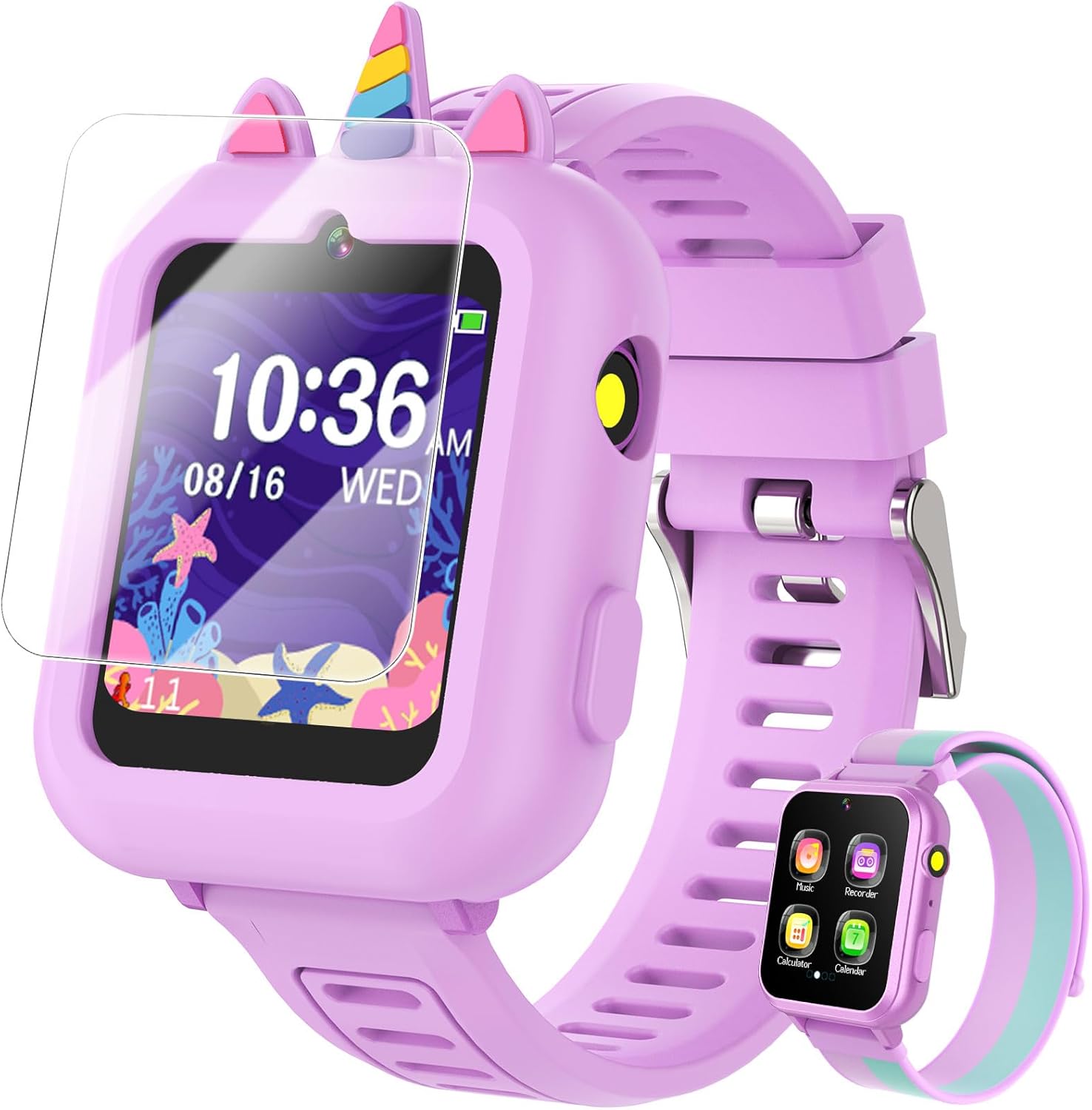
Image 1.1: MOFGDNI Kids Smart Watch S16G
2. อะไรอยู่ในกล่อง
Your MOFGDNI Kids Smart Watch S16G package includes the following items:
- 1 x Smartwatch
- 2 x Soft Bands (one pre-installed, one extra)
- 1 x USB Cable for charging and data transfer
- ฟิล์มกันรอยหน้าจอ 1 ชิ้น
- 1 x Silicone Case (unicorn design)
- Built-in SD Card (for storage)
- 100 x Educational Learning Cards (digital content)
- 10 x Engaging Audiobooks (digital content)
ภาพที่ 2.1: เนื้อหาบรรจุภัณฑ์
3. การตั้งค่า
3.1 ค่าบริการเริ่มต้น
Before first use, ensure the smartwatch is fully charged. Connect the provided USB cable to the watch's USB socket and a compatible power adapter (not included). A full charge typically takes approximately 2 hours.
3.2 เปิด/ปิดเครื่อง
To power on the watch, press and hold the power button located on the side until the screen illuminates. To power off, press and hold the power button until the shutdown option appears on the screen, then confirm.
3.3 Attaching the Silicone Case and Screen Protector
The silicone case provides protection against drops and bumps. Gently fit the watch into the silicone case. For added screen protection, carefully apply the included screen protector to the watch display, ensuring no air bubbles.

Image 3.1: Multi-Function Smart Watch Interface
4. คู่มือการใช้งาน
The smartwatch features a vibrant 1.54-inch touchscreen for easy navigation. Swipe left or right to access different menus and tap icons to select functions.
4.1 กล้องและวิดีโอ
The upgraded HD camera allows children to capture photos and record videos. Access the camera function from the main menu. Fun pop-up stickers can be added to photos. The watch has storage for over 10,000 photos or 6+ hours of video.

Image 4.1: HD Camera & Video Features
4.2 เกม
The watch includes 39 pre-installed games: 36 educational puzzle games designed to enhance logical thinking, reaction time, and hand-eye coordination, and 3 sports games to encourage physical activity. Parental controls allow customization of daily playtime limits.
Image 4.2: 39 Puzzle Games
4.3 Music Player & Audiobooks
The smartwatch functions as an MP3 player and comes pre-loaded with 10 engaging audiobooks. Children can enjoy music and stories directly from their wrist.

Image 4.3: Learning by Playing with Audiobooks and Learn Cards
4.4 Pedometer & Habit Tracking
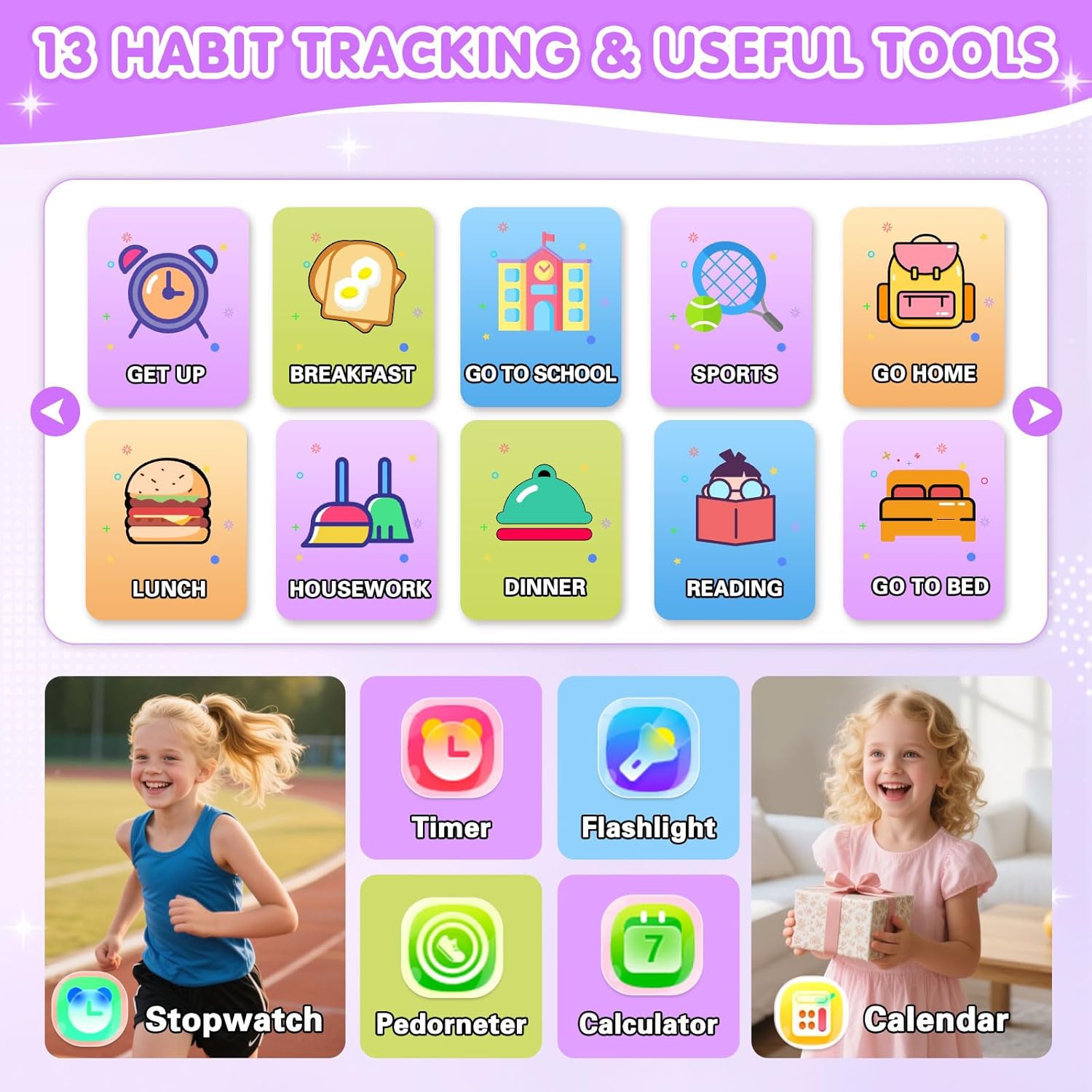
A built-in pedometer and calorie tracker encourage active play. The watch also includes 13 customizable habit-tracking alarms to help children build responsibility and routines, such as 'Get Up', 'Breakfast', 'Go to School', and 'Go to Bed'.

Image 4.4: 13 Habit Tracking & Useful Tools
4.5 Other Useful Tools
The smartwatch includes a variety of practical tools:
- ไฟฉาย: เพื่อใช้ส่องสว่างในสภาพแวดล้อมที่มืด
- เครื่องคิดเลข: For basic arithmetic.
- ปฏิทิน: ถึง view วันที่และตารางกิจกรรม
- นาฬิกาจับเวลา: สำหรับการจับเวลาในการทำกิจกรรม
- นาฬิกาปลุก: ตั้งนาฬิกาปลุกเตือนความจำได้หลายรายการ
- เครื่องบันทึกเสียง: To record audio notes.
- การ์ดการเรียนรู้: 100 educational cards covering various topics.

Image 4.5: Product Detail Overview
5. การบำรุงรักษา
To ensure the longevity and optimal performance of your smartwatch, follow these maintenance guidelines:
- การทำความสะอาด: Wipe the watch and bands regularly with a soft, dry cloth. Avoid using harsh chemicals or abrasive materials.
- ความต้านทานน้ำ: The watch is not waterproof. Avoid submerging it in water or exposing it to heavy rain.
- พื้นที่จัดเก็บ: เก็บนาฬิกาไว้ในที่แห้งและเย็น หลีกเลี่ยงแสงแดดโดยตรงและอุณหภูมิที่สูงหรือต่ำเกินไป
- การดูแลแบตเตอรี่ Charge the battery regularly, even if the watch is not in use, to maintain battery health. Avoid completely draining the battery frequently.
6 การแก้ไขปัญหา
If you encounter any issues with your MOFGDNI Kids Smart Watch S16G, please refer to the following common solutions:
- Watch does not turn on: Ensure the watch is fully charged. If the battery is completely depleted, it may take a few minutes of charging before it can power on.
- หน้าจอไม่ตอบสนอง: Try restarting the watch by holding down the power button. If the issue persists, ensure the screen protector is properly applied and not interfering with touch sensitivity.
- ไม่สามารถโอนได้ files: Ensure the USB cable is securely connected to both the watch and your computer. Check if the watch is recognized as a storage device.
- Games or apps are slow: Close any unnecessary applications running in the background. Ensure there is sufficient storage space available.
- อายุการใช้งานแบตเตอรี่สั้น: Reduce screen brightness, limit game time, and close unused applications to conserve battery.
หากขั้นตอนเหล่านี้ไม่สามารถแก้ไขปัญหาได้ โปรดติดต่อฝ่ายสนับสนุนลูกค้า
7. ข้อมูลจำเพาะ
| คุณสมบัติ | ข้อมูลจำเพาะ |
|---|---|
| ขนาดสินค้า | 9.37 x 1.5 x 0.38 นิ้ว |
| น้ำหนักสินค้า | 3.84 ออนซ์ |
| หมายเลขรุ่นสินค้า | S16G |
| แบตเตอรี่ | 1. ต้องใช้แบตเตอรี่แบบไม่มาตรฐาน |
| ผู้ผลิต | กระทรวงกลาโหม |
| ระบบปฏิบัติการ | NO (Proprietary) |
| ความจุของหน่วยความจำ | 512MB |
| คุณสมบัติพิเศษ | หน้าจอสัมผัส |
| ความจุของแบตเตอรี่ | 500 มิลลิวินาทีamp ชั่วโมง |
| เทคโนโลยีการเชื่อมต่อ | NO (No Wi-Fi/Cellular) |
| ส่วนประกอบของเซลล์แบตเตอรี่ | ลิเธียมโพลีเมอร์ |
| จีพีเอส | ไม่มีจีพีเอส |
| รูปร่าง | สี่เหลี่ยมผืนผ้า |
| ขนาดหน้าจอ | 1.54 นิ้ว |
8. การรับประกันและการสนับสนุน
The MOFGDNI Kids Smart Watch S16G comes with a 1-year warranty from the date of purchase. This warranty covers manufacturing defects. For any support inquiries, troubleshooting assistance, or warranty claims, please contact MOFGDNI customer service through the retailer where the product was purchased.


