1. บทนำ
This manual provides detailed instructions for the safe and efficient operation of your OWON ADS824A 4-Channel 200 MHz Digital Oscilloscope. Please read this manual thoroughly before using the device to ensure proper functionality and to prevent damage. Keep this manual accessible for future reference.
2. ข้อมูลด้านความปลอดภัย
Observe the following safety precautions to prevent injury and avoid damage to the instrument or any connected products.
- แหล่งพลังงาน: ใช้เฉพาะอะแดปเตอร์ไฟฟ้าที่ระบุเท่านั้น
- การต่อลงดิน: ตรวจสอบให้แน่ใจว่าได้ต่อสายดินอุปกรณ์อย่างถูกต้องเพื่อป้องกันไฟฟ้าช็อต
- การระบายอากาศ : Do not block ventilation openings. Operate in a well-ventilated area.
- สิ่งแวดล้อม: Avoid operating in wet, damp, or explosive atmospheres. Keep away from strong electromagnetic fields.
- การทำความสะอาด: ถอดปลั๊กไฟออกก่อนทำความสะอาด ใช้ผ้านุ่มและแห้ง ห้ามใช้น้ำยาทำความสะอาดชนิดน้ำหรือสเปรย์
- การบริการ: ควรส่งเครื่องมือไปให้ช่างผู้ชำนาญการซ่อมบำรุงดูแล ห้ามซ่อมแซมเครื่องมือด้วยตนเอง
3. สินค้าหมดview
3.1 คุณสมบัติหลัก
- Ultra-High Precision: 12-bit vertical resolution (4096 levels) with 500 μV sensitivity for detailed signal analysis, ideal for low-noise power supplies and weak signal capture.
- Fast Waveform Refresh Rate: 700,000 wfms/s for capturing rare events and rapid signal disturbances, crucial for CAN/LIN bus diagnostics and fast digital signals.
- ความสามารถแบบ 5-in-1: Integrates a 12-bit oscilloscope, protocol analyzer (UART/I2C/SPI/CAN/LIN), 6-digit frequency counter, 4-digit voltmeter, and FFT spectrum analyzer. Includes 43 automatic measurements and hardware bus decoding.
- 7-inch Multi-Touch Screen: 1024x600 HD touchscreen for intuitive operation, supporting mouse, keyboard, Wi-Fi, network printers, and external cameras.
- การเชื่อมต่อที่กว้างขวาง: Equipped with LAN, USB, HDMI, and Type-C ports. Features an integrated web server for remote control via a browser, supporting wireless modules and network equipment.
- ความลึกของหน่วยความจำ: 50 Mpts memory for extended waveform capture.
3.2 ส่วนประกอบแผงด้านหน้า
The front panel of the ADS824A features the multi-touch display, input channels, and various control buttons.
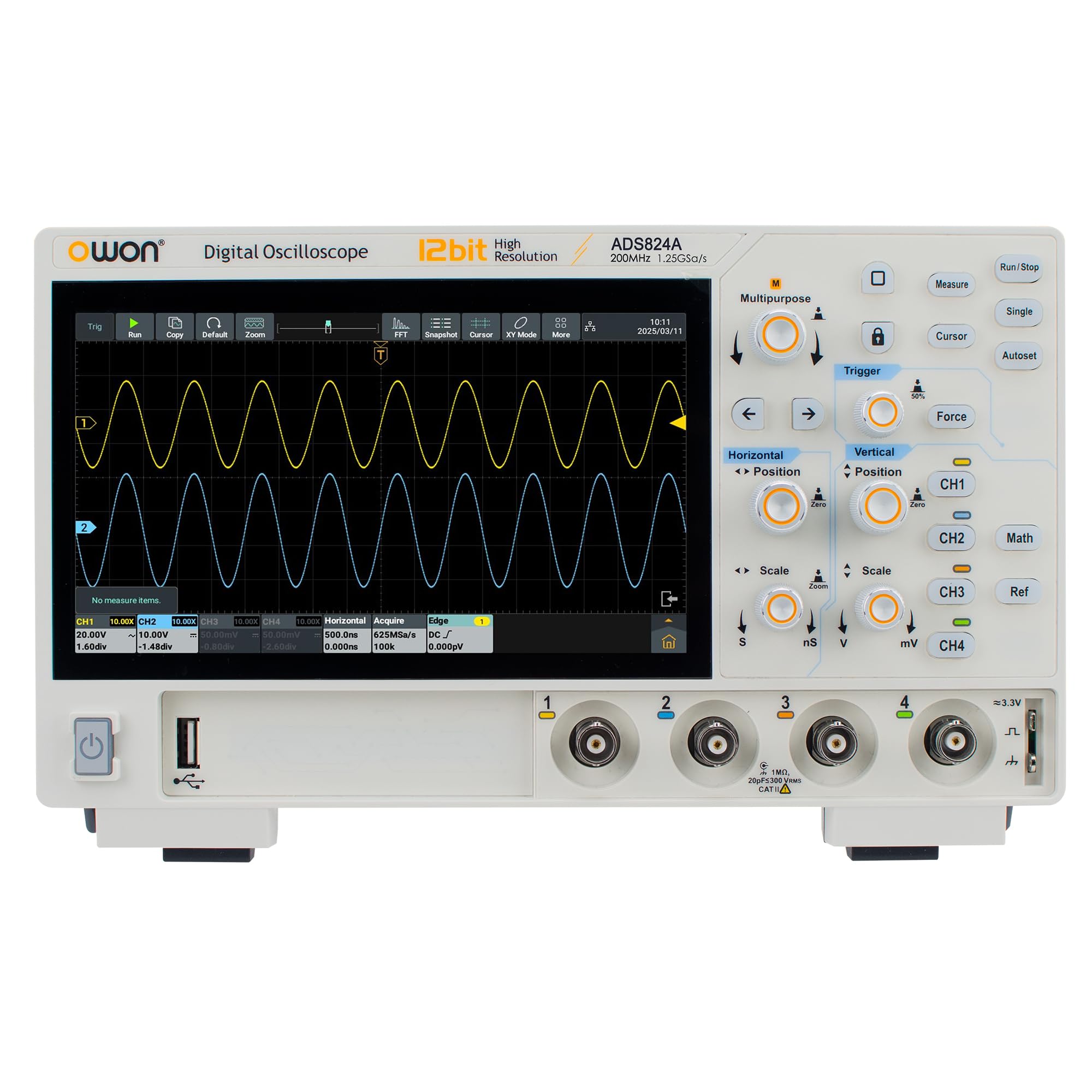
รูปที่ 1 : ด้านหน้า view of the OWON ADS824A Digital Oscilloscope. The 7-inch multi-touch screen is central, flanked by input connectors and control buttons.
Detailed descriptions of each component are provided below:
- แสดง: 7-inch 1024x600 HD multi-touch screen for waveform display and menu navigation.
- Channel Inputs (CH1-CH4): BNC connectors for connecting probes to measure signals.
- ปุ่มควบคุมแนวตั้ง: Buttons and knobs for adjusting vertical scale (Volts/Div) and position for each channel.
- การควบคุมแนวนอน: Buttons and knobs for adjusting horizontal scale (Sec/Div) and position.
- ปุ่มควบคุมทริกเกอร์: Buttons for setting trigger mode, level, and source.
- ปุ่มฟังก์ชั่น: Dedicated buttons for common functions such as Auto Setup, Run/Stop, Measure, Cursor, Acquire, etc.
- การควบคุมการนำทาง: Directional buttons and a rotary knob for menu navigation and parameter adjustment.
3.3 การเชื่อมต่อแผงด้านหลัง
The rear panel provides various connectivity options for power, data transfer, and external display.
- กำลังไฟเข้า: Connector for the AC power adapter.
- พอร์ตโฮสต์ USB: For connecting USB storage devices, mouse, or keyboard.
- พอร์ต USB Type-C: For data transfer and device communication.
- พอร์ต LAN: Ethernet connection for network access and remote control.
- เอาท์พุต HDMI: For connecting to an external monitor or display.
- ขั้วกราวด์: เพื่อความปลอดภัยในการต่อสายดิน
4. การตั้งค่า
4.1 การแกะบรรจุภัณฑ์และการตรวจสอบ
Upon receiving your ADS824A oscilloscope, carefully inspect the packaging for any signs of damage. Open the package and verify that all standard accessories are present:
- OWON ADS824A Digital Oscilloscope
- อะแดปเตอร์แปลงไฟ
- สาย USB
- Passive Probes (4 units)
- คู่มือแนะนำ
- ใบรับรองการสอบเทียบ
หากมีสิ่งของใดสูญหายหรือเสียหาย โปรดติดต่อตัวแทนจำหน่ายของคุณทันที
4.2 การเปิดเครื่อง
- Connect the power adapter to the power input port on the rear panel of the oscilloscope.
- เสียบอะแดปเตอร์ไฟฟ้าเข้ากับเต้ารับไฟฟ้า AC ที่เหมาะสม
- Press the power button located on the front panel to turn on the oscilloscope. The boot screen will appear, followed by the main waveform display.
4.3 การชดเชยโพรบ
Before taking measurements, it is recommended to compensate the probes to ensure accurate readings.
- เชื่อมต่อโพรบเข้ากับช่องสัญญาณอินพุตที่ 1 (CH1)
- Connect the probe tip to the probe compensation output (usually a square wave test signal) on the front panel.
- ปรับตัวปรับชดเชยบนหัววัดจนกระทั่งปรากฏคลื่นสี่เหลี่ยมยอดแบนบนหน้าจอ
- Repeat for all other probes and channels as needed.
5. คู่มือการใช้งาน
5.1 การวัดรูปคลื่นพื้นฐาน
- Connect the compensated probe to the desired input channel (e.g., CH1).
- Connect the probe tip to the signal source you wish to measure.
- กดปุ่ม ตั้งค่าอัตโนมัติ กดปุ่มนี้ ออสซิลโลสโคปจะปรับการตั้งค่าแนวตั้ง แนวนอน และทริกเกอร์โดยอัตโนมัติ เพื่อแสดงรูปคลื่นที่เสถียร
- ปรับแต่ง โวลต์/ดิวิชั่น knob to change the vertical scale and the วินาที / Div knob to change the horizontal time base for optimal waveform viewการไอเอ็นจี
- ใช้ ระดับทริกเกอร์ knob to stabilize the waveform if needed.
5.2 Using the Multi-Touch Screen
The 7-inch multi-touch screen allows for intuitive control similar to a smartphone.
- แตะ: Select menu items, buttons, or parameters.
- ลาก: Move waveforms, cursors, or menu windows.
- บีบเพื่อซูม: Adjust vertical or horizontal scale by pinching or spreading two fingers on the waveform display.
- ปัด: Navigate through menus or scroll lists.
5.3 ฟังก์ชั่นขั้นสูง
The ADS824A offers a range of advanced measurement and analysis capabilities:
- การวัดอัตโนมัติ: กดปุ่ม วัด button to access 43 automatic measurements (e.g., Vpp, Vrms, Frequency, Period, Rise Time).
- Protocol Analysis: Utilize the integrated protocol analyzer for UART, I2C, SPI, CAN, and LIN bus decoding. Access this function via the main menu.
- FFT Spectrum Analysis: Perform Fast Fourier Transform (FFT) to analyze the frequency components of a signal. Select FFT from the Math menu.
- การจัดเก็บข้อมูล: Save waveforms, setups, and screenshots to internal memory or a connected USB drive.
- รีโมทคอนโทรล: Connect the oscilloscope to a network via LAN or Wi-Fi (with optional module) and access the integrated web server from a browser for remote operation.
6. การบำรุงรักษา
6.1 การทำความสะอาดเครื่องมือ
เพื่อรักษาประสิทธิภาพและรูปลักษณ์ของออสซิลโลสโคปของคุณ:
- ถอดสายไฟออกก่อนทำความสะอาดทุกครั้ง
- ใช้ผ้าแห้งนุ่มๆ เช็ดทำความสะอาดพื้นผิวภายนอก
- For the display, use a soft, lint-free cloth specifically designed for screens. Avoid abrasive cleaners.
- Do not use liquid or spray cleaners directly on the instrument.
การอัปเดตเฟิร์มแวร์ 6.2 รายการ
Periodically check the OWON official webเว็บไซต์นี้ใช้สำหรับอัปเดตเฟิร์มแวร์ การอัปเดตเฟิร์มแวร์อาจเพิ่มคุณสมบัติใหม่ ปรับปรุงประสิทธิภาพ และแก้ไขข้อบกพร่อง โปรดปฏิบัติตามคำแนะนำที่ให้มาพร้อมกับแพ็คเกจการอัปเดตเฟิร์มแวร์อย่างระมัดระวัง
7 การแก้ไขปัญหา
| ปัญหา | สาเหตุที่เป็นไปได้ | สารละลาย |
|---|---|---|
| ไม่มีไฟฟ้า | Power cord not connected; power adapter faulty; power outlet issue. | Check power cord connection; test power adapter; verify power outlet functionality. |
| ไม่แสดงรูปคลื่น | Probe not connected; signal source off; vertical/horizontal scale incorrect; trigger not set. | Connect probe; ensure signal source is active; press ตั้งค่าอัตโนมัติ; adjust scales; check trigger settings. |
| รูปคลื่นไม่เสถียร | Incorrect trigger level or mode; noisy signal. | Adjust trigger level; change trigger mode (e.g., Edge, Video); use averaging acquisition mode. |
| หน้าจอสัมผัสไม่ตอบสนอง | ข้อผิดพลาดทางซอฟต์แวร์ชั่วคราว; ปัญหาการปรับเทียบหน้าจอ | Restart the oscilloscope; perform screen calibration (refer to advanced settings in the full manual). |
If the problem persists after attempting these solutions, contact OWON technical support or your local dealer.
8. ข้อมูลจำเพาะ
| พารามิเตอร์ | ค่า |
|---|---|
| แบบอย่าง | ADS824A |
| แบนด์วิธ | 200 เมกะเฮิรตซ์ |
| ช่องทางการ | 4 |
| ความละเอียดแนวตั้ง | 12-bit (4096 levels) |
| อัตราการรีเฟรชรูปคลื่น | 700,000 wfms/วินาที |
| ความลึกของหน่วยความจำ | 50 มิลลิวินาที |
| แสดง | 7-inch HD Multi-Touch (1024x600) |
| multifunctionality | Oscilloscope, Protocol Analyzer, Frequency Counter, Voltmeter, FFT Analyzer |
| การเชื่อมต่อ | LAN, USB Host, USB Type-C, HDMI, Wi-Fi (optional) |
| ขนาดสินค้า (กว้าง x ยาว x สูง) | 31.3 x 21.3 x 13.6 ซม. |
| น้ำหนักสินค้า | 1.5 กิโลกรัม |
| ข้อมูลจำเพาะที่สอดคล้อง | ซีอี, โรเอชเอส |
9. การรับประกันและการสนับสนุน
OWON products are designed and manufactured to the highest quality standards. This product is covered by a standard manufacturer's warranty against defects in materials and workmanship. Please refer to the warranty card included with your product or visit the official OWON webเว็บไซต์สำหรับข้อกำหนดและเงื่อนไขการรับประกันโดยละเอียด
For technical support, service, or inquiries, please contact your local OWON distributor or visit the OWON official support website. When contacting support, please have your product model number (ADS824A) and serial number ready.
OWON อย่างเป็นทางการ Webเว็บไซต์: www.owon.com


