1. บทนำ
The NOYAFA NF-5101 is a versatile 5-in-1 wall scanner designed for accurate detection of various materials hidden behind walls, ceilings, and floors. This device assists in locating wood studs, magnetic and non-magnetic metals, and live AC wires, making it an essential tool for renovation, installation, and general home improvement projects. This manual provides detailed instructions for the proper setup, operation, and maintenance of your NF-5101 wall scanner.

Image 1.1: The NOYAFA NF-5101 Stud Finder Wall Scanner, featuring a red and black design with an LCD screen.
2. คุณสมบัติของผลิตภัณฑ์
- Multi-Wall Detection: Accurately detects magnetic metal up to 3.94 inches (100mm), non-magnetic metal up to 3.15 inches (80mm), wood up to 1.18 inches (30mm), and live AC wires up to 1.97 inches (50mm).
- HD LCD Display & Audio Alarm: Features a 3.14-inch backlit screen displaying real-time signal strength and detection status with color indicators (yellow/green/red). An audible alarm sounds upon target detection.
- ใช้งานง่าย: Simple interface with clear signal and center positioning icons for user-friendly operation.
- การสอบเทียบอัตโนมัติ: Self-calibrates upon power-on, indicated by an audible 'drip' prompt, allowing for quick and accurate scanning.
- กันน้ำ IP54: Provides protection against dust and splashing water.
- การใช้งานที่กว้างขวาง: Suitable for locating hidden elements in drywall, wood floors, acoustical ceilings, painted walls, and wallpaper for various home improvement tasks.

Image 2.1: Illustration highlighting the NF-5101's accurate and fast detection capabilities, featuring its 3.14-inch LED screen, automatic calibration, and audible alarm.

Image 2.2: Visual representation of the NF-5101's three detection modes and their respective maximum depths for wood, live AC power cables, magnetic metal, and non-magnetic metal.
3. เนื้อหาบรรจุภัณฑ์
ตรวจสอบว่ามีรายการทั้งหมดอยู่ในแพ็คเกจ:
- NF-5101 Stud Detector (1 unit)
- Color Packaging Box (1 unit)
- Certificate of Conformity (1 unit)
- คู่มือผู้ใช้ (1 หน่วย)
- 9V Alkaline Battery (1 unit)

Image 3.1: Depiction of the NF-5101 detector and its included accessories: a 9V battery, QC card, packaging box, and user manual.
4. ข้อมูลด้านความปลอดภัย
โปรดอ่านและทำความเข้าใจคำแนะนำด้านความปลอดภัยทั้งหมดก่อนใช้งานอุปกรณ์ การไม่ปฏิบัติตามคำแนะนำเหล่านี้อาจส่งผลให้เกิดไฟฟ้าช็อต ไฟไหม้ หรือการบาดเจ็บร้ายแรงได้
- Always exercise caution when drilling, cutting, or nailing into walls, ceilings, or floors that may contain electrical wiring or plumbing.
- Do not rely solely on the detector to locate items behind surfaces. Use other available information, such as building plans, to help avoid hazards.
- Before working near detected live wires, always turn off the power to the circuit at the main breaker or fuse box.
- ควรเก็บรักษาอุปกรณ์ให้แห้งและสะอาด อย่าให้อุปกรณ์โดนความชื้นหรืออุณหภูมิที่สูงเกินไป
- ห้ามเปิด ดัดแปลง หรือซ่อมแซมอุปกรณ์ด้วยตนเอง โปรดส่งต่ออุปกรณ์ดังกล่าวให้ช่างผู้ชำนาญการเป็นผู้ดำเนินการซ่อมแซม
- ทิ้งแบตเตอรี่ที่ใช้แล้วอย่างรับผิดชอบตามข้อบังคับท้องถิ่น
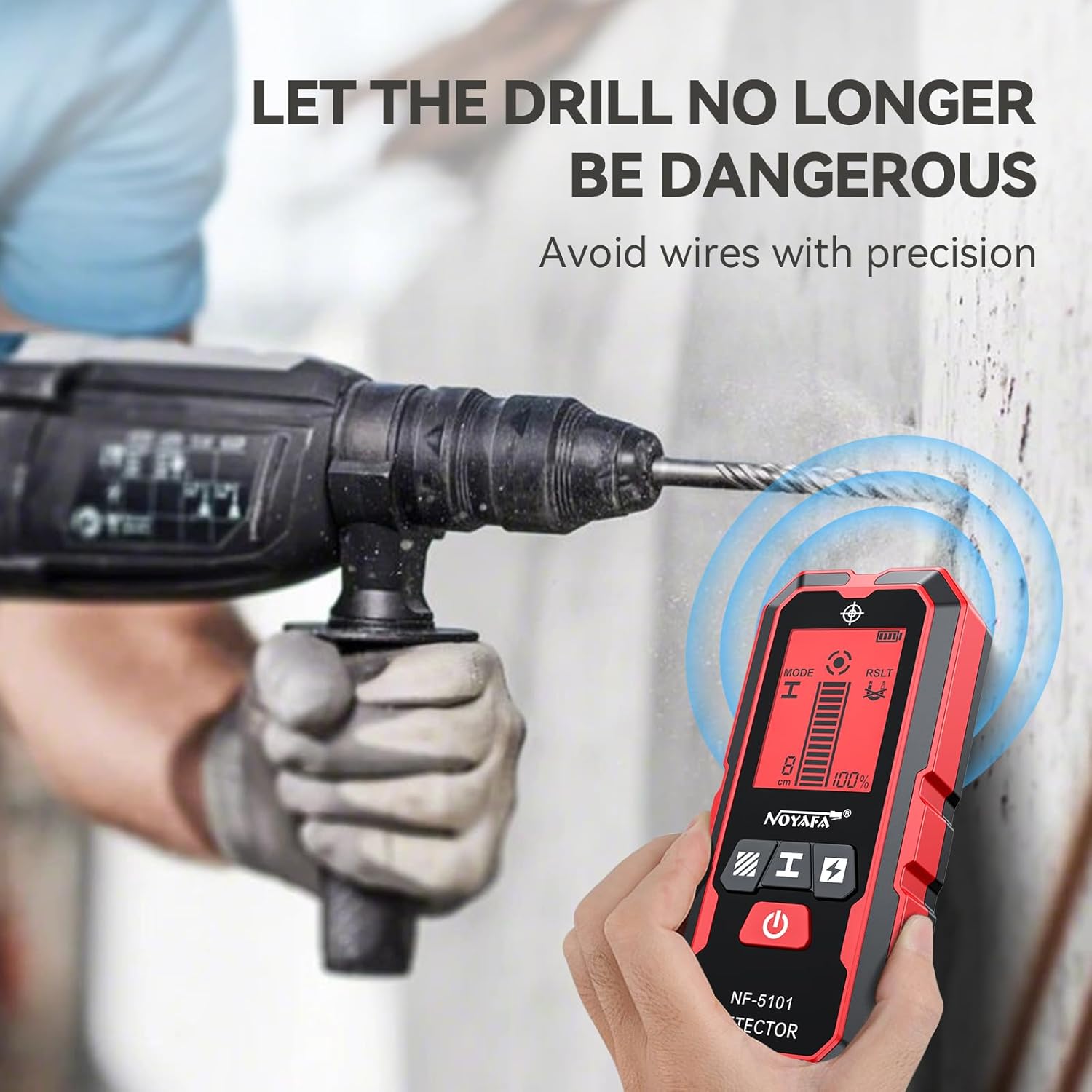
Image 4.1: The NF-5101 detector being used to identify hidden wires before drilling, emphasizing the importance of precision and safety.
5. การตั้งค่า
5.1 การติดตั้งแบตเตอรี่
- ค้นหาฝาครอบช่องใส่แบตเตอรี่ที่ด้านหลังของอุปกรณ์
- เลื่อนฝาเปิดออก
- Insert the included 9V alkaline battery, ensuring correct polarity (+/-).
- ปิดฝาช่องใส่แบตเตอรี่ให้แน่น
5.2 การสอบเทียบอัตโนมัติ
The NF-5101 features an automatic calibration function. Upon powering on, the device will self-calibrate. A 'drip' sound prompt indicates that calibration is complete and the device is ready for use. For optimal results, ensure the device is held against the wall surface where scanning will begin, away from known studs or metal objects, during calibration.

ภาพที่ 5.1: ด้านหน้าและด้านหลัง views of the NF-5101, showing its dimensions and the location of the battery compartment on the rear.
6. คู่มือการใช้งาน
การเลือกโหมด 6.1
The NF-5101 offers three distinct detection modes, selectable via the buttons on the device:
- Wood Detection Mode: For locating wood studs up to 1.18 inches (30mm) deep.
- โหมดการตรวจจับโลหะ: For detecting magnetic metal up to 3.94 inches (100mm) and non-magnetic metal up to 3.15 inches (80mm) deep.
- AC Live Wire Detection Mode: For identifying live AC wires up to 1.97 inches (50mm) deep.

Image 6.1: The NF-5101 displaying its three detection modes: Wooden Detection, Cable Detection (AC Live Wire), and Metal Detection, along with their respective depth capabilities.
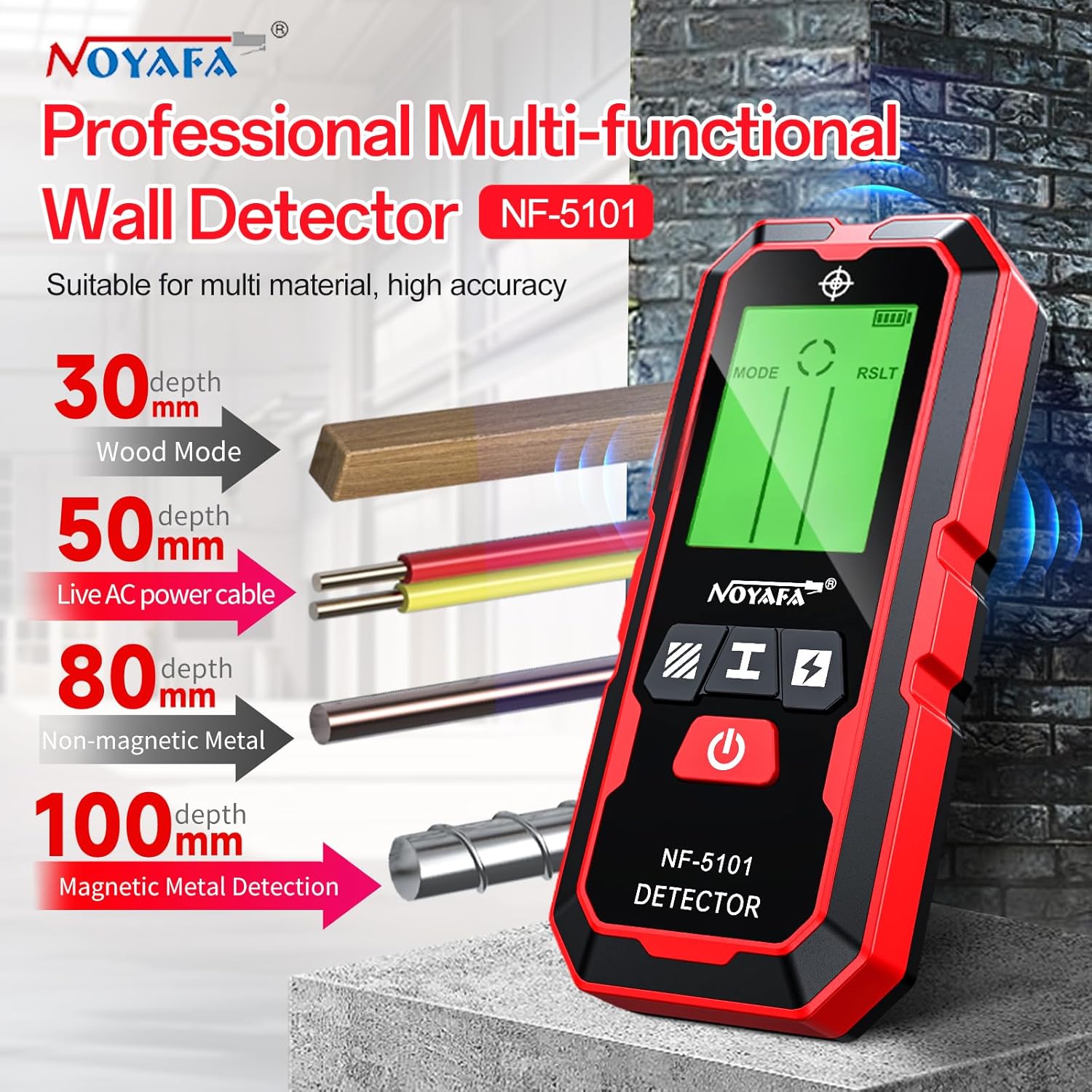
Image 6.2: An illustration demonstrating the NF-5101's ability to detect wood, live AC power cables, non-magnetic metal, and magnetic metal at different depths within a wall.
6.2 ขั้นตอนการสแกน
- กดปุ่มเปิด/ปิดเพื่อเปิดใช้งานอุปกรณ์ อุปกรณ์จะทำการปรับเทียบโดยอัตโนมัติ
- Select the appropriate detection mode (wood, metal, or AC live wire) using the mode selection buttons.
- Place the scanner flat against the wall surface. Ensure the sensor area on the back of the device is in full contact with the surface.
- Slowly slide the device horizontally across the surface. Maintain constant contact and pressure.
- Observe the LCD display and listen for audio alerts. The signal strength indicator will increase as the device approaches a target.
- When the device detects a target, the screen color will change, and an audible alarm will sound. A center positioning icon will appear on the screen when the center of the target is located.
- Mark the location of the detected object. For greater accuracy, scan the area from both directions and mark the edges, then determine the center point.

Image 6.3: A visual guide demonstrating how to scan a wall to locate a stud, showing the scanner moving from the left of a stud to its center, indicated by the display and audio alerts.
7. Understanding the Display and Audio Alerts
The NF-5101's HD LCD display provides visual feedback, complemented by audio alerts, to indicate detection status:
- Yellow Screen: Indicates the device is in calibration mode.
- กรีนสกรีน: Indicates calibration is complete and the device is ready for scanning, or no target is currently detected.
- หน้าจอสีแดง: Indicates a target has been detected.
- ตัวบ่งชี้ความแรงของสัญญาณ: Bars on the screen show the proximity and strength of the detected object. More bars indicate closer proximity.
- Center Positioning Icon: An icon appears on the screen when the device is directly over the center of a detected object.
- เสียงปลุก: A 'beeping' sound will activate when a target is detected, becoming more frequent as the device approaches the center of the object.

Image 7.1: The NF-5101's display showing different color indications (yellow for calibration, green for calibration complete, red for target detected) and signal strength.

Image 7.2: The NF-5101 display indicating a 100% full signal when a subject is detected, with corresponding color changes for different stages of detection and calibration.
8. การสมัคร
The NOYAFA NF-5101 wall scanner is suitable for a variety of tasks, including but not limited to:
- Housing decoration or modification projects.
- Installation of home appliances and wall decorations.
- Construction site inspections.
- Electrical maintenance and troubleshooting.
- Locating studs for hanging pictures, shelves, or mounting TVs.
- Identifying pipes or conduits before drilling.

Image 8.1: Various application scenarios for the NF-5101, including housing decoration, home appliance installation, and bridge maintenance.

Image 8.2: A collage of usage scenarios for the NF-5101, demonstrating its utility in housing decoration, home appliance installation, construction sites, wall decoration, and electrician maintenance.
9. การบำรุงรักษา
- การทำความสะอาด: เช็ดเครื่องเบาๆงamp ผ้า ห้ามใช้สารทำความสะอาดที่มีฤทธิ์กัดกร่อนหรือตัวทำละลาย
- พื้นที่จัดเก็บ: เก็บอุปกรณ์ไว้ในที่แห้งและเย็น หลีกเลี่ยงแสงแดดโดยตรงและอุณหภูมิที่สูงหรือต่ำเกินไป หากเก็บรักษาเป็นเวลานาน ควรถอดแบตเตอรี่ออกเพื่อป้องกันการรั่วไหล
- การเปลี่ยนแบตเตอรี่: เปลี่ยนแบตเตอรี่ 9V เมื่อไฟแสดงสถานะแบตเตอรี่อ่อนปรากฏบนหน้าจอเพื่อให้แน่ใจว่าการอ่านค่าแม่นยำ
10 การแก้ไขปัญหา
| ปัญหา | สาเหตุที่เป็นไปได้ | สารละลาย |
|---|---|---|
| Inconsistent or inaccurate readings | Improper calibration; conductive wall coverings or high humidity; presence of magnetic fields or metal building materials; device not flat against surface. | Ensure proper automatic calibration away from known objects. Ensure wall surfaces are dry and non-metallic. Avoid scanning near strong magnetic fields. Maintain constant, flat contact with the wall. |
| ไม่พบสัญญาณหรือสัญญาณอ่อนมาก | Low battery; incorrect mode selected; object too deep for selected mode. | Check battery level and replace if necessary. Verify the correct detection mode is selected for the target material. Note the maximum detection depths for each mode. |
| อุปกรณ์ไม่ได้เปิด | แบตเตอรี่เสียหรือติดตั้งไม่ถูกต้อง | Check battery installation. Replace with a new 9V alkaline battery. |
11. ข้อมูลจำเพาะ
| คุณสมบัติ | รายละเอียด |
|---|---|
| หมายเลขรุ่น | NF-5101 |
| Detection Depth (Magnetic Metal) | 3.94 นิ้ว (100 มม.) |
| Detection Depth (Non-magnetic Metal) | 3.15 นิ้ว (80 มม.) |
| Detection Depth (Wood) | 1.18 นิ้ว (30 มม.) |
| Detection Depth (Live AC Wire) | 1.97 นิ้ว (50 มม.) |
| แสดง | HD LCD with Backlight (3.14-inch) |
| แหล่งพลังงาน | Battery Powered (9V Alkaline) |
| ระดับการป้องกันน้ำและฝุ่น (IP) | กันน้ำระดับ IP54 |
| น้ำหนักสินค้า | 8.4 ออนซ์ |
| ขนาดแพ็คเกจ | 8.15 x 4.61 x 1.54 นิ้ว |
| อุณหภูมิในการทำงาน | -10°C ถึง 45°C |
12. การรับประกันและการสนับสนุน
For warranty information and technical support, please refer to the documentation included with your product or contact NOYAFA customer service through their official channels. Keep your purchase receipt as proof of purchase for any warranty claims.


