1. สินค้าหมดview
The JUSTONE A1 is an 11.3-inch portable touch screen designed to bring wireless CarPlay and Android Auto functionality to your vehicle. It features an in-Cell fully laminated display, 1920x720 resolution, and supports up to 60 frames per second for a smooth user experience. Control is available via the capacitive touchscreen or a wireless button knob. It also includes a BT Display Only Mode for audio streaming and offers multiple mounting options.
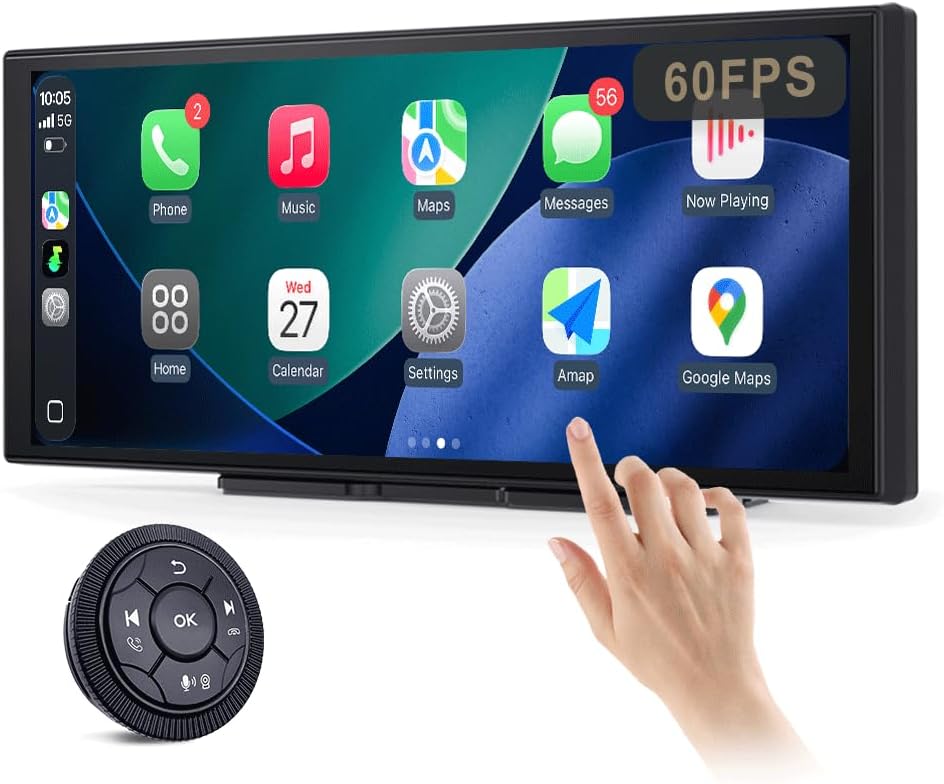
Figure 1: JUSTONE A1 Portable Touch Screen with CarPlay interface and wireless control knob.
2. เนื้อหาบรรจุภัณฑ์
ตรวจสอบว่าสินค้าทั้งหมดที่ระบุไว้ด้านล่างนี้รวมอยู่ในแพ็คเกจของคุณแล้ว หากมีสินค้าใดสูญหายหรือเสียหาย โปรดติดต่อฝ่ายสนับสนุนลูกค้า

Figure 2: Included accessories for the JUSTONE A1.
- Screen Host
- 4 Clip Bracket
- เทปกาวสองหน้า
- ขายึดถ้วยดูด
- Control Button (Wireless Knob)
- อะแดปเตอร์ไฟฟ้ารถยนต์
- Ball Shaped Bracket Converter
- TYPE-C Power Cable
- สายสัญญาณเสียง AUX
- Base for Suction Cup
- Camera Input Cable (Camera optional)
- คู่มือการใช้งาน
3. การตั้งค่า
3.1 ตัวเลือกการติดตั้ง
The JUSTONE A1 offers two primary mounting methods to suit various vehicle dashboards. Ensure the screen is securely mounted and does not obstruct your view ของถนน

รูปที่ 3: อดีตamples of suction cup and dashboard mounting.
- 4-Clip Vertical Base: Use this bracket to rest the bottom of the screen directly on your dashboard. Secure it with the provided double-sided tape for stability.
- 17mm Ball-Joint Extendable Arm Mount (Suction Cup Bracket): This option allows for more flexible positioning, typically on the windshield or a smooth dashboard surface. Ensure the suction cup is firmly attached.
บันทึก: Always ensure the chosen mounting location complies with local traffic laws regarding windshield obstructions.
3.2 การเชื่อมต่อสายไฟ
- Connect the TYPE-C Power Cable to the screen host.
- Plug the Car Power Adapter into your vehicle's 12V power outlet (cigarette lighter socket).
- The screen will power on automatically when the vehicle's ignition is turned on.
3.3 Initial Wireless Connection (CarPlay/Android Auto)
- ตรวจสอบให้แน่ใจว่าเปิดใช้งาน Bluetooth และ Wi-Fi บนสมาร์ทโฟนของคุณแล้ว
- On the JUSTONE A1 screen, select either 'CarPlay' or 'Android Auto' from the main menu.
- Follow the on-screen instructions to pair your phone via Bluetooth.
- Once Bluetooth is paired, the system will automatically establish a Wi-Fi connection for wireless CarPlay or Android Auto.
- The device is designed to auto-connect to your paired phone when you start your car after the initial setup.
4. คู่มือการใช้งาน
4.1 คุณสมบัติการแสดงผล

Figure 4: Display features including 11.3-inch size and in-cell full lamination.
- 11.3" In-Cell Full-Laminated Display: Provides a premium look and feel, appearing darker when off compared to standard lamination. The actual panel size is approximately 10.5" x 4.13".
- 1920x720 Resolution: Delivers clear and sharp visuals.
- อัตราการรีเฟรช 60Hz: Ensures smoother performance, especially for CarPlay.
4.2 วิธีการควบคุม
The device offers two ways to interact with its interface:

Figure 5: Touchscreen and wireless knob control options.
- Capacitive Touchscreen: Directly interact with the display by touching icons and swiping.
- Wireless Button Knob: For safer operation while driving, especially if the screen is difficult to reach. This knob allows navigation, volume control, and other functions without direct screen interaction.
4.3 คุณสมบัติการเชื่อมต่อ

Figure 6: Supported phone connectivity options.
- CarPlay ไร้สาย: Access navigation, music, messages, and more from your iPhone.
- อัตโนมัติ Android ไร้สาย: Access navigation, music, and communication features from your Android phone.
- แอร์เพลย์: Mirror content from your Apple devices.
- มิราแคสต์: Mirror content from compatible Android devices.
4.4 โหมดเอาต์พุตเสียง
The JUSTONE A1 supports multiple ways to output audio to your vehicle's sound system:
- BT Display Only Mode: When your phone is connected to the JUSTONE A1, audio streams directly from your phone to your vehicle's built-in Bluetooth audio system. This requires your vehicle to have its own Bluetooth audio input.
- เอาต์พุต AUX: Connect the provided AUX Audio Cable from the JUSTONE A1 to your vehicle's AUX input port.
- FM Transmitter: The device can transmit audio via an FM frequency. Tune your car radio to the same frequency set on the JUSTONE A1.
4.5 Automatic Day/Night Mode

Figure 7: Automatic brightness adjustment for day and night conditions.
The built-in light sensor automatically detects ambient light conditions and switches between dark and light themes, adjusting screen brightness for optimal visibility and glare resistance during both day and night driving.
5. การบำรุงรักษา
- การทำความสะอาด: ใช้ผ้าเนื้อนุ่มที่ไม่เป็นขุยเช็ดทำความสะอาดหน้าจอ สำหรับคราบสกปรกที่ติดแน่น ให้ใช้ผ้าชุบน้ำหมาดๆ เช็ดเบาๆampชุบผ้าด้วยน้ำหรือน้ำยาทำความสะอาดที่ปลอดภัยต่อหน้าจอ หลีกเลี่ยงสารเคมีรุนแรงหรือวัสดุที่มีฤทธิ์กัดกร่อน
- อุณหภูมิ: ควรหลีกเลี่ยงการนำอุปกรณ์ไปวางไว้ในที่ที่มีอุณหภูมิสูงหรือต่ำจัดเป็นเวลานาน
- พื้นที่จัดเก็บ: หากต้องเก็บรักษาอุปกรณ์เป็นเวลานาน ควรตัดการเชื่อมต่อจากแหล่งจ่ายไฟและเก็บไว้ในที่แห้งและเย็น
- สาย: Regularly check power and audio cables for any signs of wear or damage. Replace if necessary.
6 การแก้ไขปัญหา
- อุปกรณ์ไม่เปิดเครื่อง:
- Ensure the car power adapter is securely plugged into the vehicle's 12V outlet and the TYPE-C cable is firmly connected to the screen.
- Check if the vehicle's 12V outlet is receiving power (e.g., by testing with another device).
- Wireless CarPlay/Android Auto fails to connect:
- ตรวจสอบให้แน่ใจว่าได้เปิดใช้งาน Bluetooth และ Wi-Fi บนสมาร์ทโฟนของคุณแล้ว
- Ensure your phone is not connected to another CarPlay/Android Auto device.
- ลองลืมอุปกรณ์ในการตั้งค่าบลูทูธของโทรศัพท์ของคุณแล้วจับคู่ใหม่อีกครั้ง
- Restart both your phone and the JUSTONE A1 device.
- ไม่มีเอาต์พุตเสียง:
- If using BT Display Only Mode, ensure your phone is connected to your car's native Bluetooth audio system.
- If using AUX, check that the AUX cable is properly connected to both the JUSTONE A1 and your car's AUX input, and your car's audio source is set to AUX.
- If using FM transmitter, ensure the frequency on the JUSTONE A1 matches your car radio's frequency and there is no strong interference on that frequency.
- Check the volume levels on both the JUSTONE A1 and your car's audio system.
- หน้าจอไม่ตอบสนองหรือค้าง:
- Disconnect the power cable from the JUSTONE A1 for 10 seconds, then reconnect it to perform a restart.
- Wireless control knob is not working:
- Ensure the knob's battery is not depleted. Replace if necessary.
- Re-pair the knob with the main unit if it has become disconnected.
7. ข้อมูลจำเพาะ
| คุณสมบัติ | ข้อมูลจำเพาะ |
|---|---|
| ชื่อรุ่น | A1 |
| ยี่ห้อ | JUSTONE |
| ขนาดจอแสดงผล | 11.3 Inches (10.5" x 4.13" actual panel) |
| ประเภทจอภาพ | In-Cell Full-Laminated Touch Screen |
| ปณิธาน | ขนาด 1920x720 |
| อัตราการรีเฟรช | Up to 60Hz (for CarPlay) |
| เทคโนโลยีการเชื่อมต่อ | Bluetooth, Wi-Fi (for Wireless CarPlay/Android Auto) |
| โหมดเอาต์พุตเสียง | BT Display Only, AUX, FM Transmitter |
| อินเทอร์เฟซการควบคุม | Touchscreen, Wireless Button Knob |
| ประเภทการติดตั้ง | Panel Mount (4-clip vertical base), Dashboard Mount (17mm ball-joint extendable arm) |
| คุณสมบัติพิเศษ | Portable, Auto Day/Night Mode (Light Sensor) |
| น้ำหนักสินค้า | 14.8 ออนซ์ (420 กรัม) |
| ขนาดแพ็คเกจ | 12.01 x 5.51 x 3.98 นิ้ว |
8. การรับประกันและการสนับสนุน
8.1 ข้อมูลการรับประกัน
The JUSTONE A1 portable touch screen comes with a การรับประกันจากผู้ผลิต 1 ปี นับจากวันที่ซื้อสินค้า การรับประกันนี้ครอบคลุมถึงข้อบกพร่องในวัสดุและฝีมือการผลิตภายใต้การใช้งานปกติ ไม่ครอบคลุมถึงความเสียหายที่เกิดจากการใช้งานผิดวิธี อุบัติเหตุ การดัดแปลงโดยไม่ได้รับอนุญาต หรือการติดตั้งที่ไม่ถูกต้อง
โปรดเก็บหลักฐานการซื้อของคุณไว้เพื่อเรียกร้องการรับประกัน
8.2 การสนับสนุนลูกค้า
For technical assistance, troubleshooting, or warranty inquiries, please contact JUSTONE customer support through the retailer's platform where the product was purchased or visit the official JUSTONE webเว็บไซต์สำหรับข้อมูลการติดต่อ
When contacting support, please have your product model (A1) and purchase details ready.


