การแนะนำ
This manual provides comprehensive instructions for the operation, maintenance, and troubleshooting of your TOOLTOP ET15S Professional Thermal Imager Camera with integrated Digital Multimeter. Please read this manual thoroughly before using the device to ensure safe and efficient operation.
The TOOLTOP ET15S is an industrial-grade thermal camera combined with a high-precision digital multimeter, designed for various applications including PCB inspection, HVAC repair, and general electrical measurements.
คุณสมบัติหลัก
- 256x192 Resolution Thermal Imaging Sensor: Provides clear thermal images with a 25Hz refresh rate.
- 19,999 Counts Digital Multimeter: High-precision measurements for voltage, current, resistance, capacitance, diode, frequency, NCV, and temperature.
- หน้าจอ IPS ขนาด 3.5 นิ้ว: Large, high-definition display for clear viewing of thermal images and multimeter readings.
- Waveform Graph Visualization: Multimeter measurement results can be displayed as waveform graphs for data trend analysis.
- เลนส์มาโครเสริม: Captures small details (1mm x 1mm) for precise inspections like smartphone or PCB repairs.
- รองรับหลายภาษา: มีให้บริการใน 11 ภาษา
- อายุการใช้งานแบตเตอรี่ยาวนาน: Detachable 18650 lithium battery provides up to 8 hours of runtime.
- PC Software Support: Allows transfer and analysis of multimeter data charts and thermal images.
เนื้อหาแพ็คเกจ
ตรวจสอบว่ามีรายการทั้งหมดอยู่ในแพ็คเกจ:
- ET15S Thermal Imager & Multimeter Unit
- Macro Lens (if purchased with this option)
- คู่มือผลิตภัณฑ์
- Instrument Storage Bag
- หัววัดมัลติมิเตอร์
- สายเคเบิลข้อมูล USB

Figure 1: Included components of the ET15S package.
การตั้งค่า
1. การติดตั้งและการชาร์จแบตเตอรี่
The ET15S is powered by a detachable 18650 lithium battery. Ensure the battery is fully charged before first use.
- ค้นหาช่องใส่แบตเตอรี่บนอุปกรณ์
- Insert the 18650 battery, observing the correct polarity (+/-).
- ปิดช่องใส่แบตเตอรี่ให้แน่น
- Connect the device to a USB power source using the provided USB data cable for charging. The charging indicator will show the charging status.
2. Macro Lens Installation (Optional)
If your model includes the optional macro lens, follow these steps for installation:
- Identify the macro lens attachment point on the top of the ET15S unit.
- Carefully align the macro lens with the attachment point.
- Gently slide or click the macro lens into place until it is secure.
- When using, the macro lens can be moved left and right to adjust focus for optimal small detail capture.

Figure 2: Installation and adjustment of the optional macro lens.
คำแนะนำการใช้งาน
1. การเปิด/ปิดเครื่อง
Press and hold the power button (usually located on the side or front) to turn the device on or off.
2. การนำทางอินเทอร์เฟซ
The ET15S features a 3.5-inch IPS screen. Use the navigation buttons (e.g., directional pad, SELECT, MENU) to move through menus and select options.

Figure 3: ET15S display and control layout.
3. Thermal Imaging Mode
To activate thermal imaging:
- Select the "IR Camera" mode from the main menu.
- Point the camera lens towards the object or area you wish to inspect.
- The screen will display the thermal image with temperature readings.
- Adjust emissivity (0.1 – 0.99, default 0.95) as needed for accurate temperature measurements based on the material being inspected.
- Choose from various color palettes (e.g., White Heat, Black Heat, Rainbow, Iron Red) to visualize temperature differences effectively.

รูปที่ 4: จอแสดงผลภาพถ่ายความร้อนแสดงการกระจายอุณหภูมิ
4. Digital Multimeter Mode
The ET15S integrates a full-featured digital multimeter. To use:
- Connect the multimeter probes to the appropriate input jacks (COM, VΩ, 10A MAX).
- Select the "Multimeter" mode from the main menu.
- Choose the desired measurement function (e.g., DCV, ACV, Resistance, Capacitance, Diode, Frequency, NCV).
- The device supports both manual and automatic ranging.
- For waveform visualization, select the appropriate option within the multimeter interface to view data trends.
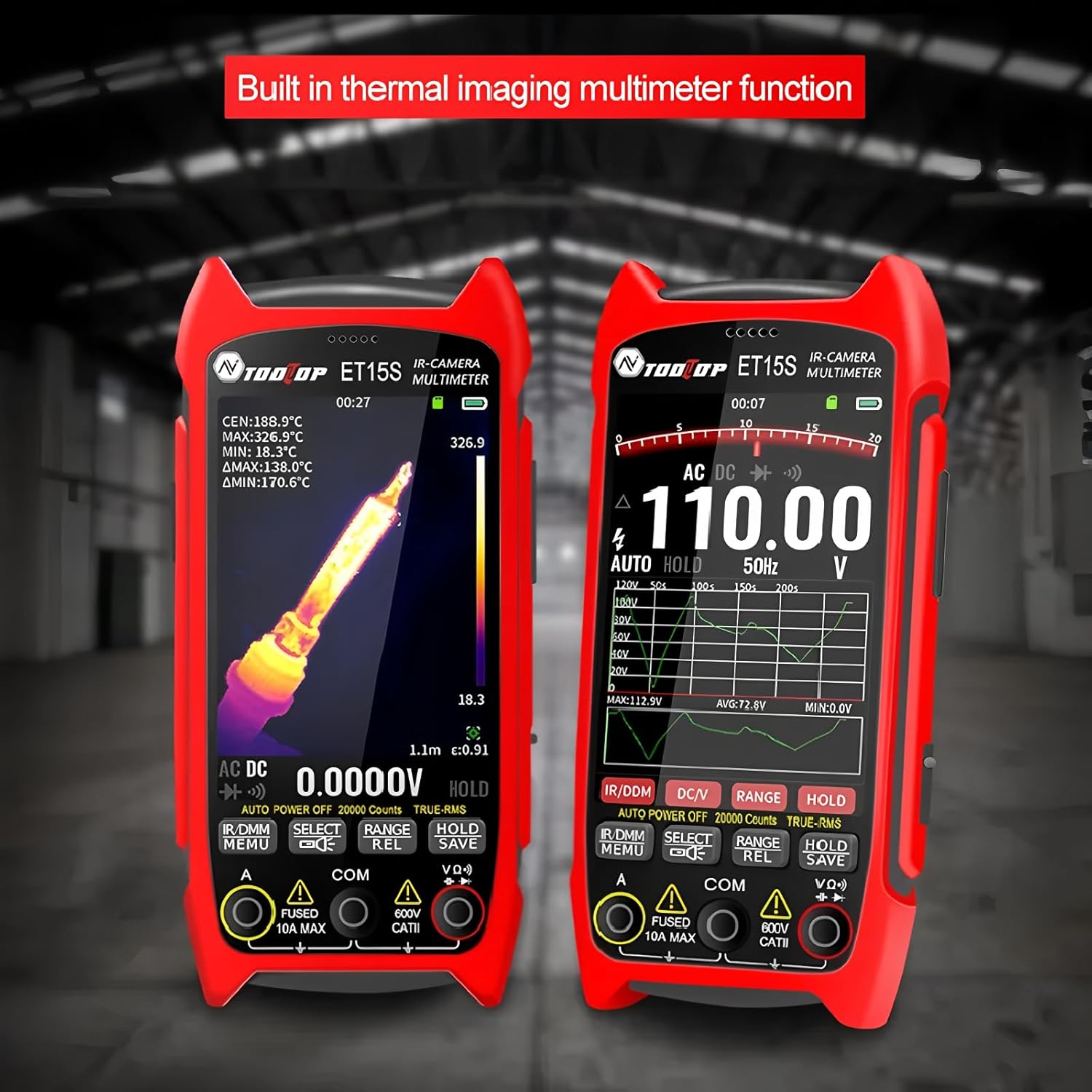
Figure 5: Multimeter interface showing voltage measurement and waveform graph.
5. Data Storage and PC Connectivity
The ET15S allows for saving thermal images and multimeter data. To transfer data to a PC:
- Connect the ET15S to your computer using the USB data cable.
- The device should appear as a removable storage device.
- Access saved images and data files.
- Use the dedicated PC software (available for download from the manufacturer's website) for advanced analysis of multimeter data charts and thermal images.

Figure 6: Connecting the ET15S to a PC for data transfer and analysis.
การซ่อมบำรุง
1. การทำความสะอาดอุปกรณ์
การทำความสะอาดอย่างสม่ำเสมอจะช่วยรักษาประสิทธิภาพและอายุการใช้งานของอุปกรณ์ให้ยาวนานขึ้น
- ใช้ผ้าแห้งนุ่มเช็ดบริเวณภายนอกของอุปกรณ์
- For the screen and lens, use a microfiber cloth specifically designed for optics. Avoid abrasive materials or harsh chemicals.
- ตรวจสอบให้แน่ใจว่าอุปกรณ์ปิดอยู่ก่อนทำความสะอาด
2. การดูแลแบตเตอรี่
- เก็บอุปกรณ์และแบตเตอรี่ไว้ในที่แห้งและเย็นเมื่อไม่ได้ใช้งาน
- หลีกเลี่ยงการปล่อยแบตเตอรี่จนหมดบ่อยครั้ง
- If storing for extended periods, charge the battery to approximately 50% to prolong its lifespan.
3. การจัดเก็บ
When not in use, store the ET15S in its provided instrument storage bag to protect it from dust, moisture, and physical damage.
การแก้ไขปัญหา
| ปัญหา | สาเหตุที่เป็นไปได้ | สารละลาย |
|---|---|---|
| อุปกรณ์ไม่เปิดเครื่อง | แบตเตอรี่หมดหรือติดตั้งไม่ถูกต้อง | ชาร์จแบตเตอรี่ ตรวจสอบให้แน่ใจว่าใส่แบตเตอรี่ถูกขั้วแล้ว |
| ภาพความร้อนมีความพร่ามัวหรือไม่ชัดเจน | Lens is dirty; incorrect focus (with macro lens); object is out of range. | Clean the lens. Adjust the macro lens position. Ensure the object is within the optimal working distance. |
| ค่าที่อ่านได้จากมัลติมิเตอร์ไม่แม่นยำ | Probes are not properly connected; incorrect measurement function selected; battery low. | Check probe connections. Select the correct measurement mode. Charge the battery. |
| ไม่สามารถเชื่อมต่อกับพีซีได้ | USB cable issue; driver not installed; device not in data transfer mode. | Try a different USB cable/port. Install necessary drivers (if prompted). Ensure the device is in USB mode. |
ข้อมูลจำเพาะ
พารามิเตอร์การถ่ายภาพความร้อน
- เซ็นเซอร์: วาเนเดียมออกไซด์ (VOx)
- ความถี่ในการจับภาพ: 25เฮิรตซ์
- Thermal Imaging Pixels: ขนาด 256x192
- Display Image Resolution: 427 x 320
- ทุ่งแห่ง View (เอฟโอวี): 50.0°(แนวนอน) × 37.2°(แนวตั้ง)
- การแผ่รังสี: 0.1 – 0.99 adjustable (0.95 by default)
- ช่วงอุณหภูมิ: -20℃ ~ +550℃
- ความแม่นยำ: ±2°C หรือ ±2%
- ความละเอียดการวัด: 0.1 ℃/0.1 ℉
- จานสี: White Heat, Black Heat, Fusion 1, Rainbow, Fusion 2, Iron Red 1, Iron Red 2, Dark Brown, Color 1, Color 2, Ice Fire, Rain, Green Heat, Red Heat, Deep Blue
- Macro Lens Working Distance: Approximately 5cm (Optional)
พารามิเตอร์มัลติมิเตอร์
- แสดง: 19999 นับ อัปเดต 3 ครั้ง/วินาที
- DC Maximum Input Voltage: 1000โวลต์
- AC Maximum Input Voltage: 750โวลต์
- การวัดกระแสสูงสุด: 10เอ
- ความต้านทานสูงสุด: 99.99เมกะโอห์ม
ข้อมูลจำเพาะทั่วไป
- หมายเลขรุ่น: TT-ET15S+Macro lens
- ยี่ห้อ: ทูลท็อป
- น้ำหนักสินค้า: 1 กิโลกรัม
- ขนาดแพ็คเกจ: 7.87 x 5.91 x 3.94 นิ้ว
- ประเทศต้นกำเนิด: จีน
- ใบรับรอง: ซีอี, โรเอชเอส
ข้อมูลการรับประกัน
TOOLTOP provides a limited warranty for the ET15S Professional Thermal Imager Camera & Digital Multimeter. Please refer to the warranty card included with your product or visit the official TOOLTOP website for detailed warranty terms and conditions. This warranty typically covers manufacturing defects and material flaws under normal use.
ระยะเวลาที่มีอะไหล่สำรองในสหภาพยุโรป: 1 ปี
การสนับสนุนลูกค้า
For technical assistance, product inquiries, or service requests, please contact TOOLTOP customer support through the following channels:
- Webเว็บไซต์: Visit the official TOOLTOP webเว็บไซต์นี้รวบรวมคำถามที่พบบ่อย (FAQ) ดาวน์โหลดซอฟต์แวร์ และแบบฟอร์มติดต่อ
- อีเมล: ดูที่บรรจุภัณฑ์ผลิตภัณฑ์ของคุณหรือที่ทางการ webเว็บไซต์สำหรับที่อยู่อีเมลฝ่ายบริการลูกค้า
- โทรศัพท์: หมายเลขติดต่ออาจมีอยู่ในเว็บไซต์ทางการ webเว็บไซต์สำหรับภูมิภาคของคุณ
When contacting support, please have your product model number (TT-ET15S+Macro lens) and purchase information ready.


