1. บทนำ
The TOOLTOP ET15S is an advanced industrial-grade device that integrates a high-resolution thermal imager with a high-precision digital multimeter. Designed for professionals, it provides comprehensive diagnostic capabilities for various applications, including electrical system inspection, HVAC troubleshooting, PCB analysis, and general temperature measurement. Its intuitive interface and robust features ensure accurate and reliable performance.

This image displays the TOOLTOP ET15S device, showcasing its dual functionality as both a thermal imager and a digital multimeter. The left screen shows a thermal image with temperature readings, while the right screen displays multimeter readings with a waveform graph.
2. การตั้งค่า
2.1 การแกะกล่องและการตรวจสอบเบื้องต้น
Carefully unpack all components from the box. Verify that all items listed in the 'What's in the Box' section are present and in good condition. If any items are missing or damaged, contact customer support immediately.

This image displays the complete contents of the ET15S package: the ET15S device, product manual, packaging box, instrument storage bag, multimeter probes, and a data line. Note that the macro lens is optional and not included in the standard package.
2.2 การติดตั้งและการชาร์จแบตเตอรี่
The ET15S is powered by a detachable 18650 lithium battery. Ensure the battery is correctly inserted into the battery compartment. For initial use, fully charge the device using the provided USB cable and a compatible USB power adapter (not included). The charging indicator will show the charging status.
The device supports reliable USB charging and offers a runtime of up to 8 hours on a full charge.
2.3 การเปิด/ปิดเครื่อง
To power on the device, press and hold the power button until the screen illuminates. To power off, press and hold the power button again until the screen shuts down.
3. คู่มือการใช้งาน
The ET15S combines thermal imaging and multimeter functions, accessible through its intuitive interface.
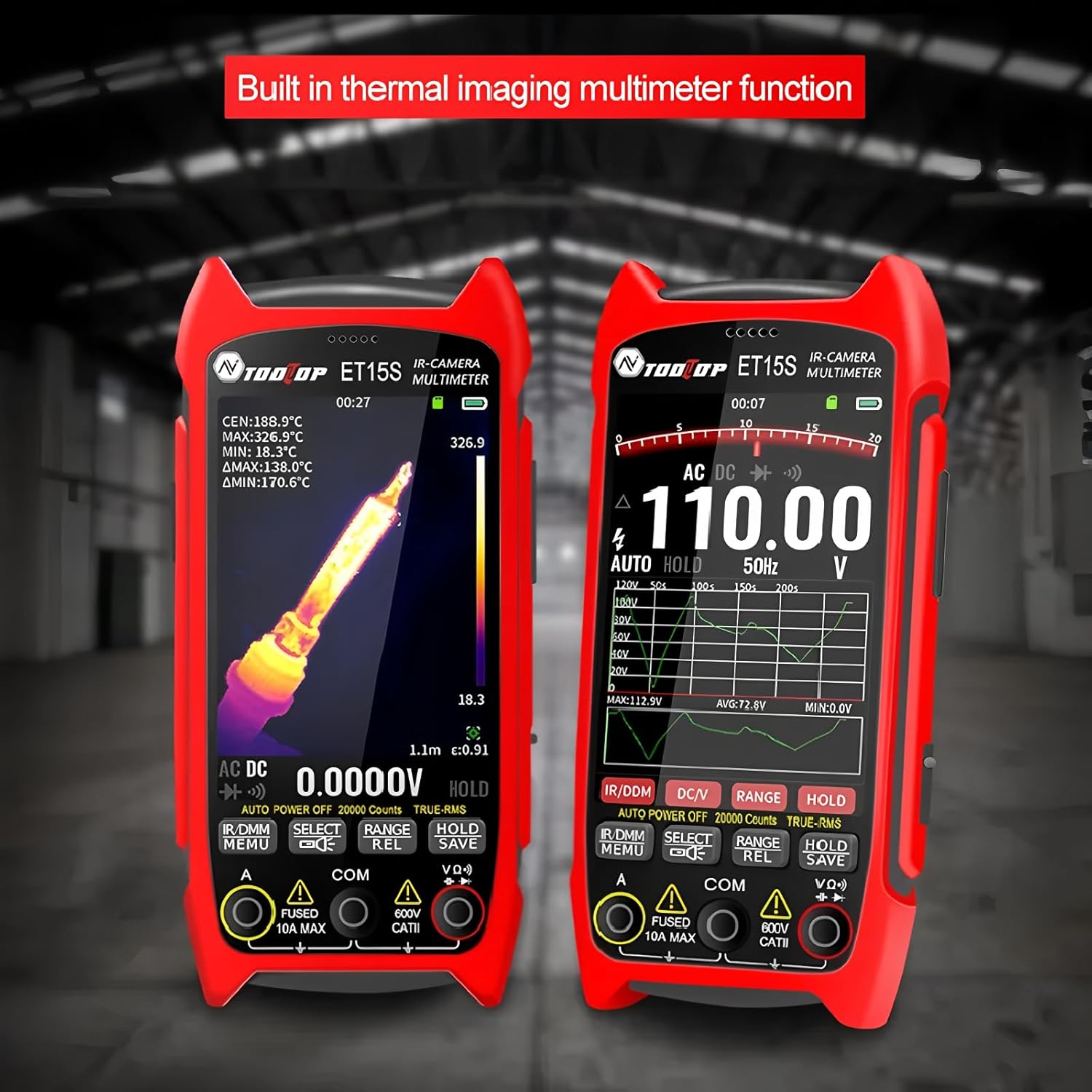
รายละเอียด view of the ET15S, highlighting its integrated thermal imaging and multimeter capabilities. The device's interface clearly shows both thermal data and electrical measurements simultaneously.
3.1 โหมดถ่ายภาพความร้อน
The thermal imaging mode utilizes a 256x192 resolution, 25Hz thermal imaging sensor to visualize temperature differences. This mode is ideal for identifying hot spots, cold spots, and thermal patterns in various environments.
- ปณิธาน: 256x192 พิกเซล
- อัตราเฟรม: 25เฮิรตซ์
- ช่วงอุณหภูมิ: -20℃ ถึง +550℃
- การแผ่รังสี: Adjustable from 0.1 to 0.99 (0.95 by default)
- จานสี: White Heat, Black Heat, Fusion 1, Rainbow, Fusion 2, Iron Red 1, Iron Red 2, Dark Brown, Color 1, Color 2, Ice Fire, Rain, Green Heat, Red Heat, Deep Blue

An industrial-grade thermal imager, the ET15S features a 256x192 pixel sensor. The image shows the device capturing thermal data from electrical panels, demonstrating its capability for professional industrial applications.
3.2 Digital Multimeter Mode
The integrated digital multimeter provides high-precision measurements with 19,999 counts. It supports both manual and automatic range options and includes an analog needle display for quick reference.
- การวัดขนาด: เล่มที่tage (DC/AC), Current, Resistance, Capacitance, Diode, Frequency, NCV (Non-Contact Voltage), Temperature
- DC ฉบับที่tage: สูงถึง 1000V
- ฉบับ ACtage: สูงถึง 750V
- ปัจจุบัน: สูงสุด 10A
- ความต้านทาน: สูงสุด 99.99MΩ

The ET15S features a 3.5-inch high-definition large screen, ideal for detailed inspection. The image shows the screen displaying a thermal view of a circuit board, emphasizing its clarity for identifying minor faults and hidden dangers.
3.3 Data Visualization and PC Software Support
The multimeter measurement results can be visualized as waveform graphs directly on the device's display, aiding in understanding data trends and simplifying fault diagnosis. The ET15S also supports PC software, allowing users to transfer and analyze multimeter data charts and thermal images on a computer.

The ET15S supports PC software for data transfer and analysis. This image shows the device connected to a laptop, illustrating how stored images and multimeter data waveforms can be reproduced and analyzed on a computer, along with USB charging.
3.4 Optional Macro Lens
An optional macro lens is available for the ET15S, enabling the capture of extremely small details (as clear as 1mm x 1mm). This feature is particularly useful for intricate tasks such as smartphone repairs and PCB mainboard inspections.

The ET15S offers an optional macro lens, shown attached to the device's rear. This lens allows for capturing small details as clear as 1mm x 1mm, making it ideal for smartphone repairs, PCB mainboard inspections, and electronic R&D.
4. การบำรุงรักษา
4.1 การทำความสะอาดเครื่อง
To maintain optimal performance, keep the ET15S clean. Use a soft, dry cloth to wipe the exterior. For stubborn dirt, a slightly damp สามารถใช้ผ้าชุบสบู่เหลวอ่อนๆ เช็ดทำความสะอาดได้ โดยระวังอย่าให้ของเหลวเข้าไปในตัวเครื่อง ห้ามใช้สารทำความสะอาดที่มีฤทธิ์กัดกร่อนหรือตัวทำละลาย
4.2 การดูแลแบตเตอรี่
เพื่อยืดอายุการใช้งานแบตเตอรี่ ควรหลีกเลี่ยงการปล่อยให้แบตเตอรี่หมดเกลี้ยงบ่อยๆ หากไม่ได้ใช้งานอุปกรณ์เป็นเวลานาน ควรชาร์จแบตเตอรี่ให้เหลือประมาณ 50% แล้วเก็บไว้ในที่แห้งและเย็น ชาร์จใหม่ทุกๆ สองสามเดือนเพื่อป้องกันการคายประจุจนหมด
4.3 พื้นที่จัดเก็บ
Store the ET15S in its protective case when not in use to prevent damage from dust, moisture, and impacts. Avoid storing in extreme temperatures or direct sunlight.
5 การแก้ไขปัญหา
This section addresses common issues you might encounter with your ET15S. If the problem persists, please contact customer support.
- อุปกรณ์ไม่เปิดเครื่อง:
- Ensure the battery is fully charged. Connect the device to a charger and wait for a few minutes before attempting to power on again.
- Check if the battery is correctly inserted. - หน้าจอว่างเปล่าหรือค้าง:
- Perform a soft reset by pressing and holding the power button for 10-15 seconds until the device restarts.
- If the issue persists, ensure the battery is charged. - การอ่านค่ามัลติมิเตอร์ที่ไม่แม่นยำ:
- Ensure the test leads are properly connected to the correct input jacks.
- Verify that the measurement range is appropriate for the value being measured (if not in auto-range mode).
- Check the condition of the test leads for any damage. - Thermal Image is Unclear:
- Ensure the lens is clean and free from smudges or dust.
- Adjust the emissivity setting to match the material being inspected for more accurate temperature readings.
- Ensure the target is within the optimal measurement distance. - ไม่สามารถเชื่อมต่อกับพีซีได้:
- Ensure the USB cable is securely connected to both the device and the computer.
- ลองใช้พอร์ต USB อื่นบนคอมพิวเตอร์ของคุณ
- Install the necessary PC software and drivers from the manufacturer's webเว็บไซต์.
6. ข้อมูลจำเพาะ
6.1 Thermal Imaging Parameters
| พารามิเตอร์ | ค่า |
|---|---|
| เซ็นเซอร์ | วาเนเดียมออกไซด์ (VOx) |
| ความถี่ในการจับภาพ | 25เฮิรตซ์ |
| พิกเซลถ่ายภาพความร้อน | ขนาด 256x192 |
| Display Image Resolution | 427 x 320 |
| ทุ่งแห่ง View (เอฟโอวี) | 50.0°(แนวนอน) × 37.2°(แนวตั้ง) |
| emissivity | 0.1 – 0.99 adjustable (0.95 by default) |
| ช่วงอุณหภูมิ | -20℃ ~ +550℃ |
| ความแม่นยำ | ±2°C หรือ ±2% |
| ความละเอียดการวัด | 0.1 ℃/0.1 ℉ |
| โหมดเกน | Auto Gain |
| เลนส์มาโคร | Optional, working distance: about 5cm |
6.2 พารามิเตอร์มัลติมิเตอร์
| พารามิเตอร์ | ค่า |
|---|---|
| แสดง | 19999 นับ อัปเดต 3 ครั้ง/วินาที |
| DC Maximum Input Voltage | 1000โวลต์ |
| AC Maximum Input Voltage | 750โวลต์ |
| Maximum Current Measurement | 10เอ |
| ความต้านทานสูงสุด | 99.99เมกะโอห์ม |
6.3 ข้อกำหนดทั่วไป
| พารามิเตอร์ | ค่า |
|---|---|
| หมายเลขรุ่นสินค้า | ทีที-อีที15เอส |
| ขนาดแพ็คเกจ | 7.87 x 5.91 x 3.94 นิ้ว |
| น้ำหนักสินค้า | 1 กิโลกรัม (2.2 ปอนด์) |
| แหล่งพลังงาน | Battery Powered (detachable 18650 lithium battery) |
| ระยะเวลาใช้งานแบตเตอรี่ | นานถึง 8 ชั่วโมง |
| ภาษาที่รองรับ | Chinese, English, German, Russian, French, Spanish, Portuguese, Korean, Japanese, Italian, Polish |
| การรับรอง | ซีอี, โรเอชเอส |
7. อะไรอยู่ในกล่อง
The standard package for the TOOLTOP ET15S includes the following items:
- ET15S Device
- คู่มือผลิตภัณฑ์
- กล่องบรรจุภัณฑ์
- Instrument Storage Bag
- หัววัดมัลติมิเตอร์
- สายเคเบิลข้อมูล (สาย USB)
Note: The optional macro lens is sold separately and is not included in the standard package.
8. การรับประกันและการสนับสนุน
8.1 ข้อมูลการรับประกัน
TOOLTOP products are manufactured to high quality standards. This product comes with a limited warranty against defects in materials and workmanship. Please refer to the warranty card included in your package or visit the official TOOLTOP webเว็บไซต์สำหรับข้อกำหนดและเงื่อนไขการรับประกันโดยละเอียด
8.2 การสนับสนุนลูกค้า
For technical assistance, troubleshooting, or any inquiries regarding your TOOLTOP ET15S, please contact our customer support team. Contact information can typically be found on the official TOOLTOP webเว็บไซต์หรือในบรรจุภัณฑ์ของผลิตภัณฑ์
When contacting support, please have your product model number (TT-ET15S) and purchase information ready to expedite the process.


