การแนะนำ
This user manual provides comprehensive instructions for the safe and effective operation of your TOOLTOP ET14S 2-in-1 Thermal Imager and Multimeter. This device integrates a high-resolution thermal camera with a full-featured digital multimeter, offering a versatile tool for various diagnostic and inspection tasks. Please read this manual thoroughly before use and retain it for future reference.
ข้อมูลด้านความปลอดภัย
โปรดปฏิบัติตามข้อควรระวังด้านความปลอดภัยต่อไปนี้เสมอ เพื่อป้องกันการบาดเจ็บหรือความเสียหายต่ออุปกรณ์:
- อย่าพยายามถอดประกอบหรือดัดแปลงอุปกรณ์
- โปรดตรวจสอบให้แน่ใจว่าอุปกรณ์ปิดอยู่ก่อนที่จะเชื่อมต่อหรือถอดสายทดสอบ
- ห้ามใช้แรงดันไฟฟ้าเกินค่าสูงสุดที่กำหนดไว้tage. กระแสไฟฟ้า หรืออุณหภูมิ
- Use appropriate personal protective equipment (PPE) when working with electrical circuits or high temperatures.
- ควรเก็บอุปกรณ์ให้ห่างจากน้ำ ฝุ่น และอุณหภูมิที่สูงหรือต่ำเกินไป
- Refer to the warning label on the back of the device for additional safety instructions.
มีอะไรอยู่ในกล่อง
ตรวจสอบว่ามีสินค้าทั้งหมดที่ระบุไว้ด้านล่างอยู่ในแพ็คเกจของคุณ:
- ET14S Thermal Imager & Multimeter
- เลนส์มาโคร
- Instrument Storage Bag
- Multimeter Probes (Test Leads)
- สายเคเบิลข้อมูล (สาย USB)
- คู่มือผลิตภัณฑ์
- กล่องบรรจุภัณฑ์

Image: Components included in the ET14S package, showing the main unit, macro lens, storage bag, multimeter probes, data cable, and product manual.
สินค้าเกินview
The TOOLTOP ET14S combines a high-resolution thermal imager with a precise digital multimeter. It features a 2.8-inch IPS high-definition screen for clear display of both thermal images and electrical measurements.
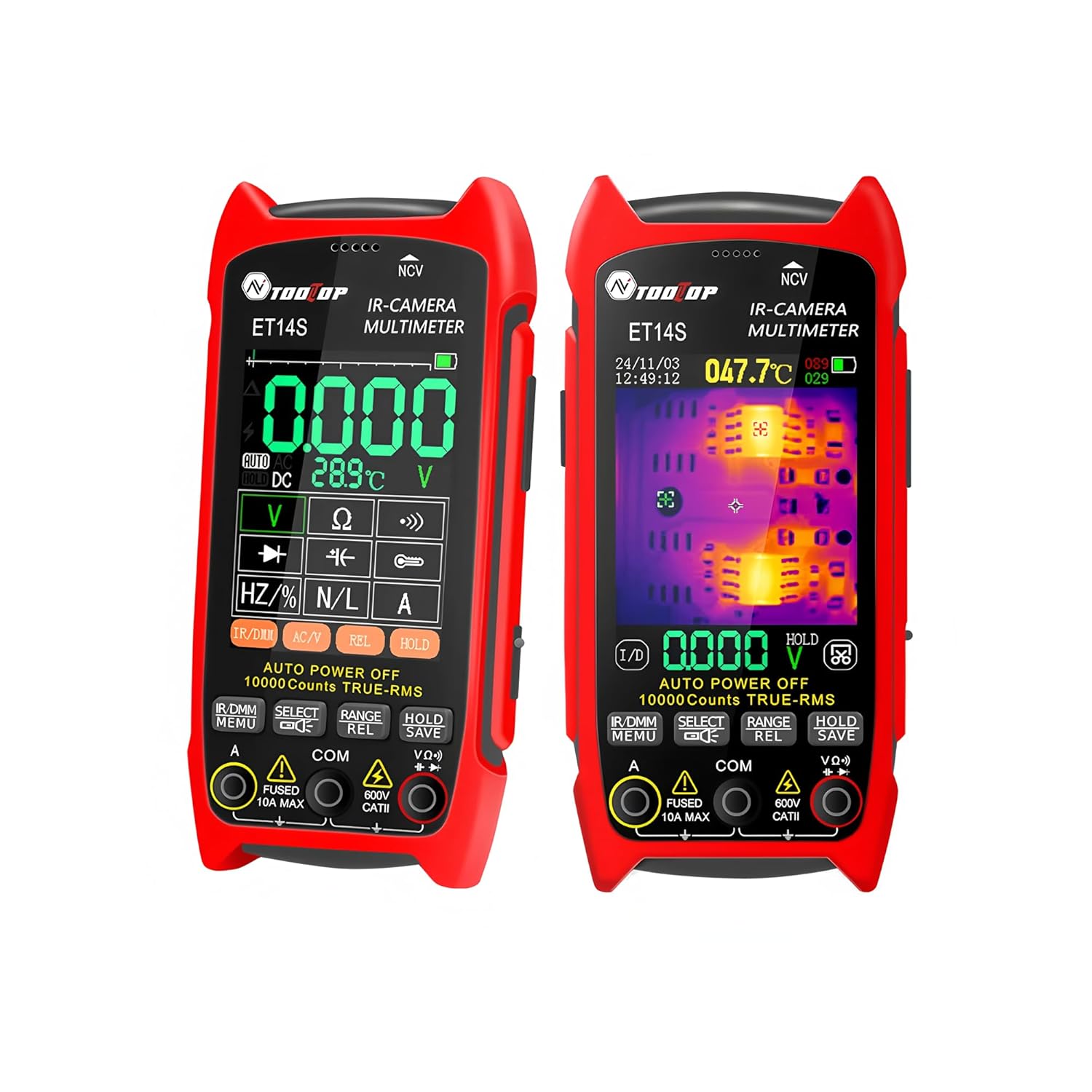
ภาพ: ด้านหน้า view of the ET14S device, illustrating its dual functionality as a thermal imager and multimeter with its display screen and control buttons.
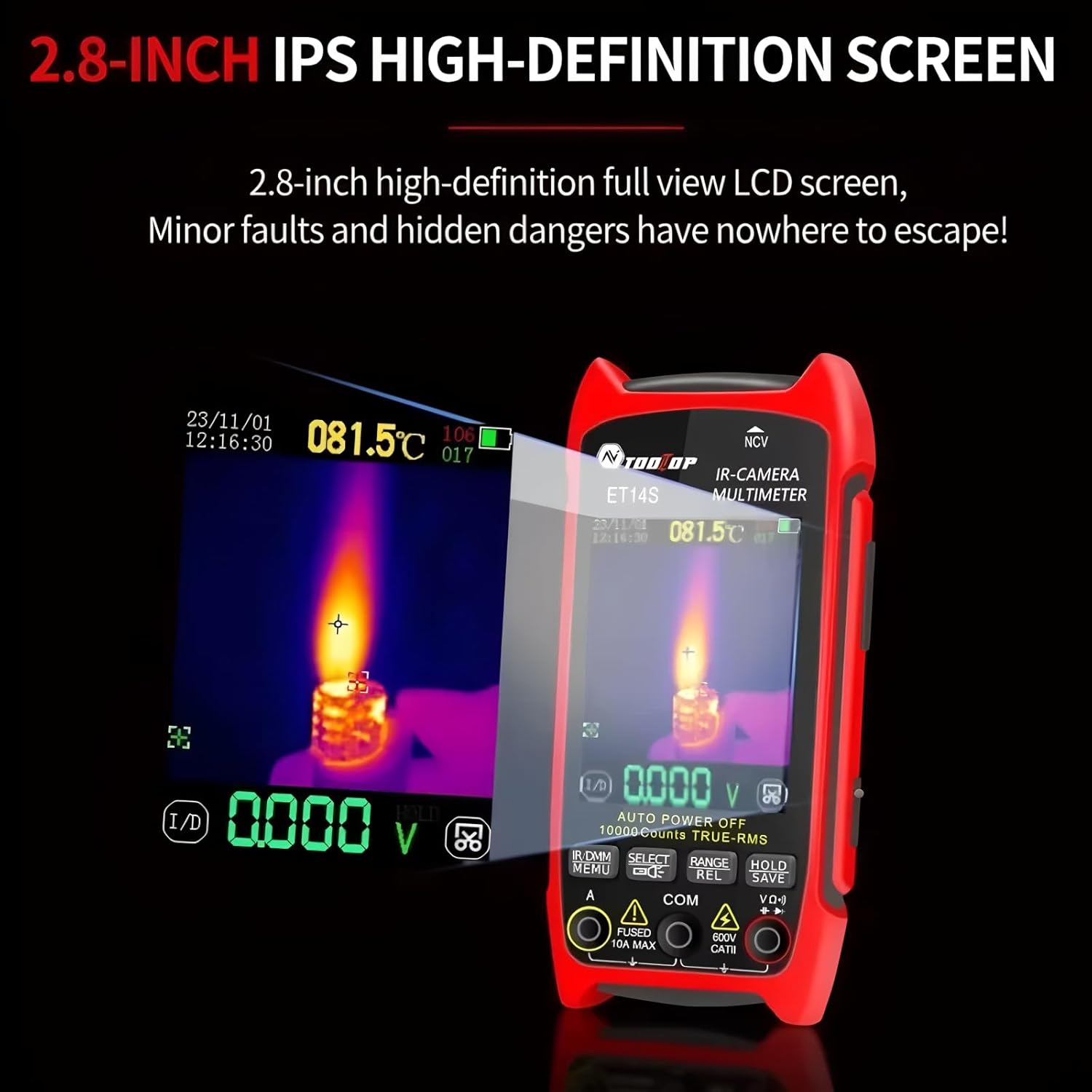
ภาพ: รายละเอียด view of the ET14S screen, showing both a thermal image overlay and digital multimeter readings simultaneously.
คุณสมบัติหลัก:
- ISR240x240 Thermal Camera: Upgraded imaging pixels of 240x240 and 25Hz image capture frequency for detailed thermal analysis.
- High-precision Multimeter: 9999 counts True RMS multimeter for accurate electrical measurements.
- อายุการใช้งานแบตเตอรี่ยาวนาน: Up to 8 hours of continuous use with a universal 18650 rechargeable battery.
- ขนาดกะทัดรัดและพกพาสะดวก: Ergonomic design with a 2.8-inch screen and innovative stand.
- ช่วงอุณหภูมิที่กว้าง: -20℃ to +550℃ with ±2℃ or ±2% accuracy.
- เลนส์มาโครเสริม: For detailed inspection of small components like PCBs.
การตั้งค่า
1. การติดตั้งและการชาร์จแบตเตอรี่:
The ET14S uses a rechargeable 18650 lithium battery. Ensure the battery is properly installed and charged before first use.
- ค้นหาช่องใส่แบตเตอรี่ที่ด้านหลังของอุปกรณ์
- เปิดฝาครอบช่อง
- Insert the 18650 battery, observing the correct polarity (+/-).
- ปิดฝาช่องใส่แบตเตอรี่ให้แน่น
- Connect the device to a power source using the provided USB data line for charging. The charging indicator will show the charging status.
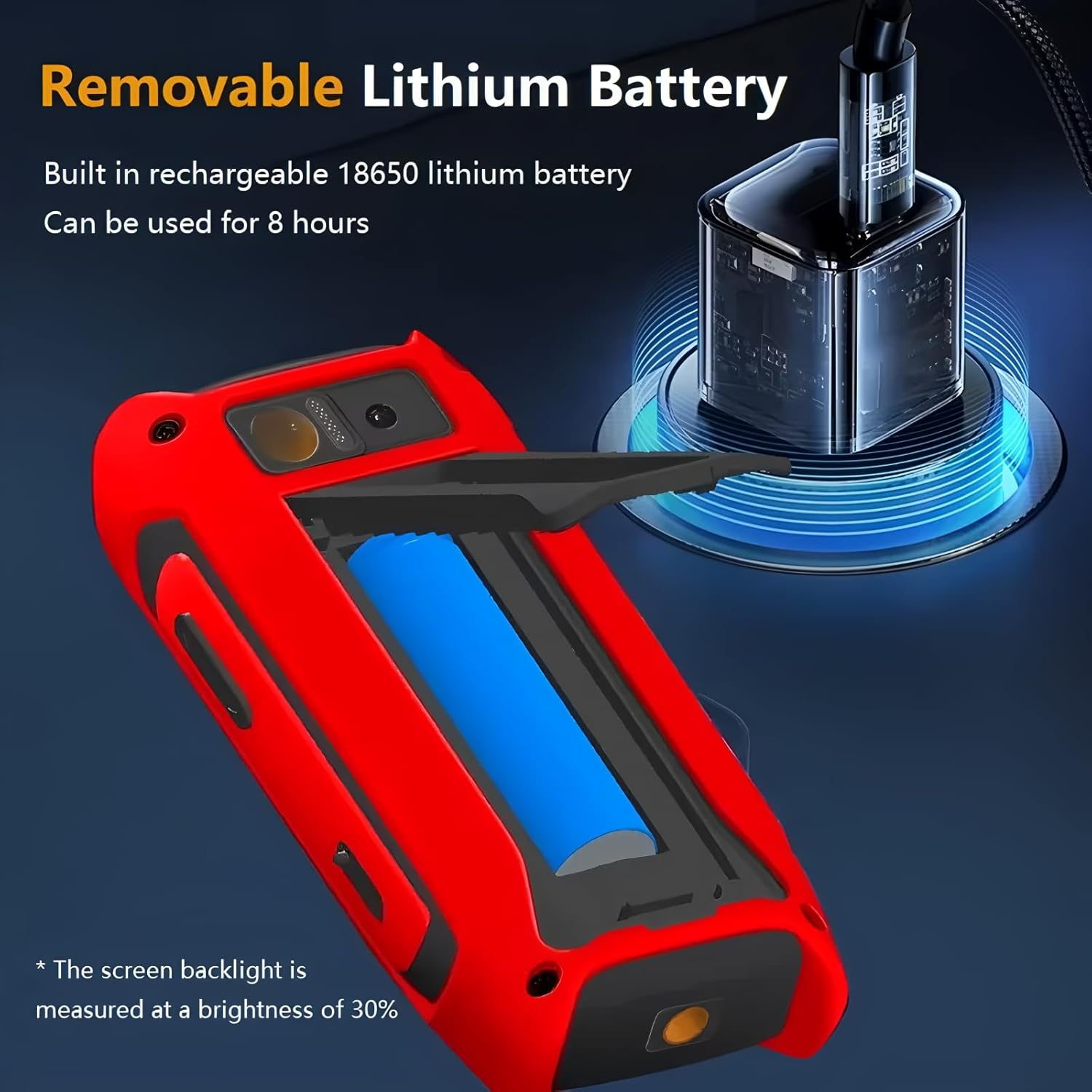
Image: The ET14S with its battery compartment open, illustrating the removable 18650 lithium battery and the USB charging port.
2. Attaching the Macro Lens (Optional):
For detailed inspection of small objects or PCB boards, attach the included macro lens.
- Locate the macro lens attachment point on the top of the device, near the thermal camera lens.
- Align the macro lens with the attachment mechanism.
- Slide or clip the macro lens into place until it is securely fastened over the thermal camera lens.
- To remove, gently slide or unclip the macro lens.
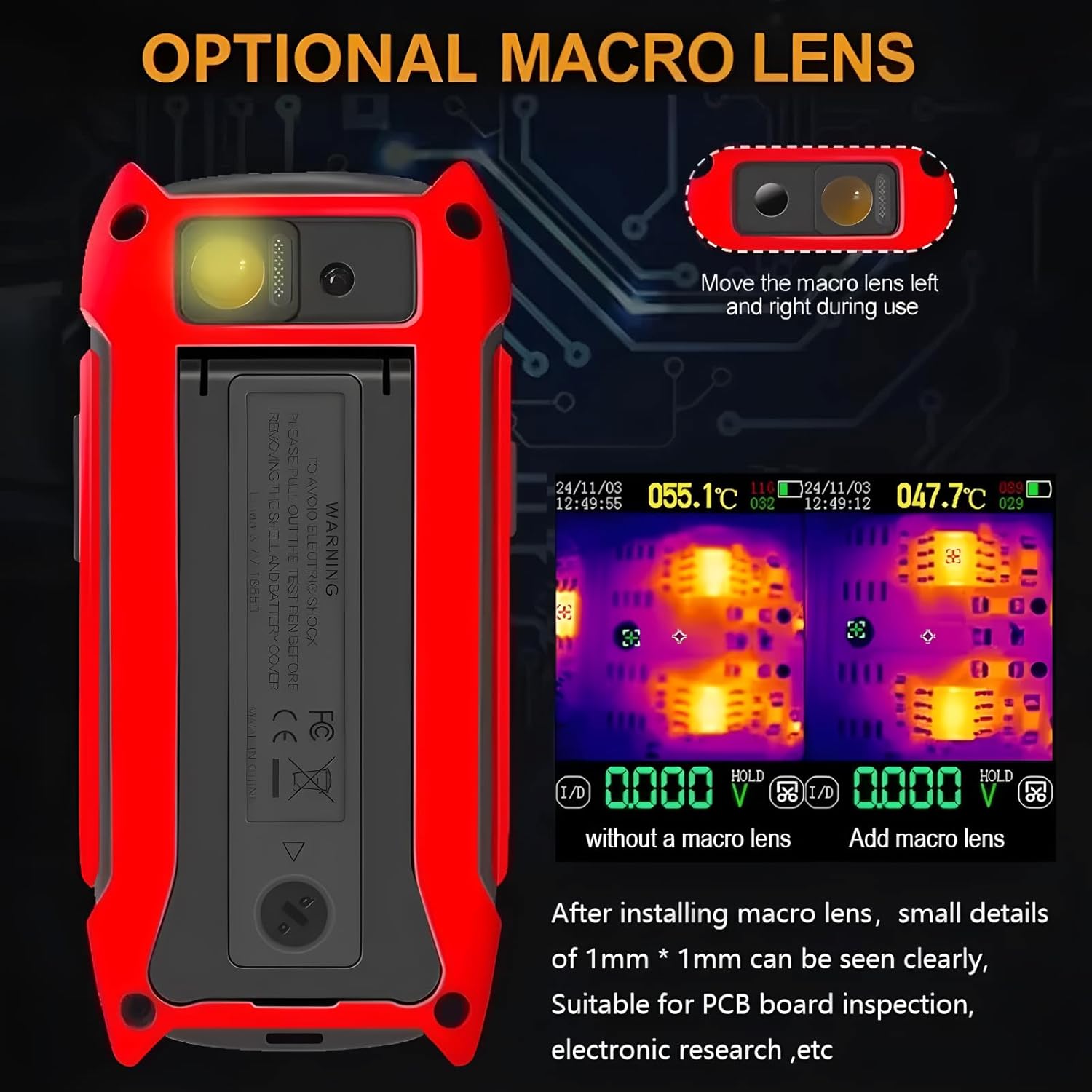
Image: The ET14S device highlighting the optional macro lens and demonstrating its capability for detailed thermal inspection of small components like PCBs.
คำแนะนำการใช้งาน
1. การเปิด/ปิดเครื่อง:
Press and hold the power button (usually located on the side or front panel) to turn the device on or off.
2. การนำทางอินเทอร์เฟซ:
The ET14S features a user-friendly interface with dedicated buttons for different functions. Use the navigation buttons (up, down, left, right, OK/Enter) to move through menus and select options.
3. โหมดถ่ายภาพความร้อน:
In thermal imaging mode, the screen displays a real-time infrared image. The device automatically detects and displays temperature readings for the hottest and coldest points, as well as a central spot temperature.

Image: The ET14S screen showing a thermal image with temperature distribution and specific temperature readings for analysis.
- การเลือกโทนสี: Use the menu to select different color palettes (e.g., Iron, Rainbow, Gray) to visualize temperature differences.
- การปรับค่าการปล่อยก๊าซเรือนกระจก: Adjust emissivity settings based on the material being inspected for accurate temperature measurements.
- การจับภาพ: Press the designated button to capture and save thermal images.
4. Multimeter Mode:
The ET14S functions as a full-featured True RMS multimeter. Connect the test leads to the appropriate input jacks (COM, VΩHz, A) and select the desired measurement function using the rotary dial or function buttons.
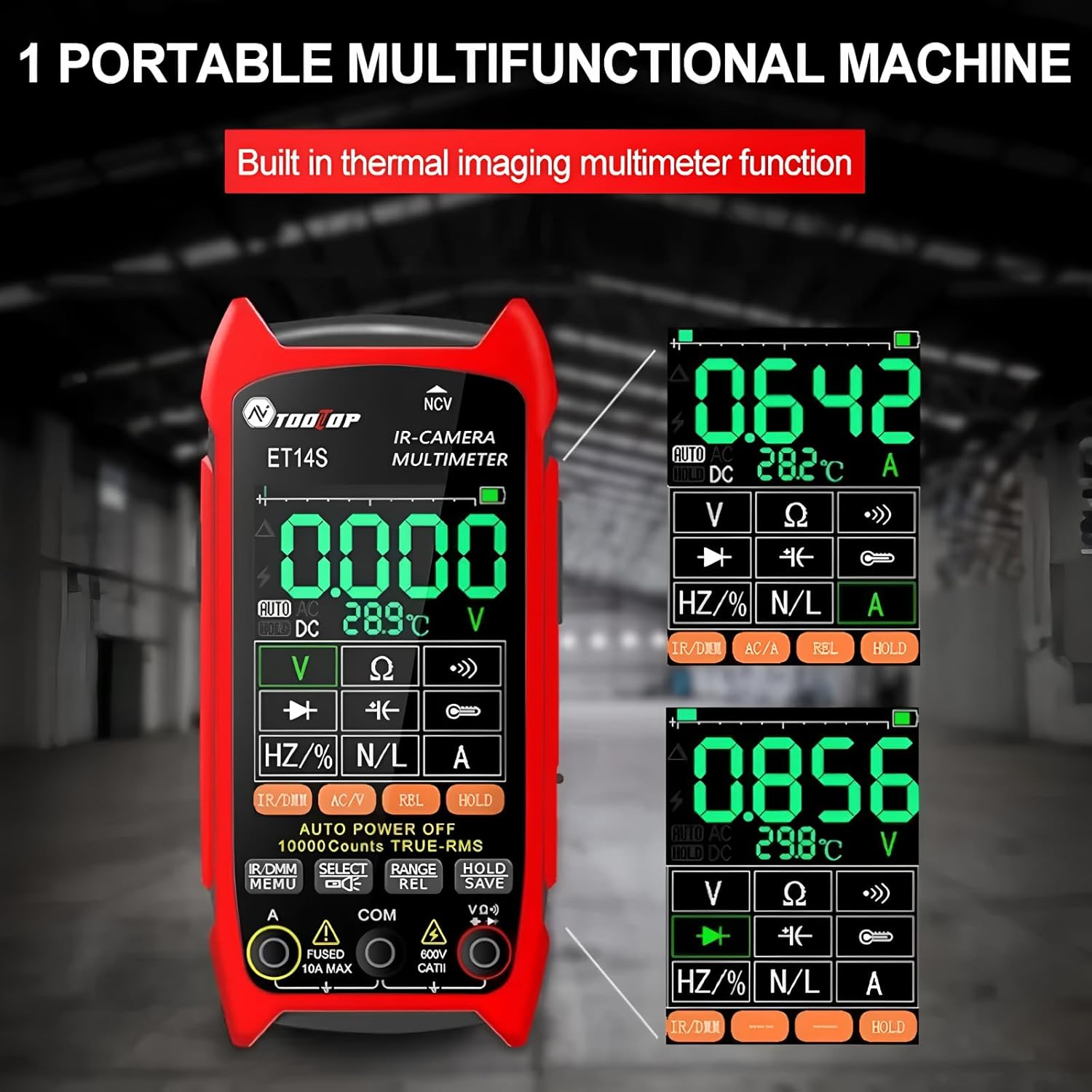
Image: The ET14S screen displaying various multimeter readings, including voltage, resistance, and frequency, demonstrating its electrical measurement capabilities.
- เล่มที่tagการวัด (AC/DC): Select V~ for AC voltage or V- for DC voltage.
- การวัดกระแสไฟฟ้า (AC/DC): Select A~ for AC current or A- for DC current. Ensure correct lead connection for current measurements.
- Resistance (Ω), Continuity, Diode: Select the Ω symbol for resistance, continuity buzzer, or diode test.
- Capacitance (F), Frequency (Hz), Duty Cycle (%): Select the appropriate symbols for these measurements.
- แบบไม่สัมผัส Voltagอี (NCV): Use the NCV function to detect AC voltagอีโดยไม่ต้องมีการสัมผัสโดยตรง
- การเก็บข้อมูล: กดปุ่ม HOLD เพื่อหยุดการอ่านปัจจุบันบนจอแสดงผล
- การเลือกช่วง: The device typically features auto-ranging, but manual range selection may be available.
แอปพลิเคชั่น
The TOOLTOP ET14S is a versatile tool suitable for a wide range of applications, including but not limited to:
- Power System Maintenance: Identifying overheating components in electrical panels, circuit breakers, and wiring.
- Underfloor Heating Inspection: Locating heating elements and identifying blockages or leaks in radiant heating systems.
- การบำรุงรักษารถยนต์: Diagnosing engine overheating, checking brake temperatures, and inspecting electrical systems.
- PCB Board Repair and Electronic Inspection: Pinpointing hot spots on circuit boards, identifying faulty components, and verifying thermal performance.
- Pipeline Heating Inspection: Detecting insulation failures or blockages in industrial pipelines.
- การตรวจสอบบ้าน: Identifying insulation gaps, moisture intrusion, and HVAC issues.
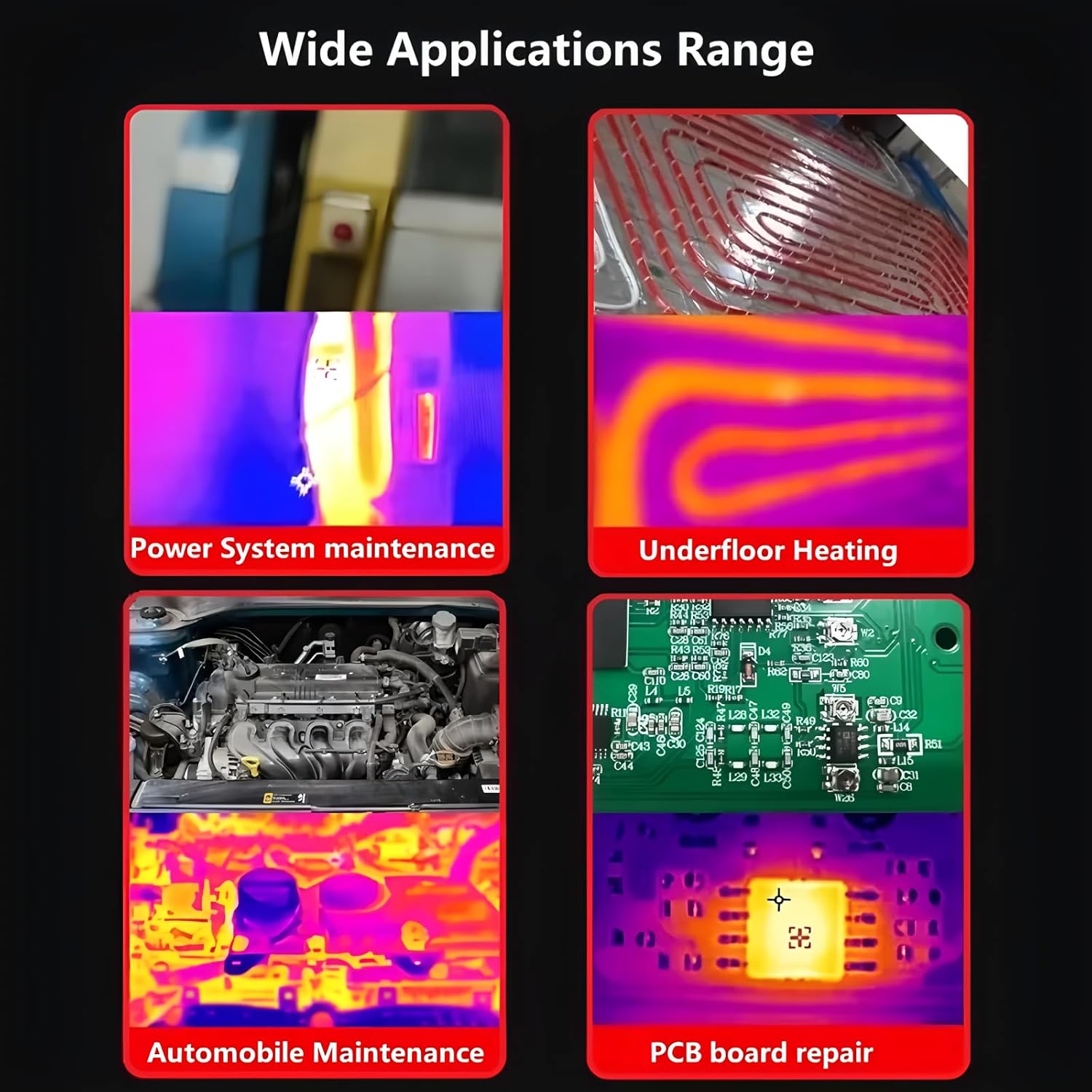
Image: A visual representation of the wide range of applications for the ET14S, including power system maintenance, underfloor heating, automobile diagnostics, and PCB board repair.
การซ่อมบำรุง
1. การทำความสะอาด:
เช็ดเครื่องเบาๆงamp cloth. Do not use abrasive cleaners or solvents. Ensure the lenses are clean and free of dust or smudges for optimal thermal imaging performance.
2. การดูแลแบตเตอรี่:
To prolong battery life, charge the device regularly and avoid completely draining the battery. If storing for extended periods, charge the battery to approximately 50% and store in a cool, dry place.
3. การจัดเก็บ:
Store the ET14S in its provided storage bag or a protective case when not in use to prevent damage from impacts or dust. Avoid storing in areas with extreme temperatures or high humidity.
การแก้ไขปัญหา
| ปัญหา | สาเหตุที่เป็นไปได้ | สารละลาย |
|---|---|---|
| อุปกรณ์ไม่เปิดเครื่อง | แบตเตอรี่ใกล้หมดหรืออ่อน การติดตั้งแบตเตอรี่ไม่ถูกต้อง | ชาร์จแบตเตอรี่ ตรวจสอบให้แน่ใจว่าใส่แบตเตอรี่ถูกขั้วแล้ว |
| การอ่านอุณหภูมิไม่ถูกต้อง | Incorrect emissivity setting. Lens is dirty. Object is too far or too close. | Adjust emissivity for the target material. Clean the thermal lens. Ensure proper measurement distance. |
| ค่าที่อ่านได้จากมัลติมิเตอร์ไม่คงที่หรือไม่ถูกต้อง | Loose test lead connections. Incorrect function selected. Battery low. | Check and secure test lead connections. Verify the correct measurement function is selected. Charge the battery. |
| หน้าจอว่างเปล่าหรือค้าง | ซอฟต์แวร์มีปัญหา | Perform a hard reset by holding the power button for 10-15 seconds, or remove and reinsert the battery. |
ข้อมูลจำเพาะ
| คุณสมบัติ | ข้อมูลจำเพาะ |
|---|---|
| ความละเอียดความร้อน | 240x240 พิกเซล |
| อัตราเฟรม | 25เฮิรตซ์ |
| ช่วงอุณหภูมิ | -20°C ถึง +550°C (-4°F ถึง +1022°F) |
| ความแม่นยำของอุณหภูมิ | ±2℃ หรือ ±2% (แล้วแต่ว่าค่าใดมากกว่า) |
| ความละเอียดการวัด | 0.1 ℃ / 0.1 ℉ |
| มัลติมิเตอร์นับ | 9999 นับ (True RMS) |
| หน้าจอแสดงผล | 2.8-inch IPS High-Definition LCD |
| ประเภทแบตเตอรี่ | Rechargeable 18650 Lithium Battery |
| อายุการใช้งานแบตเตอรี่ | สูงสุด 8 ชั่วโมง (ใช้งานต่อเนื่อง) |
| น้ำหนักสินค้า | 1 กิโลกรัม (2.2 ปอนด์) |
| ขนาด | 7.87 x 5.91 x 3.94 นิ้ว (ขนาดบรรจุภัณฑ์) |
| การรับรอง | ซีอี, โรเอชเอส |
การรับประกันและการสนับสนุน
For warranty information and technical support, please refer to the documentation provided with your purchase or contact TOOLTOP customer service directly. The EU spare part availability duration is 1 year.
ผู้ผลิต: ทูลท็อป
หมายเลขรุ่นสินค้า: TT-ET14S+Macro lens
For further assistance, please visit the official TOOLTOP webไซต์หรือติดต่อศูนย์บริการที่ได้รับอนุญาต


