1. สินค้าหมดview
The SPYPOINT Force 24 is a non-cellular trail camera designed for capturing high-quality images and videos of wildlife and for security monitoring in areas without cellular coverage. It records 2K video with sound and captures 24-megapixel still photos. The camera features a fast 0.5-second trigger speed, a 70-foot detection range, and low-glow infrared LEDs for clear day and night captures without disturbing subjects. Footage is saved directly to an SD card, eliminating the need for data plans or subscriptions.

รูปที่ 1 : ด้านหน้า view of the SPYPOINT Force 24 Trail Camera.
2. เนื้อหาบรรจุภัณฑ์
ตรวจสอบให้แน่ใจว่ามีรายการทั้งหมดอยู่ก่อนดำเนินการตั้งค่า:
- SPYPOINT Force 24 Trail Camera
- สายรัดสำหรับติดตั้ง
- คู่มือการใช้งาน (เอกสารนี้)
3. การตั้งค่า
3.1. การติดตั้งแบตเตอรี่
The Force 24 camera requires 8 AA batteries. For optimal performance and extended battery life, lithium or high-quality alkaline batteries are recommended. Rechargeable batteries can also be used.
- Open the camera latch on the side to access the internal compartment.
- ค้นหาช่องใส่แบตเตอรี่
- ใส่แบตเตอรี่ AA 8 ก้อน โดยตรวจสอบให้แน่ใจว่าขั้ว (+/-) ถูกต้องตามที่ระบุภายในช่อง
- ปิดช่องใส่แบตเตอรี่ให้แน่น
3.2. การใส่การ์ด SD
A MicroSD card (not included) is required to store photos and videos. The camera supports cards up to 32 GB.
- เมื่อเปิดกล้องแล้ว ให้หาช่องเสียบการ์ด SD
- Insert a formatted MicroSD card into the slot until it clicks into place. Ensure the card is inserted in the correct orientation.
- แนะนำให้ฟอร์แมตการ์ด SD โดยใช้เมนูของกล้องก่อนใช้งานครั้งแรก
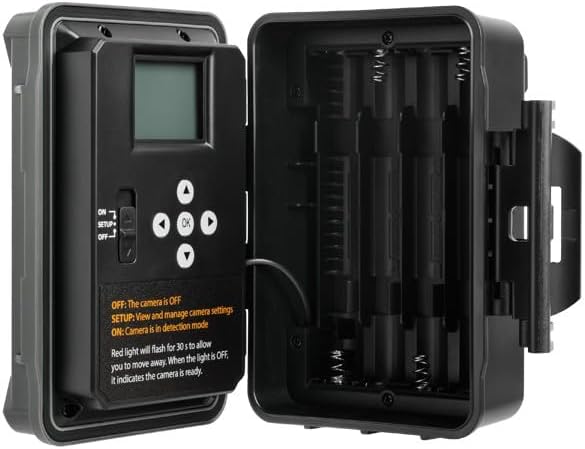
รูปที่ 2: ภายใน view of the camera showing the control panel and battery compartment.
4. โหมดการทำงาน
The SPYPOINT Force 24 offers four versatile operating modes:
- โหมดภาพถ่าย: บันทึกภาพนิ่ง
- โหมดวิดีโอ: Records video clips with sound.
- โหมด Time-Lapse: Captures images at set intervals over a period.
- Time-Lapse Plus Mode: Combines time-lapse photography with motion-triggered captures.
4.1. การเลือกโหมด
Use the camera's internal control panel to navigate through the menu and select your desired operating mode. Refer to the on-screen instructions for specific settings within each mode.
4.2. การตรวจจับการเคลื่อนไหวและความเร็วในการเรียกใช้งาน
The camera features a 0.5-second trigger speed and a 70-foot detection range to ensure quick capture of moving subjects. The low-glow infrared LEDs provide discreet illumination for night captures.
5. Camera Interface and Controls
The camera's internal display and buttons allow for easy configuration and review of captured media.
- ON/SETUP/OFF Switch: Controls the camera's power and enters setup mode.
- ปุ่มนำทาง: Used to move through menu options and review ภาพ/วิดีโอ
- ปุ่มตกลง: ยืนยันการเลือก
- ปุ่มเมนู: เข้าถึงเมนูการตั้งค่าหลัก
When in SETUP mode, the red light will flash for 30 seconds, allowing you time to move away before the camera enters detection mode. When the light is OFF, the camera is ready.
6. การบำรุงรักษา
- การเปลี่ยนแบตเตอรี่: Replace batteries when the low battery indicator appears on the screen or in the app.
- การจัดการการ์ด SD: Regularly check the SD card capacity. Transfer important files to a computer and format the card periodically to maintain optimal performance.
- การทำความสะอาด: Keep the camera lens, PIR sensor, and infrared LEDs clean from dirt, dust, and debris using a soft, dry cloth.
- การปกป้องสิ่งแวดล้อม: Ensure the camera is securely mounted and latches are closed to protect against weather elements.
7 การแก้ไขปัญหา
- กล้องไม่เปิดเครื่อง: ตรวจสอบการติดตั้งแบตเตอรี่และให้แน่ใจว่าแบตเตอรี่ยังใหม่
- ไม่มีการถ่ายภาพ/วิดีโอ: Verify the SD card is inserted correctly and has sufficient space. Check motion detection settings and ensure the camera is in ON mode.
- คุณภาพของภาพต่ำ: Clean the camera lens and ensure there are no obstructions. Check the camera's position relative to the subject and lighting conditions.
- อายุการใช้งานแบตเตอรี่สั้น: Ensure high-quality batteries are used. Adjust camera settings such as detection delay and video length to conserve power.
8. ข้อมูลจำเพาะ
- แบบอย่าง: บังคับ-24
- ความละเอียดภาพ: 24 ล้านพิกเซล
- ความละเอียดวิดีโอ: 2K with Sound
- ความเร็วทริกเกอร์: 0.5 วินาที
- ระยะการตรวจจับ: 70 ฟุต
- ช่วงแฟลช: 70 feet (Low Glow IR)
- แหล่งพลังงาน: แบตเตอรี่ AA 8 ก้อน (ไม่รวม)
- พื้นที่จัดเก็บ: MicroSD Card (up to 32 GB, not included)
- ขนาด : 8 x 4 x 3 นิ้ว
- น้ำหนักสินค้า: 1 ปอนด์
9. การรับประกันและการสนับสนุน
The SPYPOINT Force 24 trail camera comes with a two-year warranty, ensuring reliable performance. For technical assistance, troubleshooting, or warranty claims, please refer to the official SPYPOINT support channels or visit their webเว็บไซต์.
สำหรับข้อมูลเพิ่มเติมและแหล่งข้อมูลเพิ่มเติม โปรดไปที่ SPYPOINT Store.


