1. บทนำ
This manual provides comprehensive instructions for the installation, operation, and maintenance of your visiPower Smart Electronic Door Lock (Model Z17-17cm). This advanced lock offers multiple unlocking methods including fingerprint, password, IC card, mechanical key, and app control, ensuring enhanced security and convenience for your home or office.
2. ข้อมูลด้านความปลอดภัย
โปรดอ่านคำแนะนำด้านความปลอดภัยทั้งหมดอย่างละเอียดก่อนการติดตั้งและใช้งาน การไม่ปฏิบัติตามคำแนะนำเหล่านี้อาจส่งผลให้เกิดความเสียหายต่อผลิตภัณฑ์ ทรัพย์สิน หรือการบาดเจ็บส่วนบุคคล
- Do not expose the lock to direct water or extreme temperatures.
- ใช้เฉพาะแบตเตอรี่ชนิดที่ระบุไว้เท่านั้น (แบตเตอรี่ AA 4 ก้อน ไม่รวมอยู่ในชุด)
- อย่าพยายามถอดประกอบหรือซ่อมแซมล็อคด้วยตนเอง โปรดติดต่อช่างผู้ชำนาญการเพื่อขอรับบริการ
- Keep mechanical keys in a secure location outside the property.
- ตรวจสอบให้แน่ใจว่าวงกบประตูและตัวประตูมีความแข็งแรงทนทานก่อนทำการติดตั้ง
3. เนื้อหาบรรจุภัณฑ์
ตรวจสอบว่ามีส่วนประกอบทั้งหมดอยู่ในแพ็คเกจ:
- Smart Electronic Door Lock (Front and Rear Panels)
- 17CM Lock Body (Mortise)
- กุญแจกลไก (2)
- บัตร IC (2)
- Installation Accessory Kit (screws, spindles, etc.)
- คู่มือการใช้งาน (เอกสารนี้)

ภาพ: เหนือview of the smart door lock components and included accessories. This includes the main lock unit, the mortise lock body, two mechanical keys, two IC cards, and various installation hardware.
4. สินค้าหมดview
The visiPower Smart Electronic Door Lock features a sleek design with integrated biometric and keypad functionalities. The front panel includes the touchscreen keypad, fingerprint sensor, and IC card reader. The rear panel houses the battery compartment and manual override.

Image: The visiPower Smart Electronic Door Lock, showing both the exterior and interior handles and panels. The exterior panel features a numeric keypad and a fingerprint sensor on the handle.

Image: A visual representation of the multiple unlocking methods supported by the smart lock, including fingerprint, password, IC card, mobile app, NFC, and traditional key.
5. การตั้งค่าและการติดตั้ง
The installation process is designed to be straightforward, requiring only a Phillips screwdriver. The lock is suitable for both left and right-handed doors. Ensure your door thickness is between 38mm and 55mm.
5.1 การตรวจสอบก่อนการติดตั้ง
- Confirm door opening direction (left or right).
- วัดความหนาของประตู
- Ensure existing mortise cutout matches the provided 17CM lock body dimensions (270mm*62mm*69mm).
5.2 ขั้นตอนการติดตั้ง
- เตรียมประตู: If replacing an existing lock, remove it. Ensure the door is clean and the mortise cutout is clear.
- Install the Mortise Lock Body: Insert the 17CM lock body into the door's mortise cutout and secure it with screws.
- Install Spindles and Cables: Insert the square spindles through the mortise. Connect the cable from the front panel to the rear panel.
- ติดตั้งแผงด้านหน้าและด้านหลัง: Align the front and rear panels with the spindles and secure them to the door using the provided screws. Ensure the lock is level and operates smoothly.
- ติดตั้งแบตเตอรี่: Open the battery compartment on the rear panel and insert 4 AA batteries (not included), observing polarity.
- การดำเนินการทดสอบ: After installation, test all unlocking methods (mechanical key, default password if any) to ensure proper function before closing the door.

Image: A comprehensive diagram illustrating the dimensions of the smart lock components, including the main unit and the mortise lock body, crucial for accurate installation and fit.
6. คู่มือการใช้งาน
The visiPower Smart Electronic Door Lock offers multiple convenient ways to unlock your door.
6.1 Initial Setup and Administrator Registration
Upon first power-up, you will need to register an administrator. The lock supports up to 9 administrators (fingerprints, passwords, or cards). The administrator has full authority to manage users and settings.
- Follow the voice prompts on the lock to register the first administrator fingerprint, password, or IC card.
- Download the "Tuya Smart" app from your mobile app store.
- Open the app, create an account, and add a new device. Follow the in-app instructions to connect your lock via Bluetooth (BLE) and Wi-Fi.
6.2 วิธีการปลดล็อค
The lock supports a total capacity of 300 users (fingerprints, passwords, or cards).
- ปลดล็อคลายนิ้วมือ: Place your registered finger on the fingerprint sensor. The lock will unlock in under 0.3 seconds.

ภาพ: ภาพระยะใกล้ view of the smart lock's handle, highlighting the integrated fingerprint sensor with a blue light, signifying an active fingerprint scan for unlocking.
- ปลดล็อครหัสผ่าน: Enter your registered 6-12 digit password on the touchscreen keypad, followed by the '#' key.

Image: A hand interacting with the smart lock's touchscreen keypad, demonstrating the process of entering a password for access.
- ปลดล็อคบัตร IC: Tap your registered IC card against the card reader area on the front panel.

Image: A hand holding an IC card, demonstrating how to tap it against the smart lock's designated reading area for quick and easy unlocking.
- App Unlock (Tuya Smart App): Open the Tuya Smart app on your smartphone. If connected, you can remotely unlock the door. Note: Remote unlocking via app is primarily for when a visitor rings the doorbell; active remote unlocking without a doorbell trigger may not be supported.
- ปลดล็อคด้วยกุญแจกลไก: In case of emergency or battery depletion, insert the mechanical key into the hidden keyhole and turn to unlock.
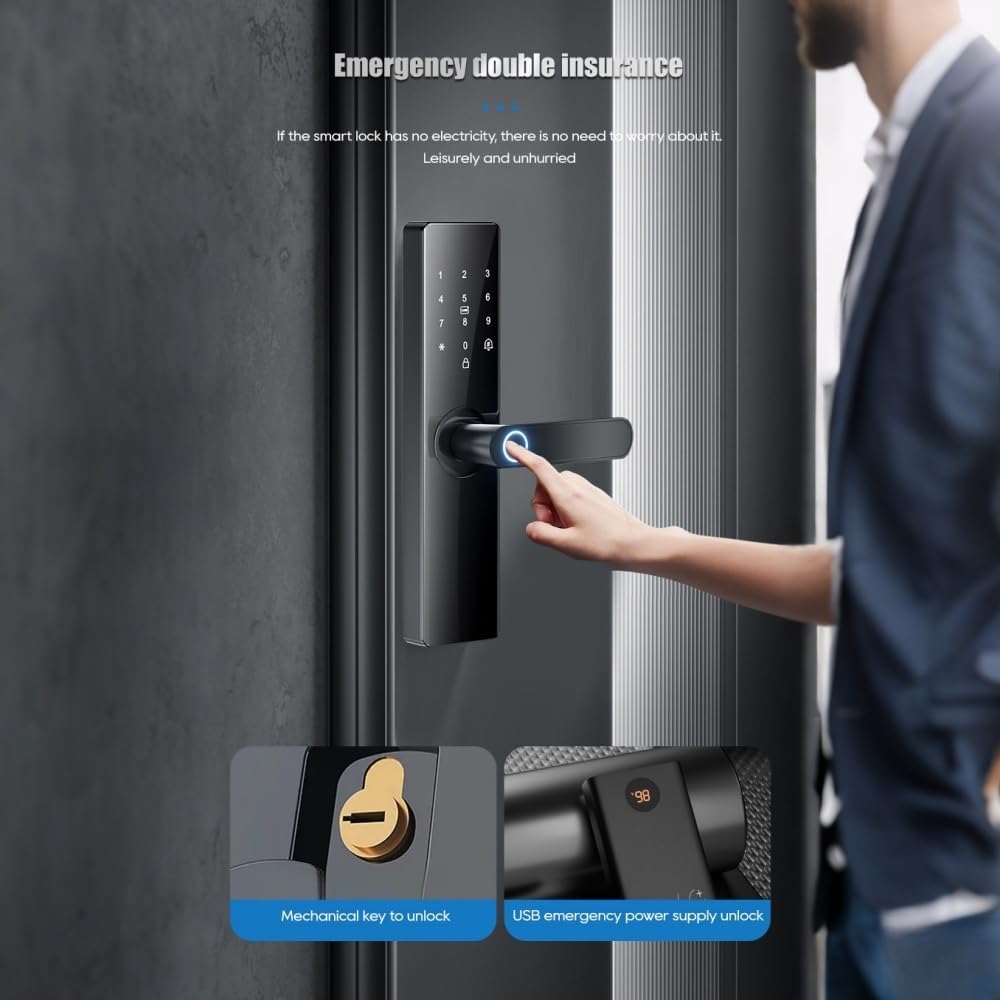
Image: This image illustrates two emergency unlocking methods: using a traditional mechanical key and providing temporary power via a USB Type-C port for emergency access when batteries are depleted.
6.3 การล็อคอัตโนมัติ
The lock can be set to automatically secure itself within 3-900 seconds after being unlocked. This feature enhances security by ensuring the door is always locked after entry or exit.
6.4 Dual Verification Mode
For enhanced security, you can enable a dual verification mode where two registered users (e.g., two fingerprints, or a fingerprint and a password) must authenticate simultaneously to unlock the door. This is suitable for high-security areas.
7. การบำรุงรักษา
การบำรุงรักษาอย่างถูกวิธีจะช่วยให้สมาร์ทล็อคของคุณมีอายุการใช้งานยาวนานและทำงานได้อย่างมีประสิทธิภาพสูงสุด
- การเปลี่ยนแบตเตอรี่: Replace the 4 AA batteries approximately every six months, or when the low battery alarm is triggered.
- การทำความสะอาด: เช็ดพื้นผิวของตัวล็อคด้วยผ้าแห้งเนื้อนุ่ม หลีกเลี่ยงการใช้สารทำความสะอาดที่มีฤทธิ์กัดกร่อนหรือตัวทำละลายที่อาจทำให้พื้นผิวหรือชิ้นส่วนอิเล็กทรอนิกส์เสียหายได้
- เซ็นเซอร์ลายนิ้วมือ: Keep the fingerprint sensor clean and dry for accurate recognition.
- ชิ้นส่วนเครื่องจักร: Periodically check that all screws are tight and the handles operate smoothly. Do not lubricate the lock cylinder unless specifically instructed by the manufacturer.
8 การแก้ไขปัญหา
หากคุณพบปัญหาเกี่ยวกับสมาร์ทล็อค โปรดดูปัญหาและวิธีแก้ไขที่พบบ่อยต่อไปนี้:
| ปัญหา | สาเหตุที่เป็นไปได้ | สารละลาย |
|---|---|---|
| ล็อคไม่ตอบสนอง | แบตเตอรี่หมด | Replace batteries. Use a 5V mobile power bank via Type-C for emergency power. |
| ไม่พบลายนิ้วมือ | Fingerprint not registered, dirty sensor, or incorrect placement. | Ensure finger is clean and dry. Re-register fingerprint if necessary. Try different angle. |
| รหัสผ่านไม่ถูกต้อง | Incorrect password, or multiple incorrect attempts. | Verify password. After multiple incorrect inputs, the lock will temporarily disable for 90 seconds. Wait and try again. |
| แอปไม่สามารถเชื่อมต่อกับล็อกได้ | Bluetooth/Wi-Fi off, lock not in pairing mode, or network issues. | Ensure Bluetooth is on. Check Wi-Fi signal. Restart lock and app. Re-pair if necessary. |
| ตัวล็อกส่งเสียงแปลกๆ | Mechanical obstruction or internal issue. | Check for any obstructions around the latch or bolt. If issue persists, contact support. |

Image: This diagram illustrates the various alarm features of the smart lock, including alerts for attempted prying, low battery status, and multiple incorrect password entries.
9. ข้อมูลจำเพาะ
| คุณสมบัติ | รายละเอียด |
|---|---|
| ยี่ห้อ | วิสิพาวเวอร์ |
| หมายเลขรุ่น | Z17-17cm |
| ประเภทล็อค | ไบโอเมตริกซ์ |
| วัสดุ | อลูมิเนียม |
| วิธีการปลดล็อค | APP, Mechanical Keys, Fingerprint, Password, IC Card |
| ประเภทพลังงาน | แบตเตอรี่ AA 4 ก้อน (ไม่รวม) |
| ไฟฟ้าฉุกเฉิน | USB Type-C |
| ความยาวรหัสผ่าน | 6-12 บิต |
| ความจุของผู้ใช้ | 300 (including 9 administrators) |
| ความหนาของประตูที่ใช้งานได้ | 38~55มม. |
| ขนาดสินค้า (กว้าง x ยาว x สูง) | 270 มม. x 62 มม. x 69 มม. (10.5 x 2.3 x 2.7 นิ้ว) |
| น้ำหนักสินค้า | 5 ปอนด์ |
| โปรโตคอลการเชื่อมต่อ | Wi-Fi (via Tuya Smart App) |
| ประเทศต้นกำเนิด | จีน |
10. การรับประกันและการสนับสนุน
For warranty information and technical support, please refer to the warranty card included with your product or visit the official visiPower webไซต์ โปรดเก็บใบเสร็จรับเงินไว้เป็นหลักฐานการซื้อสำหรับการเรียกร้องการรับประกัน
For further assistance, you may contact visiPower customer service through the contact details provided on their official website or within the Tuya Smart application.


