1. บทนำ
This manual provides detailed instructions for the installation, operation, and maintenance of your COOAU D20 Dash Cam. The D20 dash camera is designed to capture high-quality video footage both in front of and inside your vehicle, offering enhanced security and evidence recording. Please read this manual thoroughly before using the product to ensure proper function and safety.
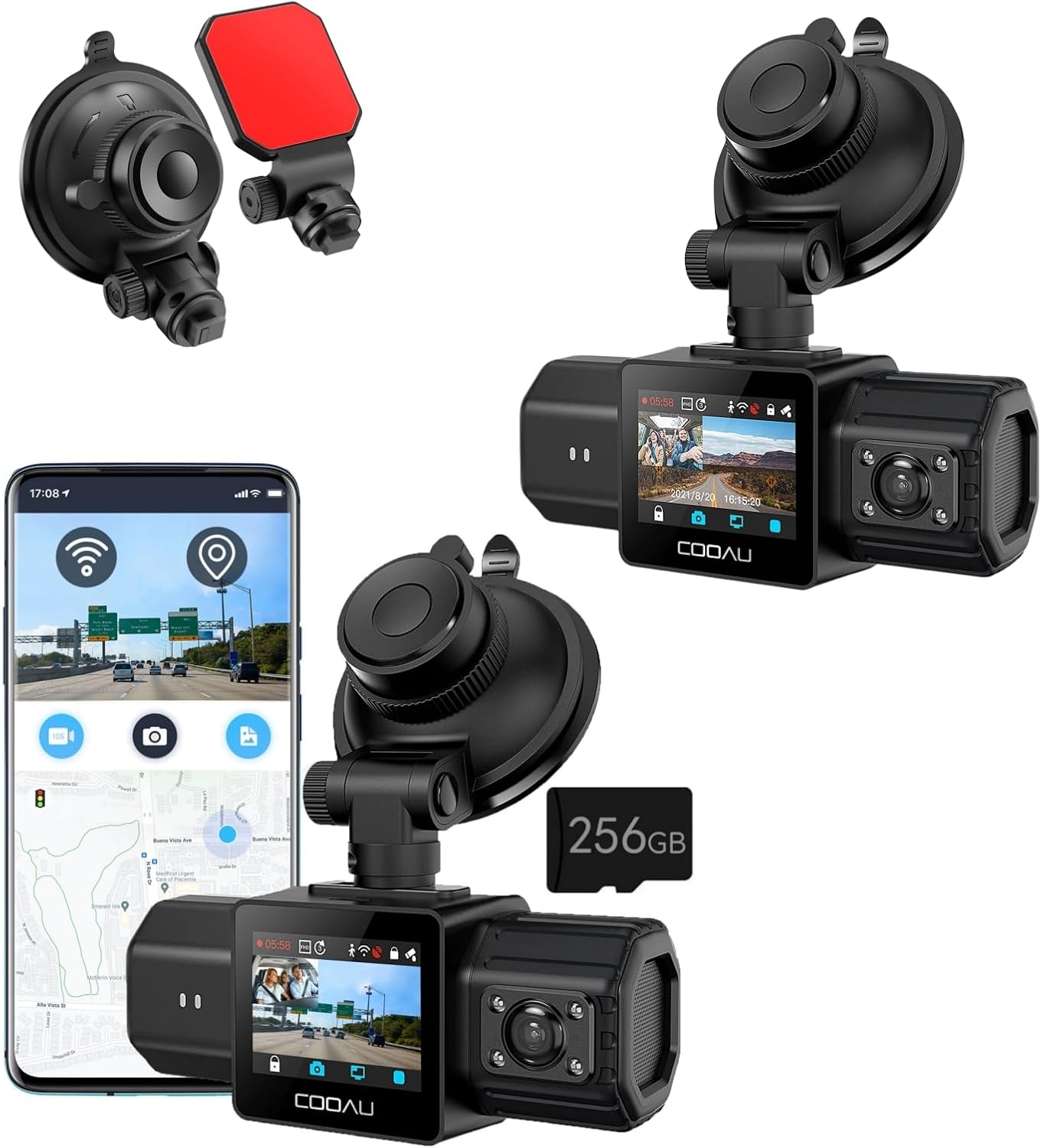
Image 1: COOAU D20 Dash Cam with various mounting options and a smartphone showing the companion app.
2. เนื้อหาบรรจุภัณฑ์
โปรดตรวจสอบว่าสินค้าทั้งหมดมีอยู่ในแพ็คเกจของคุณ:
- COOAU D20 Dash Cam
- การ์ดหน่วยความจำ 256GB (ติดตั้งมาแล้ว)
- ถ้วยคัพดูด
- 3M กาวติด
- สายไฟ (ที่ชาร์จในรถยนต์)
- คู่มือการใช้งาน
3. สินค้าหมดview
The COOAU D20 Dash Cam features a compact design with dual lenses for comprehensive coverage. It integrates advanced technologies such as GPS, WiFi, and infrared night vision to provide a reliable recording solution for your vehicle.

ภาพที่ 2: ระเบิด view illustrating the high-quality materials used in the D20 Dash Cam's construction, including high temperature resistance, corrosion resistance, wear resistance, and flame retardant PC+ABS shell.
4. การตั้งค่าและการติดตั้ง
The D20 Dash Cam offers two primary installation methods: the suction cup mount for flexible placement and the 3M adhesive mount for a more permanent fixture.
4.1 Suction Cup Mount Installation
- ทำความสะอาดกระจกหน้ารถ: Ensure the area on your windshield where you intend to mount the dash cam is clean and dry.
- ติดตั้งขาตั้ง: Press the suction cup firmly against the windshield and engage the lock lever to secure it.
- ติดตั้ง Dash Cam: เลื่อนกล้องติดรถยนต์เข้าไปในฐานยึดจนกระทั่งได้ยินเสียงคลิกเข้าที่
- ปรับและทดสอบ: ปรับมุมกล้องให้เหมาะสมที่สุด viewing and ensure it is stable.

Image 3: Step-by-step guide for installing the dash cam using the suction cup mount, showing cleaning the windshield, attaching the mount, attaching the dash cam, and adjusting the view.
4.2 3M Adhesive Mount Installation
For a more permanent installation, use the 3M adhesive mount. Clean the surface thoroughly before applying the adhesive. Once applied, press firmly for several seconds to ensure a strong bond. Allow the adhesive to cure for at least 24 hours before attaching the dash cam.

Image 4: Illustrates the two distinct installation options: the suction cup mount and the 3M adhesive mount, highlighting their attachment mechanisms.
4.3 การเชื่อมต่อสายไฟ
Connect the provided car charger to your vehicle's 12V power outlet and then to the dash cam. The dash cam will typically power on automatically when the vehicle starts and power off when the engine is turned off.
5. คู่มือการใช้งาน
5.1 Dual Recording (Front and Interior)
The D20 Dash Cam simultaneously records the road ahead in 2.5K (2560 x 1440P) at 30fps with a 170° wide-angle lens, and the vehicle's interior in 1080P with a 150° wide-angle lens. This dual recording capability ensures comprehensive coverage.

Image 5: Visual representation of the dual recording capability, showing a clear 2.5K front view (170° angle) and a 1080P interior view (150° angle).
5.2 Built-in GPS and WiFi
The dash cam features built-in GPS to record your driving speed (KM/H or MPH), route, and location, providing crucial data in case of an incident. The integrated WiFi allows you to connect the dash cam to the COOAU Dash App on your smartphone. Through the app, you can view อยู่ footage, record, download, and share recordings without needing to remove the memory card.

Image 6: Smartphone screens demonstrating the COOAU Dash App's functionality, including GPS tracking on a map and browsing recorded video files.
5.3 การบันทึกแบบวนซ้ำ
The D20 Dash Cam supports seamless loop recording. When the 256GB memory card is full, the system automatically overwrites the oldest unlocked files with new recordings. This ensures continuous recording without manual intervention.

Image 7: Diagram showing the loop recording process, where older files are overwritten as the 256GB card fills up, along with estimated recording times for different card sizes.
5.4 การตรวจสอบที่จอดรถ
The 24-hour parking monitor feature provides surveillance even when your vehicle is parked. It includes:
- Collision Lock: บันทึกและล็อก foo โดยอัตโนมัติtage upon detecting an impact.
- การตรวจจับการเคลื่อนไหว: บันทึกเมื่อตรวจพบการเคลื่อนไหวรอบๆ ยานพาหนะ
- เวลาที่ล่วงเลย: บันทึกอย่างต่อเนื่องด้วยอัตราเฟรมต่ำเพื่อประหยัดพื้นที่จัดเก็บข้อมูล
บันทึก: A hardwire kit (sold separately) is required to enable the 24-hour parking monitoring features.
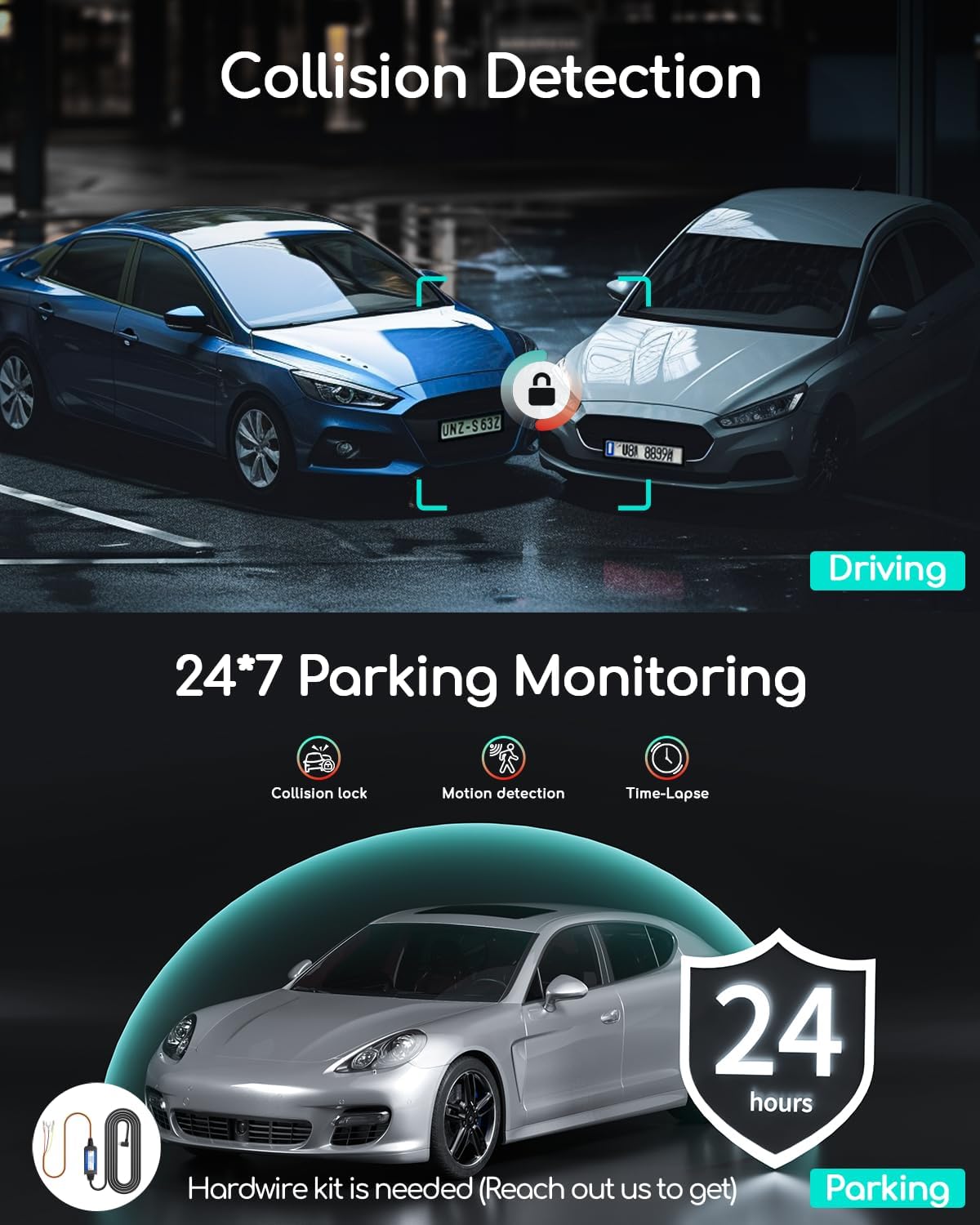
Image 8: Visual explanation of collision detection during driving and the 24/7 parking monitoring features, including collision lock, motion detection, and time-lapse, noting the requirement for a hardwire kit.
5.5 การมองเห็นกลางคืนแบบอินฟราเรด
Equipped with F/1.8 apertures, EV adjustment, and WDR (Wide Dynamic Range) technology, the D20 Dash Cam provides clear video recording in low-light conditions, enhancing visibility and safety during nighttime driving.

Image 9: Depicts the Super Night Vision capability of the dash cam, showing a clear view of a city street at night, supported by F/1.8 Apertures, EV adjustment, and WDR Technology.
5.6 G-เซ็นเซอร์
The built-in G-Sensor detects sudden movements or impacts and automatically locks the current video footage to prevent it from being overwritten by loop recording. This ensures critical event footagค่า e ถูกรักษาไว้
6. การบำรุงรักษา
- การทำความสะอาด: Use a soft, dry cloth to clean the camera lenses and body. Avoid using abrasive cleaners or solvents.
- การ์ดหน่วยความจำ: Periodically format the memory card (at least once a month) to maintain optimal performance and prevent data corruption. Back up any important fileก่อนทำการฟอร์แมต
- อัพเดตเฟิร์มแวร์: Check the COOAU official website or app for any available firmware updates to ensure your dash cam has the latest features and improvements.
- อุณหภูมิ: Avoid exposing the dash cam to extreme temperatures for extended periods, as this can affect battery life and component integrity.
7 การแก้ไขปัญหา
- กล้องติดรถยนต์ไม่เปิดใช้งาน: Ensure the power cable is securely connected to both the dash cam and the car's power outlet. Check if the car's power outlet is functioning.
- ปัญหาการบันทึก: Format the memory card. Ensure the memory card is inserted correctly. Try a different compatible memory card if issues persist.
- คุณภาพวิดีโอไม่ดี: Clean the camera lenses. Ensure the protective film has been removed from the lenses. Adjust exposure settings if necessary.
- ปัญหาการเชื่อมต่อ WiFi: Ensure the dash cam's WiFi is enabled. Restart both the dash cam and your smartphone. Ensure you are within range of the dash cam's WiFi signal.
- GPS ไม่ทำงาน: ตรวจสอบให้แน่ใจว่ากล้องติดรถยนต์มีสัญญาณที่ชัดเจน view of the sky for GPS signal acquisition. It may take a few minutes for the GPS to lock onto satellites.
8. ข้อมูลจำเพาะ
| คุณสมบัติ | ข้อมูลจำเพาะ |
|---|---|
| แบบอย่าง | D20 |
| ความละเอียดของกล้องหน้า | 2.5K (2560 x 1440P) @ 30fps |
| กล้องหน้า Viewอิงแองเกิล | 170° |
| ความละเอียดของกล้องภายใน | 1080P@30fps |
| กล้องภายใน Viewอิงแองเกิล | 150° |
| การรองรับการ์ดหน่วยความจำ | ความจุสูงสุด 256GB (มีเมมโมรี่การ์ด 256GB ให้มาด้วย) |
| จีพีเอส | ในตัว |
| ไวไฟ | ในตัว |
| การมองเห็นตอนกลางคืน | IR Night Vision, F/1.8 Apertures, WDR |
| จอภาพที่จอดรถ | Collision Lock, Motion Detection, Time-Lapse (requires hardwire kit) |
| จีเซนเซอร์ | ใช่ |
| การบันทึกแบบวนซ้ำ | ใช่ |
9. การรับประกันและการสนับสนุน
COOAU offers professional and efficient customer service for the D20 Dash Cam. This includes:
- Prompt email replies within 24 hours.
- Worry-free returns within 30 days.
- รับประกัน 2 ปี.
- การสนับสนุนทางเทคนิคตลอดอายุการใช้งาน
For technical assistance or warranty claims, please contact COOAU customer service through their official webไซต์หรือข้อมูลการติดต่อที่ให้มาพร้อมกับบรรจุภัณฑ์ผลิตภัณฑ์ของคุณ


