1. บทนำ
Thank you for choosing the Altera Homestep Walking Pad. This manual provides essential information for the safe and efficient use of your new walking pad. Please read all instructions carefully before operation and retain this manual for future reference.
2. คำแนะนำด้านความปลอดภัย
To reduce the risk of serious injury, read all important precautions and instructions in this manual and on your walking pad before use.
- Always place the walking pad on a level, stable surface.
- ให้เด็กและสัตว์เลี้ยงอยู่ห่างจากแผ่นรองเดินระหว่างการใช้งาน
- Ensure adequate clear space around the walking pad (at least 0.6 meters on all sides).
- ห้ามใช้แผ่นรองเดินหากคุณมีน้ำหนักเกิน 90 กิโลกรัม (198 ปอนด์)
- ควรสวมรองเท้ากีฬาที่เหมาะสม
- Always attach the safety key clip to your clothing before starting the walking pad.
- หากคุณรู้สึกหน้ามืด วิงเวียน หรือปวดเมื่อย ให้หยุดออกกำลังกายทันที
- ถอดปลั๊กแผ่นรองเดินออกจากเต้ารับไฟฟ้าเมื่อไม่ใช้งานหรือก่อนทำความสะอาด/บำรุงรักษา
- ห้ามใช้งานแผ่นรองเดินหากสายไฟหรือปลั๊กชำรุด หรือไม่ทำงานอย่างถูกต้อง
3. เนื้อหาบรรจุภัณฑ์
- Altera Homestep Walking Pad
- รีโมทคอนโทรล
- สายไฟ
- คู่มือการใช้งาน (เอกสารนี้)
4. สินค้าหมดview
Familiarize yourself with the main components and features of your Altera Homestep Walking Pad.

Image 4.1: The Altera Homestep Walking Pad shown with its remote control.

ภาพที่ 4.2: รายละเอียด view of the LED display and remote control buttons. The display shows Time, Speed, Distance, and Calories. The remote has buttons for Speed Control (+/-), Mode (M), Start/Hold, and Stop.

Image 4.3: Diagram illustrating remote control functions: '+' to increase speed, 'M' to change mode, '-' to reduce speed, 'START/HOLD' to start/continue, and 'STOP' to pause.

ภาพที่ 4.4: View of the walking pad's underside, highlighting anti-slip leveling feet, transport wheels, and the manual power switch.

Image 4.5: Diagram showing the multi-layered running belt construction, including wear-resistant surface, noise reduction, impact absorption, and high-resistance support layers.
5. การตั้งค่า
- แกะ: ถอดแผ่นรองเดินและส่วนประกอบทั้งหมดออกจากบรรจุภัณฑ์อย่างระมัดระวัง
- การจัดวาง: Place the walking pad on a flat, stable, and non-slip surface. Ensure there is sufficient space around the unit for safe operation.
- การเชื่อมต่อไฟฟ้า: Connect the power cable to the walking pad and then to a grounded electrical outlet.
- รหัสความปลอดภัย: Locate the safety key. This key must be in place for the walking pad to operate. Attach the clip of the safety key to your clothing before starting.
- เปิดเครื่อง: Flip the manual power switch (refer to Image 4.4) to the 'ON' position. The LED display should illuminate.
6. คู่มือการใช้งาน
6.1 การใช้รีโมทคอนโทรล
The walking pad is controlled via the included remote control. Ensure the remote has working batteries.
- เริ่ม/ค้าง: Press the "START/HOLD" button to begin or resume your workout. The walking pad will start at a low speed.
- หยุด: Press the "STOP" button to pause or end your workout.
- การปรับความเร็ว: Use the "+" button to increase speed and the "-" button to decrease speed. The speed range is 1 km/h to 6 km/h.
- การเลือกโหมด: Press the "M" button to cycle through different display modes (Time, Speed, Distance, Calories).
6.2 จอแสดงผล LED
The integrated LED display provides real-time feedback on your workout progress (refer to Image 4.2).
- เวลา: แสดงระยะเวลาการออกกำลังกายของคุณ
- ความเร็ว: Shows your current walking speed in km/h.
- จ.: Indicates the distance you have walked.
- แคล: ประมาณการจำนวนแคลอรีที่เผาผลาญไปในระหว่างการออกกำลังกายของคุณ
6.3 Adjustable Incline
The Altera Homestep Walking Pad features two manual incline positions to vary your workout intensity.
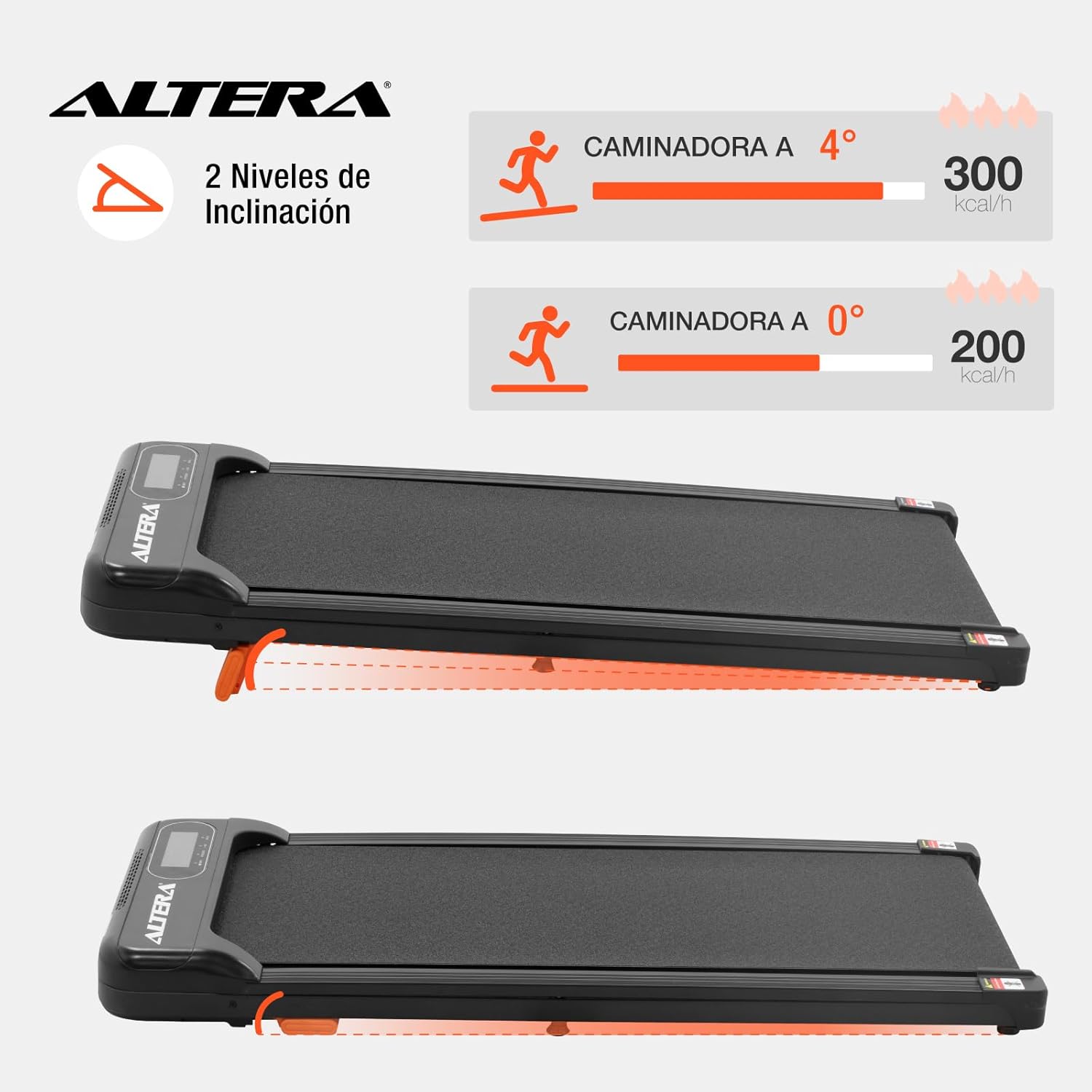
Image 6.1: Illustration of the two incline levels: 0 degrees (flat) and 4 degrees (inclined), showing estimated calorie burn difference.
To adjust the incline:
- Ensure the walking pad is turned off and unplugged.
- Carefully lift the front of the walking pad.
- Deploy or retract the small orange support feet located at the front underside of the unit to select your desired incline level.
- Ensure the support feet are securely locked in place before resuming use.
6.4 การขนส่งและการเก็บรักษา
The walking pad is designed for easy storage and portability.
- To move the unit, ensure it is powered off and unplugged.
- Lift the front end slightly to engage the transport wheels (refer to Image 4.4).
- Roll the walking pad to your desired storage location. Its compact design allows it to fit in small spaces.
7. การบำรุงรักษา
การบำรุงรักษาตามปกติจะช่วยให้แผ่นรองเดินของคุณมีอายุการใช้งานยาวนานและมีประสิทธิภาพเหมาะสมที่สุด
- การทำความสะอาด: เช็ดแผ่นรองเดินด้วยผ้าเช็ดทำความสะอาดamp หลังการใช้ทุกครั้ง ห้ามใช้น้ำยาทำความสะอาดที่มีฤทธิ์กัดกร่อนหรือตัวทำละลาย
- การหล่อลื่นสายพาน: The walking belt may require lubrication periodically. Refer to the manufacturer's guidelines for specific lubrication instructions and recommended lubricants.
- ความตึงของสายพาน: Check the walking belt tension regularly. If the belt slips or feels loose, it may need adjustment. Consult a qualified technician if you are unsure how to adjust it.
- พื้นที่จัดเก็บ: Store the walking pad in a dry, cool place away from direct sunlight and moisture.
8 การแก้ไขปัญหา
| ปัญหา | สาเหตุที่เป็นไปได้ | สารละลาย |
|---|---|---|
| Walking pad does not start. |
|
|
| เข็มขัดเลื่อนหรือติดขัด |
|
|
| รีโมทคอนโทรลไม่ตอบสนอง |
|
|
9. ข้อมูลจำเพาะ

Image 9.1: Technical specifications table and dimensional diagram of the Altera Homestep Walking Pad.
| คุณสมบัติ | รายละเอียด |
|---|---|
| หมายเลขรุ่น | CAM-HOM-02 |
| กำลังมอเตอร์ | 1.5 แรงม้า |
| ช่วงความเร็ว | 1 - 6 กม./ชม. |
| น้ำหนักผู้ใช้สูงสุด | 90 กก. (198 ปอนด์) |
| ระดับความลาดเอียง | 2 (manual, up to 4 degrees) |
| ขนาดของสายพานวิ่ง | 95ซม. x 36ซม. |
| ขนาดสินค้า (กว้าง x ยาว x สูง) | 110 x 46 x 10 ซม. |
| น้ำหนักผลิตภัณฑ์ | 17 กก. |
| วัสดุ | โลหะ, พลาสติก |
| คุณสมบัติ | Bluetooth, Portable, LED Display, Anti-slip belt, Transport wheels |
| แหล่งพลังงาน | Electric Cord (110V) |
10. การรับประกันและการสนับสนุน
For warranty information or technical support, please refer to the contact details provided with your purchase or visit the official Altera webไซต์นี้ โปรดเก็บหลักฐานการซื้อไว้เพื่อใช้ยืนยันการรับประกัน


