1. บทนำ
Thank you for choosing the Titan Maestro Smart Watch. This manual provides essential information for setting up, operating, and maintaining your device. Please read it carefully to ensure optimal performance and longevity of your smartwatch.
The Titan Maestro combines sophisticated design with advanced technology, featuring a vibrant AMOLED display, Bluetooth calling, comprehensive health tracking, and robust construction.
2. อะไรอยู่ในกล่อง
Upon unboxing your Titan Maestro Smart Watch, please verify that all the following items are included:
- Titan Maestro Smart Watch (with Stainless Steel strap)
- Extra Silicone Strap (Black)
- สายชาร์จ
- คู่มือการใช้งาน (เอกสารนี้)
3. สินค้าหมดview
The Titan Maestro Smart Watch is designed with a full stainless steel construction and an SS316L surgical-grade metal bezel, ensuring durability and a premium feel.

Image: The Titan Maestro Smart Watch showcasing its full stainless steel construction and SS316L surgical grade metal bezel, highlighting its bold and distinct design.
The watch features a 1.47-inch AMOLED display with a 60Hz refresh rate, 466x466 pixel resolution, and up to 650 nits brightness for clear visuals.
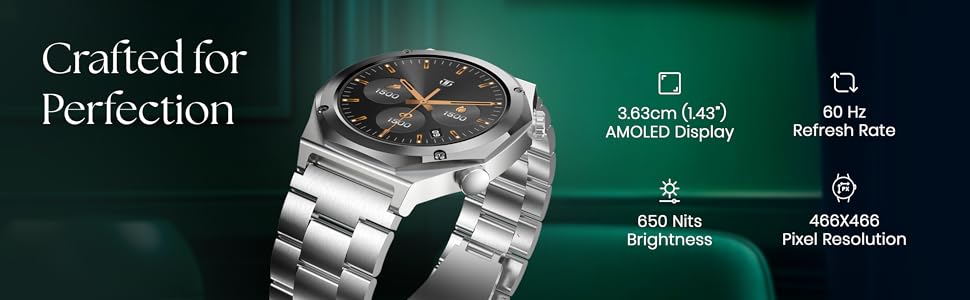
Image: Close-up of the Titan Maestro Smart Watch display, detailing its 1.47-inch AMOLED screen, 60Hz refresh rate, 466x466 pixel resolution, and 650 nits brightness.
Powered by the ATS3085S chipset, it offers smooth performance and supports Bluetooth calling.
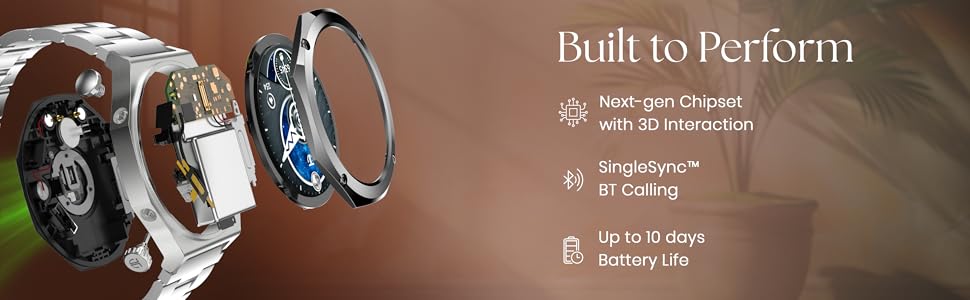
ภาพ: ระเบิด view of the Titan Maestro Smart Watch, illustrating its internal chipset, Bluetooth calling capability, and long battery life.
4. การตั้งค่า
4.1 การชาร์จสมาร์ทวอทช์
Before initial use, fully charge your Titan Maestro Smart Watch. Use the provided charging cable and connect it to a standard USB power adapter (not included).
- Connect the magnetic end of the charging cable to the charging points on the back of your smartwatch. Ensure a secure connection.
- Plug the USB-A end of the cable into a USB power adapter (5V/1A recommended) or a computer's USB port.
- หน้าจอของนาฬิกาจะแสดงสถานะการชาร์จ โดยปกติการชาร์จเต็มจะใช้เวลาประมาณ 2 ชั่วโมง
4.2 การจับคู่กับสมาร์ทโฟนของคุณ
To unlock all features, pair your Titan Maestro with the companion app on your smartphone.
- ดาวน์โหลด แอป Titan Smart from your smartphone's app store (available for Android and iOS devices).
- ตรวจสอบให้แน่ใจว่าได้เปิดใช้งาน Bluetooth บนสมาร์ทโฟนของคุณแล้ว
- Open the Titan Smart App and follow the on-screen instructions to create an account or log in.
- เลือก 'เพิ่มอุปกรณ์' หรือ 'จับคู่อุปกรณ์ใหม่' ภายในแอป
- The app will search for your Titan Maestro. Select your watch from the list of available devices.
- ยืนยันคำขอจับคู่บนนาฬิกาและสมาร์ทโฟนของคุณทั้งสอง
5. การใช้งานสมาร์ทวอทช์ของคุณ
5.1 การนำทางพื้นฐาน
- หน้าจอสัมผัส: ปัดไปทางซ้าย ขวา ขึ้น หรือลง เพื่อนำทางผ่านเมนูและการแจ้งเตือน แตะเพื่อเลือกรายการ
- เม็ดมะยม/ปุ่ม: ใช้ปุ่มทางกายภาพด้านข้างเพื่อเข้าถึงฟังก์ชั่นต่างๆ อย่างรวดเร็วหรือกลับไปยังหน้าจอหลัก
การโทรบลูทูธ 5.2
The Titan Maestro supports Bluetooth calling, allowing you to make and receive calls directly from your wrist when connected to your smartphone.
- Ensure your watch is successfully paired with your phone via the Titan Smart App.
- Access the 'Phone' or 'Call' function on your watch to dial numbers or view การโทรล่าสุด
- When a call comes in, you can answer or reject it from your watch.
5.3 ผู้ช่วยเสียง AI
Utilize the integrated AI Voice Assistant for hands-free control and information retrieval.
- Activate the AI Voice Assistant through the watch menu or a designated button.
- Speak your commands or questions clearly into the watch microphone.
5.4 โหมดกีฬาและระบบนำทาง GPS
Track various activities with dedicated sports modes and built-in GPS.
- Select 'Sports' from the main menu to choose from activities like Cycling, Running, and Walking.
- The built-in GPS provides accurate location tracking, elevation data, and is compatible with Strava.
5.5 คุณสมบัติอื่นๆ
- การแสดงสภาพอากาศ: รับการอัปเดตสภาพอากาศแบบเรียลไทม์บนข้อมือของคุณ
- การควบคุมกล้องและเพลง: Remotely control your smartphone's camera and music playback.
- ค้นหาหมายเลขโทรศัพท์: ระบุตำแหน่งสมาร์ทโฟนของคุณที่หายไปโดยใช้นาฬิกาข้อมือ
- โหมดห้ามเข้าใกล้: Enable Do Not Disturb mode to silence notifications.
6. คุณสมบัติการตรวจสอบสุขภาพ
The Titan Maestro offers comprehensive health tracking capabilities to help you monitor your well-being.
- เครื่องวัดอัตราการเต้นของหัวใจ: ติดตามอัตราการเต้นของหัวใจของคุณอย่างต่อเนื่องตลอดทั้งวัน
- เครื่องตรวจวัดออกซิเจนในเลือด (SpO2): วัดระดับความอิ่มตัวของออกซิเจนในเลือดของคุณ
- Sleep Duration & REM Tracking: Monitor your sleep patterns, including REM sleep.
- เครื่องตรวจวัดความเครียด: Track your stress levels and receive insights.
- การแจ้งเตือนการดื่มน้ำ: Receive reminders to stay hydrated.
- การออกกำลังกายการหายใจ: การหายใจแบบมีคำแนะนำเพื่อช่วยจัดการความเครียด
- AI Morning Briefs: Get personalized daily summaries of your health data.
วิดีโอ: จบแล้วview of the Titan Maestro Smart Watch's health tracking features and daily usage.
7. การปรับแต่ง
Personalize your Titan Maestro to match your style and preferences.

Image: The Titan Maestro's Hyper Personal UI, demonstrating animated menus for sports, various menu style customizations (Orbital, List, Gird, Tubular), and 3D menu styles.
- Watchfaces: Choose from over 150 curated premium watchfaces to suit any occasion.
- การปรับแต่ง UI: The hyper-personalized UI allows for multiple menu styles (Orbital, List, Gird, Tubular) and animated menus.
- สายรัด: Easily swap between the stainless steel and the additional silicone strap to change your watch's look.
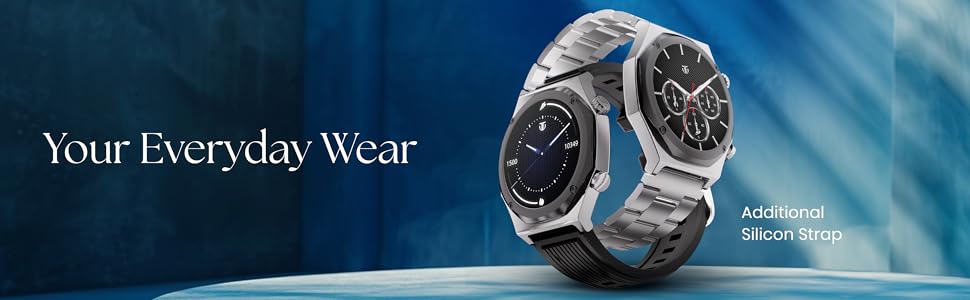
Image: The Titan Maestro Smart Watch displayed with both its metal and additional silicone strap options, emphasizing its adaptability for various styles and daily wear.
8. ความทนทานต่อน้ำ
The Titan Maestro Smart Watch is rated IP68 for water and dust resistance. This means it is protected against dust ingress and can withstand immersion in water up to 1.5 meters for 30 minutes.
บันทึก: While water resistant, it is not recommended for diving, high-pressure water activities, or prolonged submersion. Avoid exposure to hot water or steam.
9. แบตเตอรี่และการชาร์จ
Your Titan Maestro is equipped with a Lithium Polymer battery designed for extended use.
- อายุการใช้งานแบตเตอรี่: Enjoy up to 10 days of battery life on a single charge, depending on usage. Average battery life is 7 days.
- เวลาในการชาร์จ: The watch fully charges in approximately 2 hours.
- สายชาร์จ: ใช้เฉพาะสายชาร์จแม่เหล็กที่ให้มาเท่านั้น
Video: Demonstrating the charging process and battery features of the Titan Maestro Smart Watch.
10. การบำรุงรักษา
- การทำความสะอาด: Wipe the watch and straps regularly with a soft, dry cloth. For stubborn dirt, use a slightly damp ผ้าและสบู่ชนิดอ่อน จากนั้นล้างออกและเช็ดให้แห้งสนิท
- หลีกเลี่ยงสารเคมี: ห้ามใช้สารเคมีรุนแรง ตัวทำละลายในการทำความสะอาด หรือผงซักฟอกที่มีฤทธิ์รุนแรง เพราะสิ่งเหล่านี้อาจทำให้ผิวเคลือบและซีลของนาฬิกาเสียหายได้
- พื้นที่จัดเก็บ: ควรเก็บนาฬิกาไว้ในที่แห้งและเย็นเมื่อไม่ได้ใช้งาน
- หน้าสัมผัสการชาร์จ: รักษาความสะอาดและปราศจากสิ่งสกปรกบริเวณขั้วชาร์จด้านหลังนาฬิกา เพื่อให้การชาร์จเป็นไปอย่างถูกต้อง
11 การแก้ไขปัญหา
If you encounter issues with your Titan Maestro Smart Watch, refer to the following common solutions:
| ปัญหา | สารละลาย |
|---|---|
| นาฬิกาเปิดไม่ติด | ตรวจสอบให้แน่ใจว่านาฬิกาชาร์จเต็มแล้ว เสียบเข้ากับที่ชาร์จอย่างน้อย 15 นาที |
| ไม่สามารถจับคู่กับโทรศัพท์ได้ | Check if Bluetooth is enabled on your phone. Restart both the watch and phone. Ensure the Titan Smart App is updated. |
| ข้อมูลสุขภาพที่ไม่ถูกต้อง | ตรวจสอบให้แน่ใจว่าสวมนาฬิกาให้กระชับพอดีข้อมือ ไม่แน่นหรือหลวมเกินไป ทำความสะอาดเซ็นเซอร์ที่ด้านหลังนาฬิกา |
| อายุการใช้งานแบตเตอรี่สั้น | Reduce screen brightness, disable continuous heart rate monitoring if not needed, limit notifications, and ensure background app usage is optimized. |
| ปัญหาการชาร์จ | Verify the charging cable is securely connected to both the watch and power source. Clean the charging contacts. Try a different USB power adapter. |
For further assistance, please contact Titan customer support.
วิดีโอ: วิดีโอโปรโมชั่นที่แสดง...asing the Titan Smart Crown Collection, which includes the Maestro model.
12. ข้อมูลจำเพาะ
| คุณสมบัติ | รายละเอียด |
|---|---|
| หมายเลขรุ่น | 90208NM01 |
| ประเภทจอภาพ | อโมเลด |
| ขนาดหน้าจอ | 1.47 นิ้ว |
| ปณิธาน | 466 x 466 พิกเซล |
| ความสว่างสูงสุด | 750 นิต |
| อัตราการรีเฟรช | 60เฮิรตซ์ |
| ระบบปฏิบัติการ | ระบบปฏิบัติการ Android (รองรับ) |
| การเชื่อมต่อ | บลูทูธ |
| คุณสมบัติพิเศษ | Activity Tracker, Phone Call, Health Tracking |
| จีพีเอส | Built-in GPS with Strava Compatibility |
| ความต้านทานต่อน้ำ | IP68 (up to 1.5 Millimetres depth) |
| ประเภทแบตเตอรี่ | ลิเธียมโพลีเมอร์ |
| อายุการใช้งานแบตเตอรี่โดยเฉลี่ย | 7 Days (up to 10 days) |
| เวลาในการชาร์จ | 2 ชั่วโมง |
| วัสดุตัวเรือน | สแตนเลส |
| วัสดุของวงดนตรี | ซิลิโคน, สแตนเลส |
| น้ำหนักสินค้า | 160 กรัม |
| ขนาด (D x W x H) | 1.1D x 5W x 4.7H เซนติเมตร |
13. การรับประกันและการสนับสนุน
Your Titan Maestro Smart Watch comes with a รับประกันจำกัด 1 ปี นับจากวันที่ซื้อ การรับประกันนี้ครอบคลุมถึงข้อบกพร่องจากการผลิตภายใต้การใช้งานปกติ
For warranty claims, technical support, or any inquiries, please contact Titan customer service. Keep your proof of purchase for warranty validation.
ข้อมูลติดต่อผู้ผลิต: Imported by Titan Company Limited 3 Sipcot Industries complex, Hosur- 635126


