1. บทนำ
This manual provides essential information for setting up, operating, maintaining, and troubleshooting your XIAOMI TV F 65 (2025 Model) 4K UHD Smart Fire TV. Please read this manual thoroughly before using your television to ensure safe and optimal performance.
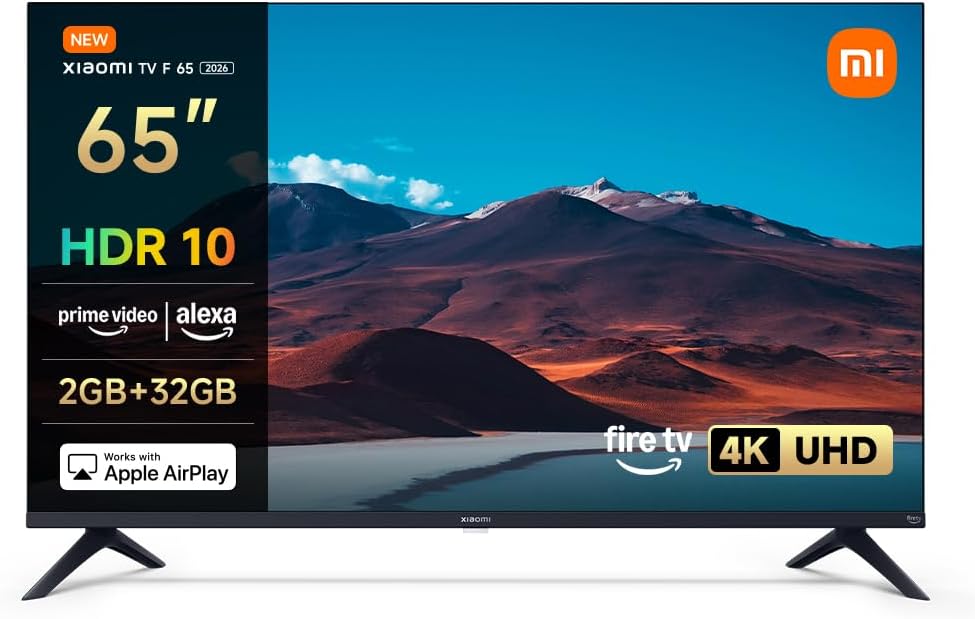
รูปที่ 1.1: ด้านหน้า view of the XIAOMI TV F 65 (2025 Model) 4K UHD Smart Fire TV.
2. การตั้งค่า
2.1. การแกะกล่องและเนื้อหาภายในบรรจุภัณฑ์
นำส่วนประกอบทั้งหมดออกจากบรรจุภัณฑ์อย่างระมัดระวัง ตรวจสอบให้แน่ใจว่ามีอุปกรณ์ครบตามรายการด้านล่าง:
- หน้าจอทีวี
- สายไฟ
- Safety and Installation Instruction Kit
- องค์ประกอบขาตั้ง
- ชุดสกรู
- รีโมทคอนโทรลบลูทูธ
2.2. การติดตั้งขาตั้ง
การติดตั้งขาตั้งทีวี:
- วางหน้าจอทีวีคว่ำหน้าลงบนพื้นผิวที่นุ่มและสะอาดเพื่อป้องกันรอยขีดข่วน
- Align the stand elements with the corresponding slots on the bottom of the TV.
- ยึดขาตั้งให้แน่นโดยใช้สกรูที่ให้มา ตรวจสอบให้แน่ใจว่าขันแน่นสนิทดีแล้ว
2.3. การติดตั้งบนผนัง (ทางเลือก)
If you choose to wall mount your TV, ensure you use a VESA-compatible mount (300 x 400 mm). Consult a professional for installation to ensure safety and proper alignment. Note that the VESA mounting holes are located in the lower third of the TV's back panel.

รูปที่ 2.1: TV dimensions and VESA mounting points (300x400mm).
2.4. การเปิดเครื่องและการเชื่อมต่อเครือข่ายครั้งแรก
After physical installation:
- เชื่อมต่อสายไฟเข้ากับทีวีและเต้าเสียบไฟ
- กดปุ่มเปิดปิดบนทีวีหรือรีโมทคอนโทรล
- Follow the on-screen instructions to complete the initial setup, including language selection and connecting to your Wi-Fi network. The TV supports dual-band Wi-Fi for stable connectivity.

รูปที่ 2.2: The TV supports Bluetooth 5.0 and dual-band Wi-Fi for seamless wireless connectivity.
3. การใช้งานทีวีของคุณ
3.1. Fire TV Interface and Navigation
Your XIAOMI TV F 65 features an integrated Fire TV operating system, providing instant access to thousands of applications and content. Navigate the interface using the provided Bluetooth remote control.
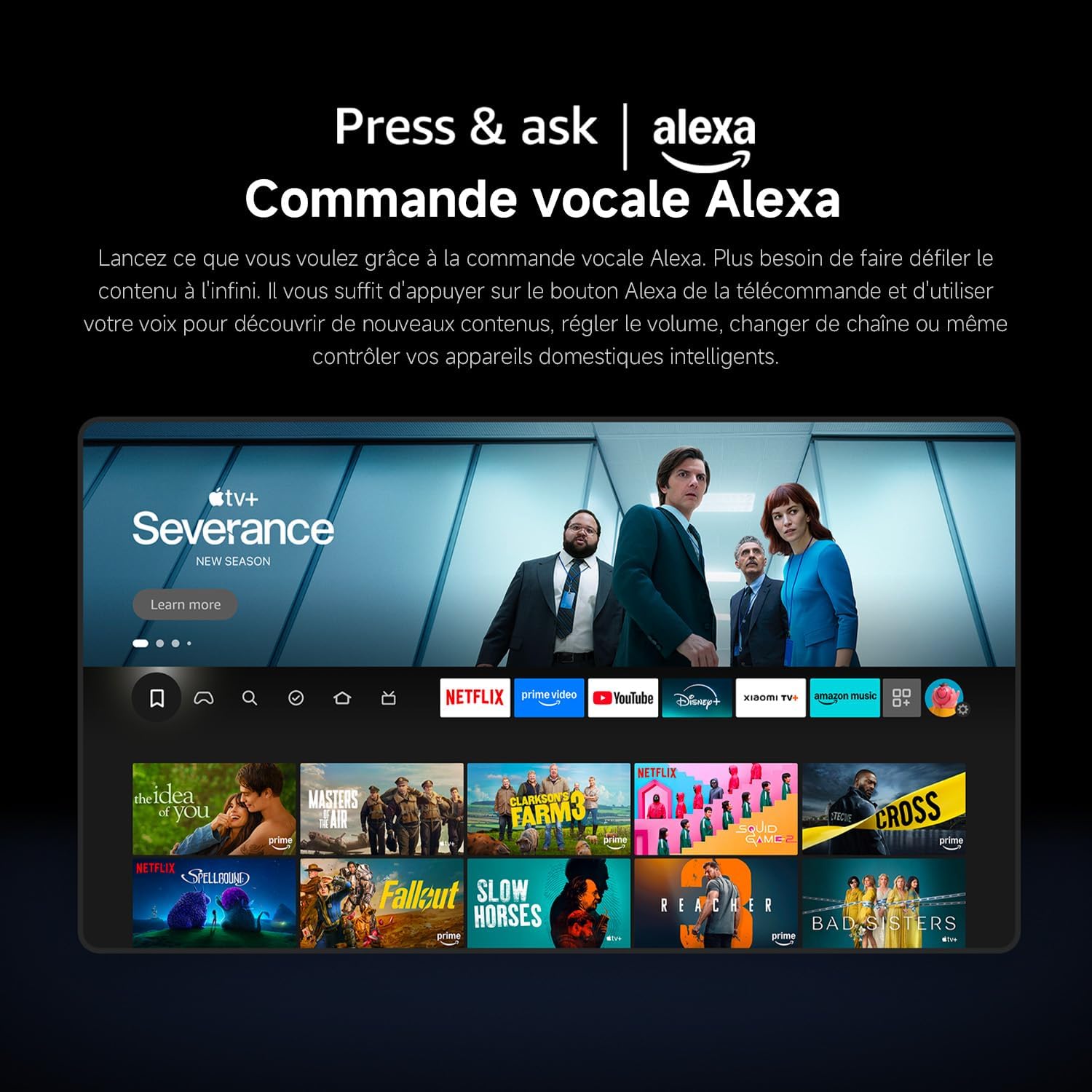
รูปที่ 3.1: The Fire TV interface offers endless entertainment with personalized recommendations and easy access to streaming services.
3.2. การควบคุมด้วยเสียง Alexa
The TV includes built-in Alexa. To use voice commands, simply press the Alexa button on your remote control and speak your request. You can discover new content, adjust the volume, change channels, or control compatible smart home devices.

รูปที่ 3.2: Use the 360° Bluetooth voice remote to easily control your TV and smart home devices with Alexa.
3.3. บริการสตรีมมิ่ง
Access popular streaming platforms such as Netflix, Prime Video, and Disney+ directly from your Fire TV interface. Enjoy exclusive movies, series, and original content with quick access and smooth playback.
3.4. Apple AirPlay
Stream content effortlessly from your iPhone, iPad, or Mac directly to your TV using Apple AirPlay. Share photos, play videos, or mirror your entire screen wirelessly in seconds for a seamless integration with your Apple ecosystem.

รูปที่ 3.3: Stream content from your Apple devices directly to your TV using Apple AirPlay.
3.5. การปรับปรุงภาพและเสียง
- 4K HDR10: Experience exceptional 4K clarity with HDR10, offering enhanced contrast and richer colors. Discover sharper details in both dark and bright scenes.
- โหมดผู้สร้างภาพยนตร์: Activate Filmmaker Mode for an authentic cinematic experience, adhering to Hollywood standards, and see the image as the director intended.
- หน่วยความจำ: Motion Estimation and Motion Compensation (MEMC) technology enhances high-speed movements for smoother images, ensuring a perfect visual experience for sports, action movies, or games.
- Game Boost Mode 120 Hz: Enjoy an improved screen refresh rate of 120 Hz (at 1080p resolution) when receiving HDMI signals, ensuring smoother and clearer images during fast-paced gaming scenes.
- โหมดแสงสีน้ำเงินต่ำ: Next-generation CC dimming technology ensures smooth brightness control and reduces blue light for more comfortable viewing without eye strain.
- Dolby Audio and DTS:X: Powerful dual speakers deliver richer highs and lows, providing an immersive, cinema-worthy sound experience with dynamic audio and exceptional clarity.

รูปที่ 3.4: Enjoy comfortable 4K viewing with HDR image quality, revealing every detail.

รูปที่ 3.5: MEMC technology ensures every image is fantastic by smoothing high-speed movements.

รูปที่ 3.6: Game Boost Mode at 120 Hz provides fast image processing for an enhanced gaming experience.

รูปที่ 3.7: Dolby Audio and DTS:X deliver a cinema-worthy immersive sound experience.
3.6. Xiaomi TV+
Enjoy free live television with Xiaomi TV+. Access a wide selection of premium content, including news, entertainment, reality TV, and movies, anytime and anywhere, without any subscription.

รูปที่ 3.8: Xiaomi TV+ offers free live television and a wide selection of content.
4. การบำรุงรักษา
4.1. การทำความสะอาดทีวีของคุณ
เพื่อรักษารูปลักษณ์และประสิทธิภาพของทีวีของคุณ:
- หน้าจอ: เช็ดหน้าจอเบาๆ ด้วยผ้านุ่มที่ไม่เป็นขุย สำหรับรอยฝังแน่น ให้เช็ดเบาๆampชุบผ้าด้วยน้ำหรือน้ำยาทำความสะอาดหน้าจอโดยเฉพาะ ห้ามฉีดน้ำยาลงบนหน้าจอโดยตรง
- กรอบและขาตั้ง: Use a soft, dry cloth to wipe dust and smudges from the TV frame and stand.
- รีโมทคอนโทรล: Clean the remote control with a soft, dry cloth. Avoid using harsh chemicals.
คำเตือน: ควรถอดปลั๊กทีวีออกจากเต้ารับไฟฟ้าทุกครั้งก่อนทำความสะอาด
4.2. การอัปเดตซอฟต์แวร์
Your TV may receive periodic software updates to improve performance and add new features. Ensure your TV is connected to the internet to receive these updates. You can usually check for updates manually in the TV's settings menu.
5 การแก้ไขปัญหา
หากคุณประสบปัญหาเกี่ยวกับทีวี โปรดดูปัญหาทั่วไปและวิธีแก้ไขต่อไปนี้:
| ปัญหา | สาเหตุที่เป็นไปได้ | สารละลาย |
|---|---|---|
| ทีวีไม่เปิด | ไม่มีไฟเลี้ยง แบตเตอรี่รีโมทคอนโทรลเหลือน้อย | Check power cable connection. Replace remote control batteries. |
| เวลาเริ่มต้นทำงานช้า | System initialization, background processes | This can take up to 2.5 minutes for the first boot. Subsequent startups from quick standby are faster (3-8 seconds). |
| Pixelated image on some channels/sources | Low resolution source content (e.g., 720p, analog) | This is normal for lower resolution content on a 4K screen. Ensure you are viewing 4K or HD content for optimal clarity. |
| Voice control (Alexa) not responding | Remote control issue, network connectivity | Ensure remote batteries are charged. Check TV's internet connection. Re-pair the remote if necessary. |
| ไม่มีการเชื่อมต่อ Wi-Fi | Router issue, incorrect password, TV too far from router | Restart your router. Re-enter Wi-Fi password. Move TV closer to router or use an Ethernet cable. |
6. ข้อมูลจำเพาะ
Key technical specifications for the XIAOMI TV F 65 (2025 Model):
| คุณสมบัติ | รายละเอียด |
|---|---|
| ยี่ห้อ | เสี่ยวหมี่ |
| หมายเลขรุ่น | L65MB-FAEU |
| ขนาดหน้าจอ | 65 นิ้ว (165 ซม.) |
| เทคโนโลยีการแสดงผล | นำ |
| ปณิธาน | 4K UHD (3840 x 2160 พิกเซล) |
| อัตราการรีเฟรช | 60 Hz (120 Hz in Game Boost Mode via HDMI at 1080p) |
| คุณสมบัติพิเศษ | Apple AirPlay, Alexa Voice Control, Fire TV, HDR10, MEMC, Filmmaker Mode, Low Blue Light |
| ระบบปฏิบัติการ | ไฟร์ทีวี |
| โปรเซสเซอร์ | 64-bit CPU, Quad-core A55 CPU |
| หน่วยความจำ (RAM + พื้นที่จัดเก็บข้อมูล) | 2 GB RAM + 32 GB Storage |
| เสียง | Dolby Audio, DTS:X, DTS Virtual:X (5.1 Surround Configuration) |
| การเชื่อมต่อ | Wi-Fi (Dual-band), Bluetooth 5.0, Ethernet, 3x HDMI Ports, 1x USB Port |
| จูนเนอร์ | DVB-S2, DVB-T2 |
| ขนาดสินค้า (กว้าง x ยาว x สูง) | 144.5 x 39.1 x 90 ซม. |
| น้ำหนัก (รวมขาตั้ง) | 20 กก. |
| แท่นยึด VESA | 300 x 400 มม. |

รูปที่ 6.1: The quad-core chip ensures smoother performance and faster response times.
7. ข้อมูลการรับประกัน
Your XIAOMI TV F 65 (2025 Model) is covered by a two-year manufacturer's warranty. Please retain your proof of purchase for any warranty claims. The warranty covers defects in materials and workmanship under normal use. For specific terms and conditions, refer to the warranty documentation included with your product or visit the official XIAOMI support webเว็บไซต์.
8. การสนับสนุนลูกค้า
If you require further assistance or have questions not covered in this manual, please contact XIAOMI customer support. You can typically find support contact information, FAQs, and additional resources on the official XIAOMI webเว็บไซต์:
- เยี่ยมชม XIAOMI Brand Store สำหรับข้อมูลผลิตภัณฑ์
- Refer to the online support section for your specific model.


