การแนะนำ
This user manual provides detailed instructions for the FJFJOPK 4K Video Camera Camcorder, Model HDV-3051L. Please read this manual thoroughly before operating the device to ensure proper usage and to maximize its performance. Keep this manual for future reference.

Figure 1: FJFJOPK 4K Video Camera Camcorder with included accessories like external microphone, handheld stabilizer, and remote control.
เนื้อหาแพ็คเกจ
ตรวจสอบว่าสินค้าทั้งหมดที่ระบุไว้ด้านล่างนี้รวมอยู่ในแพ็คเกจของคุณแล้ว หากมีสินค้าใดสูญหายหรือเสียหาย โปรดติดต่อฝ่ายสนับสนุนลูกค้า
- กล้องวิดีโอ 4K
- มือถือโคลง
- รีโมทคอนโทรล
- ไมโครโฟน
- ฮูดเลนส์
- การ์ด SD 32GB
- 2 x แบตเตอรี่แบบชาร์จไฟได้
- สายชาร์จ
- คู่มือการใช้งาน
- กระเป๋ากล้อง
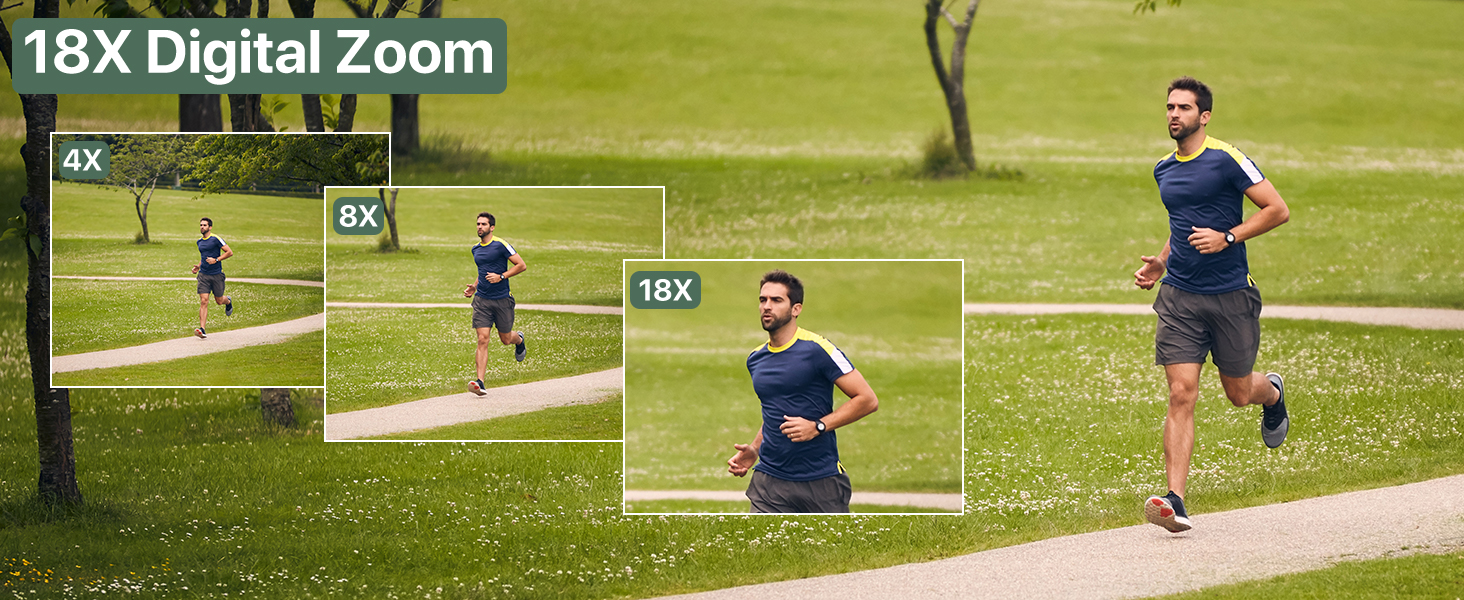
Figure 2: Visual representation of the complete packing list for the camcorder.
คู่มือการติดตั้ง
1. การติดตั้งแบตเตอรี่
The camcorder uses two long-lasting rechargeable batteries. Ensure batteries are fully charged before first use.
- ค้นหาช่องใส่แบตเตอรี่บนกล้องวิดีโอ
- เปิดฝาช่องใส่แบตเตอรี่
- Insert the charged batteries according to the polarity indicators inside the compartment.
- ปิดฝาช่องใส่แบตเตอรี่ให้แน่น

Figure 3: Proper insertion of batteries into the camcorder.
2. การติดตั้งการ์ด SD
A 32GB SD card is included for immediate use. The camcorder supports SD cards for storing your videos and photos.
- หาช่องเสียบการ์ด SD ซึ่งโดยทั่วไปจะอยู่ใกล้กับช่องใส่แบตเตอรี่
- ใส่การ์ด SD โดยให้ด้านที่เป็นโลหะหันลง จนกระทั่งได้ยินเสียงคลิกเข้าที่
- หากต้องการถอดออก ให้กดการ์ดเบาๆ จนกระทั่งการ์ดหลุดออกมา
3. การติดตั้งอุปกรณ์เสริม
Enhance your recording experience by attaching the included accessories.
- External Stereo Microphone: Attach the microphone to the hot shoe mount on top of the camcorder. Connect the microphone cable to the designated audio input port. This ensures clear audio capture.
- อุปกรณ์กันสั่นแบบถือด้วยมือ: The anti-shake handheld stabilizer can be attached to the bottom tripod mount of the camcorder. This accessory helps in achieving smooth and steady shots, especially during movement.
- เลนส์ฮูด: Screw the lens hood onto the front of the camcorder's lens. The lens hood is designed to reduce glare and lens flare, improving image quality in bright outdoor conditions.

Figure 4: Handheld stabilizer attached for improved stability.

Figure 5: External microphone for enhanced audio recording.

Figure 6: The lens hood reduces glare for clearer outdoor shots.
คำแนะนำการใช้งาน
1. การเปิด/ปิดเครื่อง
To power on the camcorder, open the LCD screen. To power off, close the LCD screen or press and hold the Power button.
2. Using the 3.0-inch Touch Screen
The camcorder features a 3.0-inch IPS touch screen that is 270° rotatable, allowing for versatile viewing angles, including selfie-angle recording.
- การนำทาง: Tap on-screen icons to navigate menus and settings.
- การหมุน: Gently rotate the screen to your desired angle for comfortable viewing or self-recording.

Figure 7: The 270° rotatable touch screen provides flexible viewing and recording options.
3. การบันทึกวิดีโอและการถ่ายภาพ
The camcorder supports 4K Ultra HD video recording and 64MP still image capture.
- การบันทึกวิดีโอ: Press the Record button to start and stop video recording. The camcorder captures every detail with stunning clarity.
- จับภาพ: Switch to photo mode and press the Shutter button to take 64MP high-definition photos.
- ซูมดิจิตอล 18 เท่า: Use the zoom controls to magnify your subject up to 18 times. This feature allows for clear footage even from a distance.
- IR ไนท์วิชั่น: Activate IR Night Vision mode for clear recording in low-light conditions or complete darkness.

Figure 8: Experience superior image and video quality with 4K UHD and 64MP resolution.

Figure 9: The 18X digital zoom allows for detailed capture of distant subjects.

Figure 10: IR Night Vision provides clear visibility in low-light or dark environments.
4. คุณสมบัติขั้นสูง
- ป้องกันการสั่น: The built-in anti-shake function, complemented by the handheld stabilizer, ensures smooth and stable footagแม้ในขณะที่มีการเคลื่อนไหวแบบไดนามิก
- การถ่ายภาพแบบไทม์แลปส์: Capture stunning time-lapse videos by setting the desired interval in the camera settings.
- การตรวจจับใบหน้า: The camcorder can detect faces in the frame, optimizing focus and exposure for portraits and group shots.
- One-Click Live Streaming: Connect the camcorder to your computer via USB to use it as a webcam for live streaming.
- บันทึกขณะชาร์จ: The camcorder supports recording while connected to a power source, ideal for extended shooting sessions.
- รีโมทคอนโทรลไร้สาย: Use the included remote control for convenient wireless operation, perfect for self-recording or group shots.

Figure 11: Explore various shooting modes including anti-shake, slow motion, and time-lapse.

Figure 12: Continuous recording is possible while the camcorder is charging.
การซ่อมบำรุง
- การทำความสะอาด: ใช้ผ้าแห้งนุ่มเช็ดทำความสะอาดตัวกล้อง สำหรับเลนส์ ให้ใช้ผ้าและน้ำยาทำความสะอาดเลนส์โดยเฉพาะ หลีกเลี่ยงวัสดุที่มีฤทธิ์กัดกร่อน
- พื้นที่จัดเก็บ: เก็บกล้องวิดีโอไว้ในที่แห้งและเย็น หลีกเลี่ยงแสงแดดโดยตรงและอุณหภูมิที่สูงหรือต่ำเกินไป ถอดแบตเตอรี่ออกหากเก็บไว้นาน
- การดูแลแบตเตอรี่ ชาร์จแบตเตอรี่ให้เต็มก่อนเก็บรักษา และชาร์จซ้ำทุกๆ สองสามเดือนเพื่อยืดอายุการใช้งาน
การแก้ไขปัญหา
If you encounter issues with your camcorder, refer to the following common solutions:
| ปัญหา | สาเหตุที่เป็นไปได้ | สารละลาย |
|---|---|---|
| กล้องไม่สามารถเปิดได้ | Low or uncharged battery; incorrectly inserted battery. | ชาร์จแบตเตอรี่ให้เต็ม ตรวจสอบให้แน่ใจว่าใส่แบตเตอรี่ถูกต้องแล้ว |
| คุณภาพรูปภาพ/วิดีโอไม่ดี | เลนส์สกปรก; แสงสว่างไม่เพียงพอ; การตั้งค่าไม่ถูกต้อง | Clean the lens. Use IR Night Vision in low light. Adjust exposure settings. |
| มีข้อผิดพลาดของการ์ด SD | SD card full; incorrectly inserted; incompatible card. | ลบ files or use a new SD card. Reinsert card correctly. Ensure card is compatible (up to 32GB). |
| No audio recording. | External microphone not connected properly or turned off. | Check microphone connection and ensure it is powered on if applicable. |
ข้อมูลจำเพาะ
| คุณสมบัติ | รายละเอียด |
|---|---|
| ยี่ห้อ | เอฟเจเอฟเจโอพีเค |
| หมายเลขรุ่น | HDV-3051L |
| ความละเอียดในการจับภาพวิดีโอ | 4K |
| เทคโนโลยีโฟโต้เซนเซอร์ | ซีมอส |
| ความยาวโฟกัสสูงสุด | 64 มิลลิเมตร |
| รูรับแสงสูงสุด | 7.36 ฟ. |
| ประเภทหน่วยความจำแฟลช | การ์ด SD (มีหน่วยความจำ 32GB ให้มาด้วย) |
| รูปแบบการจับภาพวิดีโอ | เอวีไอ |
| ขนาดหน้าจอ | 3 Inches (270° Rotatable IPS Touch Screen) |
| คุณสมบัติพิเศษ | Anti-Shake, Image Stabilization, IR Night Vision, 18X Digital Zoom, External Microphone Support, Webcam Function, Time-Lapse, Face Detection, Recording While Charging, Wireless Remote Control |
| น้ำหนักสินค้า | 2.05 ปอนด์ |
| ขนาดแพ็คเกจ | 7.48 x 5.87 x 4.21 นิ้ว |
การรับประกันและการสนับสนุน
For warranty information and customer support, please refer to the warranty card included in your package or contact FJFJOPK customer service directly. Optional protection plans are available for purchase to extend coverage beyond the standard manufacturer's warranty.
- แผนคุ้มครอง 2 ปี: มีให้เลือกใช้สำหรับการครอบคลุมแบบขยายเวลา
- แผนคุ้มครอง 3 ปี: มีให้เลือกใช้สำหรับการครอบคลุมแบบขยายเวลา
- การปกป้องที่สมบูรณ์: แผนรายเดือนครอบคลุมการซื้อที่เข้าเงื่อนไขในอดีตและอนาคต


