1. บทนำ
This user manual provides comprehensive instructions for the Jedel KL69 60% Mechanical Gaming Keyboard. It covers setup, operation, maintenance, troubleshooting, and detailed specifications to help you maximize your keyboard's performance and lifespan. The Jedel KL69 is a compact, wired mechanical keyboard featuring a 61-key layout, rainbow LED backlighting, and durable blue mechanical switches, designed for an optimal gaming and typing experience.

Figure 1: Jedel KL69 60% Mechanical Gaming Keyboard. This image displays the compact keyboard with its vibrant rainbow LED backlighting and black/red keycap design.
2. การตั้งค่า
The Jedel KL69 keyboard is designed for simple plug-and-play setup. Follow these steps to connect your keyboard:
- Unpack the keyboard and its USB cable from the packaging.
- Locate an available USB Type-A port on your computer (desktop or laptop).
- เสียบหัวต่อ USB ของสายคีย์บอร์ดเข้ากับพอร์ต USB บนคอมพิวเตอร์ของคุณให้แน่น
- Your operating system (Windows, Android, Linux, etc.) will automatically detect and install the necessary drivers. This process may take a few moments.
- เมื่อติดตั้งไดรเวอร์เสร็จแล้ว ไฟ LED แบ็คไลท์ของคีย์บอร์ดจะสว่างขึ้น แสดงว่าพร้อมใช้งานแล้ว

Figure 2: Connecting the Jedel KL69 Keyboard. This image shows the keyboard with its attached USB cable, ready for connection to a computer.
3. คู่มือการใช้งาน
3.1 คุณสมบัติหลัก
- การออกแบบที่กะทัดรัด 60%: The KL69 features a space-saving 61-key layout, ideal for gaming setups and smaller desks.
- Arabic/English Layout: Keycaps are designed with both Arabic and English characters for versatile use.
- สวิตช์กลไกสีน้ำเงิน: Provides tactile feedback and an audible click, preferred by many for typing and gaming precision.
- ไฟแบ็คไลท์ LED สีรุ้ง: Offers vibrant, customizable lighting effects to enhance your experience.
- คีย์แคปแบบ Double-Shot: Ensures legends never fade, providing long-lasting durability.
- ระบบป้องกันภาพซ้อนแบบเต็มรูปแบบ: All 61 keys support N-key rollover, ensuring every keystroke is registered accurately, even during intense gaming sessions.
- Wired USB Connectivity: Provides a stable and reliable connection with minimal latency.

รูปที่ 3: เกินview of the 60% Mechanical Gaming Keyboard. This image emphasizes the compact size and key features like RGB backlight, ABS double injection keycaps, 50 million switch lifespan, and ergonomic design.
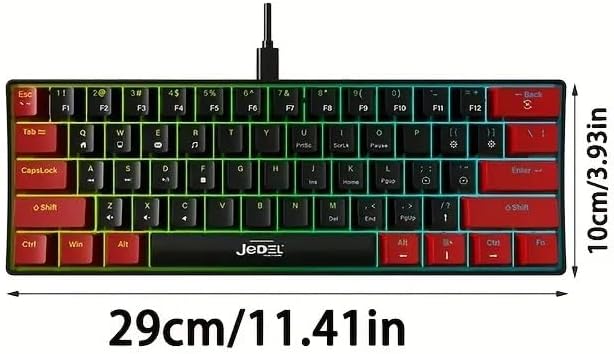
Figure 4: Blue Switches and Double-Shot Keycaps. This close-up view shows the transparent housing of the blue mechanical switches and the durable double-shot keycaps, designed for fast response and longevity.
3.2 Lighting Adjustment Function
The Jedel KL69 keyboard offers 10 distinct rainbow LED lighting modes. Use the following key combinations to adjust the lighting effects:
- Fn + \: Switch between 19 stunning LED lighting effects. (Note: The product description states 10 modes, while the image indicates 19. Please refer to the image for the most accurate number of effects.)
- Fn + [: ลดความสว่างของไฟแบ็คไลท์
- Fn + ]: เพิ่มความสว่างของไฟแบ็คไลท์
- Fn + ": Slow down the lighting effect speed.
- Fn + .: Speed up the lighting effect speed.

Figure 5: Introduction to Light Adjustment Functions. This diagram illustrates the Fn key combinations for controlling LED lighting effects, brightness, and speed.
3.3 Special Key Functions
The 60% layout utilizes the Function (Fn) key to access secondary functions of certain keys. Refer to the keycap legends for specific Fn combinations. For example, multimedia controls or F-keys (F1-F12) are typically accessed by holding down the Fn key and pressing the corresponding key.
4. การบำรุงรักษา
Proper maintenance will ensure the longevity and optimal performance of your Jedel KL69 keyboard. Follow these guidelines for cleaning and care:
- การทำความสะอาดปกติ: ใช้แปรงขนนุ่มหรือลมอัดเพื่อขจัดฝุ่นและเศษต่างๆ ออกจากระหว่างปุ่มต่างๆ
- การทำความสะอาดคีย์แคป: For deeper cleaning, you can carefully remove keycaps using a keycap puller (if included or purchased separately). Clean the keycaps with a damp cloth and mild soap, then ensure they are completely dry before reattaching.
- การทำความสะอาดพื้นผิว: เช็ดพื้นผิวแป้นพิมพ์ด้วยผ้านุ่มๆ เช็ดเบาๆamp ผ้า. หลีกเลี่ยงการใช้สารเคมีรุนแรงหรือวัสดุกัดกร่อน
- การรั่วไหลของของเหลว: In case of a liquid spill, immediately unplug the keyboard from your computer. Invert the keyboard to drain as much liquid as possible. Allow it to air dry completely for at least 24-48 hours before plugging it back in. Do not use a hairdryer as excessive heat can damage components.
- พื้นที่จัดเก็บ: เมื่อไม่ได้ใช้งานเป็นเวลานาน ควรเก็บแป้นพิมพ์ไว้ในที่แห้งและปราศจากฝุ่น
5 การแก้ไขปัญหา
If you encounter issues with your Jedel KL69 keyboard, refer to the following common problems and solutions:
| ปัญหา | สาเหตุที่เป็นไปได้ | สารละลาย |
|---|---|---|
| แป้นพิมพ์ไม่ตอบสนอง | การเชื่อมต่อ USB หลวม, พอร์ต USB ชำรุด, มีปัญหากับไดรเวอร์ |
|
| LED backlight is not working or is dim. | Lighting mode off, brightness set too low, software conflict. |
|
| ปุ่มบางปุ่มใช้งานไม่ได้ | ฝุ่น/เศษสิ่งสกปรกใต้ปุ่มกด, สวิตช์ทำงานผิดปกติ, ปัญหาซอฟต์แวร์ |
|
6. ข้อมูลจำเพาะ
Below are the detailed technical specifications for the Jedel KL69 Mechanical Gaming Keyboard:
| คุณสมบัติ | รายละเอียด |
|---|---|
| หมายเลขรุ่น | เคแอล69 |
| ชื่อยี่ห้อ | Jedel |
| คำอธิบายแป้นพิมพ์ | เครื่องจักรกล |
| จำนวนคีย์ | 61 |
| เทคโนโลยีการเชื่อมต่อ | USB (แบบมีสาย) |
| คุณสมบัติพิเศษ | Backlit (Rainbow LED) |
| สี | สีดำ / สีแดง |
| อุปกรณ์ที่รองรับ | Desktop, Laptop (Windows, Android, etc.) |
| การใช้ที่แนะนำ | การเล่นเกม |
| วัสดุ | อะคริโลไนไตรล์ บิวทาไดอีน สไตรีน (ABS) |
| ส่วนประกอบที่รวมอยู่ | สาย USB |
| อายุการใช้งานที่สำคัญ | 50 ล้านเครื่อง |
| ขนาดแป้นพิมพ์ (ยาว x กว้าง x สูง) | 290 x 101 x 38 มม. (11.41 x 3.93 x 1.49 นิ้ว) |
| น้ำหนัก | Approx. 404 ±5 grams |
| ป้องกันการโดนผีหลอก | โรลโอเวอร์ N-Key แบบเต็ม |

Figure 6: Keyboard Dimensions. This image provides a visual representation of the keyboard's length (29 cm / 11.41 in) and width (10 cm / 3.93 in).
7. การรับประกันและการสนับสนุน
For warranty information and technical support, please refer to the documentation provided with your purchase or visit the official Jedel webไซต์ เก็บหลักฐานการซื้อของคุณไว้เพื่อใช้ในกรณีเรียกร้องการรับประกัน


