1. บทนำ
Thank you for choosing the Infiniity DM56 Sport Smartwatch. This device is designed to enhance your active lifestyle with advanced fitness tracking, health monitoring, and smart connectivity features. Equipped with a vibrant 1.43-inch AMOLED display, built-in GPS, and comprehensive health sensors, the DM56 is your reliable companion for both daily wear and intense workouts.
This manual provides detailed instructions on how to set up, operate, maintain, and troubleshoot your smartwatch to ensure optimal performance and longevity.

ภาพที่ 1.1: ด้านหน้า view of the Infiniity DM56 Sport Smartwatch, showcasing its round AMOLED display and rugged design.
2. อะไรอยู่ในกล่อง
Upon opening your Infiniity DM56 Sport Smartwatch package, please ensure all the following items are present:
- Infiniity DM56 Sport Smartwatch
- สายชาร์จ
- คู่มือการใช้งาน (เอกสารนี้)
3. การตั้งค่า
3.1 การชาร์จสมาร์ทวอทช์
Before first use, fully charge your DM56 smartwatch. A full charge typically takes approximately 2 hours.
- เสียบสายชาร์จแม่เหล็กเข้ากับขั้วชาร์จด้านหลังของสมาร์ทวอทช์ ตรวจสอบให้แน่ใจว่าขาเสียบตรงกันอย่างถูกต้อง
- เสียบปลาย USB ของสายชาร์จเข้ากับอะแดปเตอร์แปลงไฟ USB มาตรฐาน (แนะนำ 5V/1A) หรือพอร์ต USB ของคอมพิวเตอร์
- The watch display will show a charging indicator. Once fully charged, the indicator will change or disappear.
3.2 การจับคู่กับสมาร์ทโฟนของคุณ
To unlock the full potential of your DM56 smartwatch, you need to pair it with your smartphone via Bluetooth using the dedicated companion application. The DM56 is compatible with Android 5.0+ and iOS 11 and above.
- ดาวน์โหลดแอป: ค้นหา the official Infiniity companion app (refer to the packaging or quick start guide for the exact app name) on the Google Play Store (for Android) or Apple App Store (for iOS) and install it.
- เปิดใช้งานบลูทูธ: ตรวจสอบให้แน่ใจว่าได้เปิดใช้งาน Bluetooth บนสมาร์ทโฟนของคุณแล้ว
- เปิดแอป: Launch the companion app on your smartphone and follow the on-screen instructions to create an account or log in.
- เพิ่มอุปกรณ์: Within the app, navigate to the 'Add Device' or 'Pair Device' section. The app will search for available smartwatches.
- Select DM56: Select 'DM56' from the list of found devices. A pairing request may appear on both your phone and the watch. Confirm the pairing on both devices.
- ตั้งค่าให้เสร็จสมบูรณ์: Once paired, the app will guide you through initial settings, such as profile information, notification permissions, and data synchronization.
4. การใช้งานสมาร์ทวอทช์
4.1 การนำทางพื้นฐาน
The DM56 features a responsive touchscreen and physical buttons for intuitive control.
- หน้าจอสัมผัส: ปัดขึ้น ลง ซ้าย หรือขวา เพื่อนำทางผ่านเมนูและการแจ้งเตือน แตะเพื่อเลือกรายการ
- ปุ่มทางกายภาพ: The watch has multiple buttons, typically labeled 'SPORT', 'SEL', 'BACK', and a dedicated 'GPS' button. Their functions may vary depending on the current screen or mode.
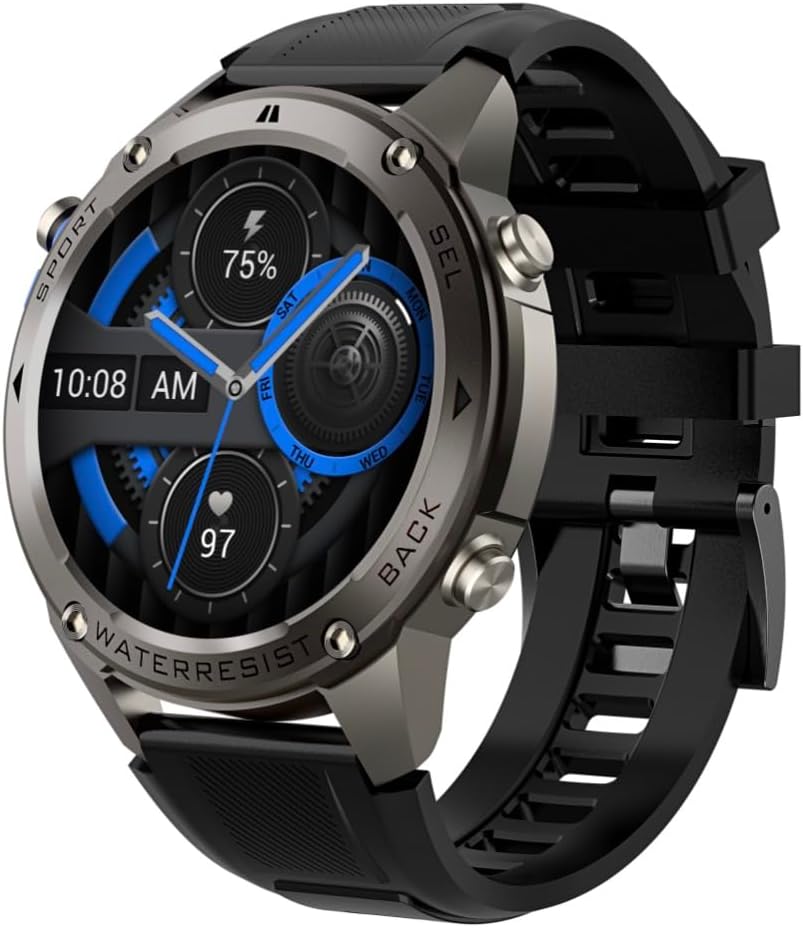
ภาพที่ 4.1: ด้านข้าง view of the Infiniity DM56 Sport Smartwatch, highlighting the physical control buttons.
4.2 คุณสมบัติการแสดงผล
The 1.43-inch AMOLED display offers vibrant colors and deep blacks with a resolution of 466x466 pixels.
- จอแสดงผลแบบเปิดตลอดเวลา: The DM56 supports Always-On Display functionality, allowing you to see the time and essential information at a glance without needing to raise your wrist or press a button. This feature can be configured in the watch settings.

Image 4.2: The Infiniity DM56 Sport Smartwatch display, showcasing a typical watch face with various data points.
4.3 Built-in GPS & Compass
The DM56 features dual-frequency GPS (L1+L5) and supports multiple satellite systems (GPS, GLONASS, BDS, Galileo, NAVIC, QZSS) for precise outdoor tracking. A built-in compass further aids navigation.
- ติดตาม GPS: When starting an outdoor activity (e.g., running, cycling), the watch will automatically attempt to acquire a GPS signal. Ensure you are in an open area for faster signal acquisition. Your route, distance, and pace will be recorded.
- เข็มทิศ: Access the compass feature from the watch's menu to get real-time directional information.

Image 4.3: The Infiniity DM56 Sport Smartwatch from an angle, highlighting the dedicated GPS button on the side.

ภาพที่ 4.4: ภาพระยะใกล้ view of the GPS button on the Infiniity DM56 Sport Smartwatch, indicating its function.
4.4 All-Day Health Monitoring
The DM56 is equipped with the VC30F sensor for continuous health monitoring.
- การตรวจสอบอัตราการเต้นของหัวใจ: Track your heart rate in real-time throughout the day. View your current heart rate on the watch face or in the dedicated heart rate app.
- การตรวจวัดออกซิเจนในเลือด (SpO2): วัดระดับความอิ่มตัวของออกซิเจนในเลือดของคุณ
- การติดตามการนอนหลับ: The watch automatically monitors your sleep patterns, including deep sleep, light sleep, and awake times. View การวิเคราะห์การนอนหลับอย่างละเอียดในแอปพลิเคชันที่ใช้งานร่วมกัน
- การติดตามความเครียด: สังเกตระดับความเครียดของคุณตลอดทั้งวัน
- pedometer: Counts your daily steps, distance, and estimated calories burned.
Note: The Infiniity DM56 Smartwatch is NOT A MEDICAL DEVICE. All health monitoring data is for reference only and should not be used for medical diagnosis or treatment.
โหมดกีฬา 4.5 โหมด
The DM56 offers over 170 customizable sports modes, with 14 built-in modes such as outdoor running, cycling, and swimming. You can add up to 10 additional modes manually via the companion app.
- การเริ่มกิจกรรม: Navigate to the 'Workout' or 'Sports' menu on the watch, select your desired activity, and tap to start.
- ระหว่างกิจกรรม: The watch will display real-time metrics such as duration, distance, heart rate, and calories burned.
- Ending Activity: Swipe or press the designated button to pause or end the activity. Your workout data will be saved and synchronized with the app.
4.6 การแจ้งเตือนและการโทรอัจฉริยะ
Once paired with your smartphone, the DM56 can receive notifications and handle calls directly on your wrist.
- การแจ้งเตือน: Receive alerts for incoming calls, SMS messages, and app notifications (e.g., social media, email). Configure which app notifications you want to receive in the companion app.
- Make/Answer Call: The DM56 allows you to make and answer calls directly from the watch, utilizing its built-in microphone and speaker. Ensure the watch is connected to your phone via Bluetooth.
5. การบำรุงรักษา
5.1 ระดับการกันน้ำ
The DM56 has a 5ATM waterproof rating, meaning it can withstand water pressures equivalent to a depth of 50 meters. This makes it suitable for swimming, showering, and other water-based activities. However, it is not recommended for diving or high-pressure water activities.
- Avoid exposing the watch to hot water, steam, or strong detergents.
- หลังจากสัมผัสกับน้ำเกลือ ให้ล้างนาฬิกาด้วยน้ำสะอาดและเช็ดให้แห้งสนิท
5.2 การทำความสะอาดและการดูแล
เพื่อรักษารูปลักษณ์และฟังก์ชันการทำงานของสมาร์ทวอทช์ของคุณ:
- ทำความสะอาดตัวเรือนและสายนาฬิกาเป็นประจำด้วยผ้านุ่มๆamp ผ้า.
- ตรวจสอบให้แน่ใจว่าขั้วชาร์จด้านหลังนาฬิกาสะอาดและแห้งก่อนทำการชาร์จ
- หลีกเลี่ยงการใช้น้ำยาทำความสะอาดหรือตัวทำละลายที่มีฤทธิ์กัดกร่อน
5.3 การเพิ่มประสิทธิภาพอายุการใช้งานแบตเตอรี่
The DM56 is powered by a 500mAh high-voltage battery, offering extended usage. To maximize battery life:
- Adjust screen brightness to a lower level.
- Limit the use of Always-On Display if not essential.
- ปิดการแจ้งเตือนที่ไม่จำเป็น
- ปิดใช้งานการตรวจสอบอัตราการเต้นของหัวใจอย่างต่อเนื่องหากไม่จำเป็นต้องใช้งานตลอด 24 ชั่วโมง
6 การแก้ไขปัญหา
If you encounter issues with your Infiniity DM56 smartwatch, try the following common solutions:
- นาฬิกาไม่เปิด: ตรวจสอบให้แน่ใจว่านาฬิกาชาร์จเต็มแล้ว เสียบนาฬิกาเข้ากับเครื่องชาร์จและรอสักครู่ก่อนลองเปิดเครื่องอีกครั้ง
- ไม่สามารถจับคู่กับโทรศัพท์ได้:
- ตรวจสอบให้แน่ใจว่าได้เปิดใช้งานบลูทูธบนโทรศัพท์และนาฬิกาของคุณแล้ว
- ตรวจสอบให้แน่ใจว่านาฬิกาอยู่ในระยะบลูทูธของโทรศัพท์ของคุณ
- รีสตาร์ททั้งนาฬิกาและโทรศัพท์ของคุณ
- ล้างแคชบลูทูธในโทรศัพท์ของคุณ (Android) หรือยกเลิกการเชื่อมต่ออุปกรณ์แล้วเชื่อมต่อใหม่อีกครั้ง
- ตรวจสอบให้แน่ใจว่าแอปคู่หูได้รับการอัปเดตเป็นเวอร์ชันล่าสุด
- ข้อมูลสุขภาพที่ไม่ถูกต้อง:
- ตรวจสอบให้แน่ใจว่าสวมนาฬิกาให้พอดีกับข้อมือ ไม่แน่นหรือหลวมเกินไป
- ทำความสะอาดเซ็นเซอร์ที่ด้านหลังของนาฬิกา
- Note that environmental factors and individual physiology can affect readings. Remember, it is not a medical device.
- ไม่ได้รับการแจ้งเตือน:
- ตรวจสอบการตั้งค่าการแจ้งเตือนในแอปพลิเคชันคู่หู
- ตรวจสอบให้แน่ใจว่าแอปมีการอนุญาตที่จำเป็นบนโทรศัพท์ของคุณ (เช่น การเข้าถึงการแจ้งเตือน)
- Verify that the watch is connected to your phone.
- อายุการใช้งานแบตเตอรี่สั้น: โปรดดูหัวข้อ 5.3 สำหรับเคล็ดลับการเพิ่มประสิทธิภาพแบตเตอรี่
หากปัญหายังคงมีอยู่หลังจากลองขั้นตอนเหล่านี้แล้ว โปรดติดต่อฝ่ายสนับสนุนลูกค้าเพื่อขอความช่วยเหลือเพิ่มเติม
7. ข้อมูลจำเพาะ
| คุณสมบัติ | ข้อมูลจำเพาะ |
|---|---|
| หมายเลขรุ่น | ดม.56 |
| แสดง | หน้าจอ AMOLED ขนาด 1.43 นิ้ว ความละเอียด 466x466 พิกเซล |
| เซ็นเซอร์ | Heart Rate (VC30F), Accelerometer (STK8321), Magnetometer (Compass), Barometer+Altitude (SPL07-03) |
| การเชื่อมต่อ | บลูทูธ 5.3 |
| ความจุของแบตเตอรี่ | 500mAh |
| ระดับการกันน้ำ | 5ตู้เอทีเอ็ม |
| ความเข้ากันได้ | Android 5.0+ and iOS 11 and above |
| น้ำหนักสินค้า | 3 ออนซ์ |
| ขนาดแพ็คเกจ | 4.25 x 4.25 x 2.8 นิ้ว |
| ระบบปฏิบัติการ | Android Wear 2.7 (Note: This refers to the underlying OS, not necessarily full Android Wear functionality) |
| จีพีเอส | Built-in GPS (L1+L5 dual-frequency) |
| รูปร่าง | กลม |
| ประเภทแบตเตอรี่ | Nonstandard Battery, Lithium Ion |
8. การรับประกันและการสนับสนุน
The Infiniity DM56 Sport Smartwatch comes with a standard manufacturer's warranty. Please refer to the warranty card included in your product packaging for specific terms and conditions, including warranty duration and coverage details.
For technical support, troubleshooting assistance beyond what is covered in this manual, or warranty claims, please contact Infiniity customer service through the contact information provided on the product packaging or the official Infiniity webเว็บไซต์.
โปรดเก็บหลักฐานการซื้อไว้เพื่อวัตถุประสงค์การรับประกัน


