การแนะนำ
Thank you for choosing the MSXTTLY Vmag-S1 Magnetic Car Phone Holder. This manual provides detailed instructions to ensure proper installation, safe operation, and effective maintenance of your device. Please read this manual thoroughly before use.
เนื้อหาแพ็คเกจ
ตรวจสอบว่ารายการทั้งหมดที่ระบุไว้ด้านล่างนี้รวมอยู่ในแพ็คเกจของคุณ:
- 1 x MSXTTLY Vmag-S1 Vacuum Magnetic Phone Holder
- 1 x Magnetic Ring (for non-MagSafe devices)
- 1 x Round PC Pad (for textured surfaces)
- 2 x MSXTTLY Exclusive Nano Gel Pads (reusable)
- 1 x Cleaning Kit (wet and dry wipes)
- 1 x คู่มือผู้ใช้

Image: Contents of the MSXTTLY Vmag-S1 package, including the holder, magnetic ring, PC pad, nano gel pads, and cleaning kit.
การติดตั้งและการตั้งค่า
Choosing the Right Mounting Surface
The MSXTTLY Vmag-S1 holder can be installed on various smooth, flat surfaces. For optimal adhesion and longevity, consider the following:
- Smooth Surfaces: Direct application of the suction cup is suitable for glass (windshield), smooth plastic, or metal surfaces.
- Textured or Porous Surfaces: For dashboards or other textured areas, use the provided Round PC Pad to create a smooth base for the suction cup.
- Nano Gel Pads: The reusable Nano Gel Pads offer enhanced adhesion and can be used on surfaces where direct suction might be less effective. These pads are washable and reusable.
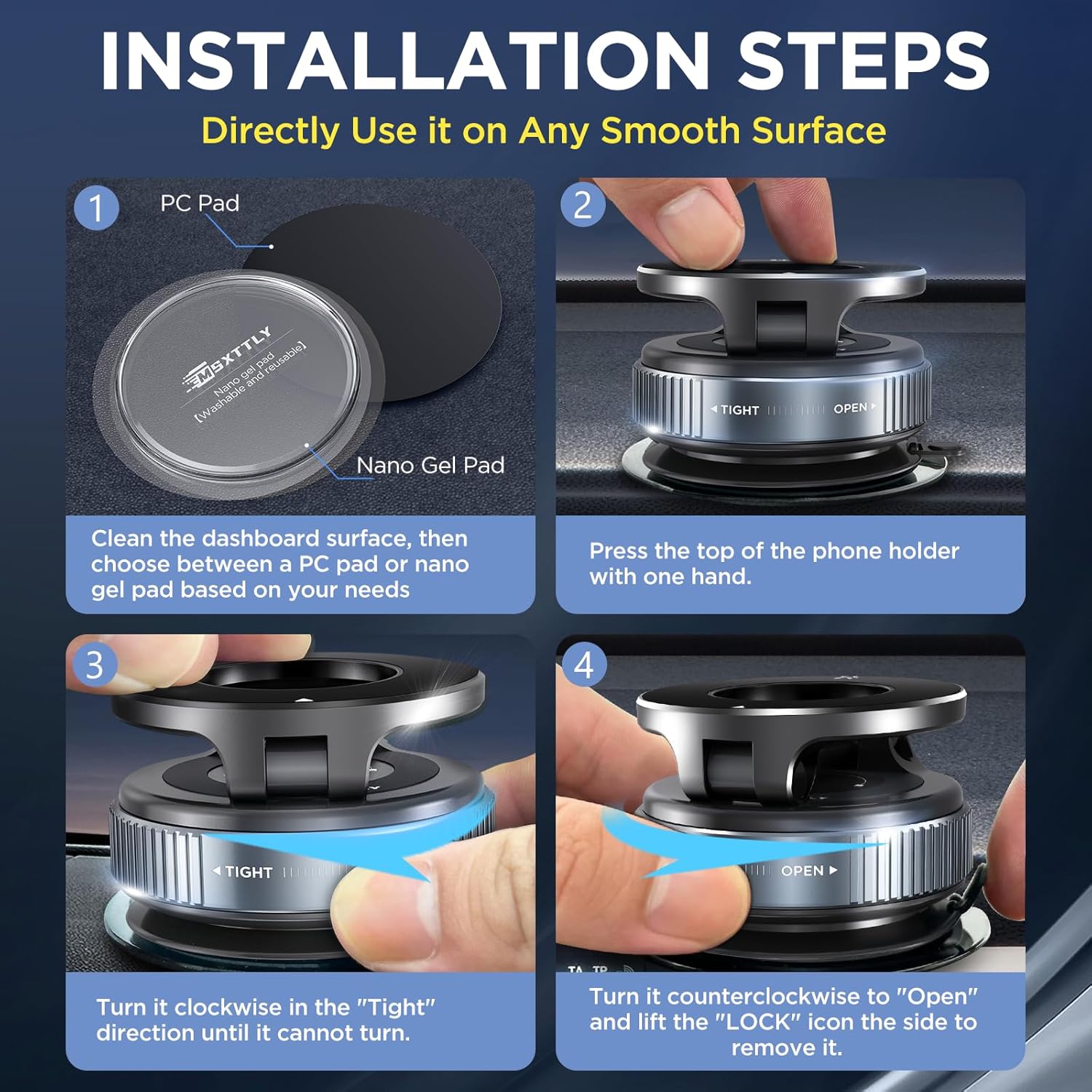
Image: Illustration of the Nano Gel Pads and PC Pad, highlighting their reusability and strong adhesion properties.
ขั้นตอนการติดตั้ง
- ทำความสะอาดพื้นผิว: Wipe the chosen installation area with the provided cleaning kit (wet and dry wipes) to ensure it is flat, clean, and free of moisture, oil, or contaminants.
- Apply PC Pad (if needed): If installing on a textured dashboard, remove the transparent protective film from the back side of the Round PC Pad and firmly press it onto the desired location. Allow at least 2 hours for the adhesive to set before attaching the phone holder.
- ติดตั้งตัวยึด: Press the suction cup firmly onto the cleaned surface (or PC Pad). While pressing, turn the knob clockwise in the "TIGHT" direction until it cannot turn further. This creates a strong vacuum seal.
- เตรียมโทรศัพท์ของคุณ:
- For MagSafe Compatible Phones (iPhone 12 series and newer, or MagSafe cases): No additional steps are needed. The phone will attach directly to the magnetic ring.
- For Non-MagSafe Phones or Cases: Clean the back of your phone or phone case. Paste the provided Magnetic Ring in the center of the back of your phone or mobile phone case. Wait at least 2 hours after attaching the magnetic ring for better adhesion.

Image: Visual guide demonstrating the installation process, from cleaning the surface to securing the holder.
คำแนะนำการใช้งาน
การเชื่อมต่อโทรศัพท์ของคุณ
Simply bring your MagSafe-compatible phone or phone with the attached magnetic ring close to the holder's magnetic surface. The strong N52 magnet will securely hold your device in place.
การปรับผู้ถือ
The MSXTTLY Vmag-S1 features a double-axis metallic bar, allowing for extensive adjustment:
- การหมุน: The magnetic head rotates 360 degrees, enabling both portrait and landscape viewมุมการเอียง
- การปรับมุม: The arm can be adjusted up to 210 degrees vertically, providing optimal viewจากตำแหน่งต่างๆ

Image: Demonstrates the 360-degree rotation and multi-angle adjustment capabilities of the phone holder for comfortable viewการไอเอ็นจี
การถอดโทรศัพท์ของคุณออก
Gently pull your phone away from the magnetic surface. The strong magnet ensures a secure hold but allows for easy detachment when needed.
ความเข้ากันได้
The MSXTTLY Vmag-S1 is designed for broad smartphone compatibility:
- การใช้งานโดยตรง: Compatible with iPhone 12 series and newer models, or any phone using a MagSafe-compatible case.
- With Magnetic Ring: For non-magnetic phones or phones with standard cases, use the included magnetic ring for secure attachment. This includes devices from Samsung, Google Pixel, OnePlus, Motorola, Xiaomi, OPPO, and older iPhone models.
หมายเหตุเกี่ยวกับความเข้ากันได้ที่สำคัญ:
The holder is generally not compatible with:
- Leather, suede, or uneven phone surfaces.
- Ring-type or glass-back phones (without proper magnetic ring application).
- Thick armor or rugged cases (may interfere with magnetic connection).

Image: Guide illustrating direct compatibility with MagSafe devices and the use of the magnetic ring for other smartphones.

Image: Details on how to attach the magnetic ring to the outside of a phone case and examples of incompatible case types.
การซ่อมบำรุง
Cleaning the Suction Cup and Gel Pads
To maintain optimal suction and adhesion, regularly clean the suction cup and Nano Gel Pads:
- ถ้วยดูด: If the suction cup loses its grip, rinse it under running water to remove any dust or debris. Allow it to air dry completely before re-installation.
- Nano Gel Pads: These pads are washable and reusable. If they become dirty or lose stickiness, rinse them with water and let them air dry. Do not wipe with a cloth, as this may leave fibers.
การแก้ไขปัญหา
- Holder not sticking:
- ตรวจสอบให้แน่ใจว่าพื้นผิวที่จะติดตั้งสะอาด แห้ง และเรียบเนียน
- Verify the suction cup knob is fully tightened in the "TIGHT" direction.
- If the surface is textured, use the provided PC Pad or Nano Gel Pad.
- Clean the suction cup or Nano Gel Pad as described in the Maintenance section.
- โทรศัพท์จับไม่แน่น:
- Ensure your phone is MagSafe compatible or has the magnetic ring properly attached to its center.
- Check if your phone case is too thick or made of an incompatible material (e.g., leather, rugged cases).
- Avoid placing metal objects between the phone and the holder.
- Difficulty removing the holder:
- Turn the knob counter-clockwise to the "OPEN" position.
- Lift the small tab on the side of the suction cup to release the vacuum seal.
ข้อมูลจำเพาะ
| ยี่ห้อ | MSXTTLY |
| ชื่อรุ่น | Vmag-S1 |
| สี | สีดำ |
| อุปกรณ์ที่รองรับ | iPhone 12, 13, 14, 15, 16 series (Pro, Pro Max, Plus, Mini), MagSafe cases, and Android phones with magnetic ring. |
| ประเภทการติดตั้ง | ถ้วยดูดสูญญากาศ |
| คุณสมบัติพิเศษ | Reusable Nano Gel Pads, Multi-scenario Use, 360° Adjustable, Strong Magnetic Hold |
| วัสดุ | Acrylonitrile Butadiene Styrene (ABS), Zinc Alloy |
| ขนาดรายการ (ยาว x กว้าง x สูง) | 6 x 59 x 64 millimeters (approx. 0.23 x 2.32 x 2.5 inches) |
| จำกัด น้ำหนัก | 10 กิโลกรัม (ประมาณ 22 ปอนด์) |

Image: Diagram showing the physical dimensions of the MSXTTLY Vmag-S1 holder.
การรับประกันและการสนับสนุน
ข้อมูลการรับประกัน
MSXTTLY products are backed by a 365-Day Guarantee, ensuring quality and performance.
การสนับสนุนลูกค้า
For any questions, technical assistance, or support, please contact our customer service team. We offer Lifetime Tech Assistance and 24/7 Fast Support to address your needs.
- อีเมล: Refer to your product packaging or the official MSXTTLY webเว็บไซต์สำหรับรายละเอียดการติดต่อ
- แหล่งข้อมูลออนไลน์: Visit the MSXTTLY webเว็บไซต์นี้รวบรวมคำถามที่พบบ่อยและข้อมูลผลิตภัณฑ์เพิ่มเติม

Image: Highlights MSXTTLY's commitment to customer support, including a 365-day guarantee and lifetime technical assistance.


