การแนะนำ
This user manual provides detailed instructions for the FREEWOLF T96 Smart Display Wireless Gaming Keyboard and Mouse Combo. This combo is designed for a seamless and responsive experience across various devices and applications, from gaming to office work.
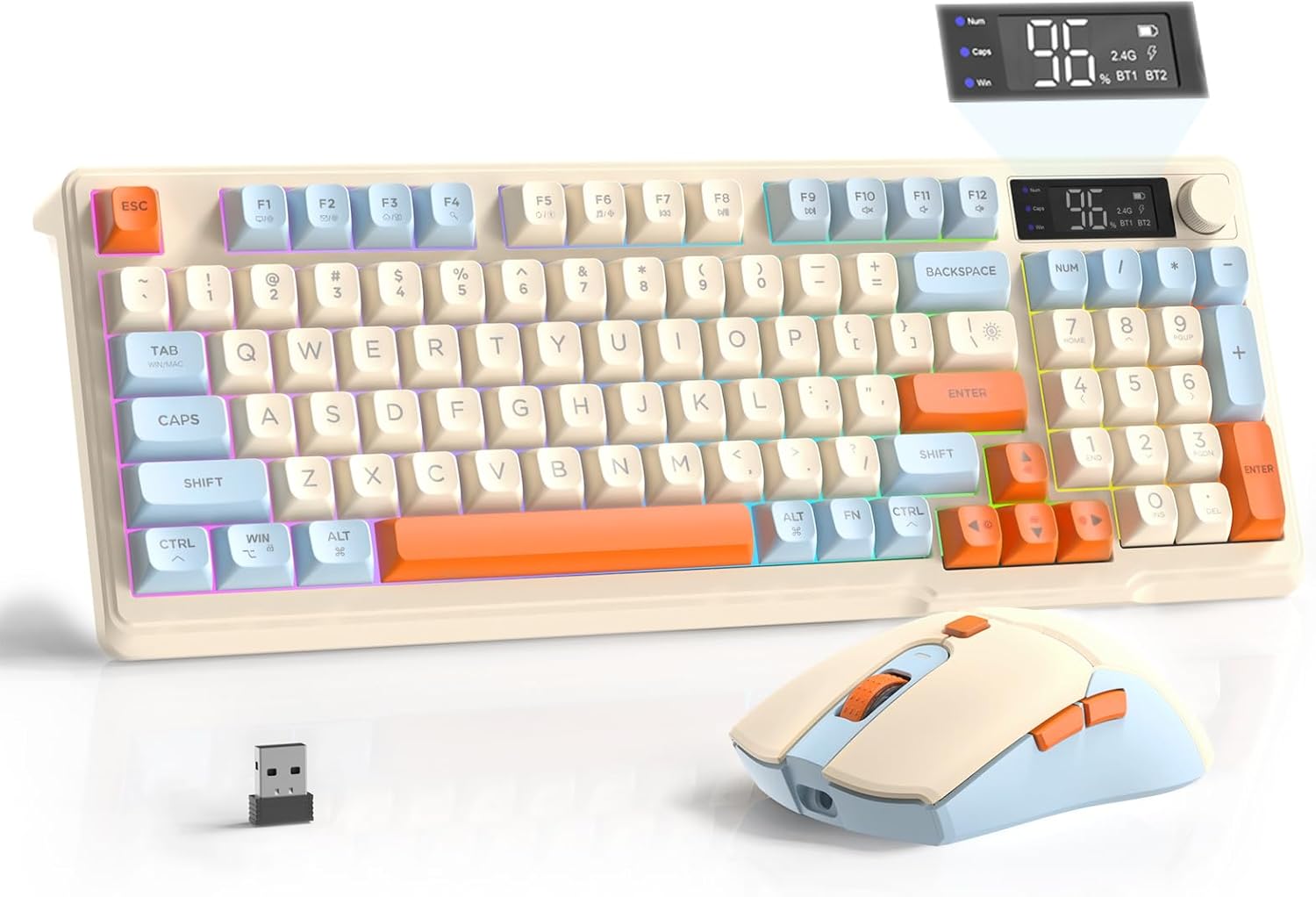
Image: The FREEWOLF T96 Wireless Gaming Keyboard and Mouse Combo, featuring the keyboard, mouse, and USB receiver.
เนื้อหาแพ็คเกจ
ตรวจสอบให้แน่ใจว่ามีรายการทั้งหมดอยู่ในบรรจุภัณฑ์:
- 1 x T96 Membrane Keyboard
- 1 x T96 Wireless Mouse
- สาย USB-C 1 เส้น
- 1 x USB Receiver (stored in mouse bottom slot)
- 1 x คู่มือผู้ใช้
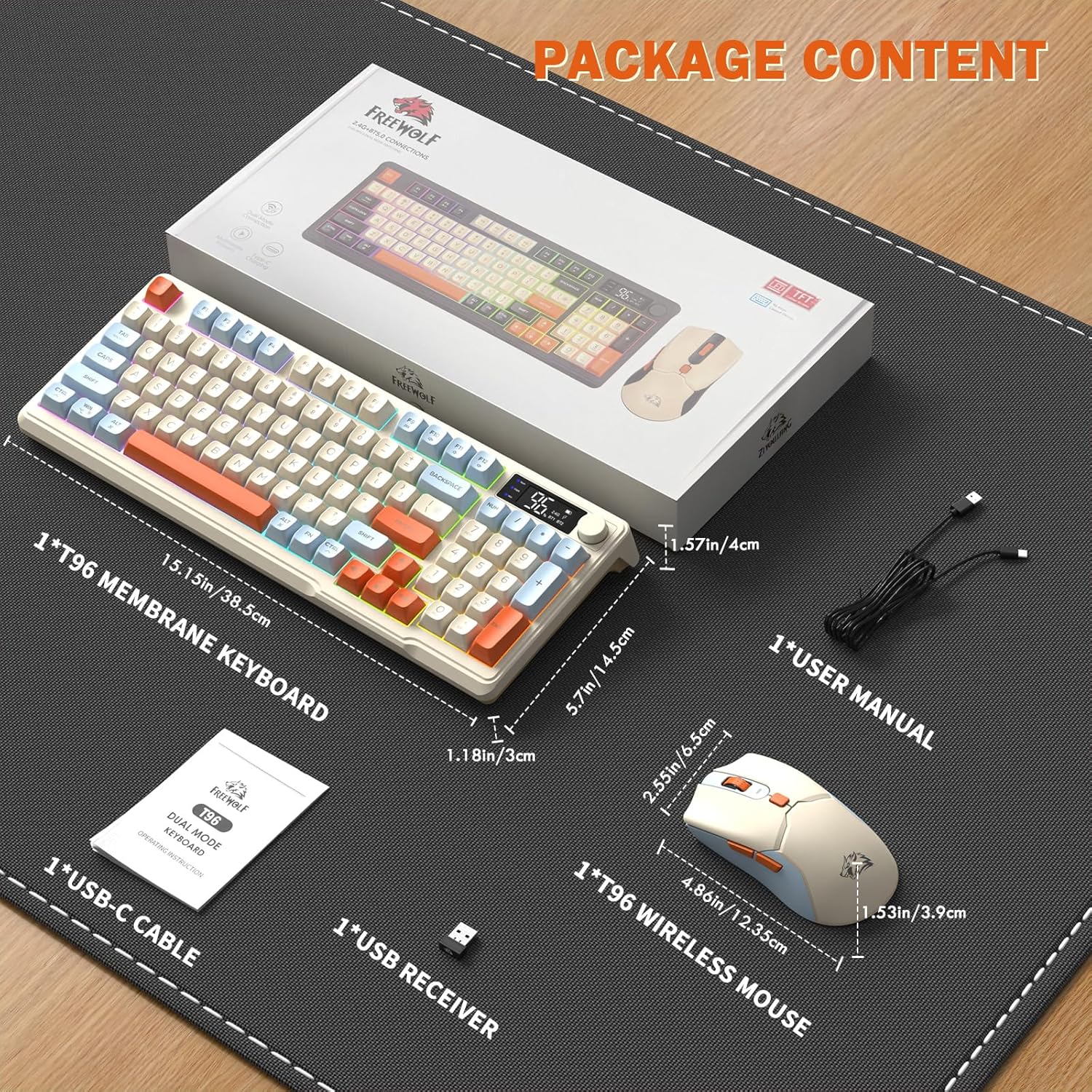
Image: A visual representation of the package contents, including the keyboard, mouse, USB-C cable, USB receiver, and user manual.
การตั้งค่า
ตัวเลือกการเชื่อมต่อ
The T96 combo supports dual-mode wireless connectivity:
- การเชื่อมต่อไร้สาย 2.4G: Utilizes the included USB receiver for a stable, plug-and-play connection.
- Bluetooth Connections (BT1/BT2): Allows pairing with up to two Bluetooth-enabled devices, enabling seamless switching.
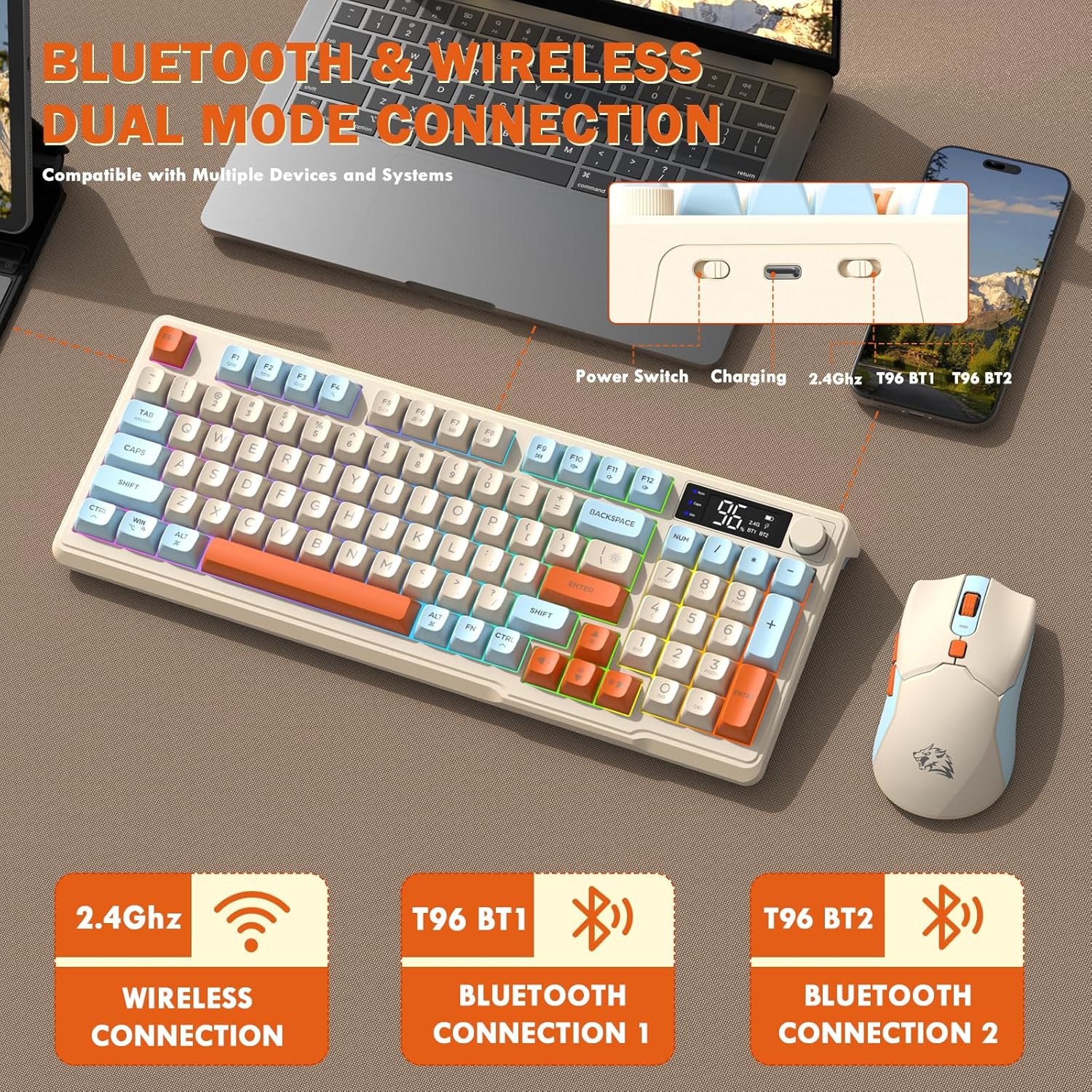
Image: Diagram illustrating the dual-mode connection options (2.4GHz, Bluetooth 1, Bluetooth 2) and the location of the power switch, charging port, and connection indicators on the keyboard.
ขั้นตอนการตั้งค่าเริ่มต้น
- อุปกรณ์ชาร์จ: Before first use, fully charge both the keyboard and mouse using the provided USB-C cable. The keyboard has a 2000mAh battery, and the mouse has a 500mAh battery. The smart display on the keyboard will show charging progress.
- ค้นหาตัวรับ USB: The USB receiver for 2.4G wireless connection is stored in a slot on the bottom of the mouse. Remove it for use.
- เปิดเครื่อง: เปิดคีย์บอร์ดและเมาส์โดยใช้สวิตช์เปิด/ปิดตามลำดับ
- Connect via 2.4G Wireless:
- เสียบตัวรับสัญญาณ USB เข้ากับพอร์ต USB ที่พร้อมใช้งานบนคอมพิวเตอร์ของคุณ
- Ensure the keyboard and mouse are set to 2.4G mode (indicated on the keyboard's smart display). They should connect automatically.
- เชื่อมต่อผ่านบลูทูธ:
- Switch the keyboard and mouse to BT1 or BT2 mode.
- On your device (PC, laptop, tablet, smartphone), open Bluetooth settings.
- ค้นหา "T96 Keyboard" and "T96 Mouse" in the list of available devices and pair them.
- The smart display will indicate the active Bluetooth connection (BT1 or BT2).
คำแนะนำการใช้งาน
การทำงานของแป้นพิมพ์
The T96 keyboard features a 94-key compact layout with various functions to enhance your experience.
Smart Display Functions
The intelligent LED display provides real-time information:
- สถานะแบตเตอรี่: แสดงเปอร์เซ็นต์แบตเตอรี่ที่เหลืออยู่tage.
- โหมดการเชื่อมต่อ: Indicates active connection (2.4G, BT1, BT2).
- ความคืบหน้าในการชาร์จ: Displays charging status when connected to power.
- Caps Lock/Num Lock/Win Lock Indicators: Shows status of these keys.
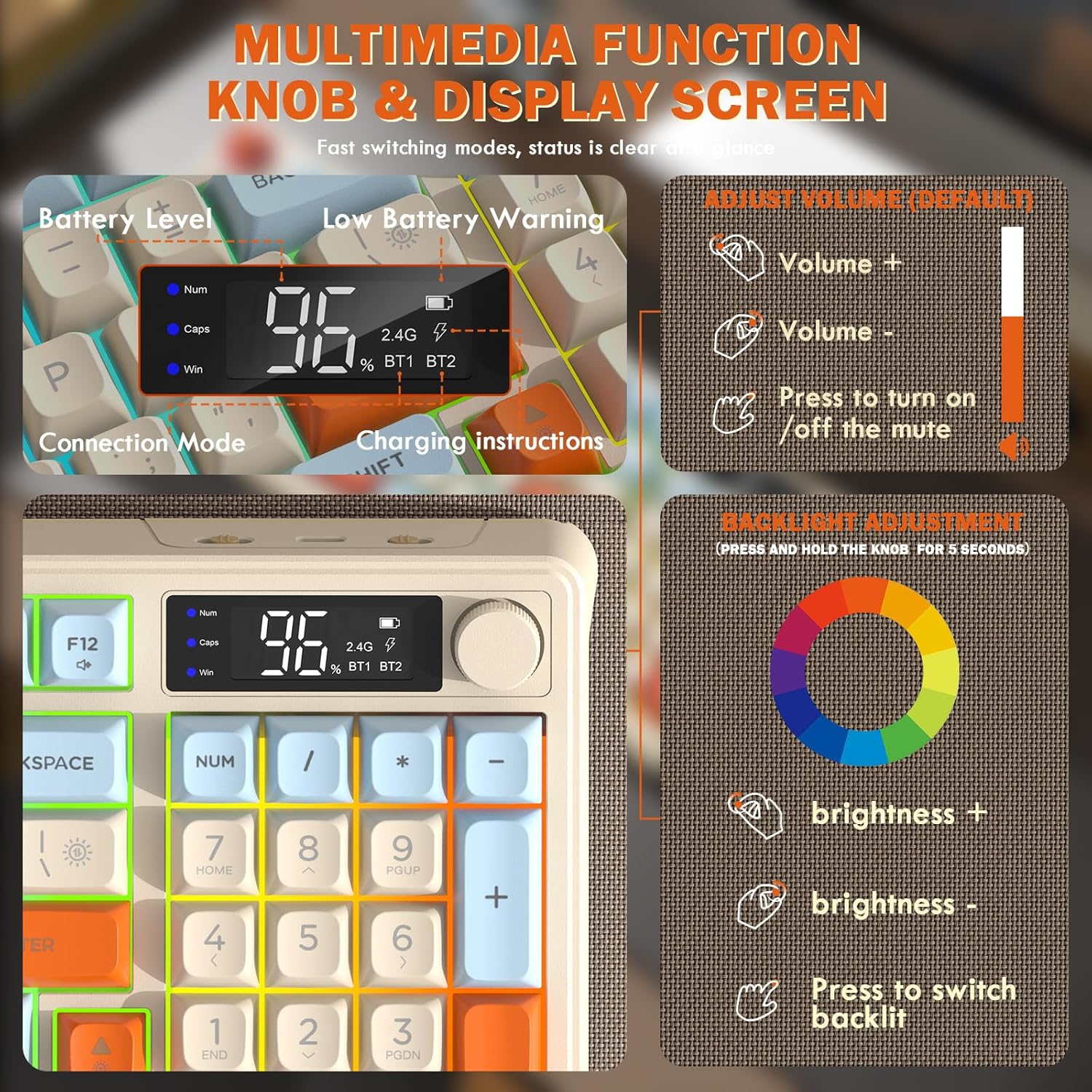
Image: Close-up of the keyboard's smart display showing battery level, connection mode, and charging instructions. Also details the multimedia knob's functions for volume and backlight control.
Multimedia Control Knob
Located on the top right of the keyboard, this knob offers quick control:
- หมุน: Adjusts system volume (clockwise for volume up, counter-clockwise for volume down).
- กด: Toggles mute on/off.
- กดค้างไว้ (5 วินาที): Activates backlight adjustment mode. Rotate to change brightness, press to switch light effects.
Multimedia Hotkeys (FN Combinations)
The keyboard includes 12 dedicated multimedia hotkeys accessible via the FN สำคัญ:
- F1 + F1-F12: Access various multimedia and system functions (e.g., media playback, volume, browser, email). Refer to keycap legends for specific functions.
การควบคุมแบ็คไลท์
The keyboard features vibrant rainbow LED backlighting. Control it using the following combinations:
- FN + ลูกศรขึ้น: เพิ่มความสว่างของไฟแบ็คไลท์
- FN + ลูกศรลง: ลดความสว่างของแสงไฟด้านหลัง
- FN + ลูกศรขวา: เพิ่มความเร็วไฟแบ็คไลท์
- FN + ลูกศรซ้าย: ลดความเร็วไฟแบ็คไลท์
- ฟน + \|: Switch between different lighting modes (e.g., always on, breathing, off).
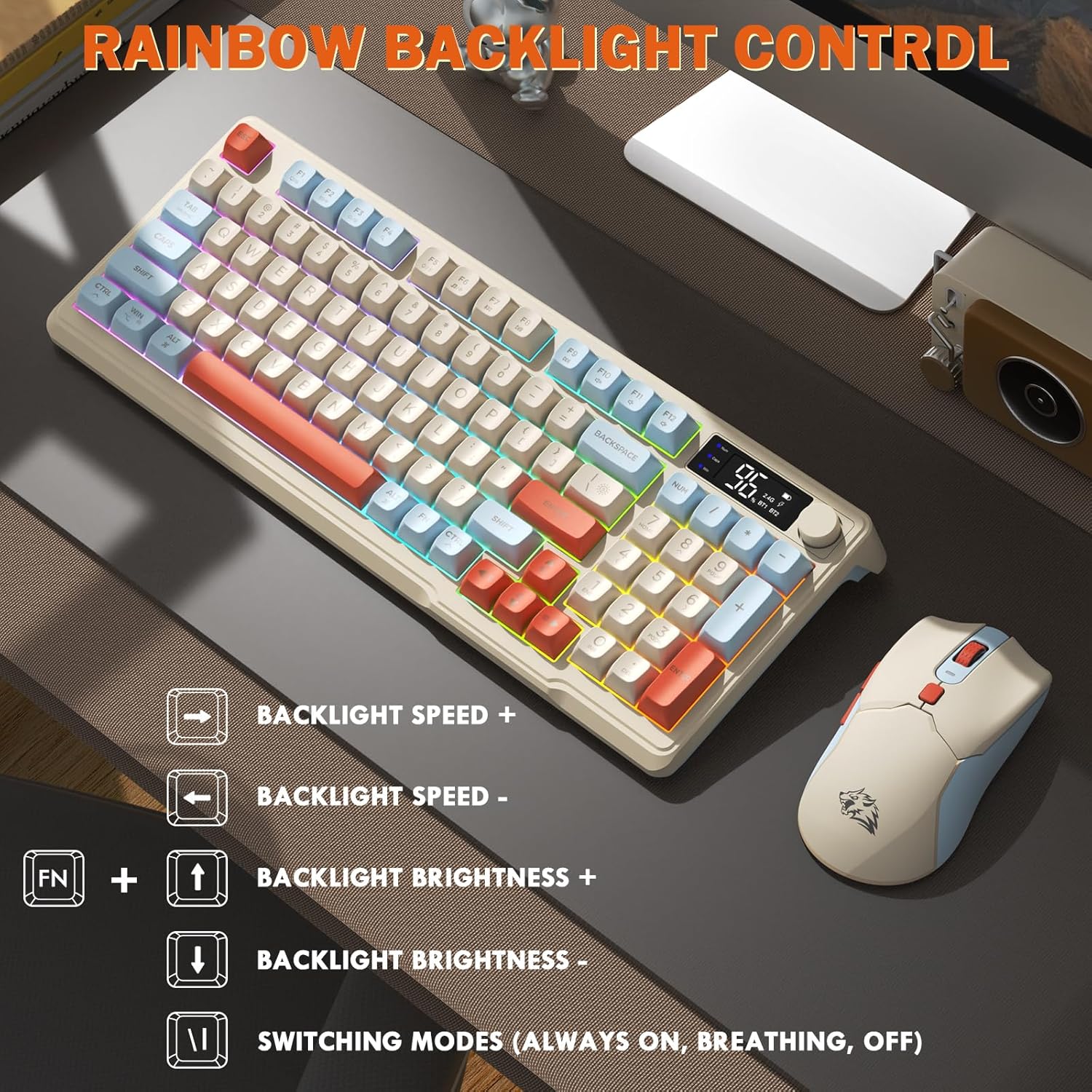
Image: Visual guide for controlling the rainbow LED backlight, showing key combinations for brightness, speed, and mode switching.
ป้องกันการโดนผีหลอก
The keyboard supports 26-key rollover anti-ghosting technology, ensuring accurate registration of multiple simultaneous key presses, crucial for gaming.
การทำงานของเมาส์
The T96 gaming mouse is designed for precision and comfort.
การปรับ DPI
Adjust the mouse sensitivity (DPI) to suit your preference:
- กดปุ่ม ปุ่ม DPI (located behind the scroll wheel) to cycle through available DPI settings: 800 / 1600 / 2400 / 4000 DPI.
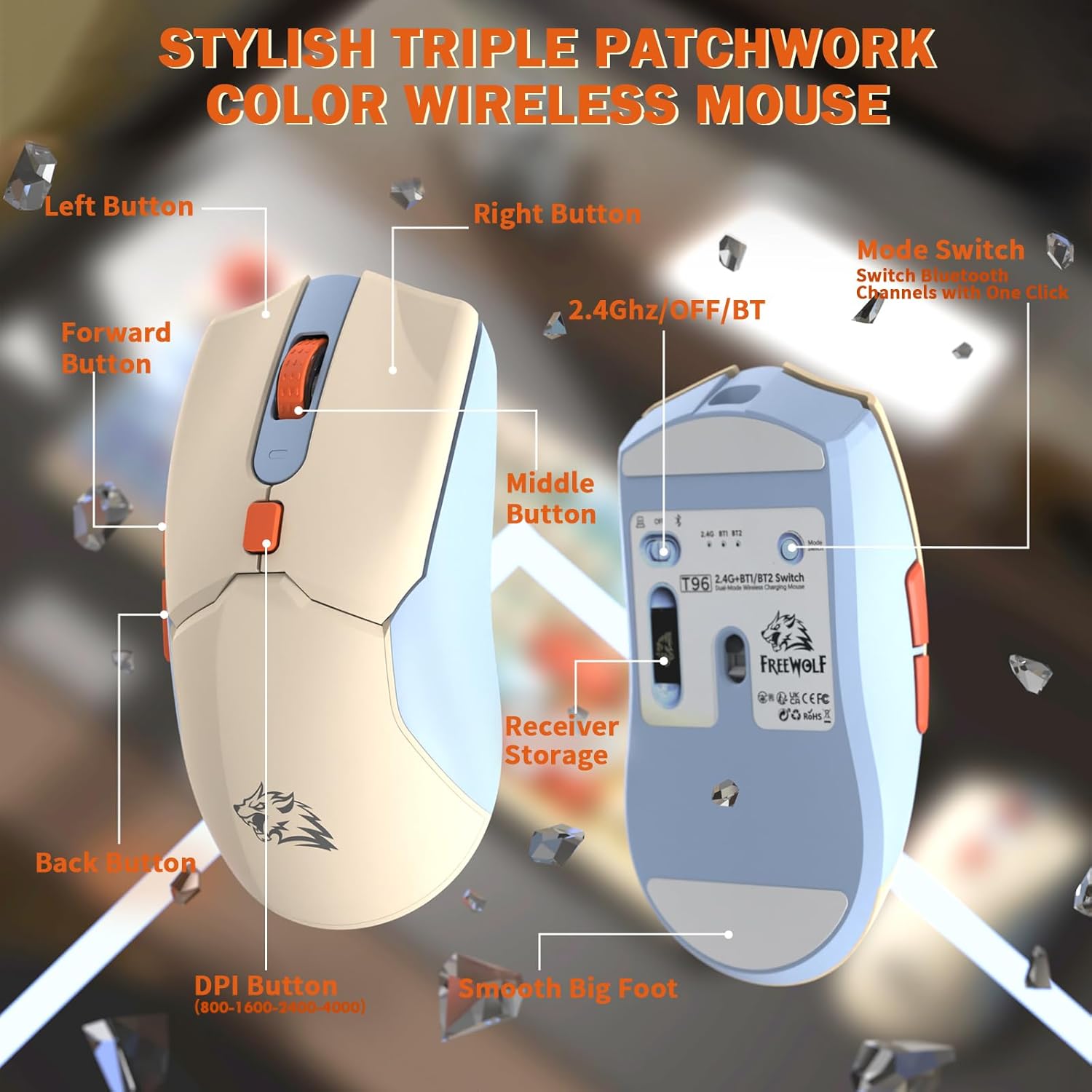
ภาพ: รายละเอียด view of the T96 wireless mouse, highlighting its buttons (Left, Right, Middle, Forward, Back, DPI) and the receiver storage compartment on the bottom.
ปุ่มที่สามารถตั้งโปรแกรมได้
The mouse features six programmable buttons. Refer to specific software (if applicable, not mentioned in data) or operating system settings for customization options.
อัตราการเลือกตั้ง
The mouse operates at different polling rates depending on the connection mode:
- บลูทูธ (BT): 115เฮิรตซ์
- 2.4G ไร้สาย: 125เฮิรตซ์
การซ่อมบำรุง
การทำความสะอาด
- ใช้ผ้าแห้งเนื้อนุ่มเช็ดทำความสะอาดพื้นผิวของแป้นพิมพ์และเมาส์
- สำหรับสิ่งสกปรกฝังแน่น ให้เช็ดออกเล็กน้อยampชุบน้ำหรือน้ำยาทำความสะอาดสูตรอ่อนโยนที่ไม่มีฤทธิ์กัดกร่อนบนผ้า
- หลีกเลี่ยงการใช้สารเคมีรุนแรง ตัวทำละลาย หรือวัสดุขัดถู เพราะอาจทำให้พื้นผิวเสียหายได้
- ห้ามจุ่มอุปกรณ์ลงในน้ำหรือของเหลวใดๆ
การดูแลแบตเตอรี่
เพื่อยืดอายุการใช้งานและประสิทธิภาพของแบตเตอรี่ให้สูงสุด:
- Recharge the devices when the low battery indicator appears on the keyboard's smart display.
- หลีกเลี่ยงการระบายแบตเตอรี่จนหมดบ่อยครั้ง
- ควรเก็บอุปกรณ์ไว้ในที่แห้งและเย็นเมื่อไม่ได้ใช้งานเป็นเวลานาน
- The devices feature smart power-saving modes: the keyboard enters sleep mode after 3 minutes of inactivity, and the mouse after 2 minutes. They wake instantly upon touch.

Image: Illustration showing the 2000mAh battery capacity of the keyboard and 500mAh battery capacity of the mouse, emphasizing long-lasting power.
การแก้ไขปัญหา
If you encounter issues with your T96 combo, refer to the following common solutions:
| ปัญหา | สาเหตุที่เป็นไปได้ | สารละลาย |
|---|---|---|
| คีย์บอร์ด/เมาส์ไม่ตอบสนอง | Low battery; Incorrect connection mode; USB receiver not connected (2.4G); Bluetooth not paired. |
|
| การเชื่อมต่อล่าช้าหรือขาดๆ หายๆ | สัญญาณรบกวน; ระยะห่างจากเครื่องรับ/อุปกรณ์; แบตเตอรี่เหลือน้อย |
|
| ไฟแบ็คไลท์ไม่ทำงานหรือหรี่ลง | Backlight turned off; Brightness set too low; Low battery. |
|
| ค่า DPI ของเมาส์ไม่เปลี่ยนแปลง | ไม่ได้กดปุ่ม DPI อย่างถูกต้อง |
|
ข้อมูลจำเพาะ
| คุณสมบัติ | รายละเอียด |
|---|---|
| ยี่ห้อ | ฟรีวูล์ฟ |
| แบบอย่าง | T96 |
| เทคโนโลยีการเชื่อมต่อ | 2.4Ghz Wireless, Bluetooth (BT1, BT2) |
| ประเภทแป้นพิมพ์ | Membrane, 94-Key Compact Layout |
| ปุ่มกด | PBT Triple-Tone Spherical Keycaps |
| แสงไฟแบ็คไลท์ | Rainbow LED Backlight |
| ป้องกันการโดนผีหลอก | รองรับการกดปุ่มพร้อมกัน 26 ปุ่ม |
| ความจุแบตเตอรี่ของคีย์บอร์ด | 2000mAh |
| DPI ของเมาส์ | 800 / 1600 / 2400 / 4000 DPI (ปรับได้) |
| Mouse Polling Rate (BT) | 115เฮิรตซ์ |
| Mouse Polling Rate (2.4G) | 125เฮิรตซ์ |
| ความจุแบตเตอรี่ของเมาส์ | 500mAh |
| อุปกรณ์ที่รองรับ | แล็ปท็อป, คอนโซลเกม, พีซี, แท็บเล็ต, สมาร์ทโฟน |
| ระบบปฏิบัติการ | Windows, macOS, ลินุกซ์, iOS, Android |
| น้ำหนักสินค้า | 2.12 ปอนด์ (ประมาณ 0.96 กก.) |
| ขนาดแพ็คเกจ | 16.26 x 8.78 x 1.85 นิ้ว (ประมาณ 41.3 x 22.3 x 4.7 ซม.) |
การรับประกันและการสนับสนุน
Information regarding product warranty and customer support was not provided in the available data. Please refer to the product packaging or the manufacturer's official webดูรายละเอียดเกี่ยวกับการรับประกันและวิธีการติดต่อฝ่ายบริการลูกค้าเพื่อขอความช่วยเหลือได้ที่เว็บไซต์นี้


