1. บทนำ
Thank you for choosing the ANRAN C2-5MP Solar Outdoor Security Camera. This advanced wireless camera system is designed to provide reliable surveillance for your property with its 5-megapixel high-definition resolution, solar power capabilities, and robust weather resistance. This manual will guide you through the setup, operation, and maintenance of your camera to ensure optimal performance and security.

Figure 1: ANRAN C2-5MP Solar Outdoor Security Camera with its solar panel and a smartphone displaying the live feed.
2. สินค้าหมดview
2.1. เนื้อหาบรรจุภัณฑ์
ตรวจสอบว่ามีรายการทั้งหมดอยู่ในแพ็คเกจของคุณ:
- Camera Body x1
- แผงโซลาร์ x1
- สายชาร์จ x1
- Instruction Manual (English) x1
- Mounting Screws Set x2
- Base Set x2
- Auxiliary Mounting Paper x2

Figure 2: All components included in the ANRAN C2-5MP product package.
2.2. คุณสมบัติหลัก
- วิดีโอความละเอียดสูง 5 ล้านพิกเซล: สามารถบันทึกภาพที่คมชัดและมีรายละเอียดสูง ทำให้สามารถระบุใบหน้าและป้ายทะเบียนรถได้อย่างแม่นยำ
- Solar Powered & Wireless: Equipped with an adjustable solar panel for continuous charging, eliminating the need for external power wiring and simplifying installation.
- PIR Motion Detection with Instant Notifications: Advanced human body detection triggers alerts and sends real-time notifications to your smartphone.
- กล้องมองกลางคืนแบบสี และกล้องมองกลางคืนแบบอินฟราเรด: Offers both clear color recording in low light and traditional infrared black-and-white night vision up to 15 meters.
- เสียงสองทาง: Built-in microphone and speaker allow for real-time communication with visitors or to deter intruders.
- ความเข้ากันได้ของอเล็กซ่า: Integrate with Amazon Alexa for voice control and viewing live camera feeds on compatible devices.
- กันฝนระดับ IP65: Designed to withstand various outdoor conditions, including rain and dust.
- ตัวเลือกการจัดเก็บ: Supports up to 128GB MicroSD card (sold separately) and offers cloud storage options.

Figure 3: Visual comparison demonstrating the superior clarity of 5MP resolution over 3MP, highlighting detail in a vehicle's license plate.

Figure 4: Illustration of the evolved solar panel design, featuring 90-degree adjustability and a compact form factor for enhanced charging efficiency and ease of installation.

Figure 5: The camera's motion detection system in action, showing a detected intruder, activated light and sound deterrents, and a push notification on a smartphone.

Figure 6: A night scene captured by the camera, demonstrating its capability for clear color night vision.

Figure 7: A child communicating through the camera, illustrating the two-way audio functionality.

Figure 8: An Alexa-enabled device displaying the live camera feed, showcasing voice control capabilities.
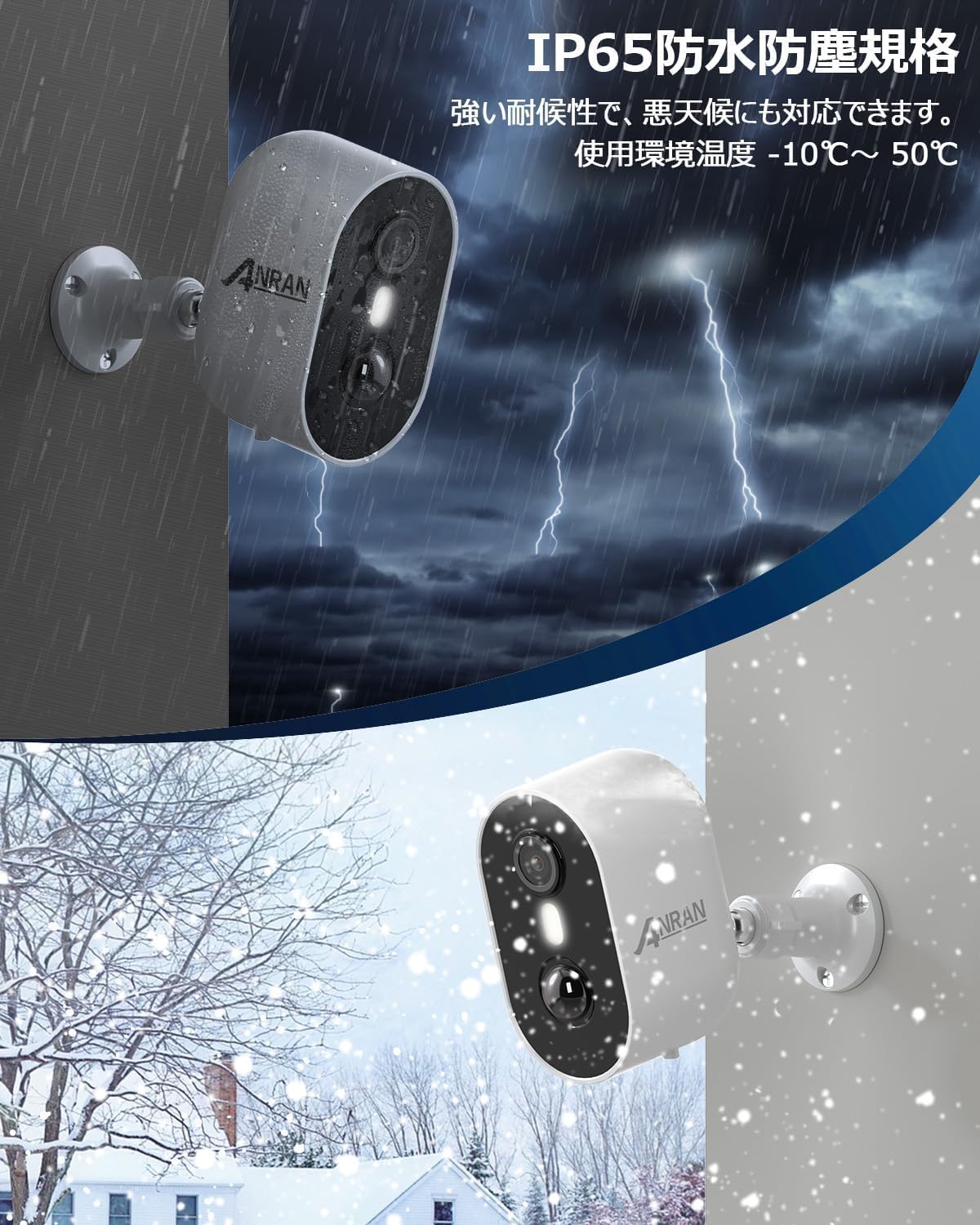
Figure 9: The camera's IP65 rating ensures reliable operation in challenging weather, depicted here in rain and snow.

Figure 10: The camera's MicroSD card slot and an illustration of cloud storage integration with the mobile application.
3. การตั้งค่า
3.1. การติดตั้งทางกายภาพ
- เลือกตำแหน่ง: Select an outdoor location with good Wi-Fi signal and direct sunlight exposure for the solar panel. Ensure the camera has a clear view ของพื้นที่ที่คุณต้องการติดตาม
- ติดตั้งกล้อง: Use the provided mounting screws and base to securely attach the camera to a wall or desired surface. The camera's angle can be adjusted after mounting.
- ติดตั้งแผงโซลาร์เซลล์: Install the solar panel in a location that receives maximum direct sunlight throughout the day. Connect the solar panel cable to the camera. The panel is adjustable up to 90 degrees to optimize sun exposure.

Figure 11: The camera and its adjustable solar panel mounted separately to ensure optimal sun exposure and surveillance coverage.

Figure 12: The camera offers flexible angle adjustments, including 360-degree rotation and 90-degree tilt, for comprehensive coverage.
3.2. การตั้งค่าแอพ
- ดาวน์โหลดแอป: ค้นหา "ANRAN" in the App Store (iOS) or Google Play Store (Android) and download the application.
- สร้างบัญชี: Open the ANRAN app and follow the on-screen instructions to register a new account.
- ชาร์จกล้อง: Before initial setup, fully charge the camera using the provided USB charging cable.
- เชื่อมต่อกับ Wi-Fi: In the app, select to add a new device. Follow the prompts to connect the camera to your 2.4GHz Wi-Fi network. (Note: The camera only supports 2.4GHz Wi-Fi).
- เพิ่มอุปกรณ์: Once connected, the camera will be added to your account, and you can begin live viewing and configuring settings.

Figure 13: A visual guide to the initial setup process, from downloading the app to connecting the camera to Wi-Fi.
4. คู่มือการใช้งาน
4.1. สด View และการเล่น
Open the ANRAN app to access the live feed from your camera. You can also review บันทึกเสียงฟูtage stored on the MicroSD card or in the cloud.
4.2. การตรวจจับการเคลื่อนไหวและการแจ้งเตือน
The camera features PIR motion detection. When motion is detected, the camera can trigger an alarm, activate a light deterrent, and send instant notifications to your smartphone.
- การปรับความไว: Adjust the PIR motion detection sensitivity from levels 1 to 10 within the app to minimize false alarms.
- Alarm Plan: Set specific times or days for the alarm function to be active, conserving battery life and ensuring alerts are only received when needed.

Figure 14: The app interface showing adjustable motion detection sensitivity levels, allowing users to define specific detection zones.

Figure 15: The alarm scheduling feature in the app, allowing users to set specific active periods for alerts.
4.3. การสื่อสารสองทาง
Utilize the built-in microphone and speaker to engage in two-way conversations through the camera. This is useful for speaking with delivery personnel or family members.

Figure 16: A delivery person communicating via the camera's two-way audio system.
4.4. โหมดการมองเห็นตอนกลางคืน
กล้องมีตัวเลือกการมองเห็นในเวลากลางคืนหลายแบบ:
- Infrared Black & White Mode: Standard night vision for clear images in complete darkness.
- โหมดมองเห็นกลางคืนแบบสี: Utilizes ambient light and the camera's spotlight to capture full-color video at night.
- โหมดการสลับอัตโนมัติ: The camera intelligently switches between infrared and color night vision based on detected motion and lighting conditions.

Figure 17: Visual representation of the camera's night vision capabilities, including infrared, color, and automatic modes.
5. การบำรุงรักษา
5.1. การดูแลรักษาแผงโซลาร์เซลล์
To ensure efficient charging, regularly clean the solar panel surface to remove dust, dirt, or debris. Ensure the panel remains positioned for maximum direct sunlight exposure.
5.2. การจัดการแบตเตอรี่
Battery performance can be affected by weather conditions and usage frequency. In periods of prolonged cloudy weather or high activity, the battery may deplete faster. If the battery level becomes critically low, you may need to temporarily charge the camera via the USB port.
5.3. การจัดการการจัดเก็บข้อมูล
If using a MicroSD card, periodically check its storage capacity. For cloud storage, ensure your subscription is active and review storage limits as needed.
6 การแก้ไขปัญหา
If you encounter issues with your ANRAN C2-5MP camera, refer to the following common troubleshooting steps:
- กล้องไม่ชาร์จไฟ: Ensure the solar panel is clean and receiving direct sunlight. If sunlight is insufficient, charge the camera directly via the USB port.
- ไม่สามารถเชื่อมต่อกับ Wi-Fi ได้: Verify that your Wi-Fi network is 2.4GHz. Check the camera's proximity to the Wi-Fi router to ensure a strong signal. Restart both the camera and your router if necessary.
- สัญญาณเตือนผิดพลาดบ่อยครั้ง: Adjust the PIR motion detection sensitivity settings in the app to a lower level. Define specific detection zones to exclude irrelevant areas.
- การมองเห็นตอนกลางคืนไม่ดี: Ensure the camera lens is clean. Check for any obstructions blocking the infrared or spotlight illumination.
- ปัญหาเสียงสองทาง: Check the volume settings on your smartphone and within the app. Ensure there are no obstructions near the camera's microphone or speaker.
If problems persist, please contact ANRAN customer support for further assistance.
7. ข้อมูลจำเพาะ
| คุณสมบัติ | ข้อมูลจำเพาะ |
|---|---|
| ความละเอียดในการจับภาพวิดีโอ | 1920P (5MP) |
| จำนวนรายการ | 1 |
| ส่วนประกอบที่รวมอยู่ | กล้อง |
| เทคโนโลยีการสื่อสารไร้สาย | ไวไฟ (2.4GHz) |
| ทุ่งแห่ง View | 180 องศา |
| ช่วงการมองเห็นตอนกลางคืน | 15 เมตร |
| อัตราเฟรม | 15 เฟรมต่อวินาที |
| เล่มที่tage | กระแสตรง 5 โวลต์ |
| ขนาดสินค้า (กxยxส) | 20 x 16 x 10.5 ซม. |
| ระดับความต้านทานต่อน้ำ | IP65 (กันน้ำ) |
| หมายเลขรุ่นผลิตภัณฑ์ | AR-W625 |
| น้ำหนักสินค้า | 530 กรัม |
| แหล่งกำเนิดแสง | นำ |
| รวมแบตเตอรี่ | ใช่ |
| ประเภทแบตเตอรี่ | ลิเธียมไอออน |
| การใช้ที่แนะนำ | การรักษาความปลอดภัยภายนอกอาคาร |
| อุปกรณ์ที่รองรับ | ไอโอเอส/แอนดรอยด์ |
| แหล่งพลังงาน | พลังงานแสงอาทิตย์ |
| โปรโตคอลการเชื่อมต่อ | ไวไฟ |
| ประเภทตัวควบคุม | Cloud Edge App |
| ประเภทการติดตั้ง | ติดผนังกลางแจ้ง |
8. การรับประกันและการสนับสนุน
ANRAN is committed to providing high-quality products and reliable customer service.
- 1-Year Free Replacement Warranty: Your product is covered by a 1-year free replacement warranty. Please contact customer support if you experience any issues.
- การสนับสนุนลูกค้า: For any questions, concerns, or technical assistance, please reach out to our customer support team.
- ข้อมูลติดต่อ:
- Phone Support: Monday - Friday, 10:00 - 13:00 and 14:30 - 19:30 (Japan Standard Time)
- Email Support: Available 24 hours a day, 7 days a week
- App and Manual: The ANRAN app and this instruction manual are available in English for easy setup and operation.

รูปที่ 18: เกินview of ANRAN's comprehensive customer support and warranty services.


