1. บทนำ
This manual provides essential information for the installation, operation, and maintenance of your FSP VITA GM 650W ATX 3.1 PC Power Supply. Please read this manual thoroughly before installation to ensure proper and safe usage of the product. The FSP VITA GM 650W is designed to deliver stable and efficient power to your computer system, adhering to the ATX 3.1 and PCIe Gen 5.1 specifications.
2. ข้อมูลด้านความปลอดภัย
ปฏิบัติตามข้อควรระวังด้านความปลอดภัยต่อไปนี้เสมอเพื่อป้องกันการบาดเจ็บหรือความเสียหายต่ออุปกรณ์ของคุณ:
- ห้ามเปิดแหล่งจ่ายไฟ แรงดันไฟฟ้าสูงtages are present inside, and opening the casing voids the warranty and poses a risk of electric shock.
- ติดตั้งแหล่งจ่ายไฟในบริเวณที่มีการระบายอากาศที่ดี ห่างจากแหล่งความร้อน แสงแดดโดยตรง และความชื้น
- ตรวจสอบให้แน่ใจว่าได้ติดตั้งและยึดแหล่งจ่ายไฟเข้ากับเคสคอมพิวเตอร์อย่างถูกต้องแล้ว
- Use only the modular cables provided with the power supply. Using incompatible cables can cause damage.
- เชื่อมต่อแหล่งจ่ายไฟเข้ากับเต้ารับไฟฟ้าที่มีสายดิน
- Disconnect the AC power cord from the wall outlet before installing or removing the power supply or any other components.
- ควรหลีกเลี่ยงการวางสิ่งของหนักๆ ทับแหล่งจ่ายไฟหรือสายไฟ
- If the power supply is damaged or malfunctioning, discontinue use immediately and contact FSP support.
3. เนื้อหาบรรจุภัณฑ์
ตรวจสอบว่ามีรายการทั้งหมดอยู่ในแพ็คเกจของคุณ:
- FSP VITA GM 650W ATX 3.1 PC Power Supply
- Modular Cable Set (Motherboard, CPU, PCIe, SATA, Peripheral)
- สายไฟ AC
- สกรูยึด
- คู่มือการใช้งาน (เอกสารนี้)
4. สินค้าหมดview
The FSP VITA GM 650W is a high-efficiency power supply designed for modern PC systems. It features:
- การปฏิบัติตามมาตรฐาน ATX 3.1: Designed to meet the latest Intel Power Design Guide ATX 3.1 specifications, ensuring compatibility with future hardware.
- PCIe Gen 5.1 Support: Ready for next-generation graphics cards.
- 80 PLUS Gold Certification: Achieves high efficiency, reducing power dissipation, heat, and noise.
- Synchronous Rectifier LLC Resonance Converter Topology: Reduces switching loss and enhances efficiency.
- +5V & 3.3V DC to DC Circuit Design: Improves efficiency and stabilizes output voltage.
- 105°C Japanese Bulk Capacitor: Ensures reliability and extended lifespan.

รูปที่ 4.1: ด้านหน้า view of the FSP VITA GM 650W Power Supply, showcasinด้วยดีไซน์ที่กะทัดรัดและตะแกรงพัดลม
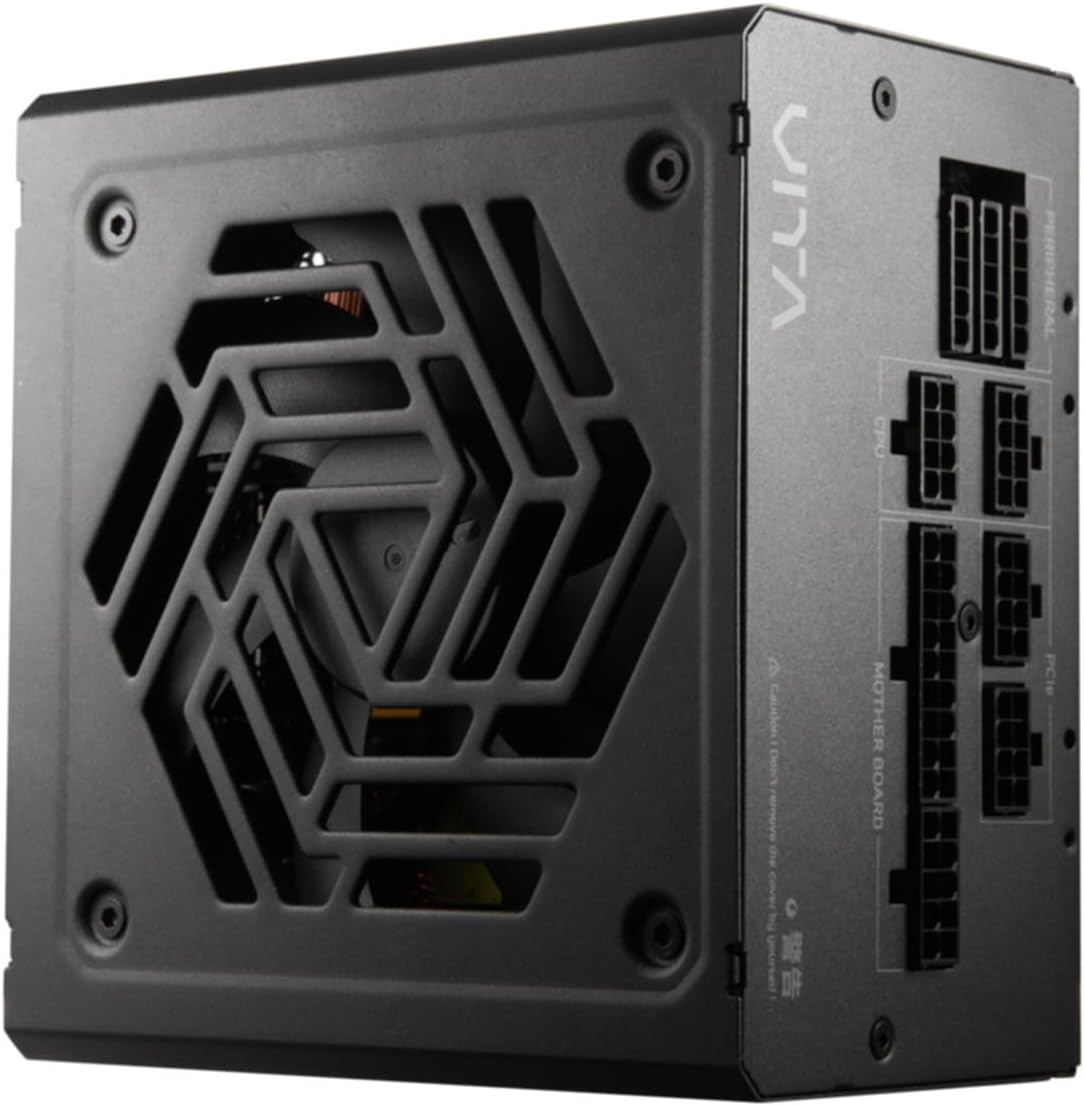
รูปที่ 4.2: จากบนลงล่าง view of the FSP VITA GM 650W Power Supply, highlighting the fan and ventilation design.

รูปที่ 4.3: ด้านข้าง view of the FSP VITA GM 650W Power Supply, showing the FSP branding and VITA model name.
5. การตั้งค่าและการติดตั้ง
Follow these steps to install your FSP VITA GM 650W power supply:
- การตระเตรียม:
- ปิดคอมพิวเตอร์และถอดสายไฟออกจากเต้ารับที่ผนัง
- เปิดเคสคอมพิวเตอร์ของคุณ
- หากคุณกำลังเปลี่ยนแหล่งจ่ายไฟตัวเก่า ให้ถอดสายเคเบิลทั้งหมดออกจากแหล่งจ่ายไฟตัวเก่าและนำแหล่งจ่ายไฟตัวเก่าออกจากเคส
- การติดตั้ง PSU:
- Carefully place the FSP VITA GM 650W into the power supply bay of your PC case.
- จัดตำแหน่งรูสกรูบน PSU ให้ตรงกับรูบนเคส
- ยึดแหล่งจ่ายไฟโดยใช้สกรูยึดที่ให้มา
- การเชื่อมต่อสายเคเบิลแบบโมดูลาร์:
The FSP VITA GM 650W is a modular power supply. Connect only the cables required for your system components.

Figure 5.1: Modular cable connection panel. Ensure cables are firmly seated.
- พลังงานเมนบอร์ด: ต่อสาย ATX แบบ 24 พินเข้ากับเมนบอร์ด
- พลังซีพียู: Connect the 4+4-pin or 8-pin EPS/ATX12V cable(s) to the CPU power connector(s) on your motherboard.
- พลัง PCIe: Connect the 6+2-pin PCIe cables to your graphics card(s).
- กำลังไฟ SATA: เชื่อมต่อสายไฟ SATA เข้ากับ SSD, HDD และไดรฟ์ออปติคัล
- พลังงานต่อพ่วง: Connect 4-pin Molex cables to other peripherals as needed.
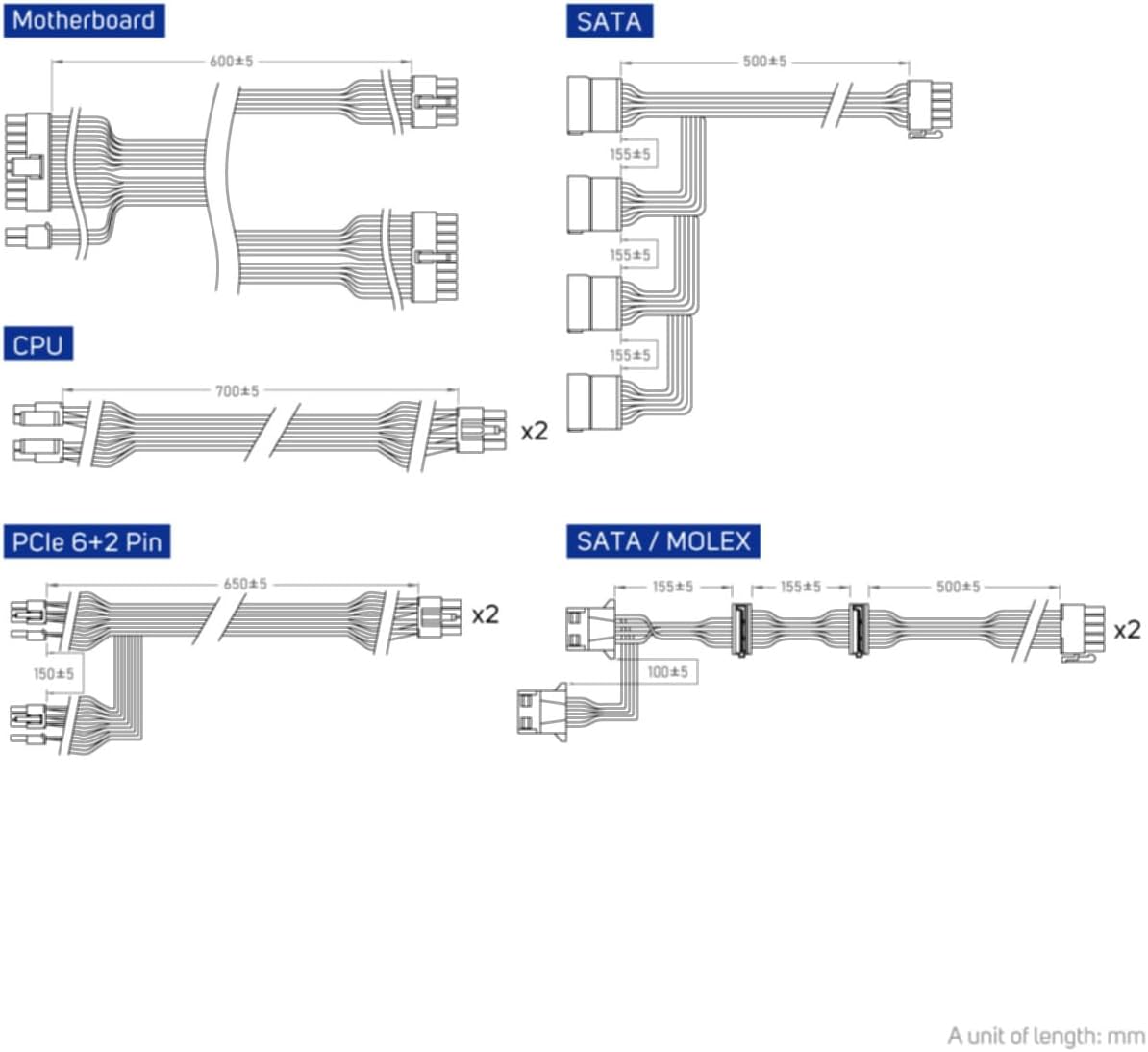
Figure 5.2: Diagram illustrating the various modular cables included and their approximate lengths (in mm).
- การตรวจสอบขั้นสุดท้าย:
- Ensure all cables are securely connected and routed to avoid obstructing airflow.
- ปิดเคสคอมพิวเตอร์ของคุณ
- เชื่อมต่อสายไฟ AC เข้ากับแหล่งจ่ายไฟ แล้วจึงเสียบเข้ากับเต้ารับติดผนังที่มีสายดิน
6. คู่มือการใช้งาน
After installation, you can power on your system:
- Ensure the power switch on the back of the power supply is in the "ON" (I) position.
- กดปุ่มเปิด/ปิดบนเคสคอมพิวเตอร์ของคุณ
- The power supply will provide stable power to your components.

รูปที่ 6.1: ด้านหลัง view of the power supply, showing the AC power input and the main power switch.
Bridge Time Importance: The FSP VITA GM 650W adheres to the recommended ATX 3.1 bridge time values. This feature ensures the power supply can maintain a stable output voltage for a critical duration after a power interruption, preventing system instability or damage during sudden power fluctuations or outagใช่
7. การบำรุงรักษา
เพื่อให้มั่นใจได้ถึงประสิทธิภาพสูงสุดและอายุการใช้งานที่ยาวนานของแหล่งจ่ายไฟของคุณ:
- การทำความสะอาดฝุ่น: Periodically clean dust from the power supply's fan grille and vents using compressed air. Ensure the system is powered off and unplugged before cleaning.
- การจัดการสายเคเบิล: Maintain good cable management inside your PC case to ensure proper airflow and prevent overheating.
- สภาพแวดล้อม : ควรใช้งานแหล่งจ่ายไฟภายในช่วงอุณหภูมิและความชื้นที่แนะนำ
8 การแก้ไขปัญหา
If you encounter issues with your FSP VITA GM 650W power supply, refer to the following common problems and solutions:
| ปัญหา | สาเหตุที่เป็นไปได้ | สารละลาย |
|---|---|---|
| ระบบเปิดไม่ติด |
|
|
| ระบบเปิดอยู่แต่ปิดลงทันที |
|
|
| มีเสียงผิดปกติจากแหล่งจ่ายไฟ (PSU) |
|
|
If the problem persists after trying these solutions, please contact FSP customer support for further assistance.
9. ข้อมูลจำเพาะ
| คุณสมบัติ | รายละเอียด |
|---|---|
| หมายเลขรุ่น | 790980 |
| ยี่ห้อ | FSP |
| วัดtage | 650วัตต์ |
| เวอร์ชั่น ATX | 3.1 |
| การรับรองประสิทธิภาพ | โกลด์พลัส 80 |
| น้ำหนักสินค้า | 2.72 กิโลกรัม (5.98 ปอนด์) |
| ผู้ผลิต | FSP |
| วันที่พร้อมใช้งานครั้งแรก | วันที่ 15 สิงหาคม 2024 |
10. การรับประกันและการสนับสนุน
For warranty information, technical support, or service inquiries, please refer to the official FSP webหรือติดต่อฝ่ายบริการลูกค้า โปรดเก็บหลักฐานการซื้อไว้เพื่อใช้ในการเคลมประกัน
FSP Official Webเว็บไซต์: www.fsp-group.com
11. การรีไซเคิลและการทิ้ง
Please dispose of this product responsibly. Electronic waste should not be disposed of with household waste. Contact your local authorities or recycling center for information on proper disposal methods for electronic components.


