1. บทนำ
This manual provides detailed instructions for the installation, configuration, and operation of your visiPower G90C Wireless 2.4GHz WiFi GPRS Home Alarm System. This system is designed to enhance the security of your home or property by providing real-time alerts and monitoring capabilities through its dual Wi-Fi and GSM/4G network connectivity.
Please read this manual thoroughly before attempting to install or operate the system to ensure proper functionality and safety.
2. เนื้อหาบรรจุภัณฑ์
Upon unpacking, please verify that all the following components are included in your package. If any items are missing or damaged, contact visiPower customer support immediately.
- 1 x G90C Alarm Panel (Main Host)
- 1 x Wireless PIR Motion Sensor
- 1 x Wireless Door/Window Sensor
- 2 x รีโมท คอนโทรลเลอร์
- 1 x Wired Mini Siren
- 1 x อะแดปเตอร์แปลงไฟ AC (DC 12V/1A)
- 1 x คู่มือผู้ใช้ (เอกสารนี้)
- 1 x Bag of Installation Accessories (screws, adhesive tape)

Image: The complete visiPower G90C alarm system kit, including the main alarm panel, a passive infrared (PIR) motion sensor, a door/window sensor, two remote controls, and a wired siren, all packaged with the user manual and power adapter.
3. หมดระบบview และคุณสมบัติ
The visiPower G90C is a versatile security system offering robust protection for your premises. Key features include:
- การเชื่อมต่อเครือข่ายแบบคู่: Supports both 2.4GHz Wi-Fi and GSM/4G networks for reliable communication. (Note: 5G SIM cards are not supported.)
- LCD Touch Screen Keypad: Intuitive interface for system control and configuration.
- Multi-Channel Alarm Modes: Delivers alerts via app push notifications, SMS messages, and voice calls.
- การควบคุมแอพมือถือ: Compatible with both Kooyii App (for smart home integration and alarm) and Safety Guard App (alarm system only) for remote management on Android and iOS devices.
- Integrated with IP Camera: อนุญาติ viewing of surveillance camera video directly within the alarm app when an alarm is triggered.
- การสนับสนุนโซนอย่างครอบคลุม: Up to 99 wireless defense zones and 8 wired zones can be configured.
- Emergency Contact System: Pre-set up to 5 phone numbers for alarming calls and 5 mobile numbers for SMS alerts.
- แบตเตอรี่สำรอง: Built-in rechargeable lithium battery provides power during AC power outages for extended operation.
- Customizable Zone Names: Users can personalize defense zone names via the touch screen.
- Central Monitoring Platform Compatibility: Designed to work with visiPower's Alarm Center Monitoring Platform.
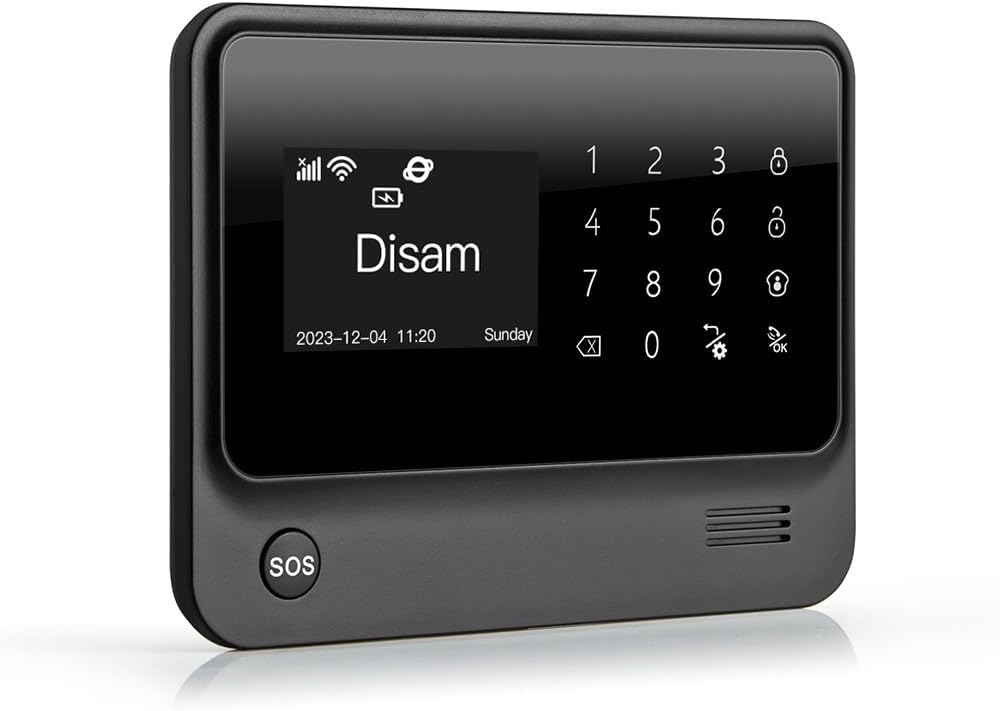
ภาพ: รายละเอียด view of the G90C alarm panel's LCD touch screen, showing the disarmed status, current date and time, and the integrated numeric keypad with various control icons.

Image: An infographic illustrating the core features of the G90C system, including its 10-hour backup battery life, 95dB built-in siren, timed arm/disarm functions, integrated surveillance, mobile app control, and dual 4G+WiFi network capabilities.

Image: A comprehensive system diagram illustrating how the G90C alarm host integrates with various security components like sensors, sirens, and cameras, all managed through a cloud server and mobile applications for a complete smart security solution.
4. การตั้งค่าและการติดตั้ง
The visiPower G90C system is designed for easy self-installation without the need for professional assistance. Follow these steps for a successful setup.
4.1. Alarm Panel (Main Host) Setup
- การเชื่อมต่อไฟฟ้า: Connect the AC power adapter to the alarm panel and plug it into a standard wall outlet. The built-in backup battery will automatically charge.
- SIM Card Installation (Optional for GSM/4G): If you intend to use GSM/4G features, insert a 2G/3G/4G SIM card into the designated slot on the alarm panel. Ensure the SIM card is active and has sufficient credit/data. (Note: 5G SIM cards are not supported.)
- เปิดเครื่องครั้งแรก: The panel will power on automatically. Follow the on-screen prompts for initial language and time settings.
4.2. การกำหนดค่าเครือข่าย Wi-Fi
- On the alarm panel's touch screen, navigate to the Wi-Fi settings.
- Select your 2.4GHz Wi-Fi network from the list. (Note: 5GHz networks are not supported.)
- Enter your Wi-Fi password and confirm. The panel should connect to your network.
4.3. Sensor Installation and Pairing
Each wireless accessory comes with screws or adhesive tape for easy mounting.
- Wireless PIR Motion Sensor:
- Mount the sensor in a corner or on a wall at a height of approximately 2-2.5 meters (6.5-8 feet) where it can cover the desired area without obstructions.
- Avoid pointing the sensor directly at heat sources, windows, or areas with significant air currents.
- To pair, put the alarm panel into "learning mode" (refer to the panel's menu for "Add Sensor" or "Learning"). Trigger the motion sensor by waving your hand in front of it. The panel will confirm successful pairing.
- Wireless Door/Window Sensor:
- Attach the main part of the sensor to the door/window frame and the smaller magnetic part to the door/window itself. Ensure they are aligned and within 1 cm (0.4 inches) of each other when the door/window is closed.
- To pair, put the alarm panel into "learning mode." Open and close the door/window to separate and connect the sensor parts. The panel will confirm successful pairing.

ภาพ: อดีตamples of outdoor security installations, showing waterproof beam detectors for perimeter protection and highlighted windows on a house indicating strategic placement for outdoor fence detectors to secure vulnerable entry points.
4.4. Remote Controller Pairing
- Put the alarm panel into "learning mode" for remote controls.
- Press any button on the remote controller. The panel will confirm successful pairing.
4.5. การตั้งค่าแอปพลิเคชันบนมือถือ
- Download the "Kooyii" or "Safety Guard" app from your smartphone's app store (Android or iOS).
- ลงทะเบียนสำหรับบัญชีและเข้าสู่ระบบ
- Follow the in-app instructions to add your G90C alarm system. This typically involves scanning a QR code on the panel or entering its device ID.
- Once connected, you can manage your alarm system remotely.
5. คู่มือการใช้งาน
5.1. การเปิดใช้งานและปิดใช้งานระบบ
- เปิดใช้งานระบบรักษาความปลอดภัย (โหมดไม่อยู่บ้าน): Activates all configured sensors. Use the "Arm" button on the panel, remote control, or the mobile app.
- ระบบล็อกประตู (โหมดสแตนด์บาย): Activates perimeter sensors (e.g., door/window sensors) while allowing movement within the property. Use the "Home Arm" button on the panel, remote, or app.
- ปลดอาวุธ: Deactivates all sensors. Use the "Disarm" button on the panel (requires password), remote control, or the mobile app.
- ฟังก์ชั่น SOS: Press the SOS button on the panel or remote control to trigger an immediate emergency alarm.
5.2. Receiving Alarm Alerts
When an alarm is triggered, the system will respond according to your configuration:
- The built-in siren will sound.
- การแจ้งเตือนแบบพุชของแอป: Your mobile app will receive real-time alerts. If integrated with an IP camera, you can view live video through the app.
- ข้อความ SMS: The system will send SMS alerts to the pre-set mobile numbers (requires SIM card).
- การโทรด้วยเสียง: The system will dial the pre-set phone numbers (requires SIM card).
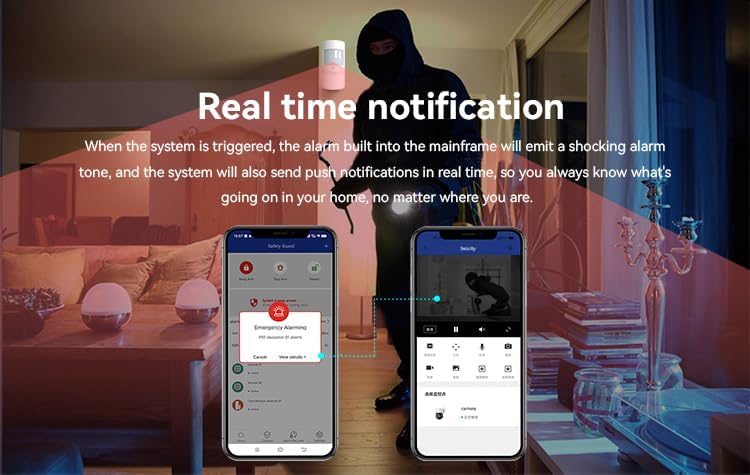
Image: This image illustrates the real-time notification capabilities of the system, showing a mobile phone receiving an emergency alarm push notification and another phone displaying live camera footage of an intruder, demonstrating immediate alert and visual verification.

Image: This infographic explains the G90C's alert distribution, showing that the system will initiate calls to five pre-programmed phone numbers and send SMS messages to two pre-programmed mobile numbers upon alarm activation, ensuring multiple contacts are notified.
5.3. Advanced App Control (Kooyii Smart Home)
The Kooyii app extends beyond basic alarm functions, allowing integration with other smart home devices for centralized control.
- Remote Device Control: Manage compatible smart home devices (e.g., lights, thermostats) directly from the app.
- การสร้างฉาก: Set up automated scenes or routines based on alarm status or time schedules.

Image: Five smartphone screens showcasing the Kooyii smart home application, demonstrating its capabilities for controlling various smart devices such as lighting, curtains, and media, alongside displaying environmental data, highlighting its comprehensive smart home management features.
6. การบำรุงรักษา
- การตรวจสอบแบตเตอรี่: Regularly check the battery status of wireless sensors and the main panel's backup battery. Replace sensor batteries as needed. The panel's backup battery provides over 10 hours of operation during power outagใช่
- การทำความสะอาด: Clean the alarm panel's screen and sensors with a soft, dry cloth. Avoid using abrasive cleaners or solvents.
- อัพเดตเฟิร์มแวร์: Check the mobile app or visiPower website for any available firmware updates for the alarm panel to ensure optimal performance and security.
- ความแรงของสัญญาณ: Periodically verify Wi-Fi and GSM/4G signal strength on the alarm panel to ensure reliable communication.
7 การแก้ไขปัญหา
If you encounter issues with your visiPower G90C system, refer to the following common problems and solutions:
| ปัญหา | สาเหตุที่เป็นไปได้ | สารละลาย |
|---|---|---|
| Alarm panel not powering on. | No AC power, backup battery depleted. | Ensure AC adapter is securely plugged in. Allow time for the backup battery to charge. |
| ไม่มีการเชื่อมต่อ Wi-Fi | Incorrect password, 5GHz network selected, router issues, weak signal. | Verify Wi-Fi password. Ensure you are connecting to a 2.4GHz network. Restart your router. Move the panel closer to the router. |
| No GSM/4G signal or SMS/calls not working. | SIM card not inserted correctly, inactive SIM, no credit, poor network coverage. | Reinsert SIM card. Check SIM card status with your carrier. Ensure sufficient credit. Check network coverage in your area. |
| เซ็นเซอร์ไร้สายไม่ส่งสัญญาณเตือน | Sensor battery low/dead, sensor not paired, sensor out of range, incorrect installation. | Replace sensor battery. Re-pair the sensor with the alarm panel. Move sensor closer to the panel. Verify correct installation and alignment. |
| Mobile app not receiving push notifications. | App not configured correctly, phone notification settings disabled, no internet connection on phone or panel. | Check app settings for push notifications. Enable notifications for the app in your phone's settings. Ensure both phone and panel have active internet connections. |
8. ข้อมูลจำเพาะ
Detailed technical specifications for the visiPower G90C Alarm System:
| หมายเลขรุ่น | G90ซี |
| เครือข่าย | 4G + Wi-Fi (2.4GHz) Dual Network |
| แหล่งจ่ายไฟ | กระแสตรง 12V/1A |
| แบตเตอรี่สำรอง | แบตเตอรี่ลิเธียมไอออน 3.7V/1000mAh (มีมาให้ในชุด) |
| ความถี่ไวไฟ | 2.4จี |
| กระแสไฟเตือน | <500mA (built-in siren) |
| กระแสไฟฟ้าทำงาน | <250มิลลิแอมป์ |
| Receiving & Emitting Frequency | 433.92เมกะเฮิรตซ์ |
| ขนาด (กว้าง x ยาว x สูง) | 11 x 7.1 x 5.1 นิ้ว (27.9 x 18 x 13 ซม.) |
| น้ำหนักสินค้า | 2.2 ปอนด์ (1 กก.) |
| สี | สีดำ/สีขาว |
| ผู้ผลิต | วิสิพาวเวอร์ |
| ยูพีซี | 762833834367 |
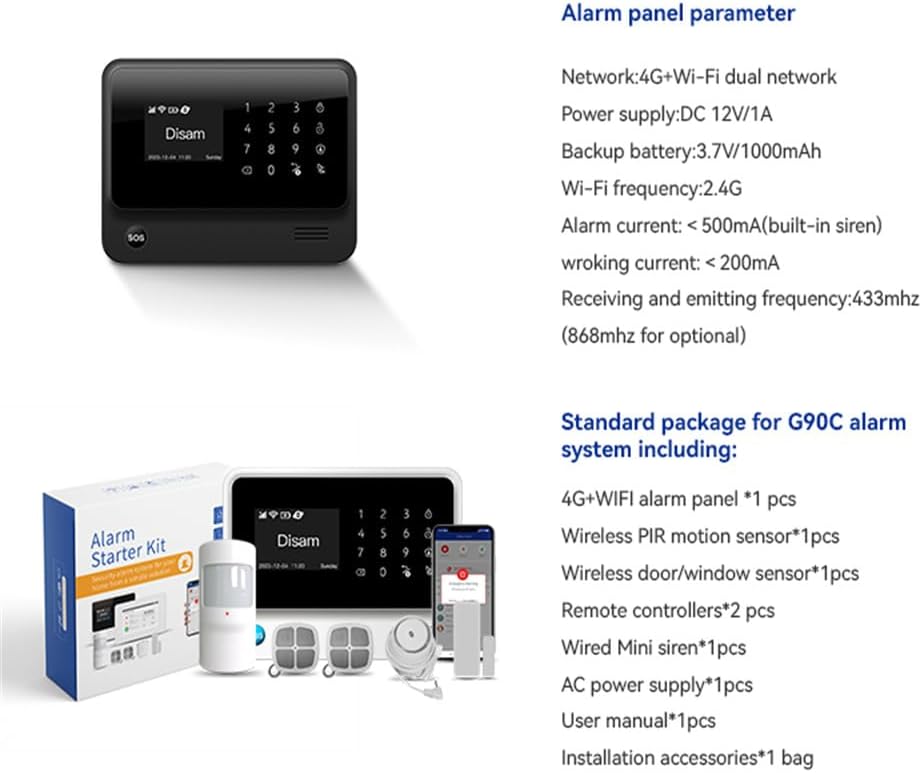
Image: This image provides a summary of the G90C alarm panel's technical specifications and a detailed list of all components included in the standard package, serving as a quick reference for system capabilities and contents.
9. การรับประกันและการสนับสนุน
For warranty information, please refer to the warranty card included with your product or visit the official visiPower website. If you require technical assistance, troubleshooting beyond this manual, or have questions regarding your product, please contact visiPower customer support through their official channels.
You can find contact information on the visiPower webเว็บไซต์หรือผ่านแพลตฟอร์มการซื้อของคุณ
