1. บทนำ
Thank you for choosing the DAHUA DHI-LM32-E230CN-A5-V1 32-inch Curved VA165 Hz Monitor. This manual provides essential information for the safe and efficient use of your new monitor. Please read it thoroughly before installation and operation, and retain it for future reference.
This monitor is designed to deliver a high-quality visual experience with its 1920 x 1080p resolution, 1500R curvature for immersive viewing, and a fast 165 Hz refresh rate. It features a 1ms response time to minimize motion blur and supports a wide color gamut (99% sRGB, 85% NTSC, 85% DCI-P3, 85% Adobe RGB) for accurate color reproduction. Connectivity options include DisplayPort 1.4 and HDMI 2.0, and adaptive sync technology is integrated for tear-free gaming and smooth video playback.
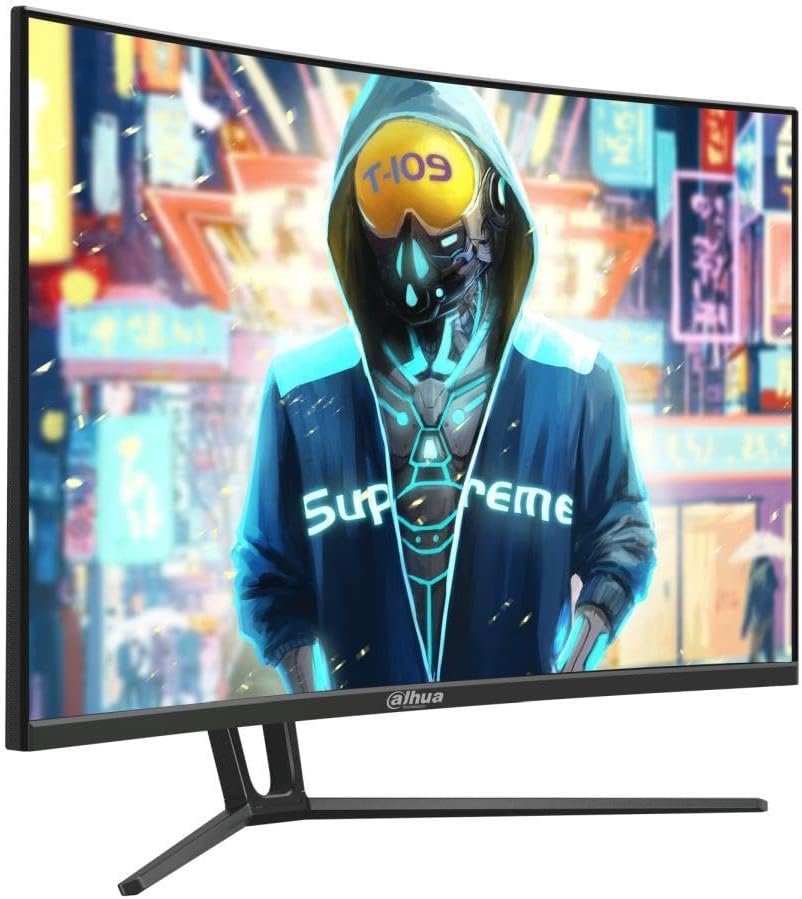
รูปที่ 1 : ด้านหน้า view of the DAHUA DHI-LM32-E230CN-A5-V1 monitor.
2. ข้อมูลด้านความปลอดภัย
Please observe the following safety precautions to ensure safe operation and prolong the life of your monitor:
- อย่าให้จอภาพโดนฝน ความชื้น หรืออุณหภูมิที่สูงหรือต่ำเกินไป
- ตรวจสอบให้แน่ใจว่ามีการระบายอากาศที่เหมาะสมรอบ ๆ จอภาพ อย่าปิดกั้นช่องระบายอากาศ
- โปรดใช้เฉพาะอะแดปเตอร์แปลงไฟและสายเคเบิลที่ผู้ผลิตจัดหาให้หรือแนะนำเท่านั้น
- หากไม่ได้ใช้งานจอภาพเป็นเวลานาน ควรดึงสายไฟออกจากเต้ารับ
- อย่าพยายามซ่อมแซมจอภาพด้วยตนเอง โปรดส่งต่อให้ช่างผู้ชำนาญการเป็นผู้ดำเนินการซ่อมแซม
- หลีกเลี่ยงการวางวัตถุหนักบนสายไฟหรือจอภาพ
- Clean the monitor screen with a soft, lint-free cloth. Do not use liquid cleaners directly on the screen.
3. เนื้อหาบรรจุภัณฑ์
กรุณาตรวจสอบสิ่งของภายในบรรจุภัณฑ์เมื่อแกะกล่อง หากมีสินค้าใดสูญหายหรือเสียหาย โปรดติดต่อผู้ค้าปลีกของคุณ
- DAHUA DHI-LM32-E230CN-A5-V1 Monitor
- ขาตั้งจอมอนิเตอร์ (ฐานและคอ)
- สายไฟ
- สายเคเบิล DisplayPort
- คู่มือการใช้งาน (เอกสารนี้)
4. การตั้งค่า
4.1 การประกอบขาตั้ง
- นำจอภาพออกจากบรรจุภัณฑ์อย่างระมัดระวัง โดยวางไว้บนพื้นผิวที่อ่อนนุ่มเพื่อป้องกันความเสียหาย
- Attach the stand neck to the monitor panel. Ensure it clicks securely into place or is fastened with screws if applicable (refer to specific diagrams in the physical manual).
- ยึดฐานขาตั้งเข้ากับคอขาตั้งโดยยึดด้วยสกรูที่ให้มา
- วางจอภาพที่ประกอบแล้วไว้บนพื้นผิวที่มั่นคงและเรียบ
4.2 สายเชื่อมต่อ
โปรดตรวจสอบให้แน่ใจว่าจอภาพและคอมพิวเตอร์ของคุณปิดอยู่ก่อนทำการเชื่อมต่อใดๆ
- การเชื่อมต่อไฟฟ้า: เชื่อมต่อสายไฟเข้ากับแหล่งจ่ายไฟของจอภาพ จากนั้นเสียบปลายอีกด้านหนึ่งเข้ากับเต้ารับไฟฟ้าที่มีสายดิน
- การเชื่อมต่อวิดีโอ: Connect one end of the DisplayPort cable to the DisplayPort output on your computer's graphics card and the other end to the DisplayPort input on the monitor. Alternatively, use an HDMI cable to connect to the HDMI 2.0 input.
- ไฟล์เสียง (ไม่บังคับ): หากจอภาพของคุณมีช่องต่อสัญญาณเสียงออก คุณสามารถเชื่อมต่อลำโพงภายนอกหรือหูฟังได้

รูปที่ 2: ด้านหลัง view ของจอภาพที่มีพอร์ตอินพุต
4.3 การเปิดเครื่อง
After connecting all necessary cables, power on your computer, then press the power button on the monitor. The monitor should automatically detect the input signal.
5. คู่มือการใช้งาน
5.1 เมนูการแสดงผลบนหน้าจอ (OSD)
The OSD menu allows you to adjust various monitor settings. Typically, buttons are located on the back or bottom edge of the monitor.
- กดปุ่ม เมนู ปุ่มสำหรับเปิดเมนู OSD
- Use the navigation buttons (usually directional arrows) to move through menu options.
- กดปุ่ม เข้า or OK ปุ่มสำหรับเลือกตัวเลือกหรือยืนยันการตั้งค่า
- กดปุ่ม ทางออก ปุ่มสำหรับปิด OSD หรือกลับไปยังเมนูก่อนหน้า
5.2 การตั้งค่าการแสดงผล
- ปณิธาน: The native resolution is 1920 x 1080p. For optimal image quality, set your computer's display resolution to this setting.
- อัตราการรีเฟรช: This monitor supports up to 165 Hz. Ensure your graphics card and operating system are configured to use the highest refresh rate for the smoothest experience.
- การซิงโครไนซ์แบบปรับได้: This feature synchronizes the monitor's refresh rate with your graphics card's frame rate to eliminate screen tearing and stuttering. Enable this feature in the OSD menu and your graphics card control panel.
- ช่วงสี: The monitor supports 99% sRGB, 85% NTSC, 85% DCI-P3, and 85% Adobe RGB. Adjust color settings in the OSD or through your graphics card software to match your preferences or professional requirements.
- เวลาตอบสนอง: The monitor features a fast 1ms response time. This setting is usually optimized by default but can sometimes be adjusted in the OSD for specific use cases.

รูปที่ 3: ด้านข้าง view ของจอภาพ
6. การบำรุงรักษา
6.1 การทำความสะอาดจอภาพ
หากต้องการทำความสะอาดจอภาพของคุณ ให้ทำตามขั้นตอนเหล่านี้:
- ปิดจอภาพและถอดปลั๊กไฟ
- Use a soft, lint-free cloth (e.g., microfiber cloth) to gently wipe the screen and exterior surfaces.
- สำหรับรอยฝังแน่น ให้เช็ดเบาๆampชุบผ้าด้วยน้ำหรือน้ำยาทำความสะอาดหน้าจอสูตรอ่อนโยนที่ไม่กัดกร่อน ห้ามฉีดน้ำยาลงบนหน้าจอโดยตรง
- Allow the monitor to dry completely before plugging it back in and powering it on.
คำเตือน: ห้ามใช้แอลกอฮอล์ น้ำยาทำความสะอาดที่มีส่วนผสมของแอมโมเนีย หรือวัสดุที่มีฤทธิ์กัดกร่อน เนื่องจากอาจทำให้พื้นผิวหน้าจอเสียหายได้
7 การแก้ไขปัญหา
หากคุณพบปัญหาเกี่ยวกับจอภาพของคุณ โปรดดูคำแนะนำการแก้ไขปัญหาต่อไปนี้:
| ปัญหา | สาเหตุที่เป็นไปได้ | สารละลาย |
|---|---|---|
| ไม่มีไฟฟ้า | Power cable not connected; Power outlet faulty; Monitor power button off. | Check power cable connections; Test outlet with another device; Press monitor power button. |
| ไม่มีสัญญาณ | ไม่ได้เชื่อมต่อสายวิดีโอ; เลือกแหล่งสัญญาณเข้าไม่ถูกต้อง; คอมพิวเตอร์ไม่ได้เปิดเครื่อง | Check video cable connections; Select correct input source via OSD; Ensure computer is on. |
| ภาพกระพริบหรือบิดเบี้ยว | Incorrect resolution/refresh rate; Faulty video cable; Graphics driver issue. | Set to native resolution (1920x1080p) and 165Hz; Try a different video cable; Update graphics drivers. |
| สีที่ปรากฏไม่ถูกต้อง | การตั้งค่าสีไม่ถูกต้อง; สายวิดีโอชำรุด | ปรับการตั้งค่าสีใน OSD ลองใช้สายวิดีโออื่น |
8. ข้อมูลจำเพาะ
| คุณสมบัติ | ข้อมูลจำเพาะ |
|---|---|
| ยี่ห้อ | Dahua |
| หมายเลขรุ่น | DHI-LM32-E230CN-A5-V1 |
| ขนาดหน้าจอ | 31.5 นิ้ว |
| ปณิธาน | 1920x1080p ความละเอียด |
| ประเภทแผง | VA |
| อัตราการรีเฟรช | 165 เฮิรตซ์ |
| ความโค้ง | 1500อาร์ |
| เวลาตอบสนอง | 1 มิลลิวินาที |
| ช่วงสี | 99% sRGB, 85% NTSC, 85% DCI-P3, 85% Adobe RGB |
| Viewอิงแองเกิล | 178° (สูง) / 178° (ต่ำ) |
| อินพุตวิดีโอ | 1 x DisplayPort 1.4, 1 x HDMI 2.0 |
| การซิงค์แบบปรับตัว | รองรับ |
| ผู้ผลิต | ดาฮัว |
9. การรับประกันและการสนับสนุน
สำหรับข้อมูลการรับประกัน โปรดดูบัตรรับประกันที่แนบมากับผลิตภัณฑ์ของคุณ หรือเยี่ยมชมเว็บไซต์อย่างเป็นทางการของ DAHUA website. If you require technical support or have questions not covered in this manual, please contact DAHUA customer service or your authorized retailer.
Please have your monitor model number (DHI-LM32-E230CN-A5-V1) and serial number ready when contacting support.


