1. บทนำ
This manual provides detailed instructions for the installation, operation, and maintenance of your EDISION CAM-100 Broadband TV Antenna Amplifier. The CAM-100 is designed to enhance Digital Terrestrial Television (DVB-T/T2) signals, featuring adjustable gain and integrated 5G LTE protection to ensure optimal reception quality.
2. คำแนะนำด้านความปลอดภัย
Please read these safety instructions carefully before installing or operating the device. Failure to follow these instructions may result in electric shock, fire, or damage to the product.
- ตรวจสอบแหล่งจ่ายไฟ voltage ตรงกับข้อกำหนดที่ระบุไว้บนอุปกรณ์
- ห้ามให้อุปกรณ์โดนฝน ความชื้น หรืออุณหภูมิที่สูงหรือต่ำเกินไป
- หลีกเลี่ยงการวางอุปกรณ์ใกล้แหล่งความร้อนหรือแสงแดดโดยตรง
- อย่าเปิดอุปกรณ์casinก. ส่งต่อการบริการทั้งหมดให้กับบุคลากรที่มีคุณสมบัติเหมาะสม
- โปรดถอดปลั๊กไฟก่อนทำการเชื่อมต่อหรือถอดสายใดๆ
3. เนื้อหาบรรจุภัณฑ์
ตรวจสอบว่ามีรายการทั้งหมดอยู่ในแพ็คเกจ:
- เสาอากาศทีวี EDISION CAM-100 Ampชีวิต
- คู่มือเริ่มต้นอย่างรวดเร็ว
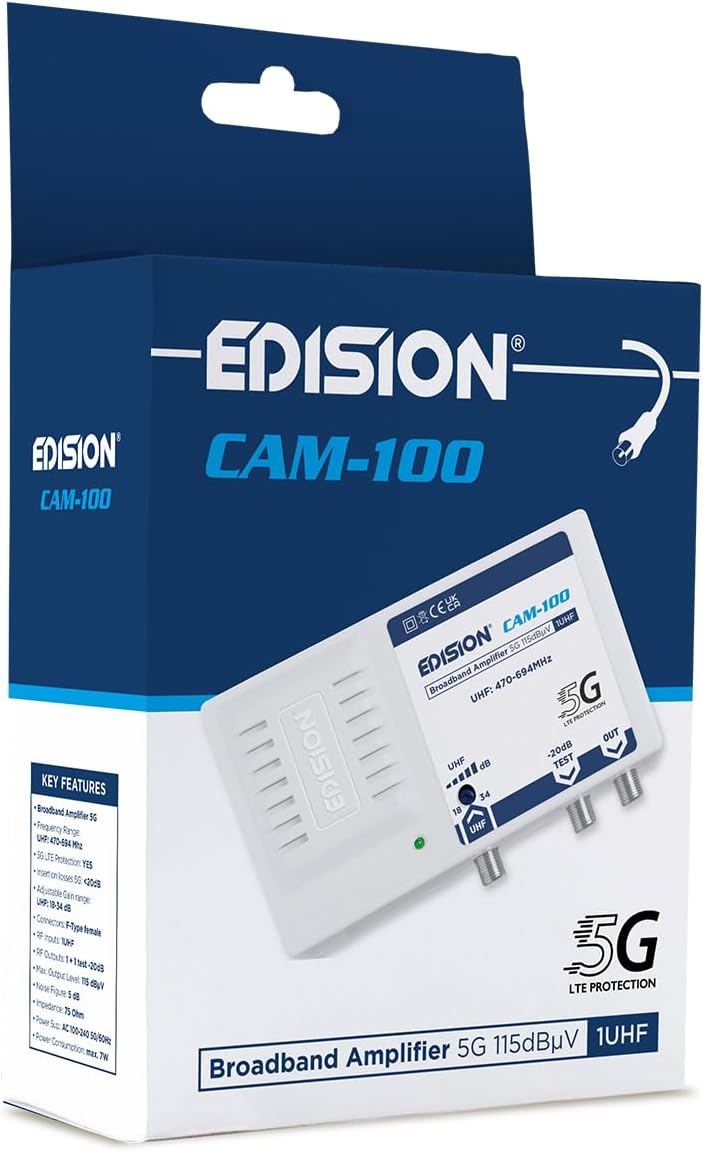
EDISION CAM-100 amplifier presented in its retail box, showcasing the product branding and key features listed on the packaging.
4. สินค้าหมดview
The EDISION CAM-100 is a compact broadband amplifier designed for UHF signals. It features adjustable gain and a built-in 5G LTE filter.

The EDISION CAM-100 broadband amplifier, shown with its power plug, features a single UHF input, adjustable gain from 18-34dB, and two output ports (one main, one -20dB test port). It includes 5G LTE protection and operates within the UHF 470-694MHz frequency range.

ภาพระยะใกล้ด้านหน้า view of the EDISION CAM-100, clearly displaying the UHF input, the adjustable gain knob, the -20dB test output, and the main output port. The 5G LTE PROTECTION label is also visible.

The rear side of the EDISION CAM-100 amplifier, featuring keyhole slots for wall mounting, indicating easy installation.
5. การตั้งค่าและการติดตั้ง
Follow these steps to properly install your EDISION CAM-100 ampเครื่องฟอก:
- การติดตั้ง: Choose a suitable indoor location for the amplifier, away from direct heat or moisture. Use the keyhole slots on the back of the unit to securely mount it to a wall or flat surface.
- การเชื่อมต่อเสาอากาศ: Connect your outdoor UHF antenna cable to the UHF IN พอร์ตบน ampเครื่องขยายเสียง ตรวจสอบให้แน่ใจว่าการเชื่อมต่อแน่นหนาดีแล้ว
- TV Connections: Connect your television(s) to the ออก port(s) of the amplifier using coaxial cables. The main output provides the amplified signal. There is also a -20dB TEST port for signal measurement or connecting a single device with reduced signal.
- การเชื่อมต่อไฟฟ้า: เสียบปลั๊ก amplifier's power cord into a standard AC 100-240V, 50/60Hz electrical outlet. The power indicator LED on the front of the unit should illuminate.
- ปรับกำไร: Turn the adjustable gain knob (labeled UHF dB) to set the desired amplification level. Start with a lower setting and gradually increase it until optimal signal quality is achieved on your television.

An illustrative diagram demonstrating a typical installation scenario for the EDISION CAM-100. It shows an outdoor UHF antenna connected to the amplifier, which then distributes the signal to multiple televisions indoors, including connections for a test point.
6. คู่มือการใช้งาน
Once installed, the EDISION CAM-100 operates continuously when powered. The primary operational adjustment is the gain control.
- ไฟแสดงสถานะพลังงาน: A green LED on the front panel indicates that the amplifier is receiving power and is operational.
- การปรับค่าเกน: Use the rotary knob to adjust the UHF signal gain between 18dB and 34dB. Adjust this setting while monitoring your TV's signal quality meter (if available) or picture quality. The goal is to achieve a strong, stable signal without over-amplification, which can cause distortion.
- ผลลัพธ์การทดสอบ: The -20dB TEST output provides a reduced signal level, useful for connecting a single TV or for signal strength measurements without affecting the main output.
7. การบำรุงรักษา
The EDISION CAM-100 requires minimal maintenance to ensure long-term performance.
- การทำความสะอาด: เช็ดภายนอกตัวเครื่องเป็นระยะด้วยผ้านุ่มและแห้ง ห้ามใช้น้ำยาทำความสะอาดหรือวัสดุขัดถู
- การระบายอากาศ : ตรวจสอบให้แน่ใจว่าช่องระบายอากาศบนอุปกรณ์ไม่ถูกปิดกั้น เพื่อป้องกันความร้อนสูงเกินไป
- การเชื่อมต่อ: ควรตรวจสอบการเชื่อมต่อสายเคเบิลทั้งหมดเป็นระยะ เพื่อให้แน่ใจว่าแน่นหนาและปราศจากสนิม
8 การแก้ไขปัญหา
If you experience issues with your EDISION CAM-100, refer to the following common problems and solutions:
| ปัญหา | สาเหตุที่เป็นไปได้ | สารละลาย |
|---|---|---|
| ไม่มีไฟแสดงสถานะเพาเวอร์ | ไม่มีไฟเข้าเครื่อง | Check power cord connection and wall outlet. Ensure the outlet is live. |
| No signal or weak signal on TV |
|
|
| Distorted picture or sound | Signal over-amplification or interference | Reduce the gain setting. Ensure the 5G LTE filter is effective; if interference persists, check for external sources. |
9. ข้อมูลจำเพาะทางเทคนิค
| คุณสมบัติ | ข้อมูลจำเพาะ |
|---|---|
| แบบอย่าง | CAM-100 (26-01-0403) |
| ช่วงความถี่ | ยูเอชเอฟ 470-694 เมกะเฮิรตซ์ |
| ป้อนข้อมูล | 1 ยูเอชเอฟ |
| เอาท์พุต | 1 Main Output, 1 Test Output (-20dB) |
| กำไรที่ปรับได้ | 18-34 dB (UHF) |
| สูงสุด ระดับเอาต์พุต | 115 เดซิเบลµV |
| กรอง | การป้องกัน 5G LTE |
| แหล่งจ่ายไฟ | ไฟฟ้ากระแสสลับ 100-240 โวลต์, 50/60 เฮิรตซ์ |
| ขนาด | 11 x 14 x 5 ซม. |
| น้ำหนัก | 270 กรัม |
| อุปกรณ์ที่รองรับ | TV antenna, Televisions |
10. ข้อมูลการรับประกัน
EDISION products are covered by a standard manufacturer's warranty against defects in materials and workmanship. Please refer to the warranty card included with your product or visit the official Edision webดูรายละเอียดข้อกำหนดและเงื่อนไขการรับประกันได้ที่เว็บไซต์ เก็บหลักฐานการซื้อไว้เพื่อใช้ในการเรียกร้องการรับประกัน
11. การสนับสนุน
หากต้องการความช่วยเหลือเพิ่มเติม การสนับสนุนด้านเทคนิค หรือ view additional products, please visit the official Edision store or contact customer service:
- Edision Store: Visit the Edision Store on Amazon
- บริการลูกค้า: Refer to the contact information provided in your Quick Start Guide or on the official Edision webเว็บไซต์.


