1. บทนำ
This manual provides detailed instructions for the proper use and maintenance of your BOBLOV A30 Mini Body Camera. Please read this manual thoroughly before operating the device to ensure optimal performance and longevity.

Image: The BOBLOV A30 Mini Body Camera shown with its various accessories, including the charging dock, extra battery, lanyard, bike mount, and clip.
2. อะไรอยู่ในกล่อง
Upon opening your BOBLOV A30 Mini Body Camera package, you should find the following items:
- กล้องติดตัว BOBLOV A30
- แบตเตอรี่แบบชาร์จไฟได้สอง (2) ก้อน
- Dual-Slot Charging Dock
- สาย USB
- ที่ยึดจักรยาน
- สายคล้องคอ
- คลิป
- คู่มือการใช้งาน

Image: A visual representation of all items included in the BOBLOV A30 Mini Body Camera package, laid out neatly.
3. การตั้งค่า
3.1. การติดตั้งและการชาร์จแบตเตอรี่
- Insert a battery into the designated battery compartment on the camera. Ensure it clicks into place securely.
- To charge the batteries, place them into the dual-slot charging dock. Connect the charging dock to a power source using the provided USB cable. The indicator lights on the dock will show charging status.
- A full charge provides up to 7 hours of continuous 1080P recording or 6 hours of 4K recording per battery.
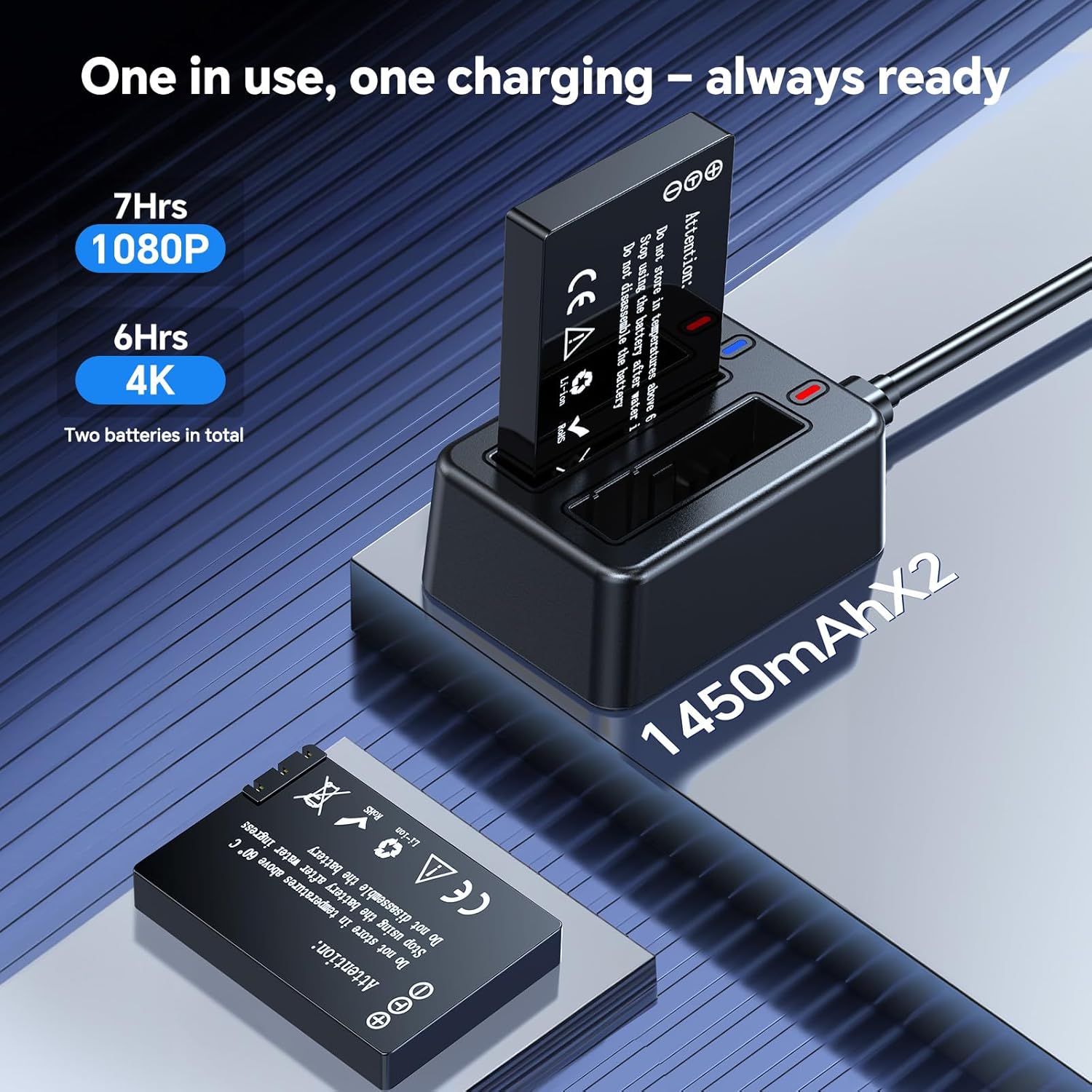
Image: The dual-slot charging dock with two batteries, one inserted and one ready for insertion, illustrating the charging process.
3.2. การติดตั้งการ์ด microSD
The camera supports external microSD cards for storage. Insert a compatible microSD card into the card slot on the camera. Ensure the card is correctly oriented before insertion.
4. คู่มือการใช้งาน
4.1. เปิด/ปิดเครื่อง
กดปุ่มเปิด/ปิดค้างไว้เพื่อเปิดหรือปิดกล้อง
4.2. การบันทึกวิดีโอ
Once powered on, press the Record button to start video recording. Press it again to stop recording. The camera supports 4K Ultra HD resolution for detailed footage.

Image: A comparison showing the clarity of 4K resolution video captured by the BOBLOV A30 Mini Body Camera versus standard resolution.
4.3. เลนส์หมุนได้ 180°
The camera features a 180° rotatable lens, allowing you to adjust the shooting angle as needed. Simply rotate the lens manually to capture footage from various perspectives (forward, upward, downward).

Image: The BOBLOV A30 Mini Body Camera demonstrating its 180° rotatable lens, showing different angles of rotation.
4.4. การบันทึกแบบวนซ้ำ
The camera supports loop recording, which automatically overwrites the oldest footage when the storage card is full. This ensures continuous recording without manual deletion of files.

Image: The BOBLOV A30 Mini Body Camera screen displaying recording information, with icons indicating loop recording and compatibility with Windows and Mac operating systems.
4.5. ตัวเลือกการติดตั้ง
The BOBLOV A30 offers flexible mounting options to suit various activities:
- คลิป: Attach the camera to clothing, bags, or other surfaces.
- เชือกเส้นเล็ก: Wear the camera around your neck for easy access.
- ที่ยึดจักรยาน: Securely attach the camera to bicycle handlebars for outdoor adventures.

Image: The BOBLOV A30 Mini Body Camera displayed with its clip, lanyard, and bike mount accessories, illustrating different ways to wear or attach the camera.

ภาพ: อดีตamples of the BOBLOV A30 Mini Body Camera being used during cycling, hiking, and for educational purposes, demonstrating its versatility.
4.6. การเชื่อมต่อกับคอมพิวเตอร์
Connect the camera to your computer using the provided USB cable to transfer files. The camera is compatible with both Windows and Mac operating systems.
5. การบำรุงรักษา
5.1. การดูแลแบตเตอรี่
To maximize battery life, avoid fully discharging the batteries frequently. Store batteries in a cool, dry place when not in use. Use only the provided charging dock and cable.
5.2. การจัดการการจัดเก็บข้อมูล
โอนย้ายข้อมูลสำคัญเป็นประจำtage from the microSD card to a computer or external storage device. While loop recording prevents storage from filling up, backing up data is recommended.
5.3. การทำความสะอาด
ใช้ผ้าแห้งเนื้อนุ่มเช็ดทำความสะอาดตัวกล้อง สำหรับเลนส์ ให้ใช้ผ้าและน้ำยาทำความสะอาดเลนส์โดยเฉพาะเพื่อป้องกันรอยขีดข่วน ห้ามใช้สารเคมีรุนแรงหรือวัสดุที่มีฤทธิ์กัดกร่อน
6 การแก้ไขปัญหา
- กล้องไม่เปิด: ตรวจสอบให้แน่ใจว่าแบตเตอรี่ชาร์จเต็มแล้วและใส่ถูกต้อง ลองใช้แบตเตอรี่สำรองดู
- ปัญหาการบันทึก: Check if the microSD card is properly inserted and has sufficient free space. Format the card if necessary (this will erase all data).
- คุณภาพวิดีโอไม่ดี: Ensure the lens is clean and free from smudges. Check recording settings to confirm 4K resolution is selected.
- คอมพิวเตอร์ไม่รู้จักกล้อง: Try a different USB port or cable. Ensure the camera is powered on when connected.
7. ข้อมูลจำเพาะ
| คุณสมบัติ | รายละเอียด |
|---|---|
| หมายเลขรุ่น | เอ30 (เอ23) |
| ความละเอียดในการจับภาพวิดีโอ | 4K |
| เทคโนโลยีโฟโต้เซนเซอร์ | ซีมอส |
| เลนส์หมุนได้ | 180 องศา |
| อายุการใช้งานแบตเตอรี่ (1080P) | Up to 7 hours (per battery) |
| อายุการใช้งานแบตเตอรี่ (4K) | Up to 6 hours (per battery) |
| ประเภทหน่วยความจำแฟลช | ไมโคร SD |
| รูปแบบการจับภาพวิดีโอ | เอ็มโอวี |
| ขนาดหน้าจอ | 1.3 นิ้ว |
| เทคโนโลยีการเชื่อมต่อ | ยูเอสบี |
| น้ำหนักสินค้า | 9.9 ออนซ์ |
| สี | สีดำ |
8. การรับประกันและการสนับสนุน
BOBLOV ให้บริการ 24-month product coverage for its supporters. For any technical assistance or inquiries, BOBLOV offers a quick response within 24 hours and lifetime technical support.
For further support or to visit the official store, please refer to the ร้านบ็อบเลิฟ.

Image: BOBLOV brand information highlighting customer satisfaction, global reach, 24-month product coverage, and 24-hour technical support.


