1. บทนำ
This manual provides essential instructions for the safe operation and maintenance of your DEERC D65 4K GPS Camera Drone. Please read this manual thoroughly before operating the drone to ensure proper usage and to prevent damage or injury. The DEERC D65 is an ultra-lightweight, foldable drone equipped with a 4K EIS camera and a 2-axis gimbal, designed for stable aerial photography and intelligent flight.
2. สิ่งที่รวมอยู่
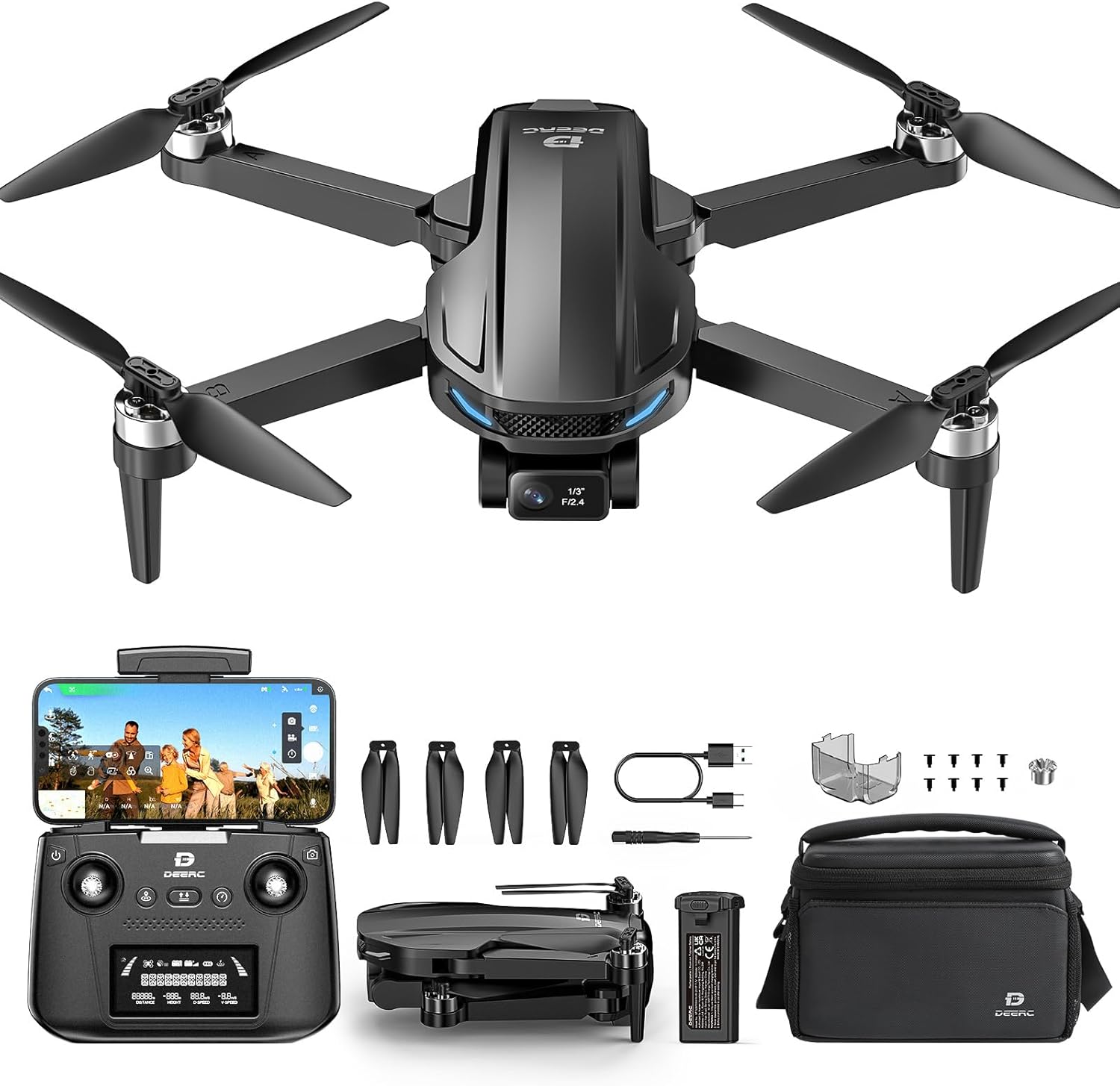
Image: DEERC D65 drone, remote controller, batteries, charging cables, spare propellers, and carrying bag.
- DEERC D65 Drone
- รีโมทคอนโทรล
- Flight Batteries (2 included)
- USB Charging Cables (for drone battery and remote controller)
- ใบพัดสำรอง
- ไขควง
- คู่มือการใช้งาน (เอกสารนี้)
- กระเป๋าใส่ของ
3. การตั้งค่า
3.1 การชาร์จแบตเตอรี่
Ensure both the drone flight battery and the remote controller are fully charged before first use. Use the provided USB charging cables. The drone battery charger will show a solid red light while charging and flash green when fully charged. The remote controller is rechargeable via USB.

Image: Illustration of drone battery charging status indicators.
3.2 กางโดรนออก
ค่อยๆ กางแขนโดรนออกจนกระทั่งล็อคเข้าที่ ตรวจสอบให้แน่ใจว่าใบพัดทุกใบไม่มีสิ่งกีดขวาง

Image: The DEERC D65 drone shown in its compact, folded state and fully unfolded, ready for flight.
3.3 การติดตั้งแบตเตอรี่โดรน
Insert the fully charged battery into the drone's battery compartment until it clicks securely. Ensure the battery is properly seated to prevent power loss during flight.
3.4 Installing the TF Card (Optional)
For storing photos and videos directly on the drone, insert a TF (MicroSD) card (not included) into the designated slot before powering on the drone.
3.5 การเปิด/ปิดเครื่อง
- โดรน : Long press the power button on the drone until the indicator lights turn on.
- รีโมทคอนโทรล: Short press the power button on the remote controller. It will beep once, indicating successful pairing with the drone.
- หมดแรง: Long press the power button on both the drone and remote controller until they power off.
3.6 การดาวน์โหลดแอปและการเชื่อมต่อ
Download the "HolyStone-FPV" app from your device's app store. Connect your mobile device to the drone's Wi-Fi network (usually named "HolyStoneGPS-XXXXXX"). Open the app and select the GPS Model (HS440D is a GPS model) to enter the flight interface.
Video: This video demonstrates the initial setup process, including app download, connection, and basic drone preparation for flight.
3.7 การปรับเทียบเข็มทิศ
Before the first flight, a mandatory compass calibration is required. Follow the on-screen prompts in the app:
- Push both the right and left joysticks simultaneously to the bottom right corner.
- Keep the drone parallel to the floor and rotate it about 3 times.
- Point the head of the drone upward and rotate it about 3 times.
- The transmitter will long beep once, indicating successful compass calibration.
3.8 GPS Signal Search
Place the drone on a flat surface after calibration. The drone will automatically search for GPS signals. The status LED will turn solid green once the search is finished (approximately 1 minute).
3.9 การสอบเทียบไจโร
Push the two joysticks to the bottom left corner to calibrate the gyro.
4. การควบคุมโดรน
4.1 การขึ้นและลงจอด
- ปลดล็อค: Short press the unlock button on the remote controller.
- ถอดออก: Short press the takeoff button to initiate automatic takeoff.
- การลงจอด: Short press the landing button to initiate automatic landing.
4.2 ระดับความเร็ว
The drone offers two speed levels (High/Low). Push the speed button on the remote controller to switch between them.
4.3 การทำงานของกล้อง
The DEERC D65 features a 4K EIS camera with a 2-axis gimbal for stable and clear footage. The camera angle can be adjusted using the scroll wheel on the remote controller.

ภาพ: ระยะใกล้ view of the DEERC D65's 4K EIS camera with 100-degree FOV and 70-degree rudder adjustment.

Image: The DEERC D65 drone highlighting its 2-axis mechanical stabilization gimbal for stable image capture.
- ถ่ายภาพ: Short press the photo button on the remote controller or tap the camera icon in the app.
- บันทึกวิดีโอ: Long press the video button on the remote controller or tap the video icon in the app to start/stop recording.
- การตั้งค่ากล้อง: Access camera settings in the app to choose between 2.5K and 4K resolutions.
- ซูม: Use the zoom slider in the app to zoom in and out.
4.4 โหมดการบินอัจฉริยะ
The DEERC D65 offers several intelligent flight modes for enhanced creativity and ease of use:
- ติดตามฉัน: The drone will track your movement by following the GPS signal from your mobile phone. Ensure the drone's flight range is within 16-98 ft (5-30m).
- เที่ยวบินโคจร: The drone will record its current position as the circle's center, then fly away from it to a set radius distance (default 15 ft / 5m) and begin to circle clockwise.
- จุดแวะพักเที่ยวบิน: Tap the icon on the app interface, then tap a few points on the screen to create a flight path. Submit the path, and the drone will fly along the path created by connecting the points you tapped in order.
- โหมดไม่มีหัว: In Headless Mode, the pilot should stay facing the same direction that the drone's head points to when it takes off. This simplifies control by eliminating the need to orient the drone.
- กลับสู่หน้าหลัก (RTH): Tap the RTH button on the remote controller or in the app to activate. The drone will automatically fly back to its takeoff point. This function is also triggered if the signal drops or the battery runs low.

Image: Visual representation of GPS Follow, Circle Fly, Image Follow, Time-lapse, and Zoom in/out intelligent flight modes.
5. การบำรุงรักษา
- การทำความสะอาด: Use a soft, dry cloth to clean the drone and remote controller. Avoid using solvents or harsh chemicals.
- การเปลี่ยนใบพัด: If propellers are damaged, replace them immediately using the provided screwdriver and spare propellers. Ensure correct propeller orientation (A and B types).
- การดูแลแบตเตอรี่
- เก็บแบตเตอรี่ไว้ในที่แห้งและเย็น
- ห้ามชาร์จแบตเตอรี่มากเกินไปหรือปล่อยประจุมากเกินไป
- หากเก็บรักษาเป็นเวลานาน ควรชาร์จแบตเตอรี่ให้มีระดับประมาณ 50-60%
- พื้นที่จัดเก็บ: Fold the drone arms and store all components in the carrying bag to protect them from dust and damage.
6 การแก้ไขปัญหา
| ปัญหา | สารละลาย |
|---|---|
| โดรนไม่สามารถเปิดเครื่องได้ | Ensure the battery is fully charged and correctly inserted. Long press the power button. |
| ไม่สามารถเชื่อมต่อ Wi-Fi ได้ | Ensure the drone is powered on. Restart your phone's Wi-Fi and search for the drone's network. |
| โดรนลอยไปมาระหว่างบิน | Perform Gyro Calibration and Compass Calibration as described in the Setup section. Ensure flight in an open area with strong GPS signal. |
| คุณภาพกล้องไม่ดี | Ensure the camera lens is clean. Check camera settings in the app for resolution (4K recommended). Fly in stable conditions. |
| รีโมทคอนโทรลไม่ตอบสนอง | Ensure the remote controller is charged and paired with the drone. Re-pair if necessary. |
| Drone does not return to home. | Ensure GPS signal is strong (solid green LED). RTH function relies on accurate GPS positioning. |
7. ข้อมูลจำเพาะ
| คุณสมบัติ | รายละเอียด |
|---|---|
| ยี่ห้อ | เดียร์ค |
| ชื่อรุ่น | RM (D65) |
| สี | สีดำ |
| ความละเอียดในการจับภาพวิดีโอ | 4K |
| ความละเอียดของภาพนิ่งที่มีประสิทธิภาพ | 8 MP |
| เทคโนโลยีการเชื่อมต่อ | ความถี่วิทยุ |
| รูปแบบการจับภาพวิดีโอ | เอ็มพี 4 |
| ประเภทการควบคุม | รีโมทคอนโทรล |
| เทคโนโลยีการสื่อสารไร้สาย | ความถี่วิทยุ |
| ส่วนประกอบของเซลล์แบตเตอรี่ | ลิเธียมโพลีเมอร์ |
| มีแบตเตอรี่รวมอยู่ด้วยหรือไม่ | Yes (2 Nonstandard Battery batteries required) |
| รูปแบบภาพที่รองรับ | MP4, JPEG |
| ความละเอียดเอาท์พุทวิดีโอ | 3840 พิกเซล |
| รวมรีโมตคอนโทรลด้วยไหม? | ใช่ |
| เทคโนโลยีเซ็นเซอร์ออปติคัล | ซีมอส |
| รวมแบตเตอรี่แบบชาร์จไฟได้ | ใช่ |
| ขนาดสินค้า | ยาว 11.5 นิ้ว x กว้าง 8 นิ้ว x สูง 2 นิ้ว |
| น้ำหนักสินค้า | 2.55 pounds (Note: Drone itself is under 249g, package weight is 2.55 lbs) |
8. การรับประกันและการสนับสนุน
For warranty information and customer support, please refer to the documentation included in your product packaging or visit the official DEERC website. Contact customer service for any technical assistance or inquiries.


