1. บทนำ
Welcome to the user manual for your new PELADN Mini PC Gaming WO7. This compact yet powerful desktop computer is designed for a wide range of applications, from gaming and multimedia to office productivity and professional tasks. Equipped with an AMD Ryzen 7 7735U processor, 16GB DDR5 RAM, and a 512GB NVMe SSD, it delivers exceptional performance and responsiveness. Please read this manual thoroughly to ensure proper setup, operation, and maintenance of your device.
2. สินค้าหมดview
2.1 คุณสมบัติหลัก
The PELADN Mini PC Gaming WO7 boasts a range of features designed for high performance and versatility:
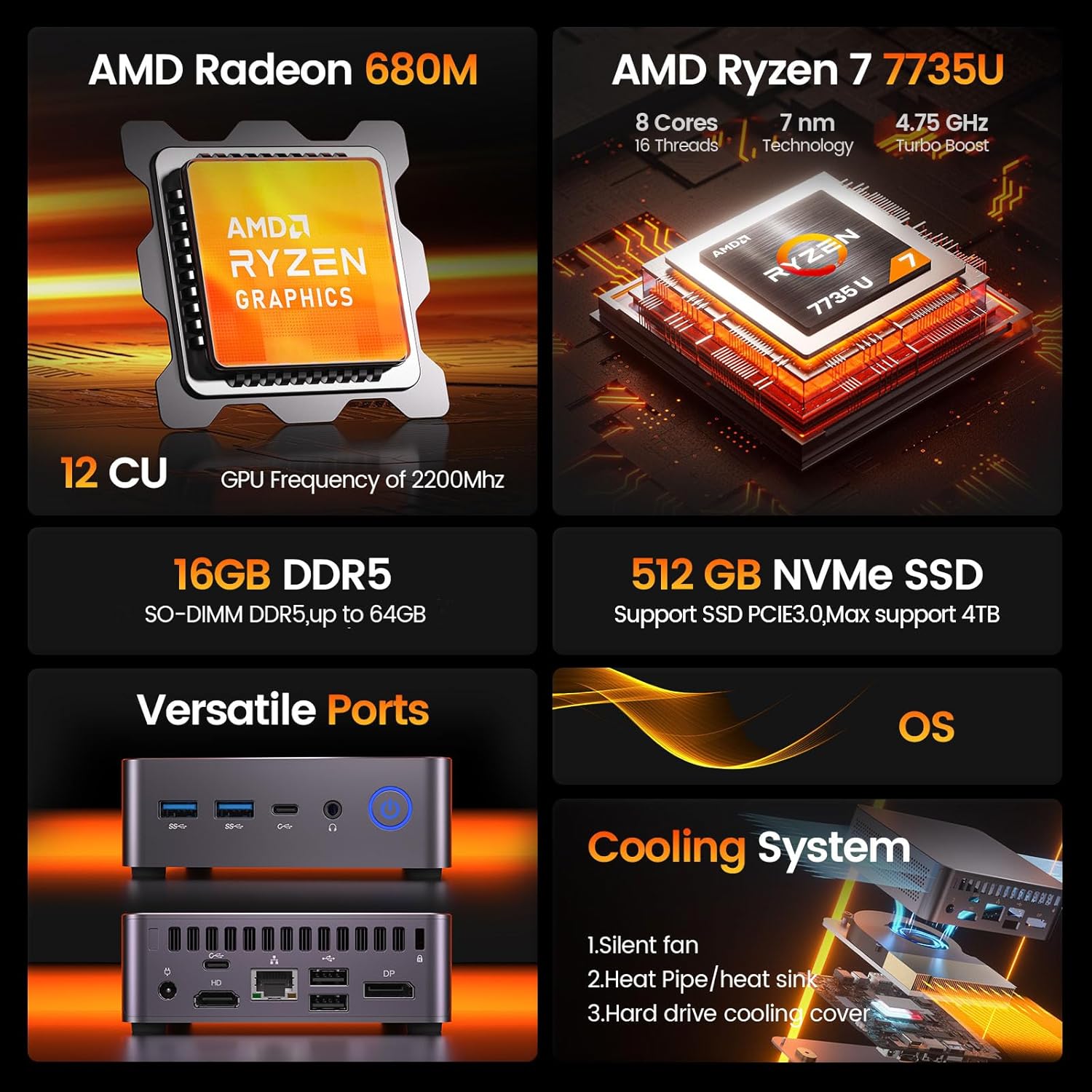
รูปที่ 2.1.1: โอเวอร์view of the PELADN Mini PC WO7's core specifications, highlighting its AMD Ryzen 7 7735U processor, AMD Radeon 680M graphics, 16GB DDR5 RAM, 512GB NVMe SSD, versatile ports, and efficient cooling system.
- โปรเซสเซอร์: AMD Ryzen 7 7735U (8 Cores/16 Threads, up to 4.75Ghz)
- กราฟิก: Integrated AMD Radeon 680M GPU (12 CU, 2200 MHz)
- หน่วยความจำ: แรม DDR5 ขนาด 16GB (สามารถเพิ่มได้สูงสุดถึง 64GB)
- พื้นที่จัดเก็บ: 512GB NVMe SSD (PCIe 3.0, expandable up to 4TB)
- การแสดงผลเอาท์พุต: Quadruple 4K/60Hz display support via DP, HD, and Dual Type-C ports
- การเชื่อมต่อไร้สาย: WiFi 6 และบลูทูธ 5.2
- ระบบปฏิบัติการ: Pre-installed OS (supports Linux, Ubuntu)
- ระบบระบายความร้อน : Efficient Peladn IceBlast 1.5 Cooling Technology with triple copper heat pipes and silent fan.
- การออกแบบที่กะทัดรัด: Small form factor (0.46L volume) for space-saving and portability.

Figure 2.1.2: Detailed specifications of the AMD Ryzen 7 7735U processor, including its 4.75 GHz turbo boost, 30W TDP, 8 cores, 16 threads, and 16MB L3 cache, alongside its Cinebench R23 multi-core and single-core performance benchmarks.

Figure 2.1.3: Information on the AMD Radeon 680M integrated graphics, highlighting its 12 compute units and 2200 MHz GPU frequency, designed for smooth gaming, entertainment, and multitasking.

Figure 2.1.4: Diagram illustrating the Peladn IceBlast 1.5 Cooling Technology, featuring triple copper heat pipes, multiple fan blades, and a top heat conductor for efficient thermal management.

Figure 2.1.5: Visual representation of the PELADN Mini PC WO7's compact dimensions (113mm x 113mm x 36mm) and design elements such as durable housing, smooth rounded edges, and responsive physical buttons.
2.2 ส่วนประกอบและพอร์ต
Familiarize yourself with the various components and ports of your PELADN Mini PC WO7.
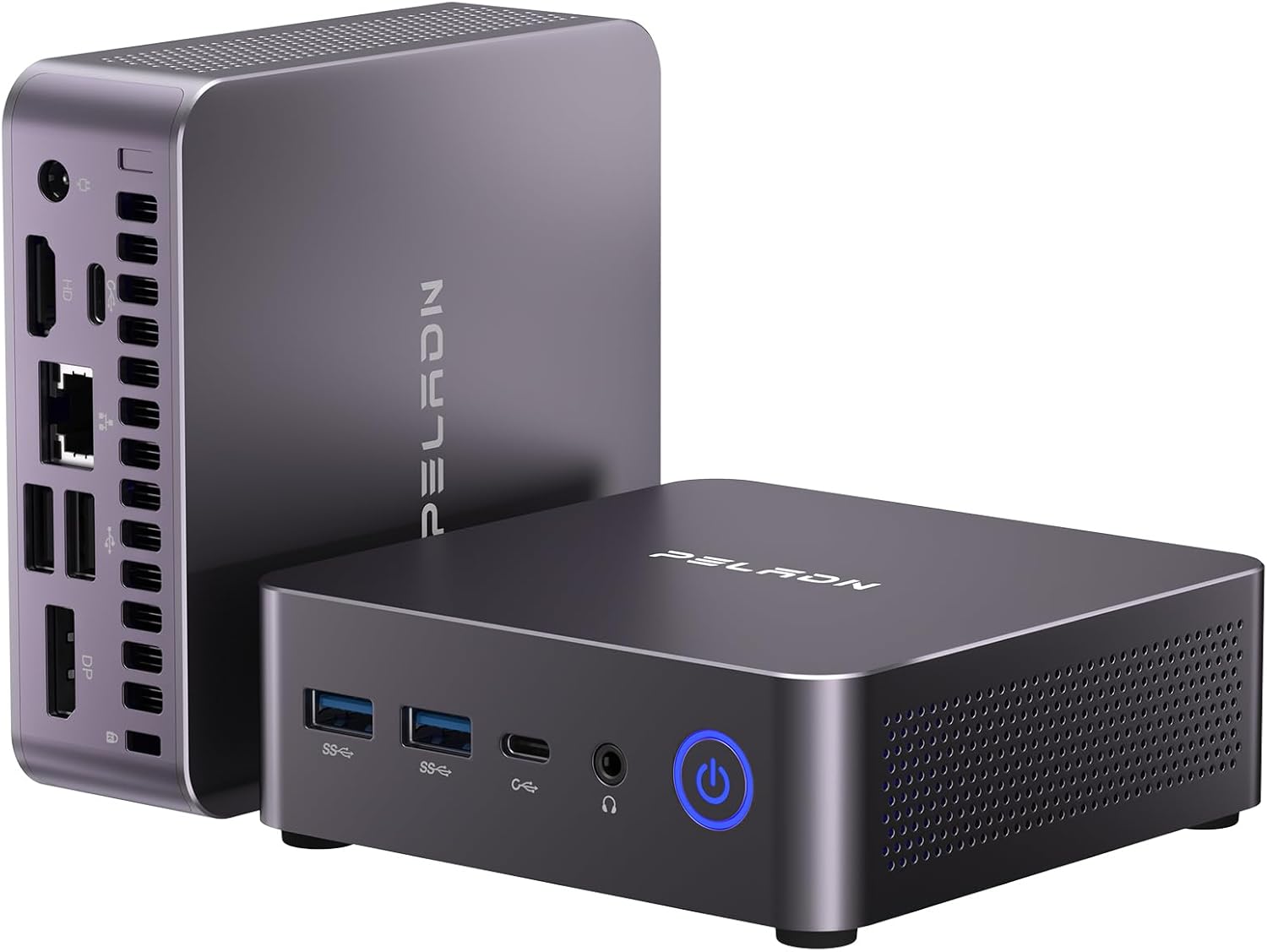
รูปที่ 2.2.1: ด้านหน้าและด้านข้าง view of the PELADN Mini PC WO7, showcasinด้วยดีไซน์ที่กะทัดรัดและตัวเลือกการเชื่อมต่อที่หลากหลาย

รูปที่ 2.2.2: รายละเอียด view of the front and rear ports of the PELADN Mini PC WO7. Front ports include 2x USB 3.2, 2x Type-C, 2-in-1 audio jack, and power button. Rear ports include DC power, HD, LAN (2.5G), 2x USB 2.0, DP, and anti-theft lock.
- แผงด้านหน้า:
- พอร์ต USB 2 จำนวน 3.2 พอร์ต
- 2 x Type-C USB 3.2 Ports
- 1 x 2-in-1 Audio Jack (Headphone & Microphone)
- 1 x ปุ่มเปิดปิด
- แผงด้านหลัง:
- 1 x DC Jack (Power Input)
- 1 x HD 2.0 Port
- 1 x RJ45 LAN Port (2.5G)
- พอร์ต USB 2 จำนวน 2.0 พอร์ต
- 2 x DP 1.4 Ports
- 1 x Anti-theft Lock Slot
3. คู่มือการติดตั้ง
3.1 อะไรอยู่ในกล่อง
ก่อนเริ่ม โปรดตรวจสอบให้แน่ใจว่ามีสิ่งของครบถ้วนในบรรจุภัณฑ์:

Figure 3.1.1: Contents of the PELADN Mini PC WO7 package, including the PC unit, power adapter, HD cable, VESA mount with screws, and user manual.
- 1 x PELADN WO7 Mini PC
- อะแดปเตอร์ไฟฟ้า 1 ตัว
- สาย 1 x HD
- 1 x ขาตั้ง VESA พร้อมสกรู
- 1 x คู่มือผู้ใช้ (เอกสารนี้)
3.2 การเชื่อมต่อมินิพีซีของคุณ
- การเชื่อมต่อไฟฟ้า: Connect the power adapter to the DC Jack on the rear panel of the Mini PC, then plug the adapter into a power outlet.
- การเชื่อมต่อจอภาพ: Connect your monitor(s) to the Mini PC using the HD, DP, or Type-C ports. The Mini PC supports up to four 4K displays simultaneously.
- อุปกรณ์ต่อพ่วง: เชื่อมต่อคีย์บอร์ด เมาส์ และอุปกรณ์ USB อื่นๆ ของคุณเข้ากับพอร์ต USB 3.2 หรือ USB 2.0 ที่ว่างอยู่
- การเชื่อมต่อเครือข่าย: For a wired connection, connect an Ethernet cable to the RJ45 LAN port. For wireless, the Mini PC supports WiFi 6.
- อุปกรณ์เสียง: Connect headphones or speakers to the 2-in-1 audio jack on the front panel.

Figure 3.2.1: Illustration of the PELADN Mini PC WO7 supporting a quadruple 4K display setup, demonstrating its versatile video output capabilities for enhanced productivity or entertainment.
3.3 การเปิดเครื่องครั้งแรก
Once all connections are secure, press the power button on the front panel to turn on the Mini PC. The system will boot into the pre-installed operating system. Follow the on-screen instructions for initial setup, including language, region, and network configuration.
4. คู่มือการใช้งาน
ระบบปฏิบัติการ 4.1
Your PELADN Mini PC comes with an operating system pre-installed. It also supports other operating systems like Linux and Ubuntu. For detailed instructions on using the operating system, please refer to the respective OS documentation.
4.2 การขยายพื้นที่จัดเก็บข้อมูลและหน่วยความจำ
The Mini PC is equipped with 16GB DDR5 RAM and a 512GB NVMe SSD. For users requiring more memory or storage, the system supports expansion:
- แรม : Expandable up to 64GB DDR5 RAM.
- เอสดีเอสดี: Supports M.2 NVMe SSD expansion up to 4TB.

รูปที่ 4.2.1: ภายใน view highlighting the DDR5 RAM and NVMe SSD slots, illustrating the upgrade potential of the PELADN Mini PC WO7 for increased memory and storage capacity.

Figure 4.2.2: Comparison of speed increases for DDR5 RAM (up to 4800MHz) and NVMe SSD (up to 3500MB/s), demonstrating the performance benefits of these components in the PELADN Mini PC WO7.
Note: Upgrading internal components should be performed by users with technical expertise. Refer to the detailed upgrade guide (if available separately) or consult professional assistance to avoid damage.
4.3 การเชื่อมต่อแบบไร้สาย
The Mini PC features high-speed WiFi 6 and Bluetooth 5.2 for seamless wireless connections.
- ไวไฟ 6: Provides faster internet speeds for browsing, streaming, and gaming. Access network settings in your operating system to connect to available WiFi networks.
- Bluetooth 5.2: Enables stable and efficient connection to various wireless devices such as keyboards, mice, headphones, and speakers. Pair devices through your operating system's Bluetooth settings.

Figure 4.3.1: Visual representation of the PELADN Mini PC WO7's advanced wireless capabilities, including WiFi 6 and Bluetooth 5.2 for enhanced connectivity and a smoother user experience.
5. การบำรุงรักษา
5.1 การทำความสะอาด
- Keep the Mini PC clean and free from dust. Use a soft, dry cloth for external surfaces.
- Periodically clean the ventilation holes to ensure proper airflow and prevent overheating. A can of compressed air can be used for this purpose.
- Do not use liquid cleaners or aerosol sprays directly on the device.
5.2 การจัดวางที่เหมาะสมที่สุด
- Place the Mini PC on a stable, flat surface.
- ตรวจสอบให้แน่ใจว่ามีการระบายอากาศที่ดีรอบๆ อุปกรณ์ หลีกเลี่ยงการวางไว้ในที่ปิดทึบหรือใกล้แหล่งความร้อน
- The included VESA mount allows for discreet mounting behind a monitor or TV, optimizing desk space.

Figure 5.2.1: The PELADN Mini PC WO7 demonstrating its portability, easily fitting into a bag, and the option for VESA mounting to save space and create a clean workstation.
5.3 การอัปเดตซอฟต์แวร์
Regularly update your operating system and drivers to ensure optimal performance, security, and compatibility. Refer to your operating system's documentation for instructions on checking and installing updates.
6 การแก้ไขปัญหา
This section provides solutions to common issues you might encounter with your PELADN Mini PC.
| ปัญหา | สาเหตุที่เป็นไปได้ | สารละลาย |
|---|---|---|
| No power/System does not turn on | อะแดปเตอร์แปลงไฟไม่ได้เชื่อมต่ออย่างถูกต้อง; ปัญหาเกี่ยวกับปลั๊กไฟ; อะแดปเตอร์แปลงไฟชำรุด | Ensure power adapter is securely connected to both the PC and the outlet. Try a different power outlet. Test with another compatible power adapter if available. |
| ไม่มีการแสดงผลบนจอภาพ | Display cable loose or incorrect; Monitor input not selected; Monitor faulty. | Check display cable connections (HD, DP, Type-C). Ensure the monitor is set to the correct input source. Test with a different monitor or cable. |
| ประสิทธิภาพการทำงานช้า | มีแอปพลิเคชันเปิดใช้งานมากเกินไป; หน่วยความจำ RAM ไม่เพียงพอ; เครื่องร้อนเกินไป | Close unnecessary applications. Consider upgrading RAM if frequently experiencing slowdowns. Ensure proper ventilation and clean dust from vents. |
| ปัญหาการเชื่อมต่อ Wi-Fi/Bluetooth | Driver issues; Interference; Incorrect settings. | Check Wi-Fi/Bluetooth drivers in Device Manager. Restart the Mini PC and your router/Bluetooth device. Ensure no strong interference sources are nearby. |
| ระบบค้างหรือล่ม | Software conflict; Driver issues; Overheating; Hardware malfunction. | Update drivers and operating system. Check for malware. Monitor temperatures. If issues persist, consider a system restore or professional diagnosis. |
If the problem persists after trying these solutions, please contact PELADN customer support for further assistance.
7. ข้อมูลจำเพาะ
Detailed technical specifications for the PELADN Mini PC Gaming WO7.
| คุณสมบัติ | ข้อมูลจำเพาะ |
|---|---|
| แบบอย่าง | WO7 |
| โปรเซสเซอร์ | AMD Ryzen 7 7735U (8C/16T, up to 4.75Ghz) |
| กราฟฟิก | Integrated AMD Radeon 680M (12 CU, 2200 MHz) |
| แรม | หน่วยความจำ DDR5 16GB (สามารถเพิ่มได้ถึง 64GB) |
| พื้นที่จัดเก็บ | 512GB NVMe SSD (PCIe 3.0, Max 4TB) |
| การแสดงผลเอาท์พุต | HD 2.0, DP 1.4, 2x Type-C (Supports Quadruple 4K/60Hz Displays) |
| การเชื่อมต่อแบบไร้สาย | ไวไฟ 6, บลูทูธ 5.2 |
| แลน | 2.5G RJ45 Ethernet |
| พอร์ต USB | 2x USB 3.2, 2x USB 2.0, 2x Type-C USB 3.2 |
| เสียง | 1x 2-in-1 Audio Jack (HP&MIC) |
| ระบบปฏิบัติการ | Pre-installed OS (Supports Linux, Ubuntu) |
| ขนาด | Approx. 113mm x 113mm x 36mm (0.46L volume) |
| น้ำหนัก | ประมาณ 2.4 ปอนด์ |
8. การรับประกันและการสนับสนุน
8.1 ข้อมูลการรับประกัน
Your PELADN Mini PC Gaming WO7 comes with a standard manufacturer's warranty. Please refer to the warranty card included in your package or visit the official PELADN webดูรายละเอียดข้อกำหนดและเงื่อนไขการรับประกันได้ที่เว็บไซต์ เก็บหลักฐานการซื้อไว้เพื่อใช้ในการเรียกร้องการรับประกัน
8.2 การสนับสนุนลูกค้า
For technical support, troubleshooting assistance, or any inquiries regarding your PELADN Mini PC, please contact our customer support team:
- การสนับสนุนทางออนไลน์: Visit the official PELADN store on Amazon (PELADN Store on Amazon(สำหรับคำถามที่พบบ่อย การดาวน์โหลดไดรเวอร์ และข้อมูลการติดต่อ)
- การสนับสนุนทางอีเมล์: ดูที่บรรจุภัณฑ์ผลิตภัณฑ์ของคุณหรือที่ทางการ webไซต์สำหรับที่อยู่อีเมลสนับสนุนเฉพาะ
When contacting support, please have your product model (WO7) and purchase details ready.

