1. บทนำ
The Bose SoundLink Flex (2nd Gen) is a portable Bluetooth speaker designed to deliver high-fidelity audio with deep bass. Its rugged, waterproof, and dustproof construction makes it suitable for various environments, including outdoor use. This manual provides essential information for setting up, operating, maintaining, and troubleshooting your speaker.
2. ข้อมูลด้านความปลอดภัย
Please read and retain all safety and use instructions. This product contains small parts that may be a choking hazard. Keep out of reach of children. Do not expose the speaker to extreme temperatures. Use only the charging cable provided or a certified USB-C cable. Avoid dropping or subjecting the speaker to strong impacts.
3. อะไรอยู่ในกล่อง
- SoundLink Flex Speaker (2nd Gen)
- USB-C® (C to A) cable
- เอกสารความปลอดภัย
4. สินค้าหมดview
4.1. ส่วนประกอบของลำโพง
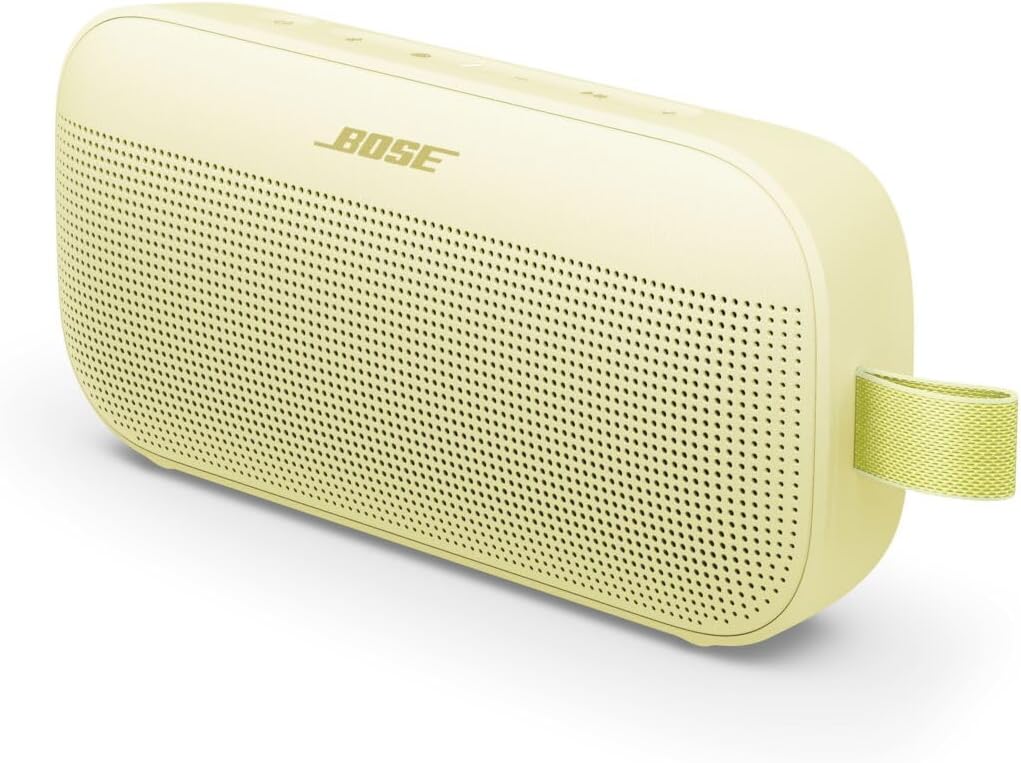
The image above displays the Bose SoundLink Flex (2nd Gen) portable Bluetooth speaker in Citrus Yellow, showcasing its compact, rectangular design with a perforated speaker grille and a durable utility loop on the side.
4.2. การควบคุมและตัวชี้วัด
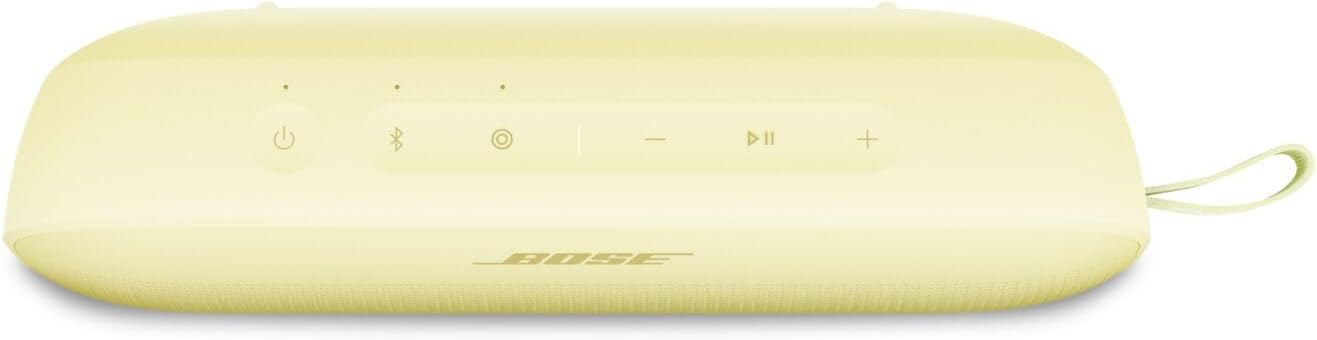
This image shows the top panel of the Bose SoundLink Flex (2nd Gen) speaker, highlighting the control buttons for power, Bluetooth pairing, volume adjustment, and a multi-function button.
- ปุ่มเพาเวอร์ (⏻): กดเพื่อเปิดหรือปิด
- ปุ่มบลูทูธ (🖧): กดเพื่อเข้าสู่โหมดจับคู่บลูทูธ
- ลดเสียงลง (-): ลดระดับเสียง
- ปุ่มมัลติฟังก์ชั่น (●): Controls playback (play/pause), track skipping, and voice assistant access.
- เพิ่มระดับเสียง (+): เพิ่มระดับเสียง
- ไฟแสดงสถานะแบตเตอรี่: แสดงระดับแบตเตอรี่ปัจจุบัน
- ตัวบ่งชี้บลูทูธ: แสดงสถานะการเชื่อมต่อบลูทูธ
4.3. พอร์ต

The image displays the side of the Bose SoundLink Flex (2nd Gen) speaker, clearly showing the USB-C charging port, which is protected by a cover to maintain its waterproof rating.
- พอร์ต USB-C: ใช้สำหรับชาร์จลำโพง
5. การตั้งค่า
5.1. ชาร์จลำโพง
Before initial use, fully charge the speaker. Connect the USB-C (C to A) cable to the speaker's USB-C port and the other end to a USB wall charger (not included) or a computer's USB port. The battery indicator will show charging status.
5.2. การเปิด/ปิดเครื่อง
กดปุ่ม Power (⏻) to turn the speaker on or off. A tone will indicate the power status.
5.3. การจับคู่บลูทู ธ
- Turn on the speaker. The Bluetooth indicator will slowly pulse blue.
- On your device (smartphone, tablet, laptop), enable Bluetooth and select "Bose SoundLink Flex" from the list of available devices.
- Once connected, the Bluetooth indicator will glow solid white, and you will hear an audible confirmation.
- To pair another device, press and hold the Bluetooth button (🖧) until the indicator pulses blue again, then repeat step 2.
5.4. Using the Bose Connect App
Download the Bose Connect app for additional features, including EQ adjustment, battery life monitoring, Bluetooth connection management, and shortcut customization. The app also facilitates Party Mode and Stereo Mode setup.
6. ปฏิบัติการ
6.1. การเล่นเสียง
Once connected via Bluetooth, play audio from your device. Use the speaker's Multi-function button (●) for playback control:
- กดหนึ่งครั้งเพื่อเล่นหรือหยุดชั่วคราว
- กดสองครั้งเพื่อข้ามไปข้างหน้า
- กดสามครั้งเพื่อข้ามย้อนกลับ
6.2. ปรับระดับเสียง
Use the Volume Up (+) and Volume Down (-) buttons on the speaker or your connected device to adjust the audio volume.
6.3. PositionIQ Technology
The SoundLink Flex features PositionIQ technology, which automatically detects the speaker's orientation (standing up, lying flat, or hanging) and optimizes the sound output for the best listening experience.
6.4. Party Mode and Stereo Mode
You can link two compatible Bose speakers for a more expansive audio experience:
- โหมดปาร์ตี้: Play the same audio on both speakers for a larger sound field.
- โหมดสเตอริโอ: Designate one speaker as the left channel and the other as the right channel for true stereo separation.
These modes are typically configured through the Bose Connect app.
6.5. โทรออก
The speaker includes a built-in microphone. When a call comes in, the music will pause. Press the Multi-function button (●) once to answer or end a call.
7. การบำรุงรักษา
7.1. การทำความสะอาด
เช็ดลำโพงด้วย d . นุ่มๆamp cloth. Do not use any solvents, chemicals, or abrasive cleaning agents. Ensure the USB-C port cover is securely closed before cleaning with water.
7.2. ความทนทานต่อน้ำและฝุ่นละออง
The SoundLink Flex is IP67-rated, meaning it is waterproof and dustproof. It can withstand immersion in water up to 1 meter (3.3 feet) for up to 30 minutes. Always ensure the USB-C port cover is fully sealed to maintain its water resistance.
7.3. การดูแลแบตเตอรี่
For optimal battery life, avoid fully discharging the speaker frequently. Store the speaker in a cool, dry place when not in use for extended periods. Recharge the battery periodically if stored for long durations.
8 การแก้ไขปัญหา
| ปัญหา | วิธีแก้ปัญหาที่เป็นไปได้ |
|---|---|
| ลำโพงไม่เปิด | ตรวจสอบให้แน่ใจว่าแบตเตอรี่ชาร์จเต็มแล้ว เชื่อมต่อกับแหล่งจ่ายไฟโดยใช้สาย USB-C |
| ไม่สามารถจับคู่ผ่านบลูทูธได้ | Ensure the speaker is in pairing mode (pulsing blue light). Check your device's Bluetooth settings. Move the speaker closer to your device. |
| ไม่มีเสียงหรือเสียงเบา | เพิ่มระดับเสียงทั้งบนลำโพงและอุปกรณ์ที่เชื่อมต่อ ตรวจสอบให้แน่ใจว่าลำโพงไม่ได้ถูกปิดเสียงไว้ |
| คุณภาพเสียงไม่ดี | Move the speaker closer to your device. Avoid obstructions between the speaker and device. Check for interference from other wireless devices. |
| ผู้พูดไม่ตอบสนอง | Perform a soft reset by pressing and holding the Power button for 10 seconds until the speaker turns off. Then power it back on. |
9. ข้อมูลจำเพาะ
| คุณสมบัติ | รายละเอียด |
|---|---|
| ชื่อรุ่น | Bose SoundLink Flex Speaker (2nd Gen) |
| ประเภทลำโพง | ลำโพงแบบพกพา |
| เทคโนโลยีการเชื่อมต่อ | บลูทูธ 5.3 |
| ช่วงสาย | สูงถึง 30 ฟุต (9 เมตร) |
| ระดับความต้านทานต่อน้ำ | IP67 (กันน้ำและกันฝุ่น) |
| อายุการใช้งานแบตเตอรี่ | Up to 12 hours (at typical listening levels) |
| พอร์ตชาร์จ | ยูเอสบี-ซี |
| โหมดเอาต์พุตเสียง | Stereo (when paired with another compatible Bose speaker) |
| น้ำหนักสินค้า | 0.59 กิโลกรัม (1.3 ปอนด์) |
| ขนาดสินค้า | ลึก 3.56 นิ้ว x กว้าง 7.93 นิ้ว x สูง 2.06 นิ้ว |
| วิธีการควบคุม | แอป ปุ่มกด |
10. การรับประกันและการสนับสนุน
The Bose SoundLink Flex (2nd Gen) is covered by a manufacturer's warranty. For specific warranty details, registration, and technical support, please visit the official Bose webหรือติดต่อฝ่ายบริการลูกค้าของ Bose โปรดเก็บหลักฐานการซื้อไว้เพื่อใช้ในการเคลมประกัน
For additional support and product information, visit: www.bose.com


