1. บทนำ
This manual provides comprehensive instructions for the Techkey MFi Certified USB 3.0 3-in-1 Flash Drive, designed for secure and efficient data transfer and backup across various devices. This 512GB external storage device features USB, Lightning, and Type-C interfaces, ensuring compatibility with iOS devices (iOS 12.1 and above), OTG Android phones, and PCs (Windows 7 and above) and Mac devices (MAC 10.6 and above).
The flash drive is MFi certified, indicating compliance with Apple's performance standards. Its robust metal construction and advanced chip technology contribute to its dustproof, drop-proof, and anti-magnetic properties, safeguarding your data.

Figure 1.1: Techkey 3-in-1 Flash Drive. This image displays the compact design of the flash drive, highlighting its three distinct connectors: USB-A, Lightning, and USB-C. The device is presented alongside its product packaging, emphasizing its MFi certification.

Figure 1.2: Advanced Technology and Certifications. This image highlights the internal high-tech chip and various authority certifications, underscoring the product's quality and adherence to industry standards.
2. การตั้งค่าและการใช้งานเบื้องต้น
2.1 ความเข้ากันได้ของอุปกรณ์
The Techkey flash drive is compatible with a wide range of devices:
- อุปกรณ์ iOS: ต้องใช้ iOS เวอร์ชัน 12.1 ขึ้นไป
- อุปกรณ์แอนดรอยด์: Compatible with OTG-enabled Android phones.
- พีซี: Supports Windows 7 and above.
- Mac Devices: Supports MAC 10.6 and above.
2.2 iOS Device Setup (U-Disk App)
For iOS devices, the "U-Disk" application is required for full functionality. Follow these steps:
- เชื่อมต่อไดรฟ์: Insert the Lightning connector of the flash drive into your iOS device.
- App Prompt: Your device will automatically prompt you to download the "U-Disk" app from the App Store. If not, manually search for "U-Disk" in the App Store and install it.
- เปิดแอป: Open the "U-Disk" app. The app will detect the connected flash drive.
- การอนุญาติ: Follow any on-screen prompts to grant necessary permissions for the app to access your device's photos, videos, and contacts.

Figure 2.1: Connecting the Flash Drive to Devices. This image shows the Techkey flash drive connected to both an iPhone and a MacBook, demonstrating its versatility across different operating systems and device types.
2.3 Android and PC Device Setup
For Android and PC devices, no additional application download is required. The flash drive functions as a standard external storage device.
- เชื่อมต่อไดรฟ์: Insert the appropriate connector (USB-A for PC/Mac, USB-C for compatible Android/Mac devices) into your device.
- เข้าถึง Files: The device will recognize the flash drive as an external storage unit. You can access its contents through your device's file manager (e.g., "My Files" on Android, "File Explorer" on Windows, "Finder" on Mac).

Figure 2.2: Multi-Interface Design. This diagram illustrates the three distinct interfaces of the Techkey flash drive: USB 3.0 for PCs and laptops, Lightning for Apple iPhones and iPads, and USB-C for modern Android devices and MacBooks. This highlights the drive's broad compatibility.
3. การดำเนินการ
3.1 File Transfer and Backup (iOS via U-Disk App)
The U-Disk app simplifies file management for iOS devices:
- สำรองข้อมูลด้วยคลิกเดียว: Within the U-Disk app, locate the "One-Click Backup" function to quickly back up photos, videos, and contacts from your iPhone/iPad to the flash drive. This frees up internal device storage.
- การโอนด้วยตนเอง: You can also manually select specific files (photos, videos, documents) within the app and transfer them to designated folders on the flash drive.
- In-App Camera: Photos and videos captured using the in-app camera feature are automatically saved directly to the flash drive, bypassing your device's internal storage.

Figure 3.1: Versatile Use Cases. This image illustrates various applications of the flash drive, including storing files, transferring data between devices, watching media directly from the drive, and using it for sharing content.
3.2 File Transfer (Android/PC/Mac)
For Android, PC, and Mac devices, file การถ่ายโอนข้อมูลคล้ายกับการใช้แฟลชไดรฟ์ USB มาตรฐานทั่วไป:
- ลากและวาง: Open the flash drive in your device's file manager. Drag and drop files or folders between your device's storage and the flash drive.
- คัดลอกวาง: เลือก files, right-click (or long-press on Android) to copy, navigate to the desired destination on the flash drive, and paste.
3.3 การเข้ารหัสข้อมูล
The U-Disk app (for iOS) provides data encryption features to protect your sensitive information:
- Full Drive Encryption: You can enable Touch ID/Passcode protection for the entire flash drive within the U-Disk app.
- เฉพาะเจาะจง File การเข้ารหัส: Alternatively, encrypt individual files or folders to secure them while leaving other content accessible.
3.4 Media Playback and Sharing
- On-the-Go Playback: Store movies and music on the flash drive and play them directly from the drive on your connected device (iOS via U-Disk app, Android/PC via native media players).
- Social Media Sharing (iOS): The U-Disk app allows direct sharing of photos, videos, and files from the flash drive to social media platforms like Facebook.

รูปที่ 3.2: รองรับ File Formats. This graphic details the extensive range of file formats supported by the flash drive, including common video (MP4, MOV), music (MP3, WAV), picture (BMP, JPG, GIF), and office document (PDF, WORD, EXCEL) types, ensuring broad compatibility for various data.

Figure 3.3: Direct Sharing Capabilities. This image illustrates the ease of sharing content directly from the flash drive to popular social media platforms, indicated by icons such as Facebook, YouTube, TikTok, and Instagram, enhancing connectivity and user convenience.
4. การบำรุงรักษา
- การดูแลทางกายภาพ: The flash drive is designed to be dustproof, drop-proof, and anti-magnetic. However, avoid excessive force, extreme temperatures, or prolonged exposure to moisture to ensure longevity.
- การป้องกันตัวเชื่อมต่อ: Utilize the provided protective caps for the connectors when the drive is not in use to prevent dust and damage.
- การกำจัดอย่างปลอดภัย: Always safely eject the flash drive from your computer or device before physically removing it to prevent data corruption.
- การอัปเดตซอฟต์แวร์: For iOS users, regularly check the App Store for updates to the "U-Disk" app to ensure optimal performance and security.
5 การแก้ไขปัญหา
- Issue: Flash drive not recognized by iOS device.
- สารละลาย: Ensure the "U-Disk" app is installed and open. Verify your iOS version is 12.1 or above. Try disconnecting and reconnecting the drive. Check for any pending app updates.
- Issue: Flash drive not recognized by Android/PC/Mac.
- สารละลาย: Ensure the correct connector (USB-A or USB-C) is fully inserted. For Android, confirm your device supports OTG. Try connecting to a different USB port. Restart your device.
- ปัญหา: ความเร็วในการถ่ายโอนข้อมูลช้า
- สารละลาย: Transfer speeds can vary based on file size, device, and other active processes. Ensure you are using a USB 3.0 compatible port for optimal speeds on PCs. Close unnecessary applications during transfer. Large numbers of small files may transfer slower than a single large file of equivalent size.
- Issue: Data corruption or loss.
- สารละลาย: Always safely eject the drive before removal. Avoid disconnecting during active transfers. If data loss occurs, cease using the drive immediately and consult data recovery specialists if the data is critical. Regularly back up important data to multiple locations.
- Issue: App prompts for permissions repeatedly (iOS).
- สารละลาย: Go to your iOS device's Settings > Privacy & Security > Photos/Contacts and ensure the "U-Disk" app has the necessary access permissions. Restart the app and reconnect the drive.
6. ข้อมูลจำเพาะ
| คุณสมบัติ | รายละเอียด |
|---|---|
| ยี่ห้อ | เทคกี้ |
| หมายเลขรุ่น | 641837950535 |
| ความจุของหน่วยความจำ | 512GB |
| เทคโนโลยีการเชื่อมต่อ | USB 3.0, Lightning, USB Type C |
| Read Speed (USB) | สูงถึง 40 MB/วินาที |
| Write Speed (USB) | สูงถึง 20 MB/วินาที |
| Read Speed (Lightning) | สูงถึง 30 MB/วินาที |
| Write Speed (Lightning) | สูงถึง 25 MB/วินาที |
| Read Speed (Type C) | สูงถึง 30 MB/วินาที |
| Write Speed (Type C) | สูงถึง 25 MB/วินาที |
| สี | ดอกกุหลาบสีชมพู |
| ขนาดสินค้า (กxยxส) | 5.43 x 3.94 x 0.04 นิ้ว |
| น้ำหนักสินค้า | 2.39 ออนซ์ |
| คุณสมบัติพิเศษ | Wear Resistant, MFi Certified, Dustproof, Drop-proof, Anti-magnetic |
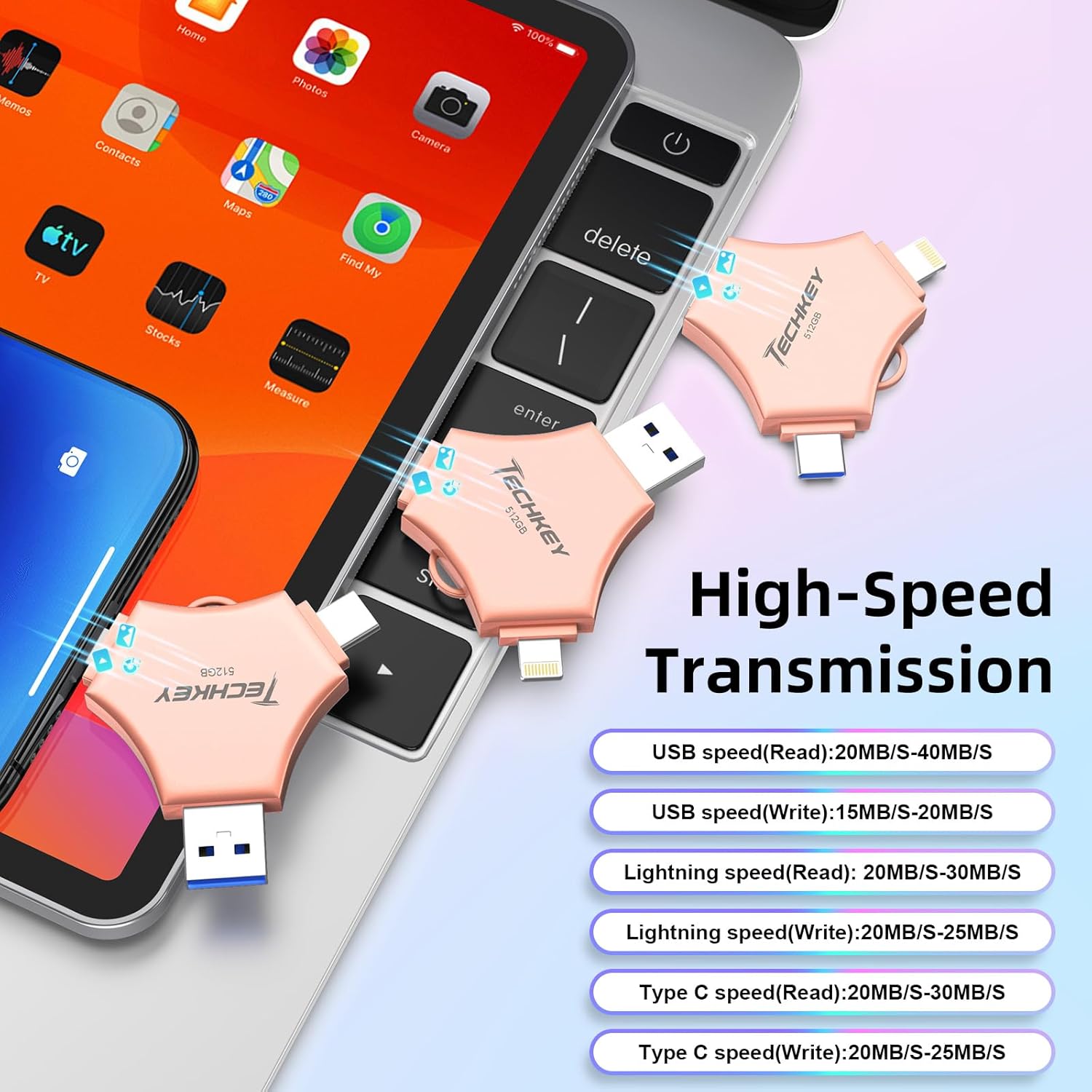
Figure 6.1: High-Speed Transmission Details. This graphic provides specific read and write speeds for each interface (USB, Lightning, Type-C), illustrating the device's performance capabilities across different connection types.
7. การรับประกันและการสนับสนุน
For warranty information and technical support, please refer to the documentation included with your purchase or visit the official Techkey webไซต์นี้ โปรดเก็บหลักฐานการซื้อไว้เพื่อใช้ยืนยันการรับประกัน
If you encounter issues not covered in this manual, please contact Techkey customer service for assistance.

