การแนะนำ
Transform your iPad into a versatile workstation with the Epico iPad Keyboard Case. This innovative accessory features a detachable keyboard with seven-colour backlighting, a multi-finger gesture touchpad, and comprehensive iPadOS shortcuts. Designed for both functionality and protection, it enhances your iPad experience for typing, watching, and browsing.

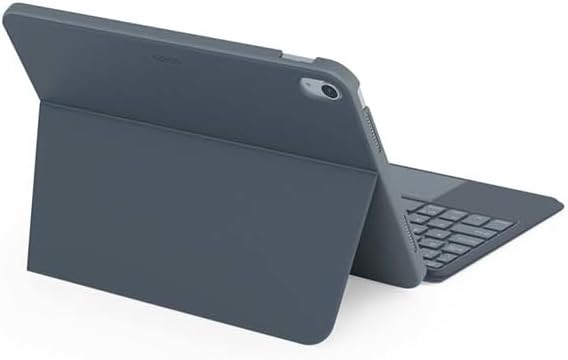
Image: The Epico iPad Keyboard Case with an iPad inserted, shown in a tilted typing position.
คุณสมบัติ
- แป้นพิมพ์พร้อมไฟแบ็คไลท์: Seven distinct backlight colours with adjustable brightness levels for comfortable typing in any lighting condition.
- ฟังก์ชันการทำงานของทัชแพด: Multi-finger gesture touchpad provides precise control and enhanced navigation capabilities.
- Shortcut Integration: Comprehensive range of iPadOS shortcuts built into the keyboard for efficient device control and workflow optimisation.
- การออกแบบที่หลากหลาย: Includes detachable keyboard and tilted backside stand for multiple viewing angles and usage modes.
- โซลูชันด้านพลังงาน: Equipped with Li-ion battery and USB-C charging capability, operating independently from iPad's power source.
เนื้อหาแพ็คเกจ
- Epico iPad Keyboard Case
- สายชาร์จ USB-C เป็น USB-C
- คู่มือการใช้งาน (เอกสารนี้)
การตั้งค่า
1. การชาร์จคีย์บอร์ด
Before first use, fully charge the keyboard. Connect the provided USB-C to USB-C charging cable to the keyboard's USB-C port and the other end to a compatible USB-C power adapter (not included).
ภาพ: ด้านข้าง view of the keyboard case, highlighting the USB-C charging port.
2. การใส่ iPad ของคุณ
- วาง iPad ของคุณให้ตรงกับขอบเคสอย่างเบามือ
- Press firmly but carefully to secure the iPad into the protective shell. Ensure all edges are properly seated.

ภาพ: ด้านหลัง view of the Epico iPad Keyboard Case, demonstrating the secure fit of the iPad.
3. Pairing with iPad
- Turn on the keyboard by sliding the power switch (usually located on the side or back of the keyboard).
- บน iPad ของคุณไปที่ การตั้งค่า > บลูทูธ.
- Enable Bluetooth. The keyboard should appear in the "Other Devices" list as "Epico Keyboard" or similar.
- Tap on the keyboard name to pair. Follow any on-screen prompts.
- Once paired, the keyboard's indicator light will change, and it will be ready for use.
คำแนะนำการใช้งาน
การใช้แป้นพิมพ์
The keyboard functions like a standard QWERTY keyboard. Ensure the keyboard is paired with your iPad before typing.

ภาพ: ด้านหน้า view of the Epico iPad Keyboard Case, displaying the full keyboard layout and touchpad.
การควบคุมแบ็คไลท์
- กดปุ่ม หลอดไฟ key (often near the function keys) to cycle through backlight colours.
- กด Fn + หลอดไฟ key to adjust backlight brightness levels.
ท่าทางทัชแพด
The integrated touchpad supports multi-finger gestures for enhanced navigation:
- แตะนิ้วเดียว: คลิกซ้าย.
- แตะด้วยสองนิ้ว: คลิกขวา (เมนูบริบท)
- การเลื่อนด้วยสองนิ้ว: เลื่อนขึ้น/ลง หรือ ซ้าย/ขวา
- บีบเพื่อซูม: ซูมเข้า/ออกจากเนื้อหา
- Refer to iPadOS settings for additional gesture customization.
iPadOS Shortcuts
The keyboard includes dedicated function keys for common iPadOS shortcuts. These may vary slightly by iPadOS version, but typically include:
- บ้าน: กลับไปที่หน้าจอหลัก
- ค้นหา: Activate Spotlight search.
- การควบคุมความสว่าง: ปรับความสว่างหน้าจอ
- การควบคุมสื่อ: Play/Pause, Previous/Next track.
- การควบคุมระดับเสียง: ปรับระดับเสียงระบบ
- ล็อกหน้าจอ: ล็อก iPad ของคุณ
การซ่อมบำรุง
การทำความสะอาด
- Use a soft, lint-free cloth to wipe the exterior of the case and keyboard.
- สำหรับรอยฝังแน่น ให้ลบออกเล็กน้อยampชุบน้ำหรือน้ำยาทำความสะอาดสูตรอ่อนโยนที่ไม่มีฤทธิ์กัดกร่อนบนผ้า
- Avoid getting moisture into the keyboard keys or ports.
- ห้ามใช้สารเคมีรุนแรง ตัวทำละลาย หรือวัสดุที่มีฤทธิ์กัดกร่อน
พื้นที่จัดเก็บ
เมื่อไม่ได้ใช้งานเป็นเวลานาน ควรเก็บเคสคีย์บอร์ดไว้ในที่แห้งและเย็น และตรวจสอบให้แน่ใจว่าได้ปิดคีย์บอร์ดแล้วเพื่อยืดอายุการใช้งานแบตเตอรี่
การแก้ไขปัญหา
- แป้นพิมพ์ไม่เชื่อมต่อ:
Ensure the keyboard is charged and turned on. Check iPad's Bluetooth settings to confirm it's enabled and the keyboard is paired. Try unpairing and re-pairing the keyboard.
- คีย์ไม่ตอบสนอง:
Check battery level. Restart both the keyboard and your iPad. Ensure no debris is lodged under the keys.
- ไฟแบ็คไลท์ไม่ทำงาน:
Ensure the keyboard is on and charged. Cycle through backlight settings using the dedicated key.
- ทัชแพดไม่ตอบสนอง:
Ensure the touchpad is enabled (some keyboards have a function key to toggle it). Check iPadOS settings for touchpad functionality.
ข้อมูลจำเพาะ
| ยี่ห้อ | มหากาพย์ |
| ชื่อรุ่น | Epico Keyboard Case |
| อุปกรณ์ที่รองรับ | แอปเปิ้ล ไอแพด |
| การเชื่อมต่อ | บลูทูธ |
| แสงไฟแบ็คไลท์ | 7-Colour, Adjustable Brightness |
| ทัชแพด | Multi-finger Gesture Support |
| พอร์ตชาร์จ | ยูเอสบี-ซี |
| แหล่งพลังงาน | แบตเตอรี่ลิเธียมไออนในตัว |
| น้ำหนักสินค้า | 15.9 ออนซ์ (ประมาณ 450 กรัม) |
| ขนาดสินค้า (กxยxส) | 9.94 x 7.24 x 0.48 นิ้ว (ประมาณ 25.25 x 18.39 x 1.22 ซม.) |
| วัสดุ | พลาสติก, โลหะ |
การรับประกันและการสนับสนุน
This Epico product is covered by a manufacturer's warranty. Please refer to the warranty card included with your purchase or visit the official Epico webเว็บไซต์สำหรับข้อกำหนดและเงื่อนไขการรับประกันโดยละเอียด
For technical support, troubleshooting assistance, or inquiries about your product, please contact Epico customer service through their official webเว็บไซต์หรือข้อมูลติดต่อที่ระบุไว้ในใบเสร็จรับเงินของคุณ


