1. สินค้าหมดview
The Exway RXM Extension is designed to enhance the functionality of your Exway Rexus Remote Control. It provides a secure mounting point for various accessories, such as external cameras or additional lighting, expanding the utility of your remote beyond basic control. This extension is compatible with Exway Flex Pro and Atlas Pro electric skateboards.
บันทึก: The Rexus Remote Control and any external accessories (e.g., cameras, lights) are not included with the RXM Extension and must be purchased separately.
2. เนื้อหาบรรจุภัณฑ์
- 1 x Exway RXM Extension
3. การติดตั้งและการตั้งค่า
Follow these steps to properly install the RXM Extension onto your Rexus Remote Control and attach compatible accessories.
- Attach RXM Extension to Rexus Remote:
Locate the designated mounting slot on your Exway Rexus Remote Control. Align the RXM Extension with this slot and firmly slide it into place until it clicks securely. Ensure the connection is stable and there is no wobble.
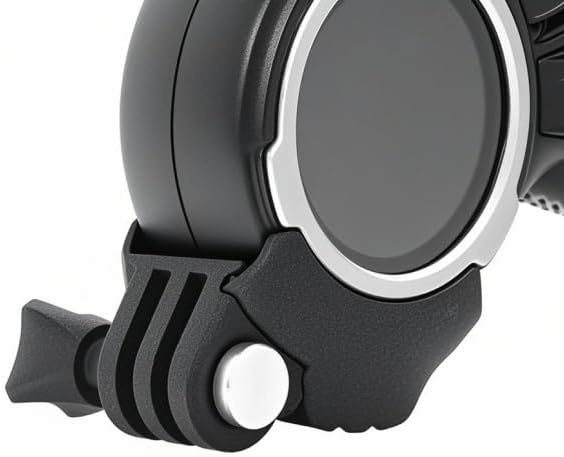
ภาพ: ระยะใกล้ view of the RXM Extension's mounting mechanism, showing how it connects to the Rexus Remote Control.
- ติดอุปกรณ์เสริม:
The RXM Extension features a standard action camera mount. To attach an accessory (e.g., action camera, light), align its mounting bracket with the extension's mount. Secure it using the provided screw or locking mechanism of your accessory. Verify that the accessory is tightly fastened before use.
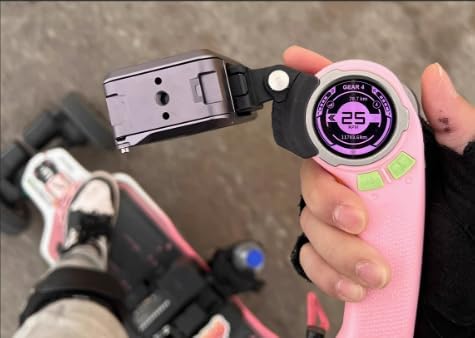
Image: A user holding the Exway Rexus Remote Control with the RXM Extension and an action camera attached, demonstrating its practical use.
4. การดำเนินการ
Once the RXM Extension and your desired accessory are securely attached, the operation of your Rexus Remote Control remains unchanged. The extension simply provides a stable platform for your additional devices.
- Ensure your Rexus Remote Control is fully charged and paired with your Exway electric skateboard (Flex Pro or Atlas Pro).
- Operate your attached accessory according to its own manufacturer's instructions. The RXM Extension does not provide power or control to the attached device.
- Always check that the accessory is firmly mounted before riding to prevent detachment during movement.
Demonstration Video: Exway Rexus Remote Control
Video: This video demonstrates the features and usage of the Exway Rexus Remote Control, including how accessories can be integrated using the extension.
5. การบำรุงรักษา
To ensure the longevity and proper function of your RXM Extension, follow these simple maintenance guidelines:
- การทำความสะอาด: Wipe the extension with a soft, damp ผ้าเพื่อขจัดสิ่งสกปรกและเศษขยะ หลีกเลี่ยงการใช้สารเคมีที่รุนแรงหรือวัสดุที่มีฤทธิ์กัดกร่อน
- พื้นที่จัดเก็บ: Store the extension in a cool, dry place when not in use.
- การตรวจสอบ: Periodically inspect the mounting points for any signs of wear or damage. If any damage is observed, discontinue use and contact customer support.
6 การแก้ไขปัญหา
If you encounter any issues with your RXM Extension, refer to the following common solutions:
- Accessory feels loose: Ensure the accessory's mounting screw or clip is fully tightened. Check if the RXM Extension is properly seated in the Rexus Remote's slot.
- Extension does not fit: Verify that you have the correct Rexus Remote Control model (compatible with Flex Pro, Atlas Pro). Ensure no debris is obstructing the mounting slot.
- Damage to extension: If the extension is cracked or broken, it should be replaced immediately to prevent potential loss of attached accessories.
For issues not covered here, please contact Exway customer support.
7. ข้อมูลจำเพาะ
| คุณสมบัติ | รายละเอียด |
|---|---|
| ยี่ห้อ | เอ็กซ์เวย์ |
| หมายเลขรุ่น | เร็กซัส |
| น้ำหนักสินค้า | 3.53 ออนซ์ |
| อุปกรณ์ที่รองรับ | Flex Pro, Atlas Pro (with Rexus Remote Control) |
| จำนวนอุปกรณ์ที่รองรับสูงสุด | 1 (via the extension mount) |
| คุณสมบัติพิเศษ | ไม่จำเป็นต้องเขียนโปรแกรม |
8. การรับประกันและการสนับสนุน
For information regarding warranty coverage, returns, or technical support, please refer to the official Exway website or contact Exway customer service directly. Keep your purchase receipt as proof of purchase for any warranty claims.
Manufacturer: ExwayBoard
หากต้องการความช่วยเหลือเพิ่มเติม โปรดไปที่: www.exwayboard.com


