สินค้าเกินview
The Linocell 20W USB-C Wall Charger with 6FT Lightning Cable is designed to provide efficient and safe fast charging for a wide range of Apple devices, including iPhones, iPads, and AirPods. This product includes two charger blocks and two MFi-certified Lightning cables, ensuring optimal performance and compatibility.

Image: Contents of the Linocell 20W USB-C Charger package, showing two white wall charger blocks and two coiled white 6-foot USB-C to Lightning cables.
Key features include advanced Quantum Boost Technology, intelligent power management, and comprehensive safety protections to safeguard your devices during charging.
คำแนะนำการตั้งค่า
- การแกะกล่อง: Carefully remove the charger blocks and cables from the packaging.
- การเชื่อมต่อกับพลังงาน: Insert the Linocell 20W USB-C Wall Charger block into a standard electrical wall outlet. Ensure the outlet is easily accessible.
- การเชื่อมต่อกับอุปกรณ์:
- Connect the USB-C end of the provided 6FT Lightning Cable into the USB-C port on the charger block.
- Connect the Lightning end of the cable into the charging port of your iPhone, iPad, or AirPods.

Image: A white Linocell 20W USB-C charger block plugged into a power strip, with its 6-foot white Lightning cable connected to an iPhone 14. The image highlights the ease of connecting the charger and cable for use.
คำแนะนำการใช้งาน
Once connected, your device will begin charging automatically. The Linocell 20W USB-C Charger is designed for fast charging compatible devices.
ความสามารถในการชาร์จอย่างรวดเร็ว
This charger delivers up to 20W of power, enabling your iPhone to reach approximately 80% charge in just 35 minutes, significantly reducing charging time compared to standard chargers.
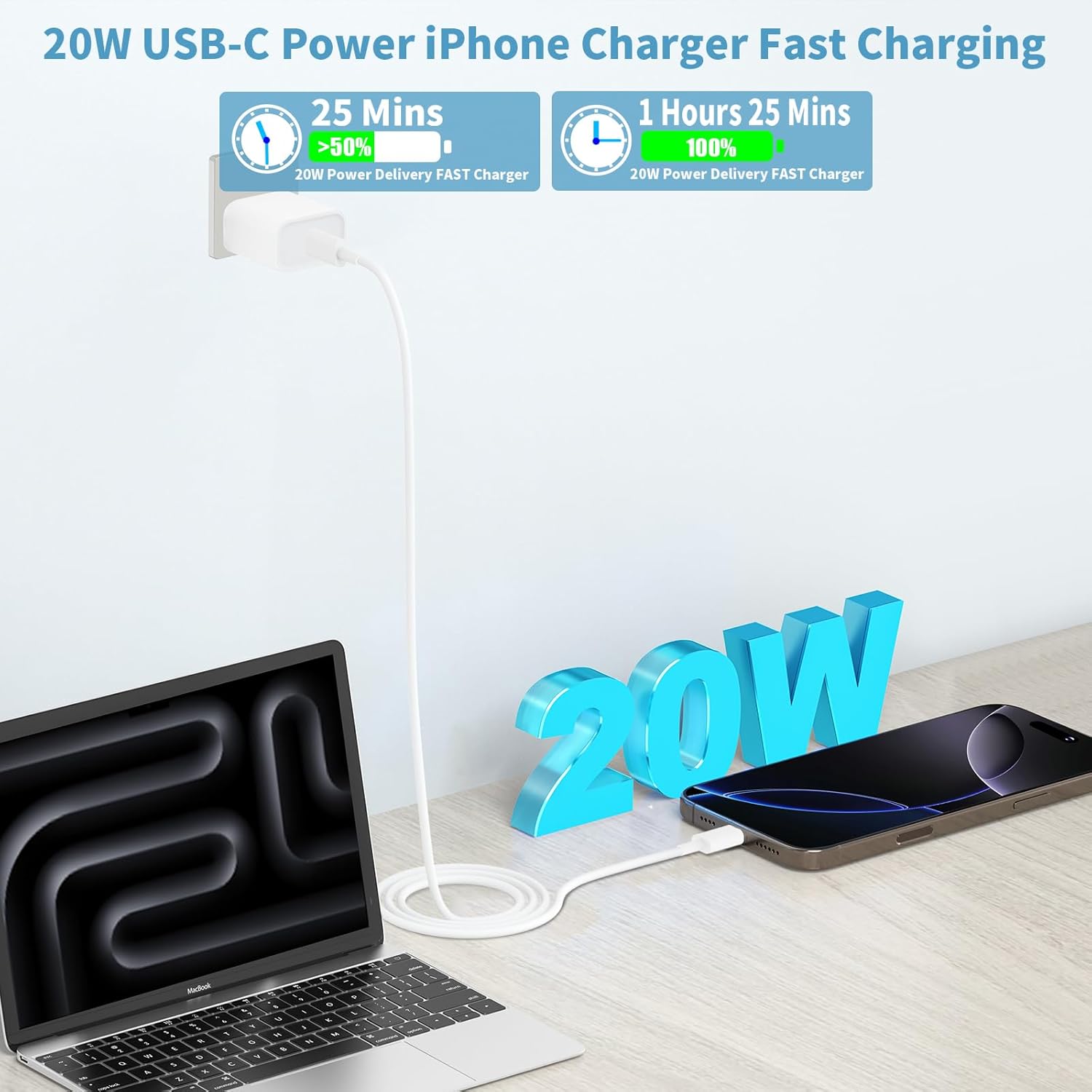
Image: A visual representation of the Linocell 20W USB-C charger's fast charging speed, showing an iPhone charging from 0% to over 50% in 25 minutes and to 100% in 1 hour 25 minutes. A laptop is also shown connected to the charger.
สายเคเบิลที่ได้รับการรับรอง MFi
The included 6-foot Type C to Lightning cable is MFi (Made for iPhone/iPad/iPod) certified, ensuring full compatibility and safe, efficient charging for your Apple devices. This certification guarantees that the cable meets Apple's performance standards.

Image: A detailed diagram illustrating the internal components of an Apple MFi Certified Type C to Lightning Cable, highlighting the MFi Certified Chip and Original C94 Terminal, along with benefits like extended battery usage life, safe charging, battery protection, and automatic chip recognition.
การซิงโครไนซ์ข้อมูล
In addition to charging, the MFi certified cable supports data synchronization at speeds up to 480Mbps, allowing you to transfer files between your device and a computer.

Image: An iPhone connected to a laptop via the Linocell Lightning cable, illustrating data synchronization at 480Mbps and charging speed up to 3.0A.
การซ่อมบำรุง
- การทำความสะอาด: Disconnect the charger from the power outlet and your device before cleaning. Use a soft, dry cloth to wipe the charger block and cable. Avoid using liquid cleaners or aerosols.
- พื้นที่จัดเก็บ: เก็บที่ชาร์จและสายเคเบิลไว้ในที่แห้งและเย็น หลีกเลี่ยงแสงแดดโดยตรงและอุณหภูมิที่สูงหรือต่ำเกินไป หลีกเลี่ยงการม้วนสายเคเบิลแน่นเกินไปเพื่อป้องกันความเสียหาย
- การจัดการ: Do not expose the charger or cable to water or excessive moisture. Avoid dropping or subjecting the charger to strong impacts.
การแก้ไขปัญหา
| ปัญหา | สาเหตุที่เป็นไปได้ | สารละลาย |
|---|---|---|
| อุปกรณ์ไม่ชาร์จ | Loose connection, faulty outlet, damaged cable/charger, incompatible device. |
|
| ชาร์จช้า | Device not supporting fast charging, background apps, high device usage during charging. |
|
| ที่ชาร์จหรืออุปกรณ์ร้อนขึ้น | Normal operation during fast charging, poor ventilation, excessive load. |
|
The charger features built-in Dynamic Temperature Sensors and a Power Tuner Chip to actively monitor and adjust power output, safeguarding your connected device from overheating.

Image: A conceptual image showing the Linocell charger's internal smart-IC chip and various safety protections, including over-temp, over-voltage, over-current, over-charge, and fireproof material, emphasizing its superior safety features.
ข้อมูลจำเพาะ
- หมายเลขรุ่น: GS-W20A0938C
- กำลังขับ: 20W (สูงสุด)
- ประเภทสายเคเบิล: USB-C to Lightning (MFi Certified)
- ความยาวสายเคเบิล: 6 ฟุต
- ขนาดแพ็คเกจ: 6.3 x 4.57 x 1.22 นิ้ว
- น้ำหนักสินค้า: 4.6 ออนซ์
- ใบรับรองความปลอดภัย: MFi, UL, ETL, FCC, CE, ROHS
- ผู้ผลิต: Shenzhen good-she technology Co., Ltd.
- มีจำหน่ายครั้งแรก: 19 เมษายน 2025
การรับประกันและการสนับสนุน
For specific warranty details and terms, please refer to the documentation included with your purchase or contact Linocell customer support directly. Linocell is committed to providing reliable products and customer satisfaction.
If you encounter any issues or have questions regarding your Linocell charger, please contact the manufacturer's customer service for assistance. Contact information can typically be found on the product packaging or the official Linocell webเว็บไซต์.


