1. บทนำ
Thank you for choosing the Thlevel Smart Key Lock Box G22. This electronic Bluetooth lock box provides secure storage for keys and access cards, offering convenient management through a mobile application and PIN codes. Designed for durability and ease of use, it is suitable for various applications including home security, property management, and office use.
2. ข้อมูลด้านความปลอดภัยที่สำคัญ
Please read and understand all safety instructions before installing and operating this product. Failure to follow these instructions may result in product malfunction or damage.
- Do not expose the lock box to extreme force or impact.
- Ensure proper battery installation to prevent damage.
- Keep the USB-C port dry and clean.
- อย่าพยายามถอดประกอบหรือซ่อมแซมอุปกรณ์ด้วยตนเอง โปรดติดต่อฝ่ายสนับสนุนลูกค้าเพื่อขอความช่วยเหลือ
- Keep PIN codes confidential and change them regularly.
3. เนื้อหาบรรจุภัณฑ์
ตรวจสอบว่ามีส่วนประกอบทั้งหมดอยู่ในแพ็คเกจ:
- Thlevel Smart Key Lock Box G22
- สกรูยึดและตัวล็อค
- คู่มือการใช้งาน (เอกสารนี้)
- หมายเหตุ: ต้องใช้แบตเตอรี่ AAA 3 ก้อน (ไม่ได้รวมอยู่ในชุด)
4. สินค้าหมดview
The Thlevel Smart Key Lock Box G22 is constructed from durable zinc alloy and ABS plastic, designed for both indoor and outdoor use. It features a keypad for PIN code entry and Bluetooth connectivity for app control.

ภาพที่ 4.1: Thlevel Smart Key Lock Box G22 with its keypad and open storage compartment, shown next to a smartphone displaying the TTLock application. This illustrates the product's design and its digital interface.

ภาพที่ 4.2: ภายใน view of the lock box, highlighting its spacious design capable of holding multiple house keys, car keys, and access cards. Dimensions are provided to illustrate the storage capacity.
คุณสมบัติหลัก:
- การควบคุมแอพ: Manage access via the TTLock App (Bluetooth connectivity).
- การเข้าถึงรหัส PIN: Create and share anti-peep virtual passwords (6-9 digits).
- โครงสร้างทนทาน: Zinc alloy body with IP65 certification for water and dust resistance.
- ไฟฉุกเฉิน: USB-C port for temporary power if batteries deplete.
- ภายในกว้างขวาง: Accommodates multiple keys, access cards, and car key fobs.
5. คู่มือการติดตั้ง
5.1 การติดตั้งแบตเตอรี่
- Open the lock box compartment.
- ค้นหาช่องใส่แบตเตอรี่
- ใส่แบตเตอรี่ AAA 3 ก้อน (ไม่รวมอยู่ในชุด) โดยตรวจสอบให้แน่ใจว่าขั้วถูกต้อง
- ปิดช่องใส่แบตเตอรี่ให้แน่น
The lock box will send low-battery alerts via the app when power is low.
5.2 การติดตั้งและการเชื่อมต่อแอป
The Thlevel Smart Key Lock Box uses the TTLock App for smart control. Ensure your mobile device has Bluetooth enabled.
- ดาวน์โหลด แอป TTLock จากร้านแอปของอุปกรณ์ของคุณ
- ลงทะเบียนและเข้าสู่บัญชีของคุณ
- เปิดบลูทูธบนอุปกรณ์มือถือของคุณ
- Lightly press any button on the lock box keypad to wake up the device.
- In the TTLock App, tap the "+" icon or "Add Lock" to search for nearby devices.
- Select your lock box from the list to bind it to your account.
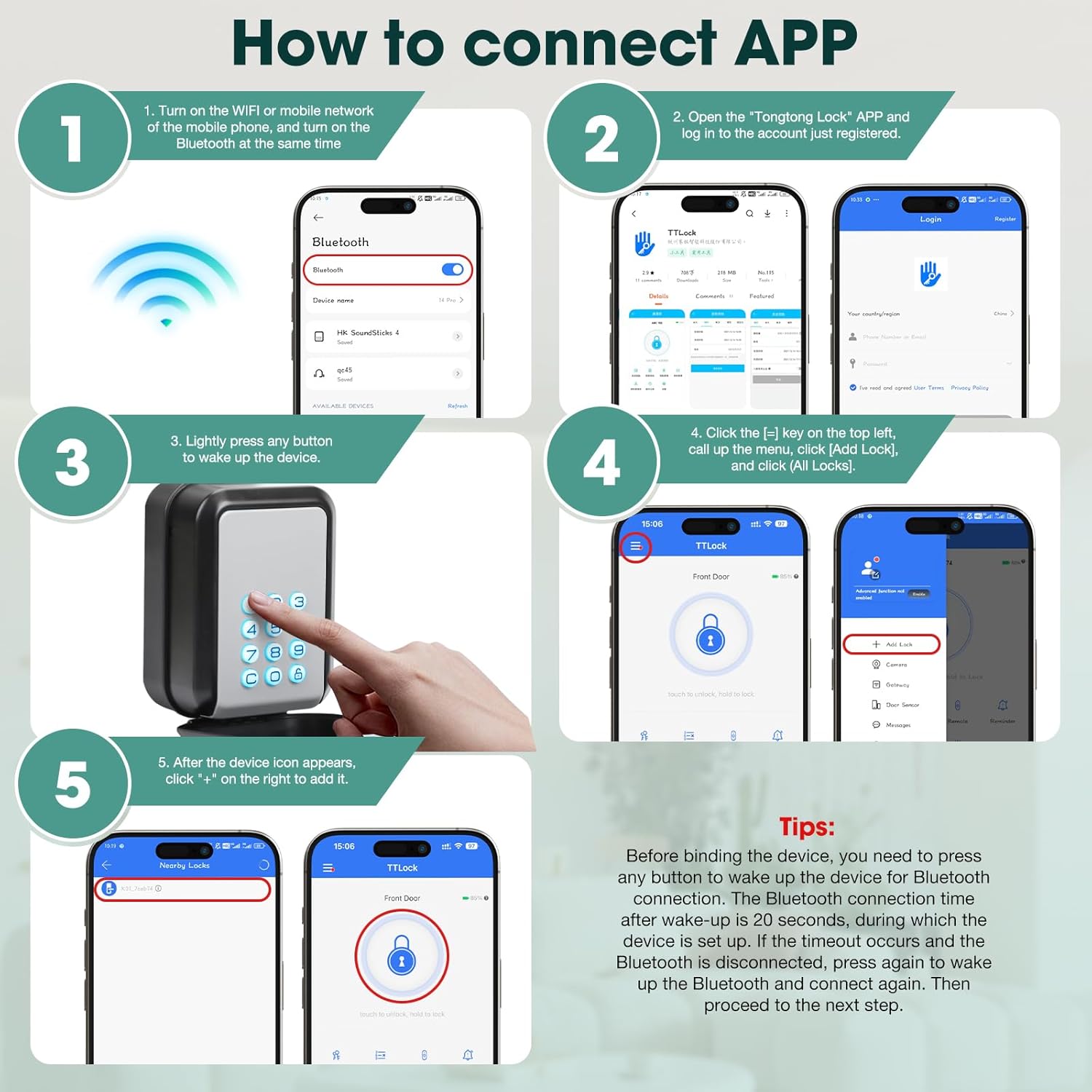
ภาพที่ 5.1: Visual instructions detailing the process of connecting the lock box to the TTLock application, including enabling Bluetooth, waking the device, and adding it within the app.
เคล็ดลับสำคัญ: Before binding, press any button to wake the device for Bluetooth connection. The connection window is 20 seconds. If it times out, press a button again to wake up and reconnect.
5.3 การติดตั้งบนผนัง
The lock box is designed for secure wall mounting. Choose a suitable location that is easily accessible but discreet.
- Open the lock box and hold it against the desired mounting surface.
- Mark the screw location holes using a pencil or marker.
- เจาะรูนักบินในตำแหน่งที่ทำเครื่องหมายไว้
- Insert the expanded colloi (wall anchors) into the drilled holes, tapping gently with a hammer if necessary.
- Align the lock box with the holes and secure it with the provided screws.

ภาพที่ 5.2: A visual guide illustrating the four steps for wall-mounting the lock box: marking screw locations, drilling holes, inserting anchors, and securing the box.
6. คู่มือการใช้งาน
6.1 การปลดล็อกด้วยรหัส PIN
- Press any button on the keypad to activate it.
- Enter your 6-9 digit PIN code.
- The lock box will unlock, and the keypad lights will change color (e.g., green for success).
- Open the compartment to access the contents.
- Close the compartment and press any button to re-lock.
6.2 Unlocking with the TTLock App (Bluetooth)
Ensure your mobile device is within Bluetooth range of the lock box.
- Open the TTLock App on your smartphone.
- Select the lock box from your list of devices.
- Tap the unlock icon within the app. The lock box will unlock.
- Close the compartment to re-lock.

ภาพที่ 6.1: Illustration of the Bluetooth unlocking feature, showing a user interacting with the TTLock app on their smartphone to unlock the wall-mounted key box.
6.3 Sharing Access (eKeys and Passcodes)
The TTLock App allows you to generate and share various types of access permissions:
- คีย์อิเล็กทรอนิกส์: Grant temporary or permanent access to other TTLock app users.
- รหัสผ่าน: Generate timed, one-time, permanent, or custom recurring PIN codes for guests, tenants, or service providers.
To share access:
- In the TTLock App, select your lock box.
- Navigate to the "eKeys" or "Passcodes" section.
- Follow the on-screen prompts to generate and share the desired access type.

ภาพที่ 6.2: This image demonstrates the versatility of sharing access, showing how the lock box can be used by various individuals such as repairmen, friends, family, and pet sitters, with the app's passcode generation feature visible.
6.4 แหล่งจ่ายไฟฉุกเฉิน
If the batteries are completely depleted, you can provide temporary power using a USB-C power bank.
- Locate the USB-C emergency power port on the lock box.
- Connect a USB-C power bank to the port.
- Once powered, you can use the keypad or app to unlock the box.
- Replace the AAA batteries as soon as possible.

ภาพที่ 6.3: The lock box connected to a USB-C power bank, illustrating the emergency power feature for access when internal batteries are depleted.
7. การบำรุงรักษา
7.1 การเปลี่ยนแบตเตอรี่
When the app indicates low battery, replace the 3 AAA batteries promptly to ensure continuous operation. Follow the battery installation steps in Section 5.1.
7.2 การทำความสะอาด
Wipe the exterior of the lock box with a soft, damp ใช้ผ้าเช็ดทำความสะอาด หลีกเลี่ยงการใช้สารทำความสะอาดที่มีฤทธิ์กัดกร่อนหรือตัวทำละลายที่อาจทำให้พื้นผิวหรือชิ้นส่วนอิเล็กทรอนิกส์เสียหายได้
7.3 ข้อพิจารณาด้านสิ่งแวดล้อม
The lock box is IP65 rated, providing resistance to water and dust. It is designed to operate in temperatures ranging from -20°C to 55°C. While durable, prolonged exposure to extreme conditions may affect battery life or performance.
8 การแก้ไขปัญหา
| ปัญหา | สาเหตุที่เป็นไปได้ | สารละลาย |
|---|---|---|
| Lock box does not respond to keypad or app. | Dead batteries; device not awake; Bluetooth off. | Replace batteries. Press any button to wake the device. Ensure Bluetooth is enabled on your phone. Use emergency USB-C power. |
| ไม่สามารถเชื่อมต่อกับแอปได้ | Bluetooth not enabled; device out of range; device not awake; app issue. | Ensure Bluetooth is on. Move closer to the lock box. Press a button to wake the device. Restart the app or your phone. |
| รหัส PIN ไม่ทำงาน | Incorrect code; code expired; device not awake. | Verify the PIN code. Check the code's validity period in the app. Press a button to wake the device. |
| Lock box opens but does not re-lock. | Mechanism obstruction; internal error. | Ensure no debris is obstructing the closing mechanism. Try pressing a button on the keypad to manually re-lock. If the issue persists, contact support. |
9. ข้อมูลจำเพาะ
| ยี่ห้อ | ระดับ |
| ชื่อรุ่น | จี22 |
| วัสดุ | Zinc Alloy + ABS Plastic |
| สี | สีเทา |
| ประเภทล็อค | พินทัมเบลอร์ |
| คุณสมบัติพิเศษ | กุญแจรหัส |
| วิธีการควบคุม | แอป |
| โปรโตคอลการเชื่อมต่อ | บลูทูธ |
| แหล่งพลังงาน | แบตเตอรี่ AAA 3 ก้อน (ไม่รวม) |
| ไฟฟ้าฉุกเฉิน | พอร์ต USB-C |
| น้ำหนักสินค้า | 1.19 ปอนด์ |
| ขนาดแพ็คเกจ | 5.35 x 3.98 x 3.03 นิ้ว |
| อุณหภูมิในการทำงาน | -20°C ถึง 55°C |
| กันน้ำ/กันฝุ่น | ได้รับการรับรอง IP65 |
10. การรับประกันและการสนับสนุน
Thlevel products are designed for reliability and performance. For warranty information or technical support, please refer to the contact details provided with your purchase or visit the official Thlevel webเว็บไซต์.
If you encounter any issues not covered in this manual, please contact customer service for assistance. Please have your product model (G22) and purchase information ready.


