1. บทนำ
Thank you for choosing the DECIUU Max 100 Pint Dehumidifier. This appliance is designed to efficiently remove excess moisture from your indoor environment, providing a more comfortable and healthier living space. This manual provides essential information for the safe operation, maintenance, and troubleshooting of your dehumidifier.
คุณสมบัติหลัก:
- Energy Star Most Efficient 2024: Removes 70 pints/D (86°F, 80% RH) and up to 100 pints/D (95°F, 90% RH), covering up to 5,000 sq. ft.
- Three Engines Powerful Dehumidification: Features a high-efficiency rotary compressor, large vortex fan, and high-conductivity copper tubing for superior performance.
- Intelligent Humidity Control System: High-precision sensor monitors ambient humidity, allowing users to set desired levels between 35% and 80% RH. Smart Memory Chip restores last settings.
- Three Drainage Options: Includes a 3/4" garden hose adapter, a 2m (6.56ft) drain hose for continuous drainage, and a 5.5L (1.45 gal) tank with auto shut-off.
- แผงควบคุมอัจฉริยะ: Clear LED panel for easy control, 1–24h timer, three fan speeds, child lock, and full-tank indicator.
- Engineered for Easy Living: Hidden handle, 360° swivel wheels for mobility, and a removable, washable filter for convenient maintenance.

Figure 1: The DECIUU Max 100 Pint Dehumidifier, showcasing its sleek design and Energy Star certification.
2. ข้อมูลด้านความปลอดภัย
Please read all instructions carefully before using the dehumidifier. Keep this manual for future reference.
- ควรเสียบปลั๊กอุปกรณ์เข้ากับเต้ารับไฟฟ้าที่มีสายดินเสมอ
- ห้ามใช้งานเครื่องลดความชื้นหากสายไฟหรือปลั๊กชำรุด
- Ensure the unit is placed on a level, stable surface to prevent tipping.
- Do not block the air intake or exhaust vents. Maintain at least 8 inches (20 cm) clearance from walls and furniture.
- ห้ามใช้เครื่องลดความชื้นในบริเวณที่มีการจัดเก็บของเหลวหรือก๊าซไวไฟ
- Unplug the unit before cleaning, moving, or performing any maintenance.
- ให้เด็กและสัตว์เลี้ยงอยู่ห่างจากเครื่องขณะใช้งาน
- ห้ามจุ่มเครื่อง สายไฟ หรือเสียบปลั๊กลงในน้ำหรือของเหลวอื่นๆ
3. เนื้อหาบรรจุภัณฑ์
ตรวจสอบว่ามีรายการทั้งหมดอยู่ในแพ็คเกจ:
- DECIUU Max 100 Pint Dehumidifier Unit
- Drain Hose (2m / 6.56ft)
- คู่มือการใช้งาน
4. สินค้าหมดview
Familiarize yourself with the main components and control panel of your DECIUU dehumidifier.

Figure 2: LED Touch Control Panel. This panel allows for easy adjustment of settings.

Figure 3: Optimized Design and Internal Components. The unit features a premium rotor compressor, large vortex fan blade, and high-density copper tubes for efficient dehumidification.

Figure 4: AI Smart Sensor Chip. This chip enables precise humidity tracking and energy optimization for intelligent humidity control.
5. การตั้งค่า
Follow these steps to set up your dehumidifier for first use:
- การจัดวาง: Place the dehumidifier on a firm, level surface in the area where you want to reduce humidity. Ensure there is at least 8 inches (20 cm) of space around the unit for proper airflow.
- การเชื่อมต่อไฟฟ้า: เสียบสายไฟเข้ากับเต้ารับไฟฟ้าที่มีสายดิน
- Drainage Option Selection: Choose one of the three drainage methods:
- Manual Drainage (1.45 Gallon Tank): The unit will collect water in its internal tank. When the tank is full, the unit will automatically shut off and indicate that the tank needs emptying.
- การระบายน้ำอย่างต่อเนื่อง (แรงโน้มถ่วง): Connect the included 2m (6.56ft) drain hose to the continuous drain port on the back of the unit. Ensure the hose is sloped downwards to allow water to drain by gravity into a suitable floor drain or container.
- Extended Outdoor Drainage (with Garden Hose Adapter): For connecting to a standard garden hose (not included), use the 3/4" garden hose adapter. Ensure the hose is positioned for continuous drainage.
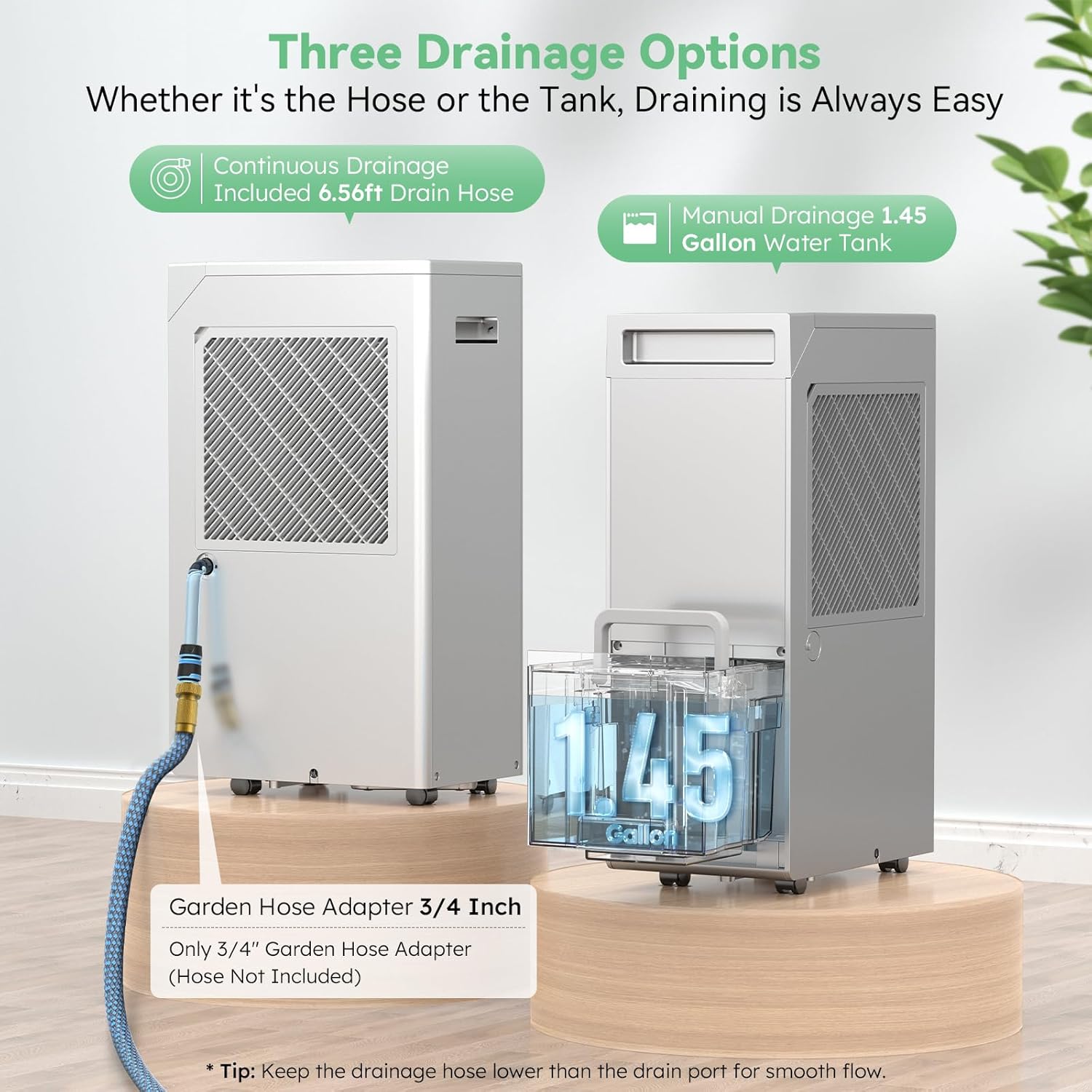
Figure 5: Three Drainage Options. Choose the method that best suits your needs for water removal.
6. คู่มือการใช้งาน
Learn how to operate your DECIUU dehumidifier using the LED touch panel.
- เปิด/ปิดเครื่อง: กดปุ่ม Power (⏻) เพื่อเปิดหรือปิดเครื่อง
- การตั้งค่าความชื้นที่ต้องการ: Press the Humidity Setting button (💧) to adjust the target humidity level between 35% and 80% Relative Humidity (RH) in 5% increments. The unit will operate until the set humidity is reached, then cycle on and off to maintain it.
- ความเร็วพัดลม: กดปุ่มปรับความเร็วพัดลม (💨) to cycle through three fan speeds: Low, Medium, and High. Higher fan speeds result in faster dehumidification.
- ฟังก์ชั่นจับเวลา: กดปุ่มตั้งเวลา (🕒) to set an auto-on or auto-off timer from 1 to 24 hours. Press repeatedly to adjust the time. The unit will automatically turn on or off after the set duration.
- การล็อคเด็ก: กดปุ่ม Child Lock ค้างไว้ (🔒) for 3 seconds to activate or deactivate the child lock. When activated, the control panel buttons will be disabled to prevent accidental changes.
- โหมดต่อเนื่อง: The unit can operate in continuous mode, where it will dehumidify continuously regardless of the set humidity level. Refer to the control panel for the specific button or combination to activate this mode.

Figure 6: Smart 24 Hour Timer. This feature allows for scheduled operation, optimizing energy use and comfort.

Figure 7: Child Lock. Provides peace of mind by preventing unintended changes to settings.
7. การบำรุงรักษา
การบำรุงรักษาตามปกติจะช่วยให้เครื่องลดความชื้นของคุณมีประสิทธิภาพสูงสุดและมีอายุการใช้งานยาวนาน
7.1. การทำความสะอาดตัวกรองอากาศ
The dehumidifier features a removable, washable filter. Clean the filter every two weeks or more frequently depending on usage and air quality.
- ปิดเครื่องลดความชื้นและถอดปลั๊กออกจากเต้าเสียบไฟฟ้า
- Locate the air filter on the back of the unit. Gently pull the filter cover outwards to remove it.
- ล้างตัวกรองด้วยน้ำสบู่อุ่นๆ ล้างให้สะอาดและผึ่งลมให้แห้งสนิทก่อนใส่กลับเข้าไป ห้ามใช้เครื่องล้างจาน
- Once dry, slide the filter back into its slot until it clicks into place.
Video 1: How to clean the air filter. This video demonstrates the process of removing, washing, and reinserting the dehumidifier's air filter for proper maintenance.
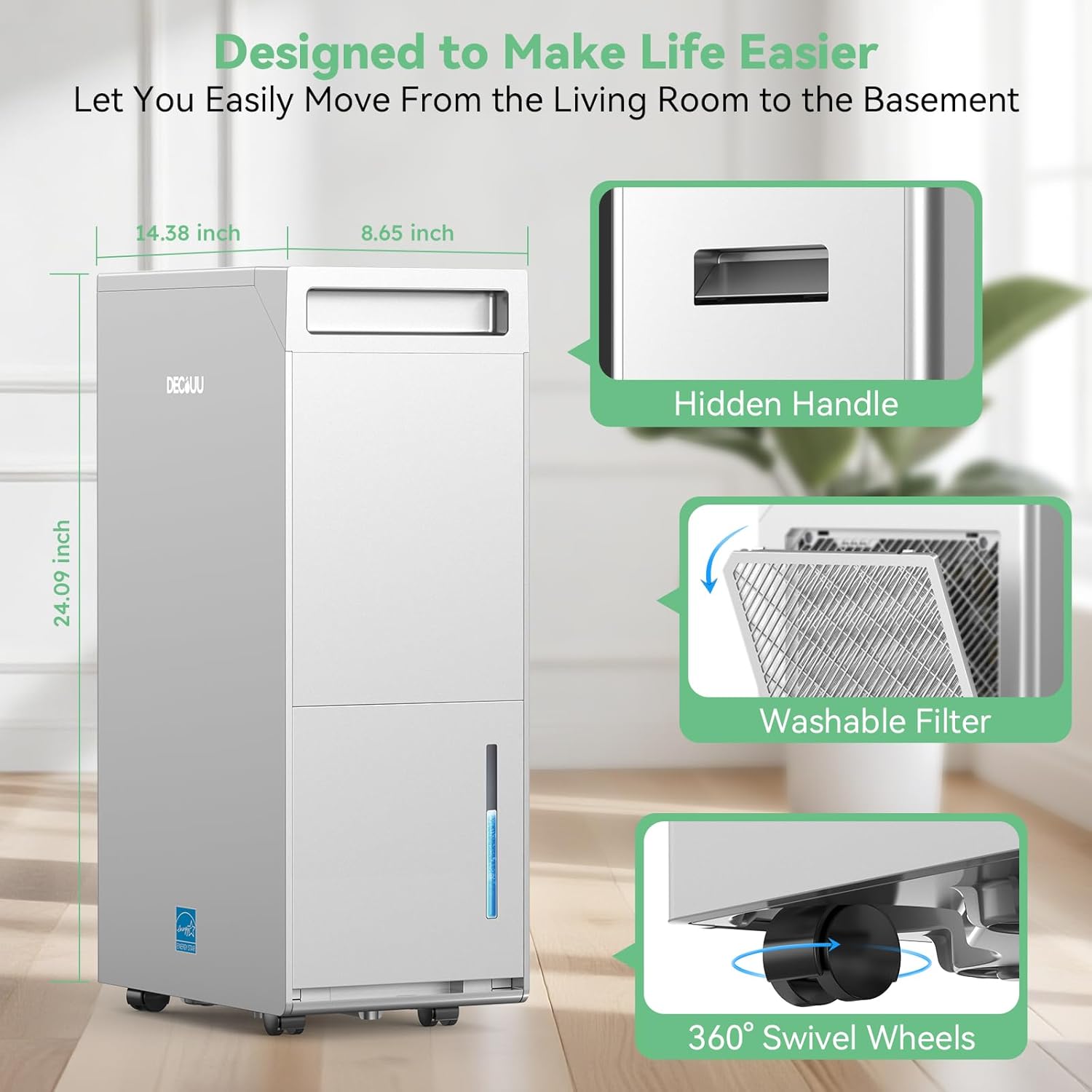
Figure 8: Washable Filter. The filter is easily accessible for routine cleaning.
7.2. การทำความสะอาดถังน้ำ
If using the manual drainage option, regularly clean the water tank to prevent mold and mildew growth.
- ถอดถังน้ำออกจากเครื่อง
- เทน้ำที่ขังอยู่ทิ้งให้หมด
- ล้างถังด้วยน้ำอุ่นและผงซักฟอกอ่อนๆ ล้างออกให้สะอาด
- Allow the tank to air dry completely before placing it back into the dehumidifier.
8 การแก้ไขปัญหา
หากคุณพบปัญหาเกี่ยวกับเครื่องลดความชื้น โปรดดูปัญหาและวิธีแก้ไขที่พบบ่อยต่อไปนี้:
| ปัญหา | สาเหตุที่เป็นไปได้ | สารละลาย |
|---|---|---|
| เครื่องลดความชื้นไม่เปิด | ไม่มีไฟฟ้า; สายไฟไม่ได้เสียบปลั๊ก; ถังน้ำเต็ม | Check power outlet; Ensure power cord is securely plugged in; Empty water tank. |
| เครื่องกำลังทำงานแต่ไม่ได้รวบรวมน้ำ | Humidity level too low; Room temperature too low; Air filter clogged. | Adjust desired humidity setting lower; Ensure room temperature is above 41°F (5°C); Clean the air filter. |
| หน่วยมีเสียงดัง | Unit not level; Air filter clogged; Fan obstruction. | Place unit on a level surface; Clean the air filter; Check for any obstructions around the fan. |
| น้ำกำลังรั่ว | Water tank not properly seated; Drain hose loose or clogged. | ใส่ถังน้ำกลับเข้าไปให้ถูกต้อง ตรวจสอบการเชื่อมต่อท่อระบายน้ำและกำจัดสิ่งอุดตันใดๆ |
หากปัญหายังคงมีอยู่หลังจากลองวิธีแก้ไขเหล่านี้แล้ว โปรดติดต่อฝ่ายสนับสนุนลูกค้า
9. ข้อมูลจำเพาะ
| ข้อมูลจำเพาะ | ค่า |
|---|---|
| ยี่ห้อ | เดซิอู |
| ชื่อรุ่น | DER32S01-50 |
| การครอบคลุมพื้นที่ | 5000 ตารางฟุต |
| สี | สีเทา |
| Capacity (Standard) | 70 ไพนต์/วัน (86°F, ความชื้นสัมสัมพัทธ์ 80%) |
| ความจุ (สูงสุด) | 100 ไพนต์/วัน (95°F, ความชื้นสัมสัมพัทธ์ 90%) |
| ปริมาตรถัง | 1.45 แกลลอน (5.5 ลิตร) |
| ขนาดสินค้า (ลึก x กว้าง x สูง) | ลึก 8.65 นิ้ว x กว้าง 14.38 นิ้ว x สูง 24.09 นิ้ว |
| น้ำหนักสินค้า | 32.78 ปอนด์ |
| วัสดุ | อะคริโลไนไตรล์ บิวทาไดอีน สไตรีน (ABS) |
| โหมดการทำงาน | ต่อเนื่อง |
| คุณสมบัติพิเศษ | Adjustable Humidity Control, Automatic Defrost, Child Lock, Continuous Draining, Timer |
10. การรับประกันและการสนับสนุน
Your DECIUU dehumidifier comes with comprehensive after-sales protection:
- การรับประกันมาตรฐาน: Enjoy a 1-year warranty from the date of purchase.
- การรับประกันแบบขยายเวลา: Register your product to receive an additional year of coverage, totaling 2 years of warranty. (Refer to the user manual for registration details).
For technical assistance, troubleshooting, or warranty claims, please contact DECIUU customer support. Our team is committed to responding within 24 hours to address your concerns.
For a downloadable PDF version of this user manual, please visit: DECIUU Dehumidifier User Manual (PDF)


