การแนะนำ
Thank you for choosing the Midland T71PNK X-TALKER FRS Walkie Talkies. This manual provides comprehensive instructions for the setup, operation, maintenance, and troubleshooting of your two-way radios. Please read this manual thoroughly before use to ensure optimal performance and safety.

Image: Two Midland T71PNK X-TALKER FRS Walkie Talkies.
คุณสมบัติหลัก
- 36 FRS (Family Radio Service) Channels for communication.
- 121 CTCSS Privacy Codes for enhanced communication options.
- NOAA Weather Scan + การแจ้งเตือนสำหรับข้อมูลอัปเดตสภาพอากาศรุนแรง
- eVOX (Easy Voice and Sound Activated Transmission) for hands-free operation.
- Channel Scan feature to monitor active channels.
- Micro USB charging capability.
มีอะไรอยู่ในกล่อง
Your Midland T71PNK X-TALKER package includes the following items:
- 2 x Midland T71PNK X-TALKER FRS Walkie Talkies
- 2 x เข็มขัดคลิป
- ชุดแบตเตอรี่แบบชาร์จไฟได้ 2 ชุด ขนาด 1000 mAh
- สายชาร์จ Micro USB 1 เส้น

Image: Contents of the Midland T71PNK X-TALKER package.
การตั้งค่า
การติดตั้งแบตเตอรี่
- ค้นหาฝาปิดช่องใส่แบตเตอรี่ที่ด้านหลังวิทยุ
- กดแท็บลงแล้วเลื่อนฝาครอบออก
- Insert the 1000mAh rechargeable battery pack, ensuring the contacts align correctly.
- Replace the battery compartment cover, sliding it until it clicks into place.
การชาร์จแบตเตอรี่
Before first use, fully charge the battery packs. The radios feature a battery meter on the display.
- Connect the micro USB charging cable to the micro-USB charging port located on the side of the radio.
- เชื่อมต่อปลายอีกด้านหนึ่งของสาย USB เข้ากับแหล่งพลังงาน USB ที่ใช้งานร่วมกันได้ (เช่น อะแดปเตอร์ติดผนัง พอร์ต USB ของคอมพิวเตอร์)
- ไฟแสดงสถานะแบตเตอรี่บนจอแสดงผลจะแสดงสถานะการชาร์จ โดยทั่วไปการชาร์จจนเต็มจะใช้เวลาหลายชั่วโมง
- ถอดสายชาร์จออกเมื่อชาร์จเสร็จแล้ว

Image: Midland T71PNK radio highlighting rapid charge feature.
การติดคลิปหนีบเข็มขัด
- จัดตำแหน่งคลิปหนีบเข็มขัดให้ตรงกับร่องด้านหลังวิทยุ
- Slide the belt clip downwards until it locks into place.
- ในการถอด ให้ยกแถบที่ตัวหนีบเข็มขัดขึ้น แล้วเลื่อนขึ้นด้านบน
คำแนะนำการใช้งาน
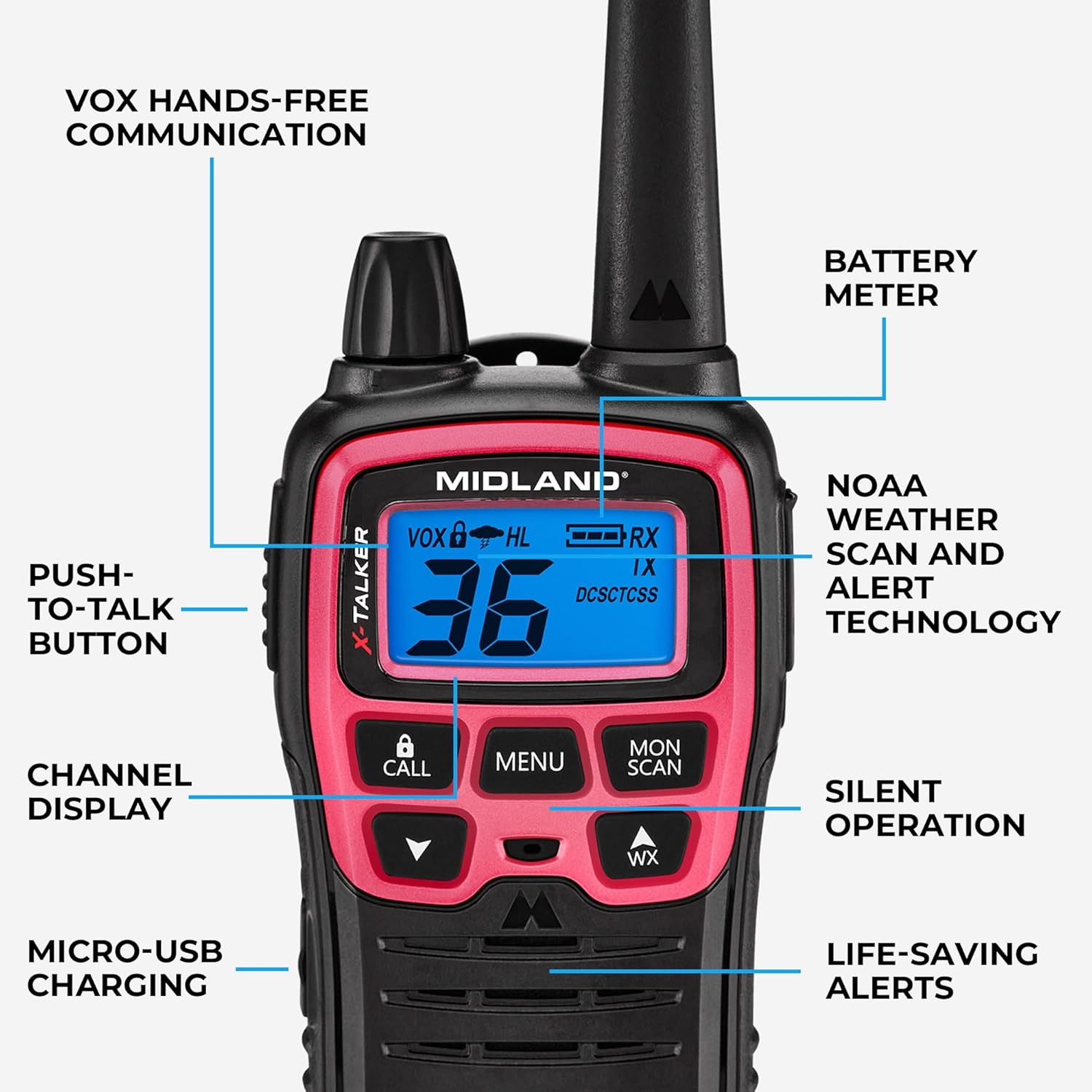
Image: Diagram of Midland T71PNK controls and features.
เปิด/ปิดเครื่อง
- หากต้องการเปิดเครื่อง ให้กดค้างไว้ พาวเวอร์/เมนู กดปุ่มจนกระทั่งหน้าจอสว่างขึ้น
- ในการปิดเครื่องให้กดปุ่ม พาวเวอร์/เมนู จนกระทั่งจอแสดงผลดับลง
การปรับระดับเสียง
- ใช้ UP และ ลง arrow buttons to adjust the listening volume.
การเลือกช่องทาง
Your radio has 36 FRS channels.
- กดปุ่ม เมนู กดปุ่มหนึ่งครั้ง หมายเลขช่องจะกะพริบ
- ใช้ UP or ลง ปุ่มลูกศรเพื่อเลือกช่องที่คุณต้องการ
- กดปุ่ม เมนู button again or wait 5 seconds to confirm the selection.
รหัสความเป็นส่วนตัว (CTCSS)
Privacy codes help reduce interference from other users on the same channel by filtering out transmissions that do not use the same code.
- Select a channel first (as described above).
- กดปุ่ม เมนู กดปุ่มสองครั้ง ตัวเลขรหัสความเป็นส่วนตัวจะกะพริบ
- ใช้ UP or ลง ปุ่มลูกศรเพื่อเลือกโค้ดความเป็นส่วนตัวที่คุณต้องการ (0-121)
- กดปุ่ม เมนู button again or wait 5 seconds to confirm.
การส่งและรับ
- หากต้องการส่งสัญญาณ ให้กดปุ่มค้างไว้ กดเพื่อพูดคุย (ปตท.) button and speak clearly into the microphone.
- ปล่อยตัว ปตท. ปุ่มรับ

Image: Person using a Midland T71PNK radio for communication.
สแกนสภาพอากาศ NOAA + แจ้งเตือน
The NOAA Weather Scan feature automatically scans through 10 available weather (WX) band channels and locks onto the strongest weather channel to alert you of severe weather updates.
- หากต้องการเปิดใช้งานการสแกนสภาพอากาศ ให้กดปุ่ม WX button. The radio will begin scanning.
- To exit Weather Scan, press the WX ปุ่มอีกครั้ง
eVOX (การทำงานแบบแฮนด์ฟรี)
eVOX allows for hands-free transmission without pressing the PTT button. An optional headset may be required for optimal performance.
- กดปุ่ม เมนู กดปุ่มค้างไว้จนกว่าไอคอน eVOX จะกะพริบ
- ใช้ UP or ลง arrow buttons to select the eVOX sensitivity level (1-3, with 3 being most sensitive).
- กดปุ่ม เมนู button again or wait 5 seconds to confirm.
การสแกนช่อง
The Channel Scan feature allows you to monitor all channels for activity.
- To activate Channel Scan, press the จันทร์/สแกน กดปุ่ม วิทยุจะเริ่มสแกนหาช่องสัญญาณ
- When activity is detected, the scan will pause on that channel.
- To exit Channel Scan, press the จันทร์/สแกน ปุ่มอีกครั้ง
การซ่อมบำรุง
การดูแลแบตเตอรี่
- Always use the specified rechargeable battery packs.
- Avoid overcharging or completely draining the batteries to prolong their lifespan.
- If storing the radios for an extended period, remove the battery packs.

Image: Midland T71PNK radio highlighting long-lasting battery life.
การทำความสะอาด
- ทำความสะอาดวิทยุด้วยผ้านุ่มๆamp ผ้า.
- อย่าใช้สารเคมีรุนแรงหรือน้ำยาทำความสะอาดที่มีฤทธิ์กัดกร่อน
พื้นที่จัดเก็บ
- Store the radios in a cool, dry place when not in use.
- หลีกเลี่ยงอุณหภูมิที่สูงและแสงแดดโดยตรง
การแก้ไขปัญหา
| ปัญหา | วิธีแก้ปัญหาที่เป็นไปได้ |
|---|---|
| ไม่มีไฟฟ้า | ตรวจสอบให้แน่ใจว่าติดตั้งแบตเตอรี่อย่างถูกต้องและชาร์จจนเต็ม |
| ไม่สามารถส่งหรือรับได้ | Verify both radios are on the same channel and privacy code. Check battery level. Ensure PTT button is fully pressed. |
| คุณภาพเสียงไม่ดี | Adjust volume. Move closer to the other radio. Check for obstructions. Ensure microphone is not covered. |
| Weather Alert not working | Ensure you are in an area with NOAA weather radio coverage. |
ข้อมูลจำเพาะ
| คุณสมบัติ | รายละเอียด |
|---|---|
| หมายเลขรุ่น | T71PNK |
| ช่องทางการ | 36 ช่อง FRS |
| รหัสความเป็นส่วนตัว | 121 รหัส CTCSS |
| ช่วงความถี่ | 450-470 เมกะเฮิรตซ์ |
| ระยะการสนทนาสูงสุด | Up to 30 Miles (unobstructed environments) |
| แหล่งพลังงาน | 1000mAh Rechargeable Battery Pack (included) |
| คุณสมบัติพิเศษ | Voice Operated Transmission (eVOX), Weather Alert |
| ระดับความต้านทานต่อน้ำ | ทนน้ำ |
| ขนาดสินค้า | 1.4 x 2.6 x 6.1 นิ้ว |
| น้ำหนักสินค้า | 7.2 ออนซ์ |
การปฏิเสธความรับผิดทางกฎหมาย
This device complies with Part 15 of the FCC Rules. Operation is subject to the following two conditions: (1) this device does not cause harmful interference, and (2) this radio must accept any interference that may cause undesired operation. To maintain compliance with the FCC's RF exposure guidelines, for body-worn operation, this radio has been tested and meets the FCC RF exposure guidelines when used with Midland Radio Corp. accessories supplied or designed for this product. Use of other accessories may not ensure compliance with FCC RF exposure guidelines.
การรับประกันและการสนับสนุน
ข้อมูลการรับประกัน
Midland products are designed for reliability. For specific warranty details regarding your T71PNK X-TALKER FRS Walkie Talkies, please refer to the warranty card included in your product packaging or visit the official Midland webเว็บไซต์.
การสนับสนุนลูกค้า
For technical assistance, troubleshooting, or general inquiries, please contact Midland customer support. You can find contact information and additional resources on the official Midland webเว็บไซต์: Midland Radio Store.


