1. บทนำ
This manual provides instructions for the proper use and maintenance of your ttec SoundFlow OWS Wireless Bluetooth Earphones, model KM156. Please read this manual thoroughly before using the product to ensure optimal performance and longevity.
The ttec SoundFlow OWS earphones feature an open-ear design for situational awareness, dynamic acoustic system for clear sound, and Bluetooth 5.4 for stable wireless connectivity.
2. เนื้อหาบรรจุภัณฑ์
ตรวจสอบว่ามีรายการทั้งหมดอยู่ในบรรจุภัณฑ์ผลิตภัณฑ์ของคุณ:
- ttec SoundFlow OWS Wireless Bluetooth Earphones (Left and Right)
- เคสชาร์จไฟ
- สายชาร์จ USB-C
- คู่มือการใช้งาน
3. สินค้าหมดview
Familiarize yourself with the components of your ttec SoundFlow OWS earphones.

Image 3.1: ttec SoundFlow OWS Earphones and Charging Case. The image displays the two black earphones with ear hooks, positioned above their open black charging case.
ส่วนประกอบของหูฟัง:
- ที่เกี่ยวหู: ให้ความกระชับและสวมใส่สบายบริเวณหู
- หน่วยลำโพง: ให้เอาต์พุตเสียง
- ไมโครโฟน: สำหรับการโทรและการสั่งงานด้วยเสียง
- Touch Sensor Area: For controlling music, calls, and other functions.
- หน้าสัมผัสการชาร์จ: เชื่อมต่อกับเคสชาร์จเพื่อรับพลังงาน

Image 3.2: Close-up of an earbud highlighting the touch sensor area. The image shows a detailed view of the earbud's outer surface, indicating the touch-sensitive zone for controls.
ส่วนประกอบของเคสชาร์จ:
- ช่องเสียบหูฟัง: Securely holds and charges the earphones.
- พอร์ตชาร์จ USB-C: สำหรับชาร์จเคส
- ไฟแสดงสถานะ LED: แสดงสถานะการชาร์จและระดับแบตเตอรี่
4. การตั้งค่า
4.1 การชาร์จหูฟังและเคส
ก่อนใช้งานครั้งแรก ควรชาร์จหูฟังและเคสชาร์จให้เต็ม
- วางหูฟังลงในกล่องชาร์จ ตรวจสอบให้แน่ใจว่าขั้วชาร์จตรงกัน
- เสียบสายชาร์จ USB-C เข้ากับพอร์ตชาร์จบนเคส และเสียบปลายอีกด้านหนึ่งเข้ากับแหล่งจ่ายไฟ (เช่น อะแดปเตอร์ USB ติดผนัง หรือพอร์ต USB ของคอมพิวเตอร์)
- The LED indicator on the case will show the charging status. Once fully charged, the indicator will change or turn off.
A full charge provides up to 6 hours of earphone use, and the charging case provides up to 30 hours of additional battery life. The Charge&Go feature allows 2.5 hours of use from a 15-minute charge.
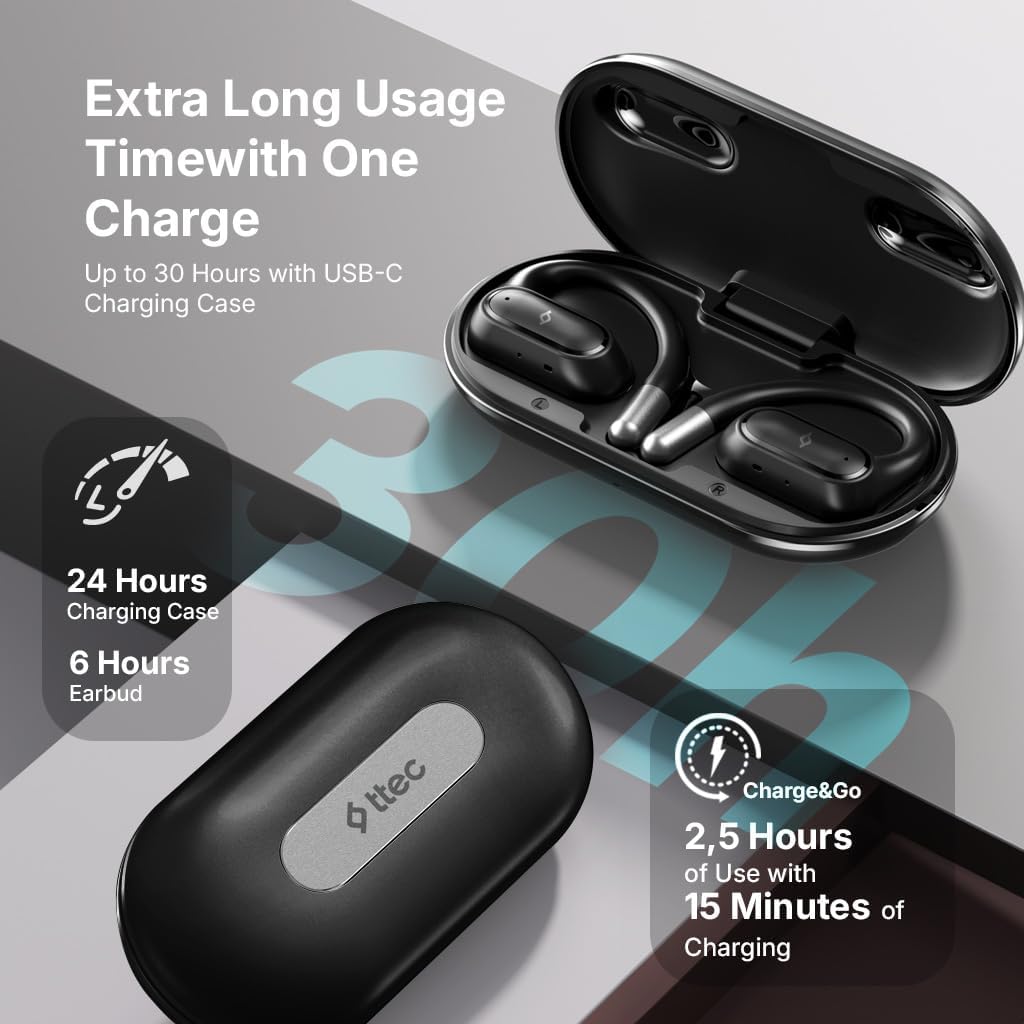
Image 4.1: Charging case displaying battery life. The image illustrates the charging case with text indicating 24 hours from the charging case, 6 hours from earbuds, and 2.5 hours of use from 15 minutes of charging.
4.2 การจับคู่กับอุปกรณ์บลูทูธ
To connect your earphones to a smartphone or other Bluetooth-enabled device:
- ตรวจสอบให้แน่ใจว่าหูฟังได้รับการชาร์จและวางไว้ในกล่องชาร์จ
- เปิดกล่องชาร์จ หูฟังจะเข้าสู่โหมดจับคู่โดยอัตโนมัติ และไฟ LED จะกะพริบ
- บนอุปกรณ์ของคุณ เปิดใช้งานบลูทูธและค้นหาอุปกรณ์ที่มีอยู่
- Select "ttec SoundFlow" from the list of found devices.
- Once connected, the earphone LED indicators will stop flashing or turn off, and you will hear a confirmation tone.
หูฟังจะเชื่อมต่อกับอุปกรณ์ที่จับคู่ล่าสุดโดยอัตโนมัติเมื่อนำออกจากเคส หากเปิดใช้งานบลูทูธบนอุปกรณ์นั้น
5. คู่มือการใช้งาน
5.1 การสวมหูฟัง
Gently place the ear hook over your ear and position the speaker unit comfortably in front of your ear canal. The open-ear design allows you to remain aware of your surroundings.

Image 5.1: A person cycling while wearing the ttec SoundFlow OWS earphones. The image highlights the open-ear design, allowing the user to stay connected to their surroundings.

Image 5.2: A woman wearing a ttec SoundFlow earbud, demonstrating the comfortable and secure fit. The image also indicates the lightweight design: 8.2g per earbud and 52g for the charging case.
5.2 ระบบควบคุมแบบสัมผัส
The earphones feature touch sensors for easy control of various functions:
| การกระทำ | การทำงาน |
|---|---|
| แตะครั้งเดียว (L/R) | เล่น/หยุดเพลง, รับสายโทรศัพท์ |
| ดับเบิ้ลแท็ป (ซ้าย) | เพลงก่อนหน้า |
| ดับเบิ้ลแท็ป (R) | เพลงถัดไป |
| แตะสามครั้ง (ซ้าย/ขวา) | เปิดใช้งานผู้ช่วยเสียง |
| กดยาว (ซ้าย/ขวา) | Reject Call, End Call |
โหมดเกม 5.3 โหมด
The earphones feature a low-latency game mode for an enhanced gaming and video experience. This mode reduces audio delay to 50ms.
- To activate Game Mode: Refer to the specific instructions in the quick start guide or product packaging for the exact touch gesture to enable/disable game mode. (Typically a specific tap sequence or long press).
- When Game Mode is active, you may notice a slight change in audio profile, optimized for lower latency.

Image 5.3: ttec SoundFlow earphones and charging case, surrounded by gaming console symbols, highlighting the 50ms low latency feature for an optimized gaming and video experience.
6. การบำรุงรักษา
6.1 การทำความสะอาด
- เช็ดหูฟังและกล่องชาร์จด้วยผ้าแห้งนุ่มที่ไม่เป็นขุย
- ห้ามใช้สารทำความสะอาดที่มีฤทธิ์กัดกร่อน แอลกอฮอล์ หรือตัวทำละลายเคมี
- Ensure charging contacts are clean and dry to prevent charging issues.
6.2 ความทนทานต่อน้ำและเหงื่อ
The ttec SoundFlow OWS earphones are IPX6 rated, meaning they are resistant to high-pressure water jets from any direction. This makes them suitable for use during workouts and in light rain.
- อย่าจุ่มหูฟังลงในน้ำ
- Ensure the earphones are dry before placing them back into the charging case to prevent damage.

Image 6.1: A man running outdoors, illustrating the sweat and water-resistant design of the ttec SoundFlow earphones, which are IPX6 rated.
6.3 พื้นที่จัดเก็บ
เมื่อไม่ใช้งาน ให้เก็บหูฟังไว้ในกล่องชาร์จเพื่อปกป้องหูฟังและรักษาระดับพลังงานให้คงที่ เก็บในที่แห้งและเย็น ห่างจากอุณหภูมิที่สูงหรือต่ำเกินไป
7 การแก้ไขปัญหา
หากคุณพบปัญหาเกี่ยวกับหูฟังของคุณ โปรดดูวิธีแก้ไขทั่วไปต่อไปนี้:
| ปัญหา | สารละลาย |
|---|---|
| หูฟังไม่จับคู่ | Ensure earphones are charged. Turn off and on Bluetooth on your device. Forget the device in your Bluetooth settings and re-pair. |
| หูฟังใช้งานได้แค่ข้างเดียว | Place both earphones back in the case, close the lid, then open again. Ensure both are charged. |
| ไม่มีเสียง | Check device volume. Ensure earphones are connected. Try playing different audio. |
| ปัญหาการชาร์จ | Ensure charging cable is securely connected. Clean charging contacts on earphones and case. Try a different USB-C cable or power source. |
หากปัญหายังคงมีอยู่ โปรดติดต่อฝ่ายสนับสนุนลูกค้า
8. ข้อมูลจำเพาะ
| คุณสมบัติ | รายละเอียด |
|---|---|
| ชื่อรุ่น | SoundFlow |
| หมายเลขรุ่น | KM156 |
| เทคโนโลยีการเชื่อมต่อ | ไร้สาย (บลูทูธ 5.4) |
| ฟอร์มแฟกเตอร์ | หูฟังไร้สายแบบเปิดหู |
| น้ำหนักเอียร์บัด | 8.2 กรัม (อันละ) |
| น้ำหนักเคสชาร์จ | 52 กรัม |
| อายุการใช้งานแบตเตอรี่ของหูฟังเอียร์บัด | สูงสุด 6 ชั่วโมง (ชาร์จครั้งเดียว) |
| อายุการใช้งานแบตเตอรี่ทั้งหมด (รวมเคส) | นานถึง 30 ชั่วโมง |
| ชาร์จเร็ว | 15 min charge for 2.5 hours use (Charge&Go) |
| ความต้านทานต่อน้ำ | IPX6 Rated (Sweat and Water Resistant) |
| ความหน่วงต่ำ | 50ms (โหมดเกม) |
| ผู้ผลิต | เทค |
9. การรับประกันและการสนับสนุน
Your ttec SoundFlow OWS Wireless Bluetooth Earphones are covered by a manufacturer's warranty. For detailed warranty information, please refer to the warranty card included in your product packaging or visit the official ttec webเว็บไซต์.
For technical support, troubleshooting assistance, or to inquire about replacement parts, please contact ttec customer service through their official channels. Contact information can typically be found on the product packaging or the official ttec webเว็บไซต์.


