การแนะนำ
This manual provides detailed instructions for the installation, operation, and maintenance of your Imou Cruiser SC 4G 5MP Outdoor IP Camera. This camera features UHD 3K resolution for detailed images, 4G LTE connectivity for independent operation without Wi-Fi, four spotlights that emit white or infrared light, and two red and blue indicator lights to enhance alarm visibility. Please read this manual thoroughly before use and retain it for future reference.
ข้อมูลด้านความปลอดภัย
- ตรวจสอบแหล่งจ่ายไฟ voltagตรงตามข้อกำหนดของกล้องเพื่อป้องกันความเสียหาย
- Install the camera in a location where it is protected from extreme weather conditions, unless specifically designed for such environments.
- ควรหลีกเลี่ยงการวางกล้องไว้ใกล้แหล่งความร้อนหรือในที่ที่มีแสงแดดส่องโดยตรงเป็นเวลานาน
- อย่าพยายามถอดประกอบหรือดัดแปลงกล้อง โปรดติดต่อช่างผู้ชำนาญเพื่อขอรับบริการทั้งหมด
- เก็บกล้องและอุปกรณ์เสริมให้พ้นมือเด็ก
เนื้อหาแพ็คเกจ
กรุณาตรวจสอบสิ่งของภายในบรรจุภัณฑ์เมื่อเปิดออก หากมีสินค้าใดสูญหายหรือเสียหาย โปรดติดต่อผู้ค้าปลีกของคุณ
- Imou Cruiser SC 4G 5MP Camera
- อะแดปเตอร์แปลงไฟ
- เทมเพลตการติดตั้ง
- ชุดสกรู
- ขั้วต่อกันน้ำ
- คู่มือเริ่มต้นอย่างรวดเร็ว
สินค้าเกินview
Familiarize yourself with the main components of your Imou Cruiser SC 4G 5MP camera.
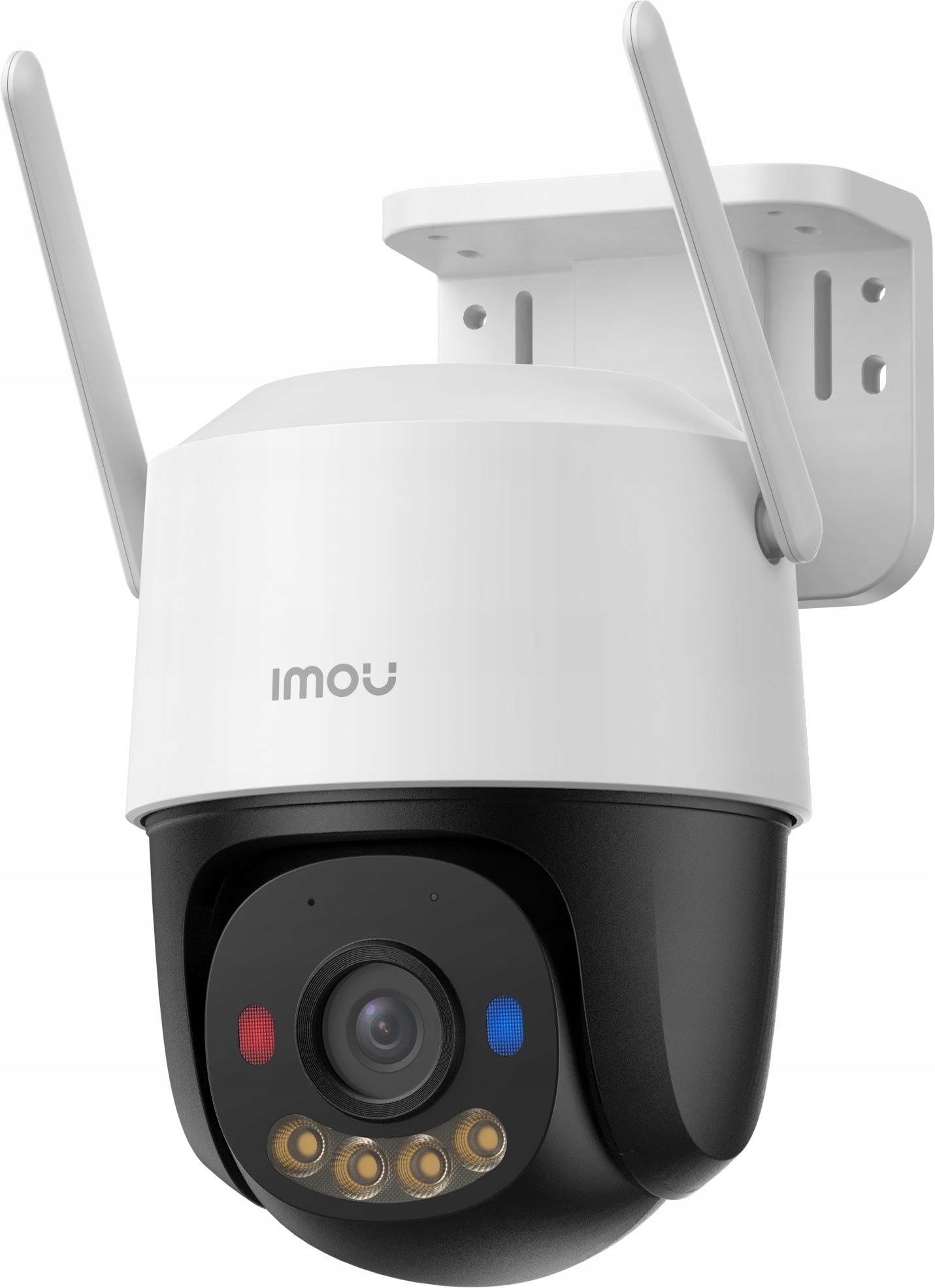
รูปที่ 1: Imou Cruiser SC 4G 5MP Outdoor IP Camera. This image shows the front view of the camera, highlighting its lens, spotlights, and overall design.
The camera features a high-resolution lens, four integrated spotlights (for both white light and infrared illumination), two prominent red and blue alarm indicator lights, a built-in microphone, a speaker for two-way audio, a SIM card slot for 4G connectivity, a reset button, and a power input port.
การตั้งค่า
1. เตรียมการติดตั้ง
- Choose a suitable outdoor location with good 4G signal reception.
- ตรวจสอบให้แน่ใจว่าพื้นผิวสำหรับติดตั้งมีความแข็งแรงเพียงพอที่จะรองรับน้ำหนักของกล้อง
2. การติดตั้งซิมการ์ด
- Locate the SIM card slot on the camera (refer to the Quick Start Guide for exact location).
- Insert a standard 4G LTE SIM card into the slot, ensuring correct orientation.
- Secure the waterproof connector cover if applicable.
3. เปิดเครื่อง
- เชื่อมต่ออะแดปเตอร์ไฟฟ้าเข้ากับพอร์ตอินพุตไฟฟ้าของกล้อง
- Plug the power adapter into a power outlet. The camera will begin to power on and initialize.
4. การตั้งค่าแอป (แอป Imou Life)
- Download the 'Imou Life' app from your smartphone's app store (iOS or Android).
- Register for an Imou account or log in if you already have one.
- แตะไอคอน '+' ที่มุมขวาบนของแอปเพื่อเพิ่มอุปกรณ์ใหม่
- สแกนคิวอาร์โค้ดที่อยู่บนตัวกล้องหรือบรรจุภัณฑ์
- Follow the on-screen prompts to complete the device setup.
5. การติดตั้งทางกายภาพ
- Use the provided mounting template to mark screw positions on the wall or ceiling.
- เจาะรูนำและใส่พุกยึดผนังหากจำเป็น
- Secure the camera mounting base with the provided screws.
- ปรับมุมกล้องตามต้องการเพื่อการครอบคลุมที่เหมาะสมที่สุด
การดำเนินงาน
1. สด View
- Open the Imou Life app and select your camera from the device list.
- The live video feed will appear, allowing you to monitor your property in real-time.
2. การบันทึกและการเล่นซ้ำ
- The camera supports continuous recording or event-triggered recording (e.g., motion detection).
- ถึง view บันทึกเสียงฟูtage, access the playback feature within the Imou Life app. You can browse by date and time.
3. Motion Detection & Alarm
- Configure motion detection sensitivity and detection zones in the app settings.
- When motion is detected, the camera can trigger an alarm, activate the spotlights, and flash the red and blue indicator lights to deter intruders.
- You will receive notifications on your smartphone when an alarm is triggered.
4. การพูดสองทาง
- ขณะถ่ายทอดสด view, tap the microphone icon in the Imou Life app to speak through the camera's speaker.
- ไมโครโฟนในตัวของกล้องช่วยให้คุณได้ยินเสียงจากตำแหน่งของกล้องได้
5. โหมดการมองเห็นตอนกลางคืน
- The camera automatically switches to infrared (IR) night vision in low light conditions, providing clear black and white images.
- You can also configure the camera to use its white light spotlights for full-color night vision when motion is detected or on a schedule.
การซ่อมบำรุง
1. การทำความสะอาด
- ควรเช็ดเลนส์กล้องด้วยผ้าแห้งเนื้อนุ่มเป็นประจำ เพื่อให้ได้ภาพที่คมชัด
- เช็ดกล้อง casinจีกับโฆษณาamp ผ้าตามความจำเป็น ห้ามใช้สารเคมีรุนแรงหรือน้ำยาทำความสะอาดที่มีฤทธิ์กัดกร่อน
2. การอัปเดตเฟิร์มแวร์
- Periodically check for firmware updates via the Imou Life app.
- Keeping your camera's firmware updated ensures optimal performance, security, and access to new features.
3. การจัดการการจัดเก็บข้อมูล
- If using a local storage card (e.g., microSD), ensure it is functioning correctly and has sufficient space.
- Manage cloud storage subscriptions and settings through the Imou Life app.
การแก้ไขปัญหา
- Q: Camera is not powering on.
- A: Check if the power adapter is securely connected to both the camera and the power outlet. Ensure the outlet is functional.
- Q: No 4G connection.
- A: Verify that the SIM card is correctly inserted and activated. Check 4G signal strength in the camera's location. Contact your mobile carrier if necessary.
- Q: Cannot add device to the Imou Life app.
- A: Ensure your smartphone has a stable internet connection. Reset the camera by pressing the reset button for 10 seconds and try adding it again. Make sure you are scanning the correct QR code.
- Q: Poor image quality.
- A: Clean the camera lens. Ensure there are no obstructions in front of the lens. Check network conditions; a weak 4G signal can affect streaming quality.
- Q: Motion detection is not working or is too sensitive.
- A: Adjust the motion detection sensitivity and detection zones in the Imou Life app settings. Ensure the camera's firmware is up to date.
ข้อมูลจำเพาะ
| ยี่ห้อ | อิโม |
| หมายเลขรุ่น | รุ่น 134 |
| ปณิธาน | UHD 3K (5MP) |
| การเชื่อมต่อ | 4G LTE (independent of Wi-Fi) |
| ไฟสปอตไลท์ | 4 (emit white or infrared light) |
| ไฟเตือน | 2 (red and blue indicator lights) |
| รวมส่วนประกอบ | Delivered as a kit |
| จำนวนรายการ | 1 |
การรับประกันและการสนับสนุน
For warranty information and technical support, please refer to the warranty card included with your product or visit the official Imou website. You can also contact Imou customer service through the Imou Life app for assistance.


