การแนะนำ
This manual provides detailed instructions for the setup, operation, and maintenance of your RAPIQUE R102 Ultra-Light Wireless Mouse. Designed for comfort and versatility, the R102 features dual-mode connectivity (Bluetooth 5.1 and 2.4GHz wireless), silent clicks, and adjustable DPI settings, making it suitable for various computing environments.

This image highlights the ultra-lightweight design of the RAPIQUE R102 mouse, emphasizing its 53-gram weight for comfortable, all-day use. It shows the mouse from different angles, illustrating its sleek profile.
เนื้อหาแพ็คเกจ
- R102 Lightweight Wireless Mouse x1
- ตัวรับสัญญาณ USB x1
- USB-C Charge cable x1
- คู่มือ x1
สินค้าเกินview
Familiarize yourself with the components and controls of your RAPIQUE R102 mouse.
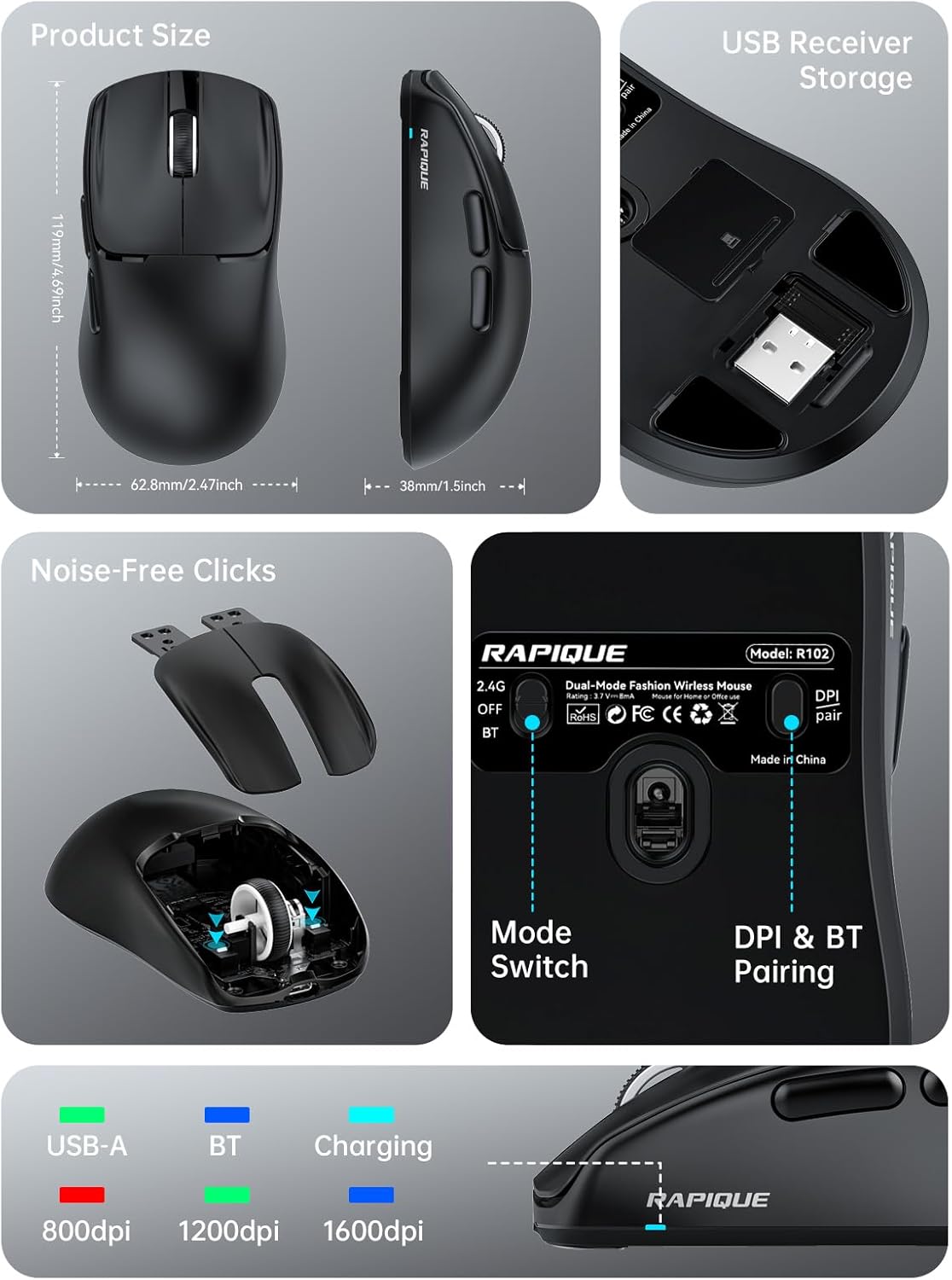
This comprehensive image provides a detailed look at the RAPIQUE R102 mouse. It includes precise product dimensions, shows the convenient storage location for the USB receiver, illustrates the internal mechanism for noise-free clicks, and clearly labels the mode switch and DPI/Bluetooth pairing button on the mouse's underside.
ส่วนประกอบหลัก
- ปุ่มคลิกซ้าย/ขวา: Designed for silent operation.
- ล้อเลื่อน: เพื่อการเลื่อนหน้าจอแนวตั้งที่ราบรื่น
- ปุ่ม DPI: Located on the top, cycles through DPI settings.
- ปุ่มเดินหน้า/ถอยหลัง: Located on the left side for quick navigation.
- พอร์ตชาร์จ USB-C: Located at the front for recharging.
- สวิตช์โหมด: On the bottom, selects between 2.4G, Off, and Bluetooth modes.
- DPI & BT Pairing Button: On the bottom, used for DPI adjustment and Bluetooth pairing.
- ช่องเก็บตัวรับสัญญาณ USB: On the bottom, for convenient storage of the 2.4GHz USB receiver.
การตั้งค่า
กำลังชาร์จเมาส์
The RAPIQUE R102 mouse is equipped with a built-in rechargeable battery. Before first use, or when the battery is low, connect the provided USB-C charging cable to the mouse's USB-C port and the other end to a USB power source (e.g., computer USB port, USB wall adapter). A full charge typically takes 1-2 hours.

This image demonstrates the USB-C charging capability of the R102 mouse. It highlights the 500mAh battery and indicates that 1-2 hours of charging can bring the battery to 98%, while 24 hours of use results in 86% power remaining, emphasizing its long-lasting battery.
การเชื่อมต่อเมาส์
The R102 mouse supports two connectivity modes: 2.4GHz Wireless via USB receiver and Bluetooth 5.1.
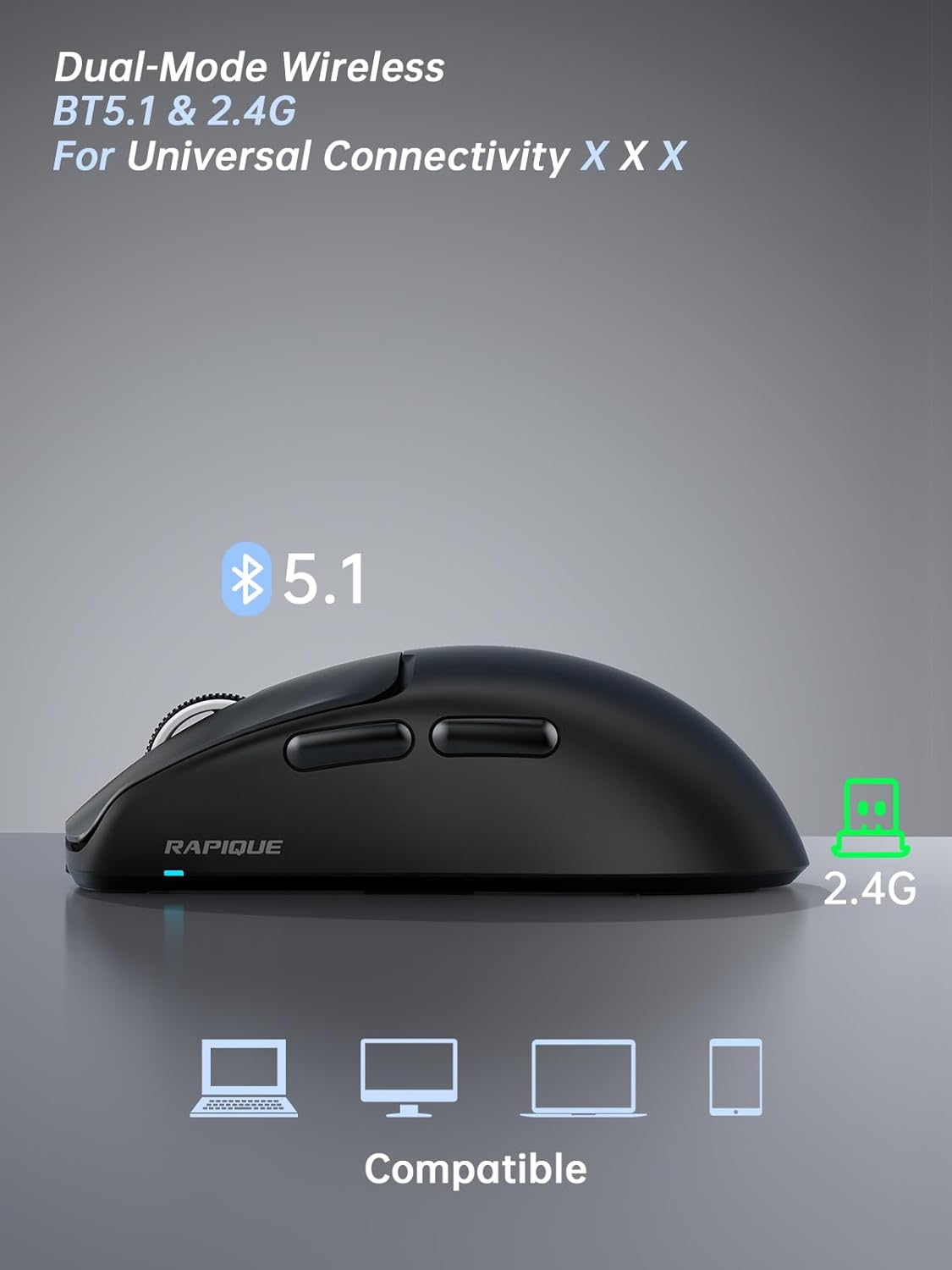
This image illustrates the dual-mode connectivity of the RAPIQUE R102 mouse, supporting both Bluetooth 5.1 and 2.4GHz connections for broad compatibility across various devices.
โหมดไร้สาย 2.4GHz
- ค้นหาตัวรับสัญญาณ USB ที่เก็บไว้ในช่องด้านล่างของเมาส์
- เสียบตัวรับสัญญาณ USB เข้ากับพอร์ต USB-A ที่ว่างอยู่บนคอมพิวเตอร์ของคุณ
- เลื่อนสวิตช์โหมดที่ด้านล่างของเมาส์ไปที่ตำแหน่ง "2.4G"
- The mouse should automatically connect to your computer. No drivers are required.
โหมดบลูทู ธ
- Slide the mode switch on the bottom of the mouse to the "BT" position.
- Press and hold the "DPI & BT Pair" button on the bottom of the mouse for 3-5 seconds until the indicator light starts blinking, indicating it's in pairing mode.
- On your device (MacBook, iPad, Android, etc.), go to Bluetooth settings and search for "RAPIQUE R102".
- Select "RAPIQUE R102" to pair. Once connected, the indicator light will stop blinking.
คำแนะนำการใช้งาน
การปรับ DPI
The R102 mouse offers three adjustable DPI (Dots Per Inch) levels: 800, 1200, and 1600. To change the DPI, press the DPI button located on the top of the mouse, just below the scroll wheel. Each press will cycle through the available DPI settings, allowing you to customize cursor sensitivity for different tasks.
This image focuses on the bottom of the R102 mouse, illustrating the DPI & BT pairing button. It highlights the three DPI levels (800, 1200, 1600) that can be cycled through by pressing this button, allowing users to adjust cursor sensitivity.
Using Side Buttons
The two side buttons on the left of the mouse function as "Forward" and "Back" buttons by default. These are useful for quick navigation in web เบราว์เซอร์และ file explorers, enhancing productivity.
การจัดการพลังงาน
To conserve battery life, the mouse will enter a sleep mode after a period of inactivity. To wake it up, simply move the mouse or click any button. For extended storage or travel, slide the mode switch to the "OFF" position.

This image demonstrates the versatility of the RAPIQUE R102 mouse in different settings, including office, home, and travel. It shows the mouse being used with a desktop setup, a tablet, and a laptop, emphasizing its adaptability for various computing needs.
การซ่อมบำรุง
- การทำความสะอาด: ใช้ผ้านุ่มและแห้งเช็ดทำความสะอาดเมาส์ สำหรับคราบฝังแน่น ให้เช็ดเบาๆamp สามารถใช้ผ้าเช็ดทำความสะอาดได้ โดยต้องแน่ใจว่าไม่มีของเหลวเข้าไปในส่วนประกอบภายใน หลีกเลี่ยงสารเคมีรุนแรงหรือวัสดุที่มีฤทธิ์กัดกร่อน
- พื้นที่จัดเก็บ: When not in use for extended periods, store the mouse in a cool, dry place. Ensure the mode switch is set to "OFF" to prevent battery drain.
- การดูแลแบตเตอรี่ Avoid fully discharging the battery frequently. Recharge the mouse when the low battery indicator appears.
การแก้ไขปัญหา
เมาส์ไม่ตอบสนอง
- ตรวจสอบแบตเตอรี่: Ensure the mouse is sufficiently charged. Connect the USB-C charging cable and allow it to charge for a few minutes.
- สวิตช์โหมดตรวจสอบ: Verify that the mode switch on the bottom of the mouse is set to the correct position (2.4G or BT) for your connection type.
- Re-pair 2.4GHz: For 2.4GHz mode, try unplugging and re-plugging the USB receiver into a different USB port on your computer.
- จับคู่บลูทูธใหม่: For Bluetooth mode, delete "RAPIQUE R102" from your device's Bluetooth list and repeat the pairing process.
- รีสตาร์ทอุปกรณ์: Sometimes, restarting your computer or device can resolve connectivity issues.
Cursor Movement is Erratic or Laggy
- เซ็นเซอร์ทำความสะอาด: Ensure the optical sensor on the bottom of the mouse is clean and free from dust or debris.
- พื้นผิว: ควรใช้เมาส์บนพื้นผิวที่สะอาด ไม่สะท้อนแสง และเรียบเสมอกัน แนะนำให้ใช้แผ่นรองเมาส์
- การรบกวน: Move the mouse closer to the USB receiver (for 2.4GHz) or your Bluetooth device. Avoid using it near strong electromagnetic interference sources.
- การตั้งค่า DPI: Adjust the DPI setting to a level that suits your preference and task.
Silent Click Feature Not Working
- The R102 is designed with silent click switches. If you experience loud clicks, ensure the mouse is not damaged. Contact customer support if the issue persists.
ข้อมูลจำเพาะ
| คุณสมบัติ | รายละเอียด |
|---|---|
| ขนาดสินค้า | 4 x 2.5 x 0.04 นิ้ว |
| น้ำหนักสินค้า | 1.94 ออนซ์ |
| ASIN | B0F1Y72169 |
| หมายเลขรุ่นสินค้า | R102 |
| แบตเตอรี่ | ต้องใช้แบตเตอรี่ที่ไม่ใช่มาตรฐาน 1 ก้อน (รวมอยู่ด้วย) |
| ลูกค้า Reviews | 4.5 จาก 5 ดาว (43 คะแนน) |
| อันดับสินค้าขายดี | #1,450 in Computer Mice |
| วันที่พร้อมใช้งานครั้งแรก | 9 พฤษภาคม 2025 |
| ผู้ผลิต | Rapique |
| ยี่ห้อ | ราปีเก้ |
| สี | สีดำ |
| เทคโนโลยีการเชื่อมต่อ | ระบบไร้สาย 2.4GHz, บลูทูธ 5.1 |
| คุณสมบัติพิเศษ | Lightweight(53g), Portable, Soundless, USB C Rechargeable, Wireless(Bluetooth 5.1+2.4GHz) |
| เทคโนโลยีตรวจจับการเคลื่อนไหว | ออฟติคอล |
การรับประกันและการสนับสนุน
For warranty information and technical support, please refer to the official RAPIQUE webหรือติดต่อฝ่ายบริการลูกค้าโดยตรง คุณยังสามารถเยี่ยมชม RAPIQUE Store on Amazon สำหรับข้อมูลเพิ่มเติมและรายละเอียดการติดต่อ


