การแนะนำ
Thank you for choosing the Mars Gaming MC-REV ATX Gaming Case. This manual provides essential information for the proper installation, operation, and maintenance of your new PC case. The MC-REV is designed for high-performance gaming systems, featuring a revolutionary airflow system, double tempered glass panels, and support for vertical GPU installation.
Please read this manual carefully before beginning the assembly process to ensure optimal performance and longevity of your components.
คุณสมบัติผลิตภัณฑ์
- Dual Seamless Tempered Glass Panels: เพลิดเพลินไปกับทัศนียภาพแบบพาโนรามา view of your build with frameless, screwless tempered glass panels, allowing easy access and an impressive aesthetic.
- Revolutionary Airflow System: Three 120mm ARGB fans are strategically tilted at a 25° angle to direct cool air directly to the GPU and motherboard, ensuring efficient heat dissipation.
- Compatibility with Reverse Port Motherboards: Designed to support motherboards with reverse connectors for optimized cable management and improved internal aesthetics.
- Vertical GPU Mounting System: A dedicated steel structure allows for vertical installation of your graphics card, enhancing visual appeal and airflow (optional riser cable not included).
- Advanced Connectivity & ARGB Hub: Features a lower control panel with USB-C, USB 3.0, USB 2.0, HD audio, and microphone ports. An integrated ARGB hub with RF remote control allows for customizable lighting effects and fan speed adjustments, with motherboard synchronization capability.
- ความจุสูงสุด: Supports ATX, MicroATX, and Mini-ITX motherboards, GPUs up to 420mm, CPU coolers up to 157mm, and liquid cooling up to 360mm. Includes internal bays for 2 x HDD 3.5" + 1 x SSD 2.5" or 1 x HDD 3.5" + 2 x SSD 2.5".
การติดตั้งและการตั้งค่า
Safety First: Always disconnect the power supply from the wall outlet before installing or removing any components. Wear an anti-static wrist strap to prevent electrostatic discharge (ESD) damage to your components.
1. การเปิดออกและการตรวจสอบ
Carefully remove the MC-REV case from its packaging. Inspect the case for any signs of damage during transit. Report any damage to your retailer immediately.
2. การถอดแผงด้านข้าง
The MC-REV features screwless tempered glass panels. Gently lift and remove the side panels to access the interior for component installation.
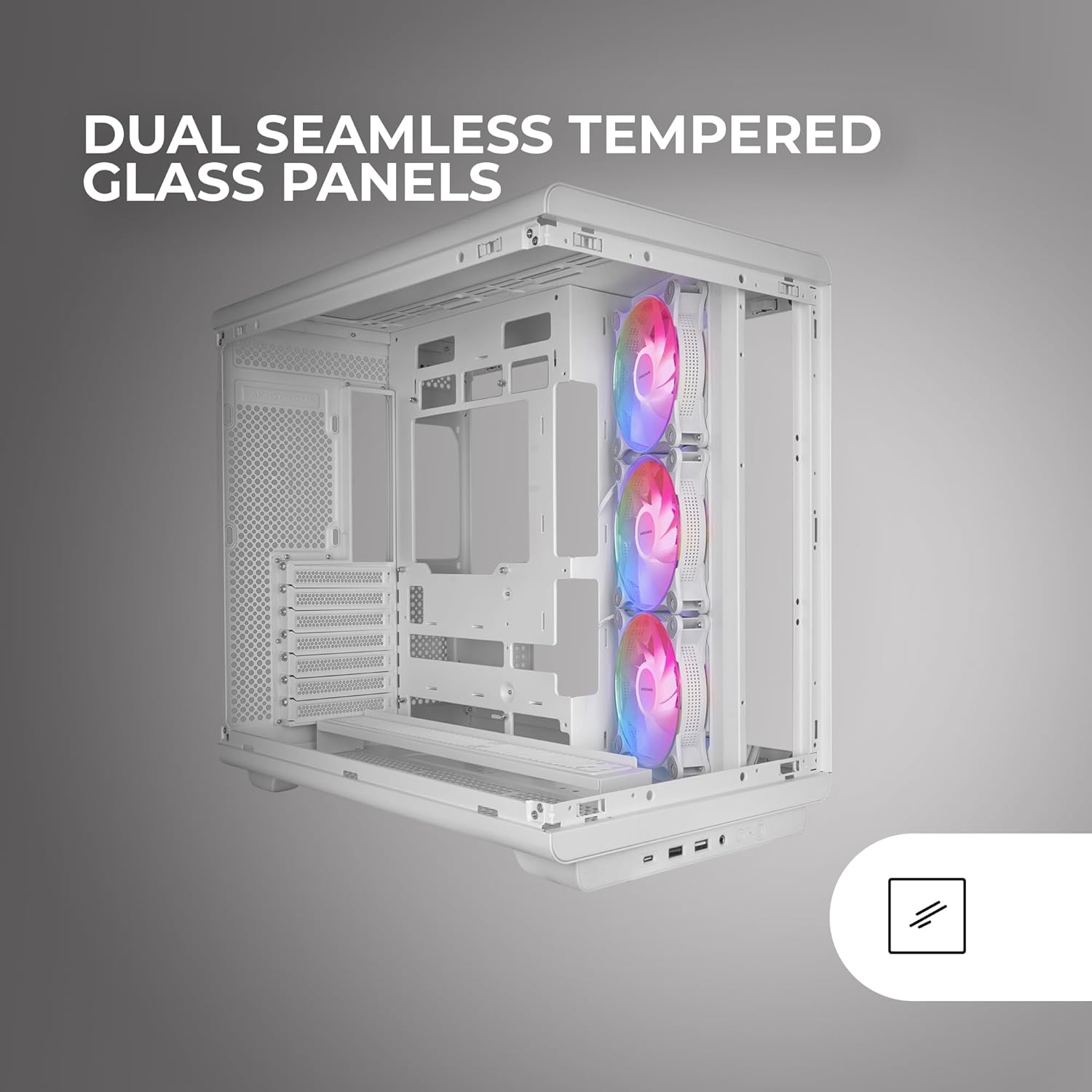
Image: The Mars Gaming MC-REV PC case with its dual seamless tempered glass panels removed, providing a clear view of the internal structure and component mounting areas.
3. การติดตั้งเมนบอร์ด
- Identify the correct standoffs for your ATX, MicroATX, or Mini-ITX motherboard. Install any necessary standoffs if they are not pre-installed.
- วางเมนบอร์ดของคุณลงบนสแตนด์ออฟอย่างระมัดระวัง โดยจัดรูสกรูให้ตรงกัน
- ยึดเมนบอร์ดด้วยสกรูที่ให้มา
- If using a reverse port motherboard, ensure all connectors are routed through the designated cutouts for optimal cable management.

ภาพ: รายละเอียด view of a motherboard installed in the MC-REV case, demonstrating the compatibility with back-connect motherboards and the clean routing of power and data cables behind the motherboard tray.
4. การติดตั้งการ์ดจอ (GPU)
- Standard Horizontal Installation: Remove the necessary PCIe slot covers. Insert your GPU into the primary PCIe slot on your motherboard and secure it with screws.
- การติดตั้งในแนวตั้ง: The MC-REV supports vertical GPU mounting. Install your graphics card into the vertical mounting bracket. Note: A PCIe riser cable is required for vertical GPU installation and is not included with the case. Secure the bracket to the case.

Image: The interior of the Mars Gaming MC-REV PC case, featuring a graphics card mounted vertically, showcasing the dedicated vertical GPU mounting system and the illuminated ARGB fans.
5. การติดตั้งไดรฟ์จัดเก็บข้อมูล
- Locate the internal drive bays for 3.5" HDDs and 2.5" SSDs.
- Mount your drives into the appropriate bays and secure them with screws.
6. การติดตั้งชุดจ่ายไฟ (PSU)
Install your PSU into the designated compartment, typically at the bottom rear of the case. Secure it with screws from the rear of the case. Route all necessary power cables through the cable management cutouts.
7. Fan and Liquid Cooling Installation
The MC-REV comes with three pre-installed 120mm ARGB fans. Additional fans (up to 10 total 120mm fans) or liquid cooling radiators (up to 360mm) can be installed in various locations. Refer to the case's specifications for supported mounting points.
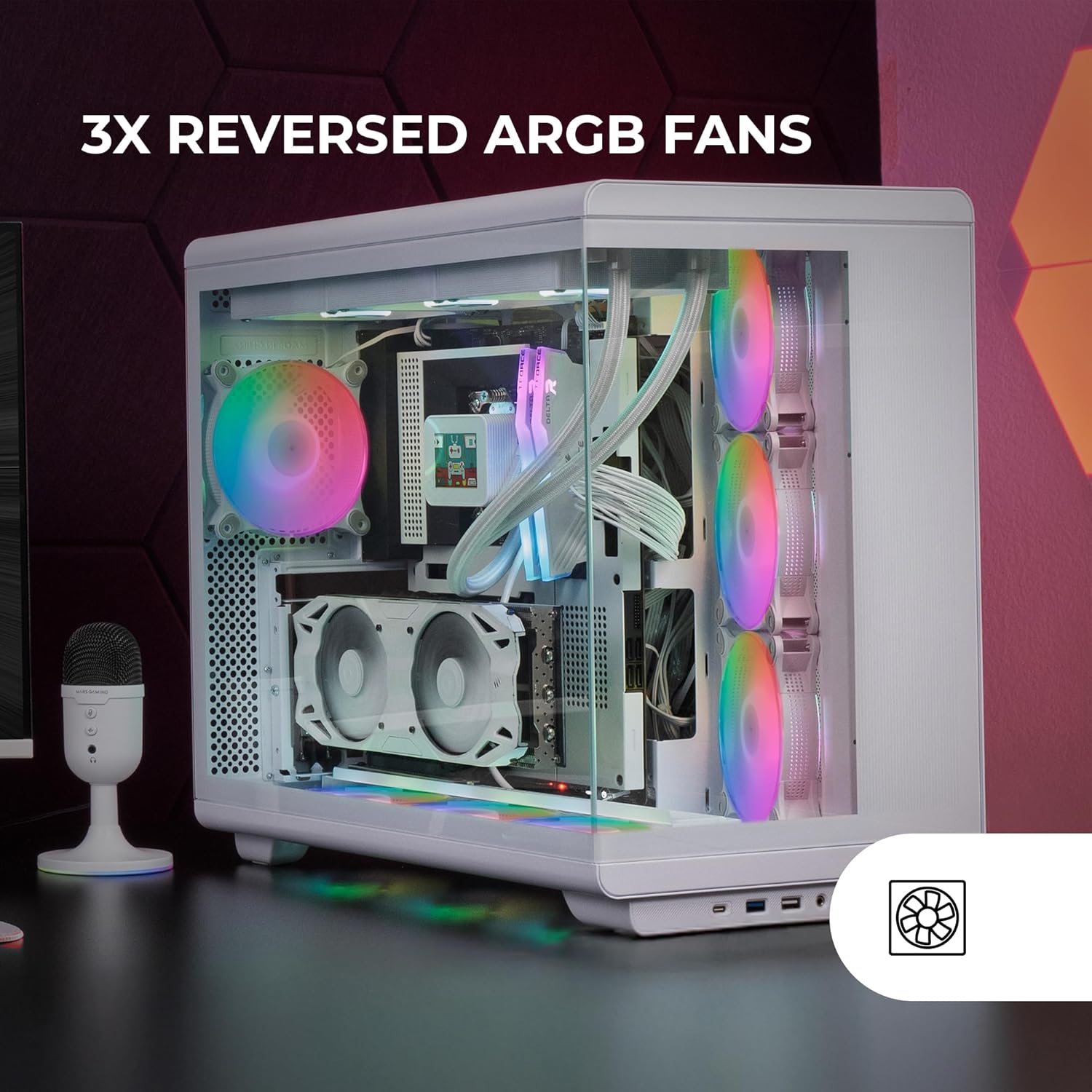
Image: The interior of the Mars Gaming MC-REV PC case, highlighting the three reversed ARGB fans with their vibrant illumination, designed for optimal airflow.
8 การเชื่อมต่อพอร์ต I/O ด้านหน้า
Connect the cables from the case's front panel (USB-C, USB 3.0, USB 2.0, HD Audio, Microphone, Power, Reset) to the corresponding headers on your motherboard. Refer to your motherboard manual for header locations.
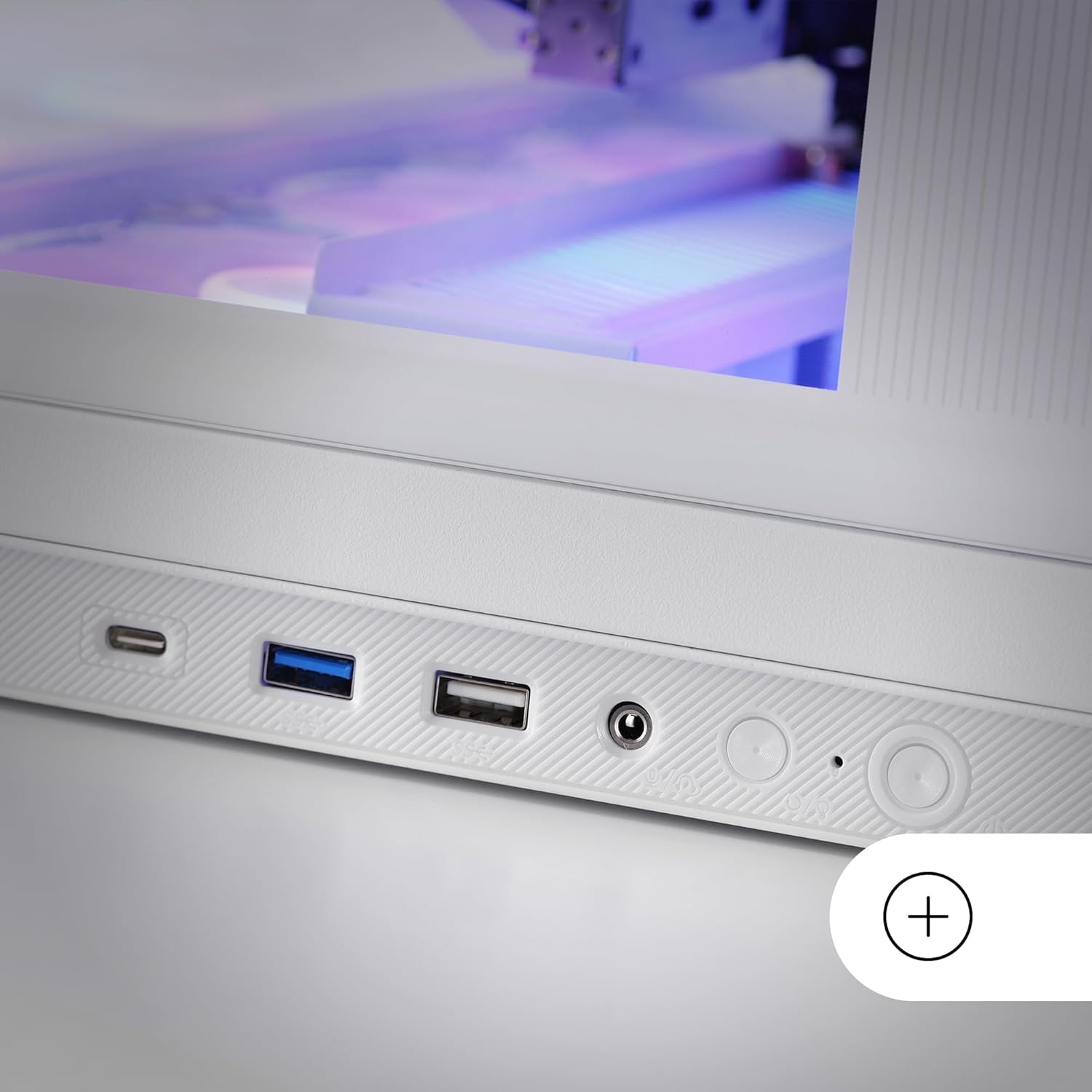
Image: A close-up of the lower control panel on the Mars Gaming MC-REV PC case, showing the USB-C, USB 3.0, USB 2.0, HD audio, and microphone ports.
9. ARGB Hub Connection
Connect the integrated ARGB hub to your power supply and, if desired, to your motherboard's ARGB header using the included connection cable for software synchronization.
10. การจัดการสายเคเบิล
Utilize the double chamber structure and cable routing channels behind the motherboard tray to organize and secure all cables. This improves airflow and maintains a clean interior aesthetic.
11. Reinstalling Side Panels
Once all components are installed and cables are managed, carefully reattach the tempered glass side panels.
คำแนะนำการใช้งาน
การเปิดเครื่อง
After ensuring all connections are secure and the power supply is switched on, press the power button located on the front I/O panel to start your system.
การควบคุมแสง ARGB
- รีโมทคอนโทรล RF: Use the provided RF remote control to cycle through various ARGB lighting effects, adjust brightness, and change fan speeds for the connected fans.
- การซิงโครไนซ์เมนบอร์ด: If the ARGB hub is connected to your motherboard's ARGB header, you can control the lighting effects and fan speeds through your motherboard's proprietary RGB software (e.g., ASUS Aura Sync, MSI Mystic Light, Gigabyte RGB Fusion).
การซ่อมบำรุง
การทำความสะอาดตัวเครื่อง
- ภายนอก: ใช้แบบนุ่มๆamp ใช้ผ้าเช็ดทำความสะอาดพื้นผิวภายนอก หลีกเลี่ยงการใช้สารทำความสะอาดที่มีฤทธิ์กัดกร่อน
- แผงกระจกนิรภัย: ทำความสะอาดด้วยน้ำยาทำความสะอาดกระจกและผ้าไมโครไฟเบอร์เพื่อป้องกันคราบ
- ตัวกรองฝุ่น: Periodically remove and clean the dust filters (if present) to maintain optimal airflow and prevent dust buildup inside the case.
การทำความสะอาดภายใน
Every few months, or as needed, open the case and use compressed air to remove dust from fans, heatsinks, and other components. Ensure the system is powered off and unplugged before performing internal cleaning.
การแก้ไขปัญหา
- ระบบไม่เปิดเครื่อง:
- ตรวจสอบการเชื่อมต่อสายไฟทั้งหมด ตั้งแต่แหล่งจ่ายไฟ (PSU) ไปจนถึงเมนบอร์ดและส่วนประกอบต่างๆ
- Ensure the power button cable is correctly connected to the motherboard header.
- ตรวจสอบว่าสวิตช์ PSU อยู่ในตำแหน่ง "เปิด"
- พัดลมไม่หมุน / ไฟ ARGB ไม่ติด:
- Ensure all fans are properly connected to the ARGB hub or motherboard headers.
- Verify the ARGB hub is receiving power.
- If using motherboard sync, check your motherboard's RGB software settings.
- Test the RF remote control's battery (1 AAAA battery included).
- พอร์ต USB ไม่ทำงาน:
- Check if the front panel USB cables are securely connected to the correct headers on your motherboard.
- แจ็คเสียงไม่ทำงาน:
- ตรวจสอบให้แน่ใจว่าสาย HD Audio จากแผงด้านหน้าเชื่อมต่อกับพอร์ตเสียงบนเมนบอร์ดอย่างถูกต้องแล้ว
For issues related to specific internal components (CPU, GPU, RAM, etc.), please refer to their respective manuals or manufacturer support.
ข้อมูลจำเพาะ
| คุณสมบัติ | รายละเอียด |
|---|---|
| ชื่อรุ่น | MCREVW |
| ยี่ห้อ | มาร์ส เกมมิ่ง |
| ประเภทเคส | ATX มิดทาวเวอร์ |
| ความเข้ากันได้ของเมนบอร์ด | ATX, Micro ATX, Mini ITX |
| วัสดุ | กระจกนิรภัย, เหล็ก |
| สี | สีขาว |
| ขนาด (กxยxส) | 16.65 x 17.44 x 10.94 นิ้ว (423 x 443 x 278 มม.) |
| น้ำหนักสินค้า | 15.09 ปอนด์ (6.86 กก.) |
| ระยะห่างระหว่าง GPU | สูงถึง 420 มม. |
| GPU Width Clearance | สูงถึง 147 มม. |
| ระยะห่างความสูงของชุดระบายความร้อน CPU | สูงถึง 157 มม. |
| ช่องเสียบขยาย | 7 |
| ช่องไดรฟ์ | 2 x HDD 3.5" + 1 x SSD 2.5" or 1 x HDD 3.5" + 2 x SSD 2.5" |
| พัดลมที่ติดตั้งล่วงหน้า | 3 x 120mm ARGB (Inverse Airflow) |
| การสนับสนุนแฟนๆ | พัดลมสูงสุด 10 x 120 มม. |
| รองรับการระบายความร้อนด้วยของเหลว | หม้อน้ำขนาดสูงสุด 360 มม. |
| พอร์ต I / O ด้านหน้า | 1 x USB-C, 1 x USB 3.0, 1 x USB 2.0, HD Audio, Microphone |
| คุณสมบัติพิเศษ | Double Tempered Glass, Vertical GPU Support, ARGB Hub with RF Remote, Reverse Port Motherboard Compatibility |
| แบตเตอรี่รีโมทคอนโทรล | แบตเตอรี่ขนาด AAAA 1 ก้อน (มีมาให้ในชุด) |
การรับประกันและการสนับสนุน
Mars Gaming products are manufactured to high-quality standards. For warranty information and technical support, please refer to the official Mars Gaming webไซต์หรือติดต่อผู้ค้าปลีกในพื้นที่ของคุณ
เก็บหลักฐานการซื้อของคุณไว้เพื่อเรียกร้องการรับประกัน
แบรนด์อย่างเป็นทางการ Webเว็บไซต์: มาร์ส เกมมิ่ง