1. บทนำ
Welcome to the user manual for your ViewSonic VX2479A-HD-PRO gaming monitor. This document provides essential information for setting up, operating, and maintaining your monitor to ensure optimal performance and longevity. The VX2479A-HD-PRO is a 24-inch Full HD (1920x1080) monitor featuring a SuperClear IPS panel, a rapid 240Hz refresh rate, and a 1ms (MPRT) response time, designed for an immersive and responsive gaming experience. It supports HDR10, 102% sRGB color coverage, and includes EyePro Tech for enhanced viewให้ความสบายตลอดการใช้งานเป็นเวลานาน

รูปที่ 1 : ด้านหน้า view ของ ViewSonic VX2479A-HD-PRO monitor.
2. เนื้อหาบรรจุภัณฑ์
Please verify that all items listed below are included in your package. If any items are missing or damaged, please contact your retailer or Viewฝ่ายบริการลูกค้าของ Sonic
- ViewSonic VX2479A-HD-PRO Monitor x1
- สายไฟ x1
- สาย HDMI x1
- คู่มือเริ่มต้นอย่างรวดเร็ว x1
3. การตั้งค่า
ทำตามขั้นตอนเหล่านี้เพื่อตั้งค่าจอภาพของคุณ:
- การแกะกล่อง: นำจอภาพและส่วนประกอบทั้งหมดออกจากบรรจุภัณฑ์อย่างระมัดระวัง วางจอภาพคว่ำหน้าลงบนพื้นผิวที่นุ่มและสะอาดเพื่อป้องกันรอยขีดข่วน
- การประกอบขาตั้ง: Attach the monitor stand to the monitor panel according to the instructions in the included Quick Start Guide. Ensure it is securely fastened.
- สายเชื่อมต่อ:
- เชื่อมต่อสายไฟเข้ากับแหล่งจ่ายไฟของจอภาพ จากนั้นจึงเชื่อมต่อกับเต้ารับไฟฟ้า
- Connect the included HDMI cable from your computer's graphics card or gaming console to one of the HDMI 1.4 ports on the monitor. Alternatively, use a DisplayPort 1.4 cable for optimal performance.
- If desired, connect headphones or external speakers to the 3.5mm audio-out jack.
- เปิดเครื่อง: Press the power button on the monitor. Power on your computer or gaming console. The monitor should automatically detect the input signal.
The monitor is also compatible with 100 x 100 mm VESA mounts for alternative mounting solutions (mounting hardware sold separately).

รูปที่ 2: ด้านหลัง view illustrating the monitor's connectivity ports.
4. การใช้งานจอภาพ
The monitor features an On-Screen Display (OSD) menu for adjusting various settings. Use the buttons located on the monitor's bezel to navigate and select options.
4.1. การนำทางเมนู OSD
- กดปุ่ม OSD ใดก็ได้เพื่อเปิดใช้งานเมนู
- Use the navigation buttons (usually arrows) to move between menu options.
- Press the 'Select' or 'Enter' button to confirm a selection or enter a sub-menu.
- กดปุ่ม 'ออก' หรือ 'ย้อนกลับ' เพื่อกลับไปยังเมนูก่อนหน้าหรือออกจากเมนู OSD
4.2. Viewการตั้งค่าโหมด
การ ViewMode feature offers preset color profiles optimized for different viewing scenarios. These modes fine-tune brightness, contrast, and gamma settings.
- เกม: Optimized for gaming, enhancing visibility in dark areas and sharpening details.
- ภาพยนตร์: มอบประสบการณ์แบบภาพยนตร์ viewing experience with enhanced contrast and color saturation.
- Web: Balanced settings for general internet browsing and document viewการไอเอ็นจี
- ข้อความ: ลดแสงสีฟ้าและปรับความสว่างเพื่อให้อ่านได้อย่างสบายตา
- โมโน: แสดงผลเนื้อหาในรูปแบบขาวดำ
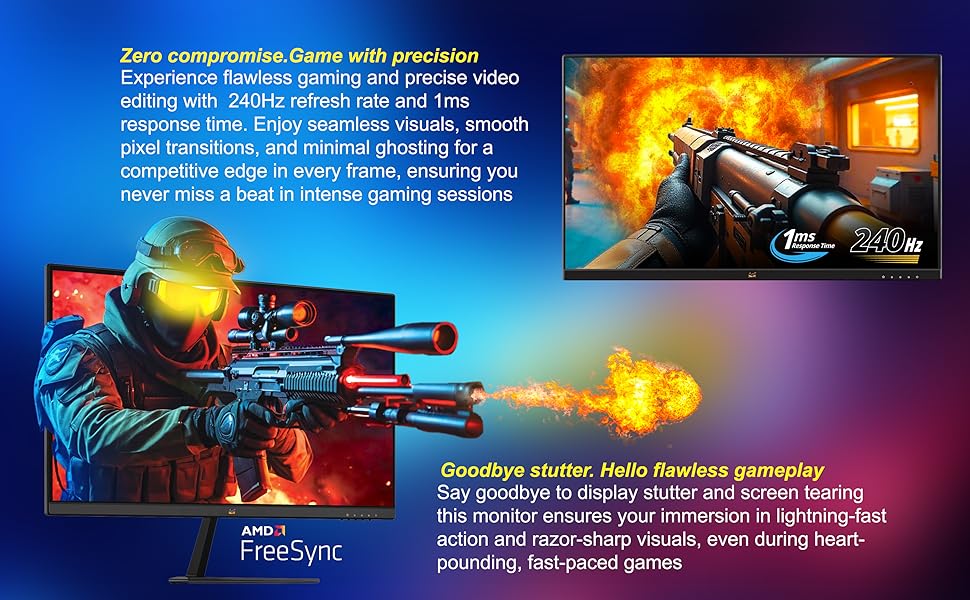
Figure 3: Illustration of preset game modes available through Viewโหมด.
5. คุณสมบัติหลัก
5.1. Ultra-Smooth Full HD Visuals
The 24-inch (23.8-inch viewable) SuperClear IPS screen delivers Full HD 1920 x 1080 resolution with vibrant visuals and sharp detail. The ultra-slim frameless design supports immersive viewing, whether in single or multi-monitor setups.
5.2. Exceptional Speed with 240Hz Refresh Rate and 1ms Response Time
Built for competitive gaming, the ultra-fast 240Hz refresh rate ensures incredibly smooth visuals. Paired with a 1ms (MPRT) response time and Variable Refresh Rate (VRR) support, this monitor eliminates screen tearing and ghosting for seamless gameplay and motion clarity.

Figure 4: Visual comparison demonstrating blur reduction at 240Hz versus 60Hz refresh rates.
5.3. AMD FreeSync Support
Experience tear-free and stutter-free gameplay with AMD FreeSync technology, which synchronizes the monitor's refresh rate with your GPU's frame rate.

Figure 5: Gameplay comparison showing the effect of AMD FreeSync on screen synchronization.
5.4. HDR10 and 102% sRGB Color Coverage
Experience deeper contrast, richer colors, and brighter highlights with HDR10 technology. The monitor also boasts 102% sRGB color coverage, ensuring vivid and accurate color reproduction for both gaming and content creation.
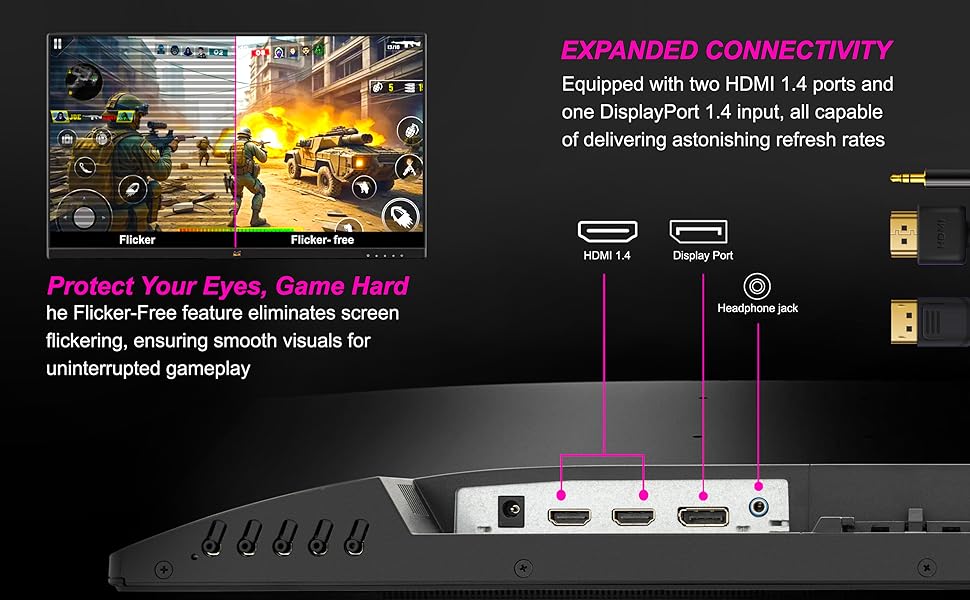
Figure 6: Visual representation of HDR10 enhancing contrast and color in a game scene.
5.5. Enhanced Eye Comfort with EyePro Tech+
The monitor incorporates Flicker-Free technology and a Blue Light Filter to reduce eye strain during extended use, making it ideal for long gaming sessions, studying, or professional work.
5.6. กว้าง Viewing Angles with SuperClear IPS
The SuperClear IPS panel technology ensures consistent color accuracy and brightness from wide viewing angles, up to 178 degrees horizontally and vertically.

Figure 7: Demonstrating wide viewing angles of the SuperClear IPS panel.
6. การเชื่อมต่อ
The VX2479A-HD-PRO offers versatile connectivity options to integrate with various devices:
- 2 x HDMI 1.4 Ports: For connecting PCs, laptops, and gaming consoles like PS5 and Xbox.
- 1 x DisplayPort 1.4: Provides high-bandwidth connectivity for optimal refresh rates and resolutions.
- 3.5mm Audio-Out Jack: สำหรับการเชื่อมต่อหูฟังหรือลำโพงภายนอก
The monitor is compatible with both PS5 and Xbox consoles, allowing for seamless switching between gaming platforms.
7. การบำรุงรักษา
การบำรุงรักษาอย่างถูกต้องจะช่วยให้จอภาพของคุณมีอายุการใช้งานยาวนานและประสิทธิภาพการทำงาน
- การทำความสะอาดหน้าจอ: เช็ดหน้าจอเบาๆ ด้วยผ้านุ่มที่ไม่เป็นขุย สำหรับรอยฝังแน่น ให้เช็ดเบาๆampเช็ดผ้าด้วยน้ำหรือน้ำยาทำความสะอาดหน้าจอโดยเฉพาะ หลีกเลี่ยงการใช้สารเคมีรุนแรงหรือวัสดุที่มีฤทธิ์กัดกร่อน
- การทำความสะอาด Casing: ใช้ผ้าแห้งนุ่มๆ เช็ดทำความสะอาดจอภาพasing.
- ปิดเครื่องเมื่อไม่ใช้งาน: ปิดจอภาพเมื่อไม่ได้ใช้งานเป็นเวลานานเพื่อประหยัดพลังงานและยืดอายุการใช้งาน
- หลีกเลี่ยงแสงแดดโดยตรง: อย่าวางจอภาพไว้ในที่ที่มีแสงแดดส่องโดยตรงหรือในที่ที่มีความร้อนสูงเกินไป
- การระบายอากาศ : ตรวจสอบให้แน่ใจว่ามีการระบายอากาศที่เหมาะสมรอบๆ จอภาพเพื่อป้องกันความร้อนสูงเกินไป อย่าปิดกั้นช่องระบายอากาศ
8 การแก้ไขปัญหา
หากคุณพบปัญหาเกี่ยวกับจอภาพของคุณ โปรดดูขั้นตอนการแก้ไขปัญหาทั่วไปต่อไปนี้:
- ไม่มีไฟฟ้า:
- ตรวจสอบให้แน่ใจว่าสายไฟเชื่อมต่อกับจอภาพและเต้าเสียบไฟอย่างแน่นหนา
- ตรวจสอบว่าเต้ารับไฟฟ้าทำงานอย่างถูกต้องหรือไม่โดยเสียบอุปกรณ์อื่น
- ตรวจสอบให้แน่ใจว่าได้กดปุ่มเปิด/ปิดของจอภาพแล้ว
- ไม่มีสัญญาณ/หน้าจอสีดำ:
- Confirm that the video cable (HDMI or DisplayPort) is securely connected to both the monitor and your computer/console.
- โปรดตรวจสอบให้แน่ใจว่าคอมพิวเตอร์/เครื่องเล่นเกมของคุณเปิดอยู่และไม่ได้อยู่ในโหมดพักเครื่อง
- Try connecting the monitor to a different video source or using a different video cable to rule out cable or source issues.
- เลือกแหล่งสัญญาณเข้าที่ถูกต้องผ่านเมนู OSD
- ปัญหาเกี่ยวกับภาพ (ภาพเบลอ ภาพบิดเบี้ยว สีผิดเพี้ยน):
- ปรับการตั้งค่าความละเอียดและอัตราการรีเฟรชบนคอมพิวเตอร์ของคุณให้ตรงกับความละเอียดดั้งเดิมของจอภาพ (1920x1080) และอัตราการรีเฟรชที่ต้องการ (สูงสุด 240Hz)
- รีเซ็ตจอภาพกลับไปเป็นการตั้งค่าเริ่มต้นจากโรงงานผ่านเมนู OSD
- ตรวจสอบไดรเวอร์การ์ดจอของคุณว่ามีการอัปเดตหรือไม่
- ตรวจสอบให้แน่ใจว่าสายเคเบิลวิดีโอไม่ชำรุด
- หน้าจอกระพริบ:
- Ensure Flicker-Free technology is enabled in the OSD menu.
- ตรวจสอบการรบกวนจากอุปกรณ์อิเล็กทรอนิกส์อื่นๆ
- Verify the video cable connection.
หากต้องการความช่วยเหลือเพิ่มเติม โปรดดูที่ Viewการสนับสนุนเสียง webเว็บไซต์หรือติดต่อฝ่ายบริการลูกค้า
9. ข้อมูลจำเพาะ
Below are the technical specifications for the ViewSonic VX2479A-HD-PRO monitor:
| คุณสมบัติ | ข้อมูลจำเพาะ |
|---|---|
| ยี่ห้อ | Viewโซนิค |
| แบบอย่าง | VX2479A-HD-โปร |
| ขนาดหน้าจอ | 23.8 นิ้ว (60.96 ซม.) |
| ประเภทแผง | SuperClear IPS |
| ปณิธาน | ฟูลเอชดี (1920 x 1080) |
| อัตราการรีเฟรช | 240เฮิรตซ์ |
| เวลาตอบสนอง | 1 มิลลิวินาที (MPRT) |
| อัตราส่วนคอนทราสต์ (คงที่) | 1,000:1 น. |
| อัตราส่วนคอนทราสต์ (ไดนามิก) | 80ม.:1 |
| ความสว่าง | 250 ซีดี/ตรม. |
| การปกปิดสี | 102% sRGB |
| รองรับ HDR | HDR10 |
| การเชื่อมต่อ | 2 x HDMI 1.4, 1 x DisplayPort 1.4, 1 x 3.5mm Audio Out |
| ใช้งานร่วมกับ VESA Mount ได้ | 100 x 100 มม. |
| มิติทางกายภาพ (กว้าง x สูง x ลึก) | 540 x 414 x 170 มม. |
| น้ำหนักสุทธิ | 2.9 กก. |
| การใช้พลังงาน (ทั่วไป) | 26วัตต์ |
| Power Consumption (Eco Mode) | 19วัตต์ |
10. การรับประกันและการสนับสนุน
ของคุณ ViewSonic VX2479A-HD-PRO monitor comes with a การรับประกันจากผู้ผลิต ณ สถานที่ติดตั้ง 3 ปีโปรดเก็บหลักฐานการซื้อไว้เพื่อใช้เรียกร้องการรับประกัน
For technical support, warranty service, or further inquiries, please visit the official Viewโซนิค website or contact their customer service department. Contact information can typically be found on the Viewโซนิค webดูได้ในเว็บไซต์ หรือในคู่มือเริ่มต้นใช้งานฉบับย่อที่มาพร้อมกับผลิตภัณฑ์ของคุณ
ผู้ผลิต: VIEWSONIC, ViewSonic International, 192, Lien Chen Road Zhonghe Dist. New Taipei City 235 Taiwan, R. O. C.
ผู้นำเข้า (อินเดีย): ViewSonic Technologies INDIA Private Limited, No.25/14 B-8 GEMS Court., Khadher Nawaz Khan Road., Nungambakkam Chennai -600006


