1. บทนำ
Thank you for choosing the Allsmartlife 50-inch Flush Mount Ceiling Fan with Lights. This manual provides essential information for the safe installation, operation, and maintenance of your new ceiling fan. Please read these instructions thoroughly before beginning installation and retain them for future reference.
ข้อมูลด้านความปลอดภัยที่สำคัญ
- Always disconnect power at the main fuse box or circuit breaker before installation or servicing.
- การเดินสายไฟทั้งหมดต้องเป็นไปตามมาตรฐานไฟฟ้าทั้งระดับชาติและระดับท้องถิ่น หากคุณไม่คุ้นเคยกับการเดินสายไฟ โปรดปรึกษาช่างไฟฟ้าผู้เชี่ยวชาญ
- ตรวจสอบให้แน่ใจว่าสถานที่ติดตั้งสามารถรับน้ำหนักของพัดลมได้ (ประมาณ 13.5 ปอนด์)
- ห้ามใช้งานพัดลมหากใบพัดหรือตัวเรือนชำรุด
- โปรดระวังอย่าให้มือ เสื้อผ้า หรือสิ่งของอื่นๆ อยู่ใกล้ใบพัดลมขณะที่พัดลมกำลังทำงาน

Figure 1: Allsmartlife 50-inch Flush Mount Ceiling Fan with Remote Control

Figure 2: Ceiling Fan in a Bedroom Setting
2. เนื้อหาบรรจุภัณฑ์
Verify that all components listed below are included in your package. If any parts are missing or damaged, please contact customer support.
- ตัวเรือนมอเตอร์พัดลมเพดาน
- ใบพัดลม (5)
- ชุดไฟ LED ในตัว
- รีโมทคอนโทรล
- Wall Mount Bracket for Remote
- อุปกรณ์สำหรับติดตั้ง (สกรู, ตัวเชื่อมสายไฟ ฯลฯ)
- คู่มือการใช้งาน

Figure 3: Fan Dimensions and Blade Options
3. คู่มือการติดตั้ง
Your Allsmartlife ceiling fan comes with pre-assembled parts to simplify installation. For detailed visual instructions, search for installation videos using the model number DY1172X on Google.
ขั้นตอนการติดตั้งทั่วไป:
- การตัดการเชื่อมต่อไฟฟ้า: Before starting, ensure the power supply to the installation area is turned off at the circuit breaker.
- การติดตั้งตัวยึด: Secure the mounting bracket to the ceiling junction box. Ensure the junction box is adequately supported for the fan's weight.
- การเดินสายไฟ: Connect the fan's electrical wires to the household wiring according to the provided wiring diagram in the full manual. Use appropriate wire nuts.
- การประกอบพัดลม: ติดตั้งตัวเรือนมอเตอร์พัดลมเข้ากับขายึด
- สิ่งที่แนบมาของใบมีด: ยึดใบพัดลมทั้ง 5 ใบเข้ากับตัวเรือนมอเตอร์อย่างแน่นหนา
- การติดตั้งชุดไฟ: Connect and install the integrated LED light kit.
- การฟื้นฟูพลังงาน: เมื่อการติดตั้งเสร็จสมบูรณ์และการเชื่อมต่อทั้งหมดปลอดภัยแล้ว ให้จ่ายไฟอีกครั้งที่เบรกเกอร์

Figure 4: Aerodynamic Blade Design and Canopy Features
4. คู่มือการใช้งาน
Your ceiling fan is controlled by the included remote control. Ensure the remote has fresh batteries installed.
ฟังก์ชั่นการควบคุมระยะไกล:
- พัดลม เปิด/ปิด: เปิดหรือปิดพัดลม
- ความเร็วพัดลม (1-6): ปรับความเร็วพัดลมได้ตั้งแต่ระดับ 1 (ต่ำสุด) ถึง 6 (สูงสุด)
- เปิด/ปิดไฟ: Controls the integrated LED light independently.
- Color Temperature (3CCT): Cycles through 3000K (Warm White), 4000K (Natural White), and 6500K (Daylight White).
- การปรับความสว่าง: Increases or decreases light brightness from 10% to 100%.
- โหมดสลีป: Activates a patented mode that varies fan frequency to simulate natural wind.
- ไปข้างหน้า/ย้อนกลับ: Changes the direction of blade rotation for seasonal use.
- Timer (1H/3H/6H): ตั้งค่าให้พัดลมปิดอัตโนมัติหลังจาก 1, 3 หรือ 6 ชั่วโมง

Figure 5: Remote Control Functionality Overview
Seasonal Operation (Forward/Reverse):
- โหมดฤดูร้อน (การไหลเวียนของอากาศลงด้านล่าง): Press the reverse button to set blades to rotate counter-clockwise, creating a downward breeze for cooling.
- โหมดฤดูหนาว (การไหลเวียนของอากาศขึ้นด้านบน): Press the reverse button again to set blades to rotate clockwise, drawing warm air up and distributing it evenly without creating a direct draft.

Figure 6: Summer and Winter Airflow Modes
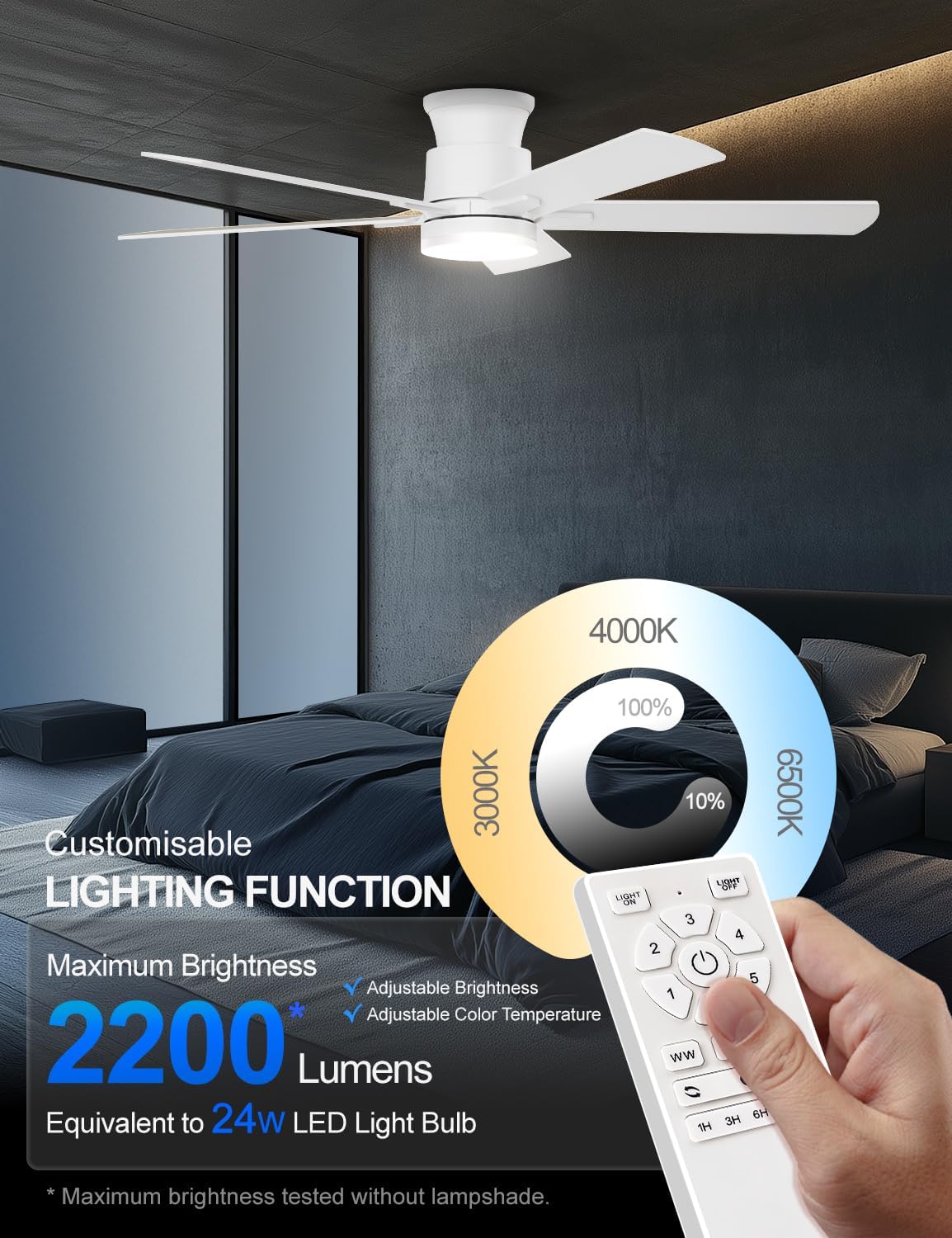
Figure 7: Customizable Lighting Functions
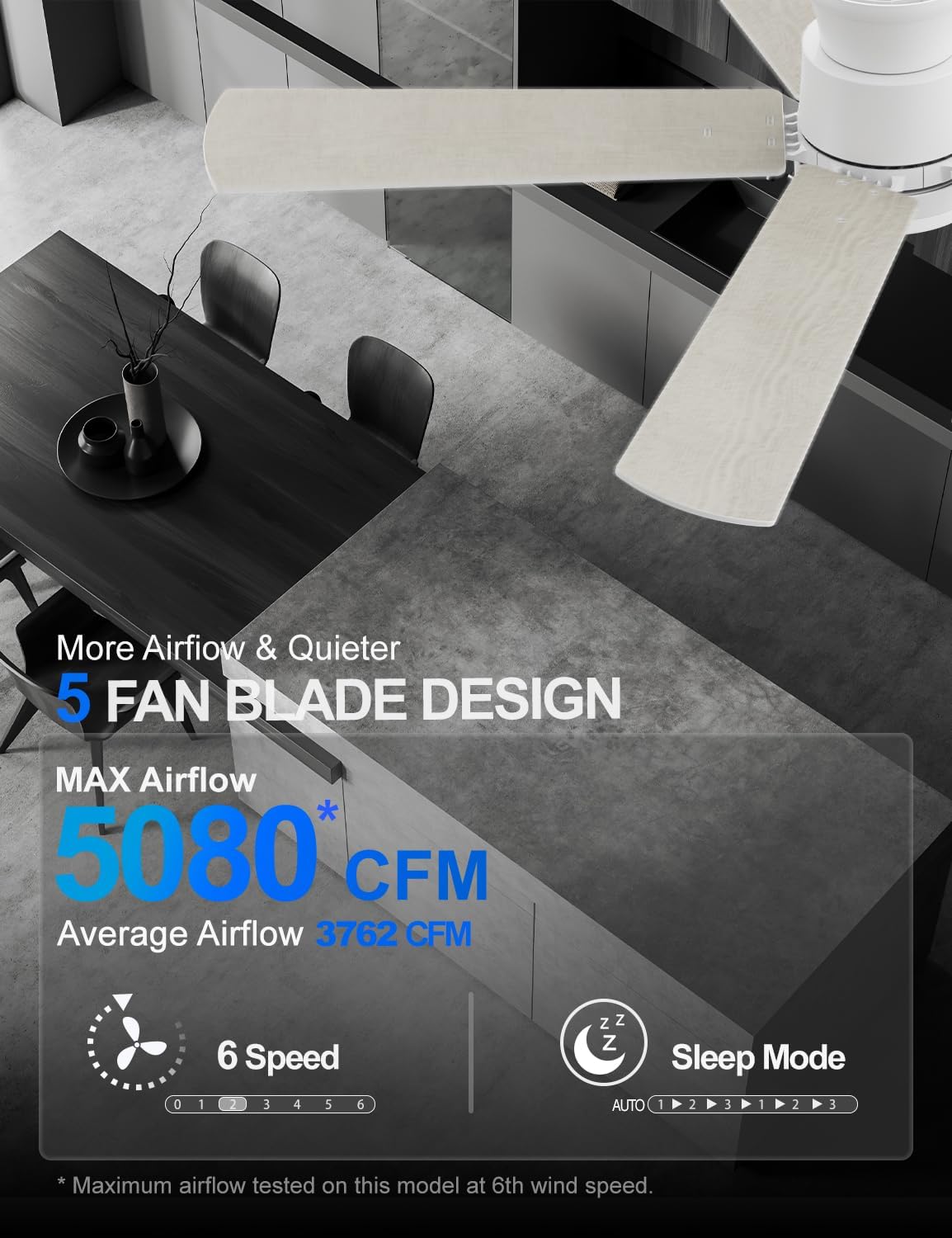
Figure 8: Airflow and Sleep Mode Features
5. การบำรุงรักษา
การบำรุงรักษาอย่างสม่ำเสมอจะช่วยให้พัดลมเพดานทำงานได้อย่างมีประสิทธิภาพสูงสุดและยืดอายุการใช้งาน
- การทำความสะอาด: ควรทำความสะอาดใบพัดและตัวมอเตอร์เป็นระยะด้วยผ้าเนื้อนุ่มและแห้งamp ผ้า ห้ามใช้สารทำความสะอาดที่มีฤทธิ์กัดกร่อนหรือตัวทำละลาย
- การตรวจสอบใบมีด: ตรวจสอบใบพัดพัดลมว่ามีรอยแตกหรือเสียหายหรือไม่ หากพบใบพัดที่เสียหาย ให้เปลี่ยนทันที
- การตรวจสอบความแน่น: Ensure all screws and connections are tight at least once a year.
- แหล่งกำเนิดแสง: The integrated LED light source is designed for long-term use and typically does not require replacement.
6 การแก้ไขปัญหา
หากคุณพบปัญหาเกี่ยวกับพัดลม โปรดดูปัญหาทั่วไปและวิธีแก้ไขต่อไปนี้:
| ปัญหา | สาเหตุที่เป็นไปได้ | สารละลาย |
|---|---|---|
| พัดลมไม่เริ่มทำงาน | ไม่มีแหล่งจ่ายไฟ ข้อต่อสายหลวม แบตเตอรี่รีโมทคอนโทรลหมด | ตรวจสอบเบรกเกอร์/ฟิวส์ Verify all wiring connections are secure เปลี่ยนแบตเตอรี่รีโมทคอนโทรล |
| ไฟไม่ทำงาน | Light switch off การต่อสายหลวม แบตเตอรี่รีโมทคอนโทรลหมด | Ensure light is turned on via remote Check light kit wiring เปลี่ยนแบตเตอรี่รีโมทคอนโทรล |
| พัดลมสั่น | สกรูใบหลวม ใบมีดไม่สมดุล ขายึดหลวม | ขันสกรูใบมีดทั้งหมดให้แน่น Ensure blades are evenly weighted and installed Check mounting bracket for secure installation |
| รีโมทคอนโทรลไม่ตอบสนอง | แบตเตอรี่หมด Remote not paired (if applicable) สิ่งกีดขวางระหว่างรีโมทและตัวรับสัญญาณ | เปลี่ยนแบตเตอรี่ Refer to pairing instructions in the full manual ให้แน่ใจว่ามีเส้นสายตาที่ชัดเจน |
7. ข้อมูลจำเพาะผลิตภัณฑ์
| คุณสมบัติ | รายละเอียด |
|---|---|
| ยี่ห้อ | Allsmartlife |
| ชื่อรุ่น | 1172X |
| ขนาด | 50 นิ้ว |
| สี | เฟรชไวท์ |
| ขนาดสินค้า | ลึก 50 นิ้ว x กว้าง 50 นิ้ว x สูง 10.5 นิ้ว |
| น้ำหนักสินค้า | 13.5 ปอนด์ |
| ประเภทมอเตอร์ | มอเตอร์ DC แบบไม่มีแปรงถ่าน |
| จำนวนใบมีด | 5 |
| ความเร็วพัดลม | 6 |
| ความจุการไหลของอากาศ | 3762 ลูกบาศก์ฟุตต่อนาที (CFM) |
| ประเภทไฟ | ไฟ LED แบบบูรณาการ |
| ความสว่าง | Up to 2200 lumens (10%-100% adjustable) |
| อุณหภูมิสี | 3000K (สีขาวอุ่น), 4000K (สีขาวธรรมชาติ), 6500K (สีขาวกลางวัน) |
| วิธีการควบคุม | รีโมทคอนโทรล |
| เล่มที่tage | 120 โวลต์ |
| วัดtage | 32 วัตต์ |
| การใช้งานภายใน/ภายนอกอาคาร | Indoor, Outdoor (with specific humidity and rain exposure guidelines) |
| การรับรอง | อีทีแอล |

Figure 9: DC Brushless Motor Noise Comparison

Figure 10: Room Size Recommendation Guide

Figure 11: Guidelines for Outdoor Use
8. การรับประกันและการสนับสนุน
Allsmartlife offers a lifetime of free replacement service for parts. If you require any assistance, have questions, or need to claim warranty service, please contact our customer support team. We are committed to providing prompt and effective solutions.
For further support, please refer to the contact information provided with your purchase or visit the official Allsmartlife webเว็บไซต์.
