1. บทนำ
This manual provides detailed instructions for the installation, setup, and operation of your ASD 20-Inch Smart RGBW Flush Mount Ceiling Light. This LED lighting fixture combines a modern design with advanced smart features, offering a versatile lighting solution for various indoor spaces. It features RGBW color-changing capabilities, dimming, and control via a remote or a smartphone app, with compatibility for Alexa and Google Assistant.
2. ข้อมูลด้านความปลอดภัย
โปรดอ่านคำแนะนำทั้งหมดอย่างละเอียดก่อนการติดตั้งและใช้งาน เก็บคู่มือนี้ไว้เพื่อใช้อ้างอิงในอนาคต
- ความปลอดภัยทางไฟฟ้า: Always turn off power at the circuit breaker before installing, servicing, or cleaning the fixture. Consult a qualified electrician if you are unsure about electrical wiring.
- การติดตั้ง: ตรวจสอบให้แน่ใจว่าพื้นผิวที่ติดตั้งสามารถรับน้ำหนักของอุปกรณ์ได้ ปฏิบัติตามข้อกำหนดและกฎหมายด้านไฟฟ้าในท้องถิ่นทั้งหมด
- การจัดการ: Do not handle the fixture with wet hands. Avoid direct eye exposure to the light source when illuminated.
- สิ่งแวดล้อม: โคมไฟนี้ได้รับการจัดอันดับสำหรับ damp locations but is intended for indoor use only. Do not expose to direct water spray or submersion.
- การทำความสะอาด: ใช้ผ้าแห้งนุ่มๆ เช็ดทำความสะอาด ห้ามใช้สารเคมีรุนแรงหรือน้ำยาทำความสะอาดที่มีฤทธิ์กัดกร่อน
3. เนื้อหาบรรจุภัณฑ์
ตรวจสอบว่าส่วนประกอบทั้งหมดมีอยู่ก่อนเริ่มการติดตั้ง:
- ASD 20-Inch Smart RGBW Flush Mount Ceiling Light Fixture (2 units)
- รีโมทคอนโทรล (1 ยูนิต)
- อุปกรณ์สำหรับติดตั้ง (สกรู, ตัวเชื่อมสายไฟ)
- คู่มือการใช้งาน
4. ข้อมูลจำเพาะผลิตภัณฑ์
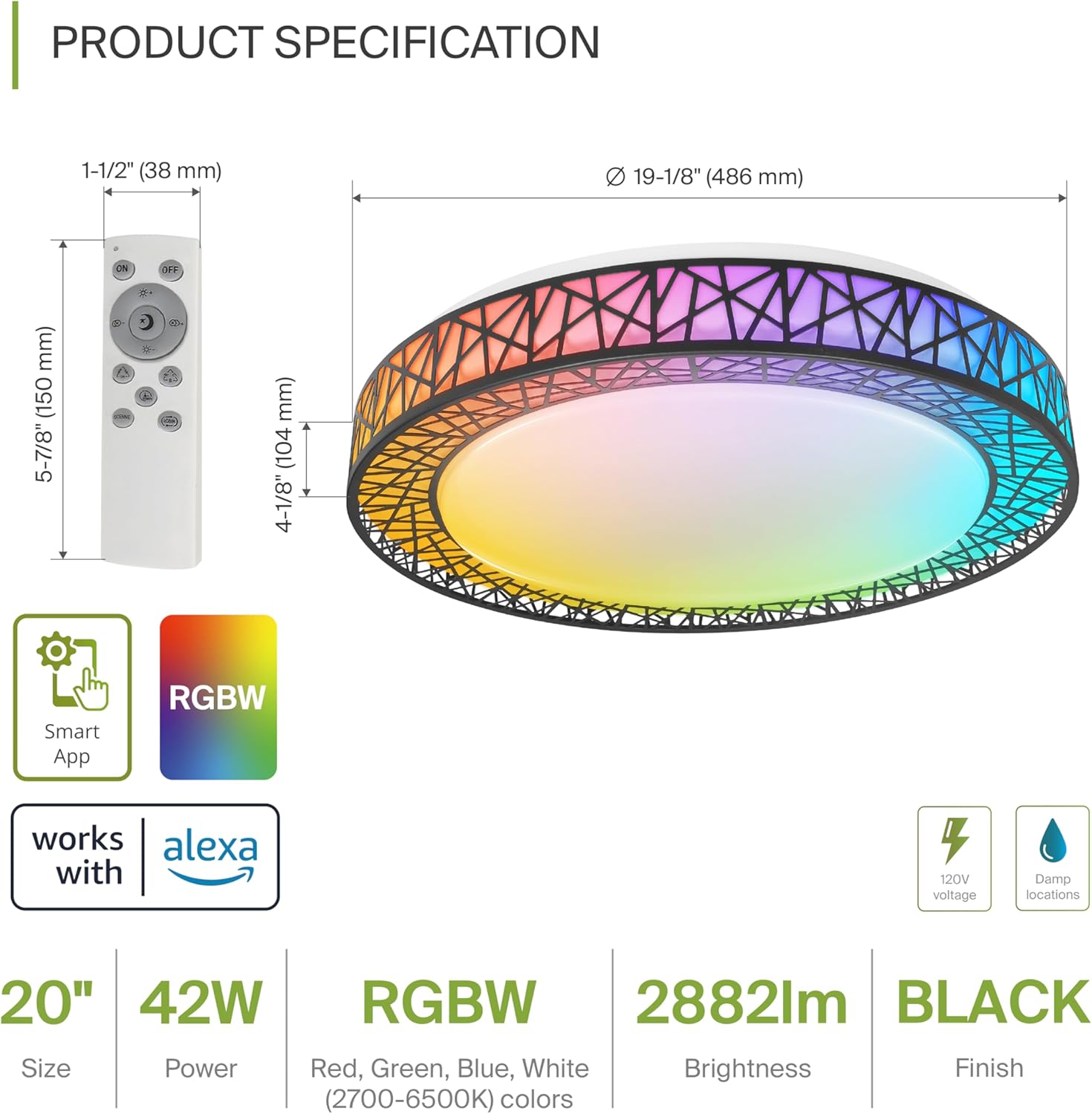
Product Specification Diagram: Dimensions, remote control, and key features.
| คุณสมบัติ | รายละเอียด |
|---|---|
| ยี่ห้อ | เอเอสดี |
| ชื่อรุ่น | ห้องใต้หลังคา |
| หมายเลขรุ่น | A-LFM20D42SRGBW-B-2p |
| สี | 20" | Black | RGBW |
| วัสดุ | Acrylic, Alloy Steel |
| ขนาดสินค้า | ยาว 19.1 นิ้ว x กว้าง 19.1 นิ้ว x สูง 4.1 นิ้ว |
| แหล่งพลังงาน | ฮาร์ดไวร์ |
| วัดtage | 42 วัตต์ |
| เล่มที่tage | 120 โวลต์ |
| ความสว่าง | 2579 lumen (max) |
| อุณหภูมิสี | 2700-6500K (ปรับ CCT) |
| คุณสมบัติพิเศษ | RGBW, Remote Control, Smart App, Dimmable |
| วิธีการควบคุม | Remote, Voice (Alexa, Google Assistant) |
| การใช้งานภายใน/ภายนอกอาคาร | ในร่ม |
| ระดับความต้านทานต่อน้ำ | กันน้ำ (D)amp Locations Rated) |
| ชีวิตเฉลี่ย | 50,000 ชั่วโมง |
| การรับรอง | รายชื่อ ETL |
5. คำแนะนำในการติดตั้ง
Before starting, ensure the power is turned off at the circuit breaker.

Installation Diagram: Visual guide for mounting the light fixture.
- เตรียมอุปกรณ์: Remove the lens from the light fixture by rotating it clockwise.
- ติดวงเล็บ: Attach the two screws to the outlet box on your ceiling.
- การต่อสายไฟ: Connect the wires: Black to Black, White to White, and Ground to Ground. Secure these connections with wire nuts.
- ยึดอุปกรณ์ให้แน่น: Carefully tuck all wires back into the outlet box. Attach the light fixture to the mounting bracket.
- Reattach the Lens: Rotate the lens counter-clockwise to secure it to the fixture.
Once installed, restore power at the circuit breaker.
6. Smart Feature Setup
6.1. ASD SMART App Control
The ASD Smart RGBW Flush Mount Ceiling Light can be controlled via the ASD SMART App on your smartphone (Wi-Fi internet connection required).
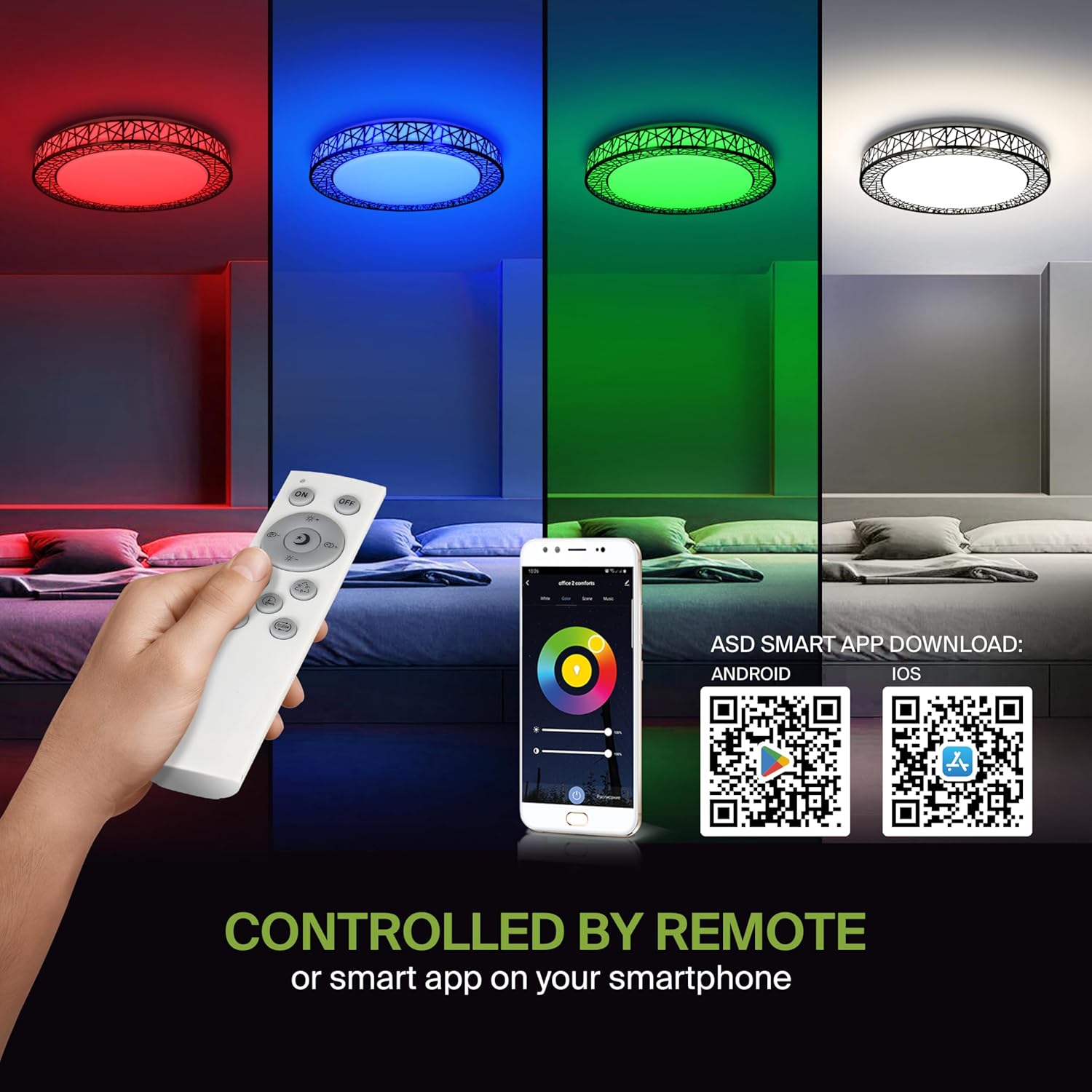
Remote control and ASD SMART App interface with QR codes for download.
- ดาวน์โหลดแอป: Scan the QR code provided in the product images or search for "ASD SMART" in the แอปสโตร์ของแอปเปิล (สำหรับ iOS) หรือ ร้านค้า Google Play (สำหรับ Android)
- ลงทะเบียน/เข้าสู่ระบบ: ทำตามคำแนะนำในแอปเพื่อสร้างบัญชีหรือเข้าสู่ระบบ
- เพิ่มอุปกรณ์: In the app, select the option to add a new device. Follow the pairing instructions to connect your ceiling light to the app via Wi-Fi.
6.2. การควบคุมด้วยเสียง (Alexa และ Google Assistant)
The fixture is compatible with Amazon Alexa and Google Assistant for convenient voice control.

Voice control compatibility with Alexa and Google Assistant.
- เชื่อมโยงบัญชี: Open your Alexa or Google Home app. Navigate to the 'Skills' or 'Works with Google' section.
- ค้นหา ASD SMART: ค้นหา the "ASD SMART" skill/service and enable it.
- เชื่อมต่อ: Link your ASD SMART account with your Alexa or Google Home account.
- ค้นพบอุปกรณ์: Ask Alexa or Google Assistant to discover new devices, or manually initiate device discovery in their respective apps.
7. คู่มือการใช้งาน
7.1. การทำงานของรีโมทคอนโทรล
Use the included remote control to manage your light fixture's functions.
Remote control for easy access to light functions.
- เปิด/ปิดเครื่อง: กดปุ่มเปิด/ปิดเพื่อเปิดหรือปิดไฟ
- การปรับความสว่าง: Use the brightness buttons to increase or decrease the light intensity (smoothly dimmable).
- Color Selection (RGBW): Press the dedicated color buttons (Red, Green, Blue, White) or use the color wheel/mode buttons to cycle through 16.7 million colors.
- อุณหภูมิสี (CCT): Adjust the white light color temperature between 2700K (warm white) and 6500K (cool white).
- โหมดฉาก: Select pre-programmed lighting patterns or scenes.
7.2. การควบคุมการทำงานผ่านแอปพลิเคชัน
The ASD SMART App offers comprehensive control over your light fixture.
- สเปktrumสีเต็มรูปแบบ: Access the full 16.7 million RGBW color palette.
- Precise Dimming: Adjust brightness levels with fine control.
- การกำหนดตารางเวลา: Set schedules for the light to turn on/off or change modes at specific times.
- การจัดกลุ่ม: Group multiple ASD smart lights to control them simultaneously.
- ฉากที่กำหนดเอง: Create and save your own custom lighting scenes.
7.3. Voice Command Exampเลส
After linking your device to Alexa or Google Assistant, use commands such as:
- "อเล็กซ่า เปิดไฟ [ชื่อไฟ]"
- "Hey Google, set [Light Name] to blue."
- "อเล็กซ่า ลดความสว่างของ [ชื่อไฟ] ลงเหลือ 50%"
- "Hey Google, make the [Light Name] warmer."
8. การบำรุงรักษา
To ensure the longevity and optimal performance of your ASD Smart RGBW Flush Mount Ceiling Light, follow these maintenance guidelines:
- การทำความสะอาด: Before cleaning, ensure the power to the fixture is turned off. Use a soft, dry, or slightly damp cloth to wipe the surface. Avoid using abrasive cleaners, solvents, or harsh chemicals, as these can damage the finish or electrical components.
- การตรวจสอบ: Periodically check the fixture for any signs of damage, loose connections, or wear. If any issues are found, turn off the power and consult a qualified electrician.
- การเปลี่ยนหลอดไฟ: This fixture uses integrated LED technology and does not require bulb replacement. The LEDs are designed for a long lifespan.
9 การแก้ไขปัญหา
If you encounter issues with your ASD Smart RGBW Flush Mount Ceiling Light, refer to the following common solutions:
| ปัญหา | สาเหตุที่เป็นไปได้ | สารละลาย |
|---|---|---|
| ไฟไม่ติด | ไม่มีไฟ, สายไฟหลวม, สวิตช์เสีย | ตรวจสอบเบรกเกอร์ ตรวจสอบให้แน่ใจว่าสายไฟทั้งหมดเชื่อมต่อแน่นหนาดี ทดสอบสวิตช์ที่ผนัง |
| รีโมตคอนโทรลไม่ทำงาน | Dead batteries, remote out of range, pairing issue | Replace remote batteries. Ensure remote is within operating range. Re-pair the remote with the light (refer to app instructions for pairing). |
| การควบคุมแอปไม่ทำงาน | No Wi-Fi connection, incorrect app pairing, outdated app | Verify Wi-Fi connectivity. Ensure the light is correctly paired in the ASD SMART App. Update the app to the latest version. |
| การควบคุมด้วยเสียงไม่ตอบสนอง | Account not linked, device not discovered, incorrect commands | Ensure ASD SMART account is linked to Alexa/Google Assistant. Redo device discovery. Use correct voice commands. |
| แสงกะพริบหรือหรี่ลงโดยไม่คาดคิด | Unstable power supply, loose wiring, incompatible dimmer (if applicable) | Check power supply stability. Verify wiring. This light is dimmable via remote/app; external dimmers may cause issues. |
10. ข้อมูลการรับประกัน
ASD ให้ รับประกันจำกัด 5 ปี สำหรับผลิตภัณฑ์นี้ การรับประกันนี้ครอบคลุมถึงข้อบกพร่องในวัสดุและฝีมือการผลิตภายใต้การใช้งานปกติ โปรดเก็บหลักฐานการซื้อไว้เพื่อใช้ในการเรียกร้องการรับประกัน สำหรับข้อกำหนดและเงื่อนไขการรับประกันโดยละเอียด โปรดดูที่เอกสารอย่างเป็นทางการของ ASD webไซต์หรือติดต่อฝ่ายสนับสนุนลูกค้า
11. การสนับสนุนลูกค้า
If you have any questions, require technical assistance, or need to make a warranty claim, please contact ASD customer support through the following channels:
- Webเว็บไซต์: Visit the official ASD Lighting webไซต์สำหรับคำถามที่พบบ่อยและทรัพยากรสนับสนุน
- อีเมล: Refer to your product packaging or the ASD webเว็บไซต์สำหรับที่อยู่อีเมลฝ่ายบริการลูกค้า
- โทรศัพท์: Refer to your product packaging or the ASD webเว็บไซต์สำหรับหมายเลขโทรศัพท์ฝ่ายบริการลูกค้า
Please have your model number (A-LFM20D42SRGBW-B-2p) and purchase date ready when contacting support.


