1. สินค้าหมดview
The ShanWan Q38 is a versatile wireless Bluetooth controller designed for a wide range of gaming platforms. It features advanced controls such as Hall Effect joysticks and micro-switch buttons for enhanced precision and responsiveness.

ภาพที่ 1.1: จากบนลงล่าง view of the ShanWan Q38 Wireless Bluetooth Controller, showcasing การออกแบบที่กะทัดรัดและเค้าโครงปุ่ม
2. เนื้อหาบรรจุภัณฑ์
โปรดตรวจสอบให้แน่ใจว่ามีสินค้าทั้งหมดอยู่ในแพ็คเกจ:
- ShanWan Q38 Wireless Bluetooth Controller
- สายชาร์จ USB
- คู่มือการใช้งาน (เอกสารนี้)
- แบตเตอรี่ AAA 1 ก้อน (ติดตั้งไว้ล่วงหน้าหรือรวมแยกต่างหาก)
3. การตั้งค่าและการเชื่อมต่อ
3.1 การชาร์จคอนโทรลเลอร์
Before initial use, ensure the controller is sufficiently charged. Connect the provided USB charging cable to the controller's charging port and to a USB power source (e.g., computer, USB wall adapter). The LED indicator will show charging status.
3.2 ความเข้ากันได้
The ShanWan Q38 controller is compatible with the following platforms:
- Nintendo Switch / Switch 2 (firmware upgrade may be required for Switch 2)
- ดาดฟ้าไอน้ำ
- พีซี (Windows)
- Android devices (phones, tablets)
- ไอโฟน
- ไอแพด
- อุปกรณ์ macOS
- PS4 (as indicated by mode switch, specific compatibility may vary)

Image 3.1: The ShanWan Q38 controller demonstrating compatibility with multiple gaming platforms.
3.3 การเชื่อมต่อผ่าน Bluetooth
ในการเชื่อมต่อตัวควบคุมกับอุปกรณ์ของคุณ:
- เปิดเครื่อง: Press and hold the Home button on the controller until the indicator lights begin to flash.
- เลือกโหมด: Use the mode switch located on the top edge of the controller to select the appropriate mode for your device:
- X Mode: For Mobile & Computer (Android, PC, macOS, iOS).
- โหมด S: For Nintendo Switch.
- โหมด P: For PS4 (if compatible).
- การจับคู่: On your device, navigate to the Bluetooth settings and search for available devices. Select "ShanWan Q38" (or similar) from the list to pair.
- การยืนยัน: Once successfully paired, the indicator light on the controller will become solid.
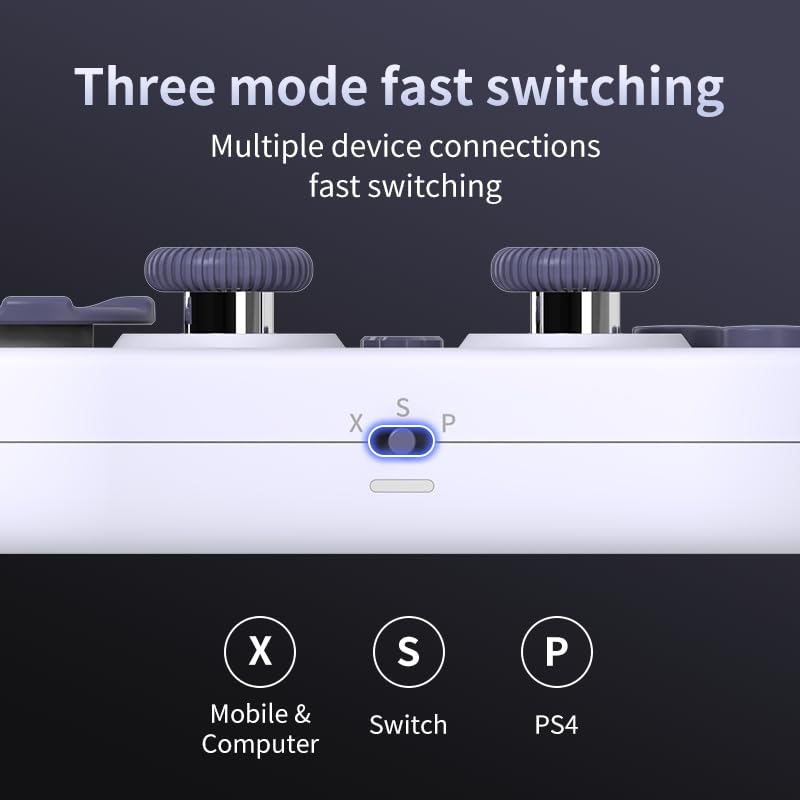
Image 3.2: Detail of the three-mode fast switching selector on the controller.
3.4 Customization and Calibration
For advanced customization, including button remapping and macro functions, download the official "gamepad space" application. This application also allows for controller calibration to ensure optimal performance.
4. การใช้งานคอนโทรลเลอร์
4.1 คุณสมบัติหลัก
- จอยสติ๊กเอฟเฟกต์ฮอลล์: Provides high precision and sensitivity. The joystick height is adjustable between 5mm and 8mm for personalized comfort.
- Composite Micro-Switch Buttons: These buttons offer a tactile response similar to mechanical keyboards, providing quick and precise input.
- Mechanical Triggers: Designed for fast response times.
- Dual Micro Motors: Provides dual vibration feedback for an immersive gaming experience.
- Somatosensory Gyroscope: Equipped with a 6-axis gyroscope for motion control in supported games.

Image 4.1: Detail of the adjustable Hall Effect joysticks.

Image 4.2: Close-up of the composite micro-switch action buttons.

Image 4.3: Diagram illustrating the internal components of the composite micro-keypad.

Image 4.4: Visual representation of the controller's gyroscope functionality.
4.2 ประสบการณ์การเล่นเกม
The compact design allows for portability, making it suitable for gaming on the go with devices like the Nintendo Switch or smartphones.

Image 4.5: Controller in use with a Nintendo Switch.

Image 4.6: Controller paired with a smartphone for mobile gaming.
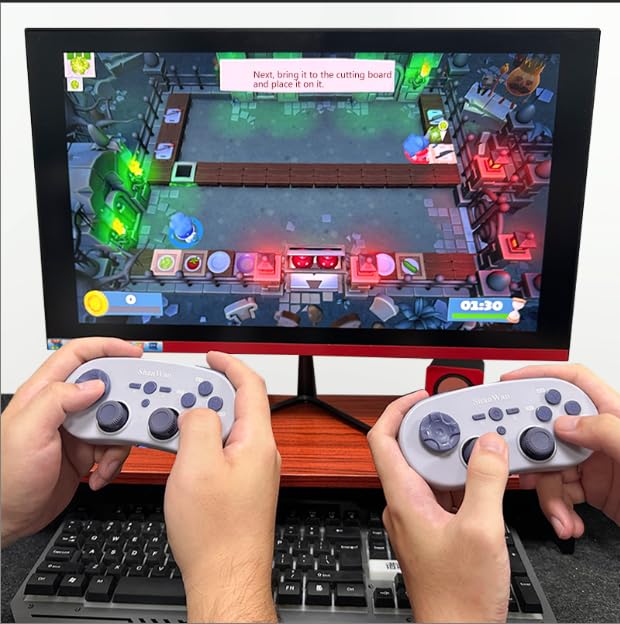
Image 4.7: Two controllers in use for multiplayer gaming on a PC.
5. การบำรุงรักษา
To ensure the longevity and optimal performance of your ShanWan Q38 controller, follow these maintenance guidelines:
- การทำความสะอาด: ใช้ผ้าแห้งนุ่มๆ เช็ดทำความสะอาดตัวควบคุม สำหรับคราบสกปรกที่ติดแน่น ให้ใช้ผ้าชุบน้ำหมาดๆ เช็ดทำความสะอาดamp สามารถใช้ผ้าได้ แต่ต้องแน่ใจว่าไม่มีความชื้นเข้าไปในอุปกรณ์ หลีกเลี่ยงสารเคมีรุนแรงหรือน้ำยาทำความสะอาดที่มีฤทธิ์กัดกร่อน
- พื้นที่จัดเก็บ: เก็บตัวควบคุมไว้ในที่แห้งและเย็น ห่างจากแสงแดดโดยตรงและอุณหภูมิที่สูงหรือต่ำมาก
- การดูแลแบตเตอรี่ If using replaceable AAA batteries, remove them if the controller will not be used for an extended period to prevent leakage.
- หลีกเลี่ยงการหยด: ควรปกป้องตัวควบคุมจากการกระแทกและการตกหล่น ซึ่งอาจทำให้ชิ้นส่วนภายในเสียหายได้
6 การแก้ไขปัญหา
If you encounter issues with your ShanWan Q38 controller, refer to the following common problems and solutions:
- ตัวควบคุมไม่เปิดใช้งาน:
- Ensure the battery is correctly inserted and has sufficient charge. Replace AAA batteries if necessary.
- Connect the controller to a power source using the USB cable to confirm if it charges.
- Difficulty Connecting via Bluetooth:
- Ensure the controller is in the correct mode (X, S, or P) for your device.
- ปิดและเปิดบลูทูธของอุปกรณ์ของคุณ
- ลืมอุปกรณ์ในการตั้งค่าบลูทูธของคุณและพยายามจับคู่ใหม่อีกครั้ง
- ตรวจสอบให้แน่ใจว่าตัวควบคุมอยู่ในระยะทำการที่อุปกรณ์ของคุณสามารถใช้งานได้
- Buttons or Joysticks Not Responding Correctly:
- Calibrate the controller using the "gamepad space" application.
- ตรวจสอบสิ่งกีดขวางทางกายภาพหรือเศษซากรอบปุ่มหรือจอยสติ๊ก
- Ensure the controller's firmware is up to date, especially for Switch 2 compatibility.
- การตัดการเชื่อมต่อแบบสุ่ม:
- ตรวจสอบให้แน่ใจว่าไม่มีสัญญาณรบกวนไร้สายแรงๆ อยู่ใกล้เคียง
- Keep the controller close to the connected device.
- Re-pair the controller if disconnections are frequent.
7. ข้อมูลจำเพาะ
| คุณสมบัติ | รายละเอียด |
|---|---|
| หมายเลขรุ่น | คำถามที่ 38 |
| ผู้ผลิต | ซานวัน |
| การเชื่อมต่อ | บลูทูธไร้สาย |
| ความเข้ากันได้ | Switch/Switch 2, Steam Deck, PC, Android, iPhone, iPad, macOS, PS4 |
| ประเภทจอยสติ๊ก | Hall Effect, Adjustable Height (5mm-8mm) |
| ประเภทปุ่ม | Composite Micro-Switch |
| การสั่นสะเทือน | Dual Micro Motors |
| การควบคุมการเคลื่อนไหว | Gyroscope แกนหมุน 6 |
| ขนาดแพ็คเกจ | 5.63 x 4.53 x 1.54 นิ้ว |
| น้ำหนักสินค้า | 4.6 ออนซ์ |
| แบตเตอรี่ | ต้องใช้แบตเตอรี่ AAA 1 ก้อน (รวมอยู่ด้วย) |

Image 7.1: Physical dimensions of the ShanWan Q38 controller.
8. การรับประกันและการสนับสนุน
For warranty information and customer support, please refer to the official ShanWan webตรวจสอบเว็บไซต์หรือติดต่อร้านค้าที่คุณซื้อสินค้ามา เก็บหลักฐานการซื้อไว้เพื่อใช้ในการเคลมประกัน


