1. บทนำ
Thank you for choosing the ZUMIMALL Dual Lens 2K Wireless Outdoor Security Camera. This manual provides detailed instructions for setting up, operating, and maintaining your camera to ensure optimal performance and security for your home or property. Please read this manual thoroughly before use and retain it for future reference.
2. ข้อมูลด้านความปลอดภัย
- Ensure the camera is installed in a location where it is protected from extreme weather conditions beyond its IP65 rating.
- ใช้เฉพาะอะแดปเตอร์แปลงไฟหรือแผงโซลาร์เซลล์ที่ระบุไว้สำหรับการชาร์จเท่านั้น
- อย่าถอดแยกชิ้นส่วนหรือพยายามซ่อมแซมอุปกรณ์ด้วยตนเอง ติดต่อฝ่ายสนับสนุนลูกค้าเพื่อขอความช่วยเหลือ
- เก็บกล้องและอุปกรณ์เสริมให้พ้นมือเด็ก
- หลีกเลี่ยงการวางกล้องไว้ใกล้สนามแม่เหล็กแรงสูงหรือแหล่งรบกวน
- Dispose of the product and battery responsibly according to local regulations.
3. เนื้อหาบรรจุภัณฑ์
โปรดตรวจสอบว่าอุปกรณ์ทุกชิ้นครบถ้วนและอยู่ในสภาพดี:
- ZUMIMALL Dual Lens 2K Wireless Outdoor Security Camera
- แผงโซล่าเซลล์ 5W
- ตัวยึดและสกรู
- สายชาร์จ USB
- คู่มือการใช้งาน
4. สินค้าหมดview
The ZUMIMALL Dual Lens 2K Wireless Outdoor Security Camera offers advanced surveillance features with a focus on wide-area coverage and intelligent detection.

Image: The ZUMIMALL Dual Lens 2K Wireless Outdoor Security Camera, featuring a main PTZ camera unit, a separate smaller camera, and a solar panel for continuous power.
คุณสมบัติหลัก:
- ระบบเลนส์คู่: Combines a fixed lens and a rotating lens for simultaneous viewing of two different areas.
- ความละเอียด 2K HD: Provides clear and detailed images and videos (3MP+3MP for a total of 6MP effective resolution).
- Wide Angle & PTZ: Offers a 220° ultra-wide-angle view from the fixed lens and 360° pan/tilt/zoom (PTZ) capabilities for comprehensive coverage.
- การมองเห็นตอนกลางคืนแบบสีเต็มรูปแบบ: Equipped with white and infrared lamps, offering full-color, infrared, or smart night vision modes.
- พลังงานแสงอาทิตย์: Includes a 5W solar panel and a built-in 10000mAh battery for continuous, uninterrupted operation.
- การตรวจจับ AI อัจฉริยะ: Advanced AI can identify people, vehicles, pets, and packages, reducing false alerts.
- การพูดคุยแบบสองทาง: ไมโครโฟนและลำโพงในตัวช่วยให้สามารถสื่อสารแบบเรียลไทม์
- การเชื่อมต่อ WiFi 2.4GHz: Ensures a stable and reliable wireless connection.
- ความต้านทานต่อสภาพอากาศ IP65: ออกแบบมาเพื่อทนต่อสภาพอากาศกลางแจ้งที่หลากหลาย
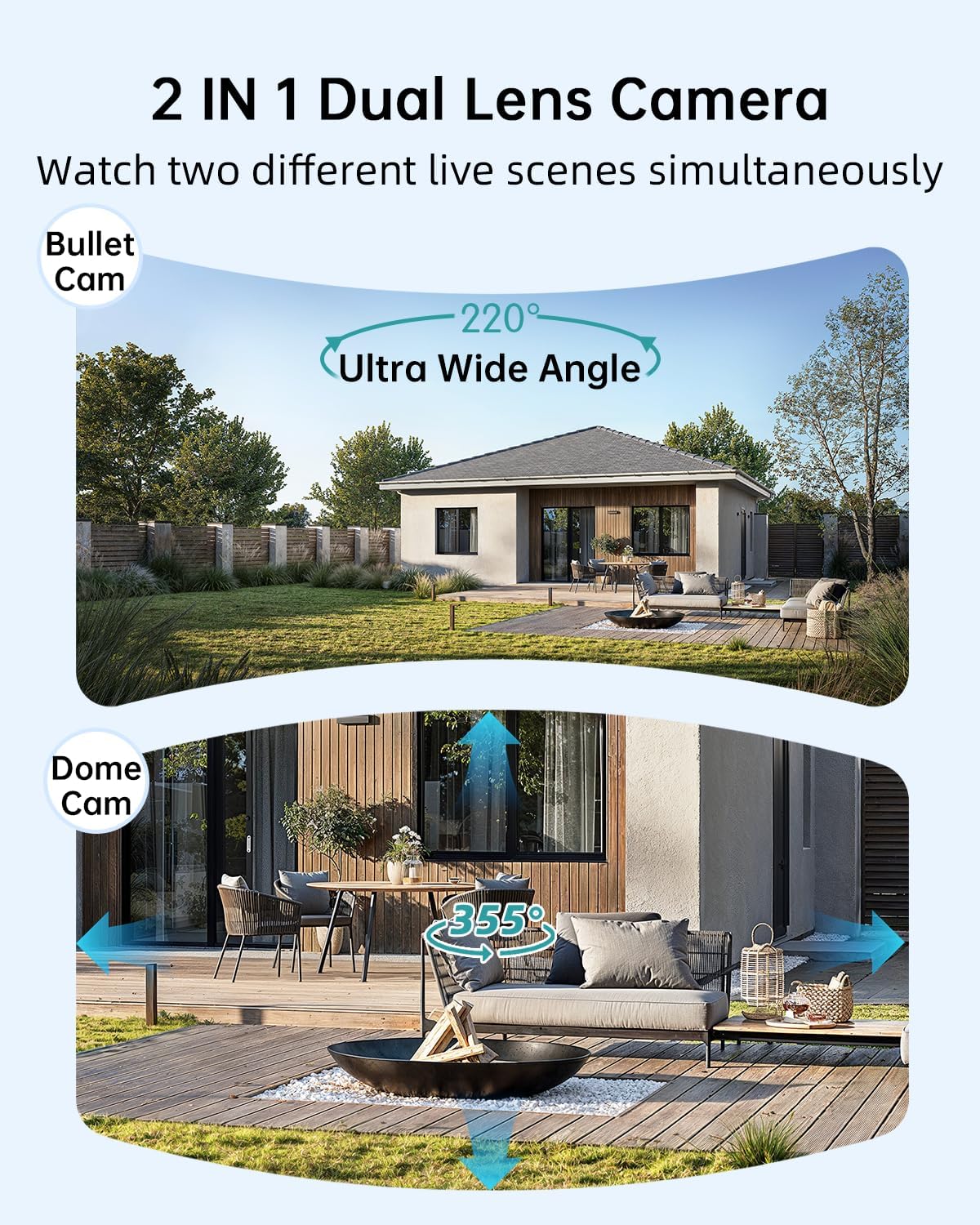
Image: Illustration of the dual-lens functionality, displaying a wide-angle 'Bullet Cam' view and a pan-tilt-zoom 'Dome Cam' view พร้อมกัน

Image: The ZUMIMALL camera connected to its 5W solar panel, highlighting its non-stop solar power capability and IP66 water resistance (note: product specification is IP65).

Image: A demonstration of the 2K ultra-colorful image quality, showing a clear view of a car's license plate at night, with indicators for 3MP FHD Image, 4X Digital Zoom, and 55FT Night Vision Range.

Image: The ZUMIMALL camera shown enduring heavy rain and snow, illustrating its IP65 waterproof rating and suitability for outdoor use in various weather conditions.
5. การตั้งค่า
5.1 การชาร์จเริ่มต้น
Before first use, fully charge the camera's built-in 10000mAh battery using the provided USB cable and a 5V/2A power adapter (not included). A full charge typically takes several hours.
5.2 การดาวน์โหลดแอปและการลงทะเบียนบัญชี
- Scan the QR code on the packaging or search for 'ZUMIMALL' in your mobile app store (iOS or Android).
- Download and install the ZUMIMALL app.
- เปิดแอปและลงทะเบียนบัญชีใหม่หรือเข้าสู่ระบบหากคุณมีบัญชีอยู่แล้ว
5.3 การเชื่อมต่อกับ Wi-Fi
- ตรวจสอบให้แน่ใจว่าสมาร์ทโฟนของคุณเชื่อมต่อกับเครือข่าย Wi-Fi 2.4GHz กล้องไม่รองรับ Wi-Fi 5GHz
- In the ZUMIMALL app, tap '+' to add a new device.
- Follow the on-screen instructions to power on the camera and enter Wi-Fi configuration mode.
- Scan the QR code displayed on your phone screen with the camera lens.
- Wait for the camera to connect to your Wi-Fi network. Once connected, you will hear a confirmation sound.
5.4 การติดตั้งกล้องและแผงโซลาร์เซลล์
The camera offers flexible installation options, including magnetic support and bracket support.

Image: Demonstrates two installation methods for the ZUMIMALL camera: a compact magnetic mount for easy placement and a more robust bracket mount for secure, permanent installation.
- เลือกตำแหน่ง: เลือกตำแหน่งที่ให้ผลลัพธ์ที่ต้องการ viewing angle, is within Wi-Fi range, and receives ampแสงแดดโดยตรงสำหรับแผงโซลาร์เซลล์
- ติดตั้งวงเล็บ: Use the provided screws to securely attach the mounting bracket to a wall or ceiling.
- ติดกล้อง: Secure the camera to the bracket. For magnetic support, simply attach the camera to the magnetic base.
- วางตำแหน่งแผงโซล่าเซลล์: Mount the 5W solar panel in a location that receives maximum direct sunlight throughout the day. Connect the solar panel cable to the camera's charging port.
- ปรับมุม: ปรับมุมกล้องเพื่อให้ครอบคลุมพื้นที่เฝ้าระวังที่ต้องการ
6. คู่มือการใช้งาน
6.1 สด View และการควบคุมเลนส์คู่
Open the ZUMIMALL app and select your camera to access the live view. The app will display two video feeds simultaneously from the fixed and PTZ lenses. You can switch between views or control the PTZ lens by swiping on the screen or using the directional controls within the app.
6.2 โหมดการมองเห็นตอนกลางคืน
The camera offers three night vision modes, configurable in the app settings:
- การมองเห็นตอนกลางคืนแบบสีเต็มรูปแบบ: Utilizes the built-in white light to provide color images in low-light conditions.
- อินฟราเรดคืนวิสัยทัศน์: Uses infrared LEDs for black and white images in complete darkness.
- สมาร์ทไนท์วิชั่น: Automatically switches between infrared and full-color based on detected motion or ambient light.

Image: A comparison of night vision modes, showing a scene with a spotlight on (color night vision) and a spotlight off (infrared night vision), demonstrating the camera's ability to capture clear images in various low-light conditions.
6.3 การตรวจจับอัจฉริยะด้วย AI
Configure AI detection settings in the app to receive alerts for specific events.

Image: An illustration of the camera's Intelligent AI Analysis feature, highlighting its capability to detect and differentiate between humans, packages, vehicles, and pets within the surveillance area.
- ประเภทการตรวจจับ: The camera can identify humans, vehicles, pets, and packages.
- การแจ้งเตือน: When motion is detected, an alert notification will be sent to your smartphone.
- ความไว: ปรับความไวในการตรวจจับการเคลื่อนไหวเพื่อลดการแจ้งเตือนที่ผิดพลาดให้น้อยที่สุด
6.4 การสนทนาสองทาง
Use the two-way talk feature to communicate with visitors or deter intruders.

Image: Depicts scenarios where the two-way voice intercom is used, showing a user communicating with a delivery person at the door and a parent speaking to a child playing outside.
- ในไลฟ์สด viewแตะไอคอนไมโครโฟนเพื่อพูดผ่านลำโพงของกล้อง
- Release the icon to listen.
6.5 การบันทึกและการเล่น
The camera records events triggered by motion detection. Recordings are stored on a local SD card (not included) or in cloud storage (subscription may be required).
- การเล่นซ้ำ: Access recorded videos through the 'Playback' section in the ZUMIMALL app.
- ดาวน์โหลด: Download important video clips to your phone.
7. การบำรุงรักษา
- การทำความสะอาด: ควรทำความสะอาดเลนส์กล้องและแผงโซลาร์เซลล์เป็นระยะด้วยผ้าเนื้อนุ่มและแห้งamp cloth to ensure clear images and efficient solar charging. Do not use harsh chemicals.
- การดูแลแบตเตอรี่ For optimal battery life, avoid prolonged exposure to extreme temperatures. Ensure the solar panel is free from obstructions to maintain consistent charging.
- อัพเดตเฟิร์มแวร์: Check the ZUMIMALL app regularly for firmware updates. Keeping your camera's firmware updated ensures the latest features and security enhancements.
8 การแก้ไขปัญหา
8.1 กล้องไม่เชื่อมต่อกับ Wi-Fi
- ตรวจสอบให้แน่ใจว่าเครือข่าย Wi-Fi ของคุณเป็น 2.4GHz
- ตรวจสอบความแรงของสัญญาณ Wi-Fi ที่ตำแหน่งของกล้อง
- ตรวจสอบว่ารหัสผ่าน Wi-Fi ที่ป้อนถูกต้อง
- รีสตาร์ทเราเตอร์และกล้องของคุณ
8.2 แบตเตอรี่หมดเร็ว
- Ensure the solar panel is receiving direct sunlight for several hours daily.
- Reduce motion detection sensitivity or frequency of recordings.
- Check for excessive live view streaming, which consumes battery.
8.3 คุณภาพของภาพไม่ดี
- ทำความสะอาดเลนส์กล้อง
- ตรวจสอบให้แน่ใจว่าไม่มีสิ่งกีดขวางใดๆ ในมุมมองของกล้อง view.
- ตรวจสอบความเร็วการเชื่อมต่อ Wi-Fi ของคุณ
8.4 การแจ้งเตือนการเคลื่อนไหวผิดพลาด
- ปรับความไวในการตรวจจับการเคลื่อนไหวในแอป
- Utilize AI detection filters (human, vehicle, pet, package) to ignore irrelevant motion.
- Ensure the camera is not pointing at busy public areas or moving foliage.
9. ข้อมูลจำเพาะ
| คุณสมบัติ | ข้อมูลจำเพาะ |
|---|---|
| แบบอย่าง | B0F189QLFH |
| ปณิธาน | 2K (3MP + 3MP Dual Lens) |
| ทุ่งแห่ง View | 220° Ultra Wide Angle (fixed lens), 360° PTZ (rotating lens) |
| ความจุของแบตเตอรี่ | 10000mAh |
| พลังงานแสงอาทิตย์แผง | 5W |
| การเชื่อมต่อ Wi-Fi | 2.4GHz (IEEE802.11b/g/n) ไร้สาย |
| ทนทานต่อสภาพอากาศ | IP65 |
| การมองเห็นตอนกลางคืน | Full-Color, Infrared, Smart |
| การตรวจจับ | Smart AI (Human, Vehicle, Pet, Package) |
| เสียง | คุยสองทาง |
| ผู้ผลิต | ZUMIMAL |
| วันที่พร้อมใช้งานครั้งแรก | 12 มีนาคม 2025 |
10. ข้อมูลการรับประกัน
ZUMIMALL products are covered by a limited warranty from the date of purchase. Please refer to the warranty card included with your product or visit the official ZUMIMALL webเว็บไซต์สำหรับข้อกำหนดและเงื่อนไขการรับประกันโดยละเอียด
11. การสนับสนุนลูกค้า
If you encounter any issues or have questions regarding your ZUMIMALL camera, please contact our customer support team:
- อีเมล: support@zumimall.com (Exampเลอ)
- Webเว็บไซต์: ZUMIMALL Official Store
Please have your model number (B0F189QLFH) and purchase information ready when contacting support.


