การแนะนำ
Thank you for choosing the witcaremed Smart Scale. This advanced body composition analyzer is designed to provide detailed insights into your health and fitness. Utilizing 8-electrode dual-frequency technology, it measures 56 body composition indicators with high precision, including body weight, BMI, body fat, and muscle mass. This manual will guide you through the setup, operation, maintenance, and troubleshooting of your new smart scale.

Image: The witcaremed Smart Scale, a sleek and modern device designed for comprehensive body composition analysis.
คู่มือการติดตั้ง
1. การแกะกล่องและการตรวจสอบเบื้องต้น
Carefully remove all components from the packaging. Ensure the scale and its accessories are free from damage. The package should include the Smart Digital Scale and a USB-A to USB-C charging cable.
2. การชาร์จอุปกรณ์
The scale features a built-in battery. Connect the provided USB-A to USB-C cable to the USB-C port located on the handle of the scale. Plug the USB-A end into a compatible power adapter (not included) or a computer USB port. Charge the device fully before first use.
3. การดาวน์โหลดและติดตั้งแอป
To unlock the full potential of your smart scale, download the 'Unique Health' mobile application. ค้นหา 'Unique Health' in your smartphone's app store (e.g., Google Play Store for Android or Apple App Store for iOS) and install it.

Image: The witcaremed Smart Scale connected to its mobile application, displaying various health metrics.
4. Device Pairing (Bluetooth & Wi-Fi)
- Open the 'Unique Health' app on your smartphone.
- สร้างผู้ใช้มืออาชีพfile or log in if you already have an account.
- Follow the in-app instructions to add a new device. You will be prompted to step on the scale to turn it on (ensure weight is no less than 5kg).
- The app will detect the scale via Bluetooth. Confirm the pairing request.
- Once connected via Bluetooth, the app will guide you through connecting the scale to your Wi-Fi network for seamless data synchronization.
The scale offers multiple connectivity options with both Wi-Fi and Bluetooth, allowing for seamless data transfer between the scale and your device.
Video: This video demonstrates the initial setup process, including pairing the witcaremed Smart Scale with a mobile device and performing a measurement.
5. การจัดวางมาตราส่วน
Place the scale on a hard, flat, and stable floor for accurate readings. Avoid carpets or uneven surfaces.
คำแนะนำการใช้งาน
1. การวัดผล
- ตรวจสอบให้แน่ใจว่าเท้าของคุณสะอาดและแห้ง
- Step onto the scale barefoot, placing your feet evenly on the electrode pads.
- Grasp the retractable handle with both hands, ensuring your palms are in contact with the handle electrodes. Extend your arms forward, parallel to the floor.
- Remain still until the measurement is complete. The 3.5-inch color display on the handle will show your weight, body fat, BMI, and muscle mass indicators.
- The data will automatically synchronize with the 'Unique Health' app on your connected smartphone or tablet.

Image: A user standing barefoot on the witcaremed Smart Scale, ready to take a body composition measurement.
2. Understanding the Display and App
The scale's 3.5-inch TFT color display provides immediate feedback on key metrics. For a detailed analysis of all 56 body composition indicators, refer to the 'Unique Health' app. The app offers comprehensive data, including:
- Weight, BMI, Body Fat Percentage
- Muscle Mass, Bone Mass, Water Ratio
- Protein Ratio, Visceral Fat, Basal Metabolic Rate (BMR)
- Heart Rate measurement with every reading
- Segmental fat and muscle analysis (arms, legs, torso)
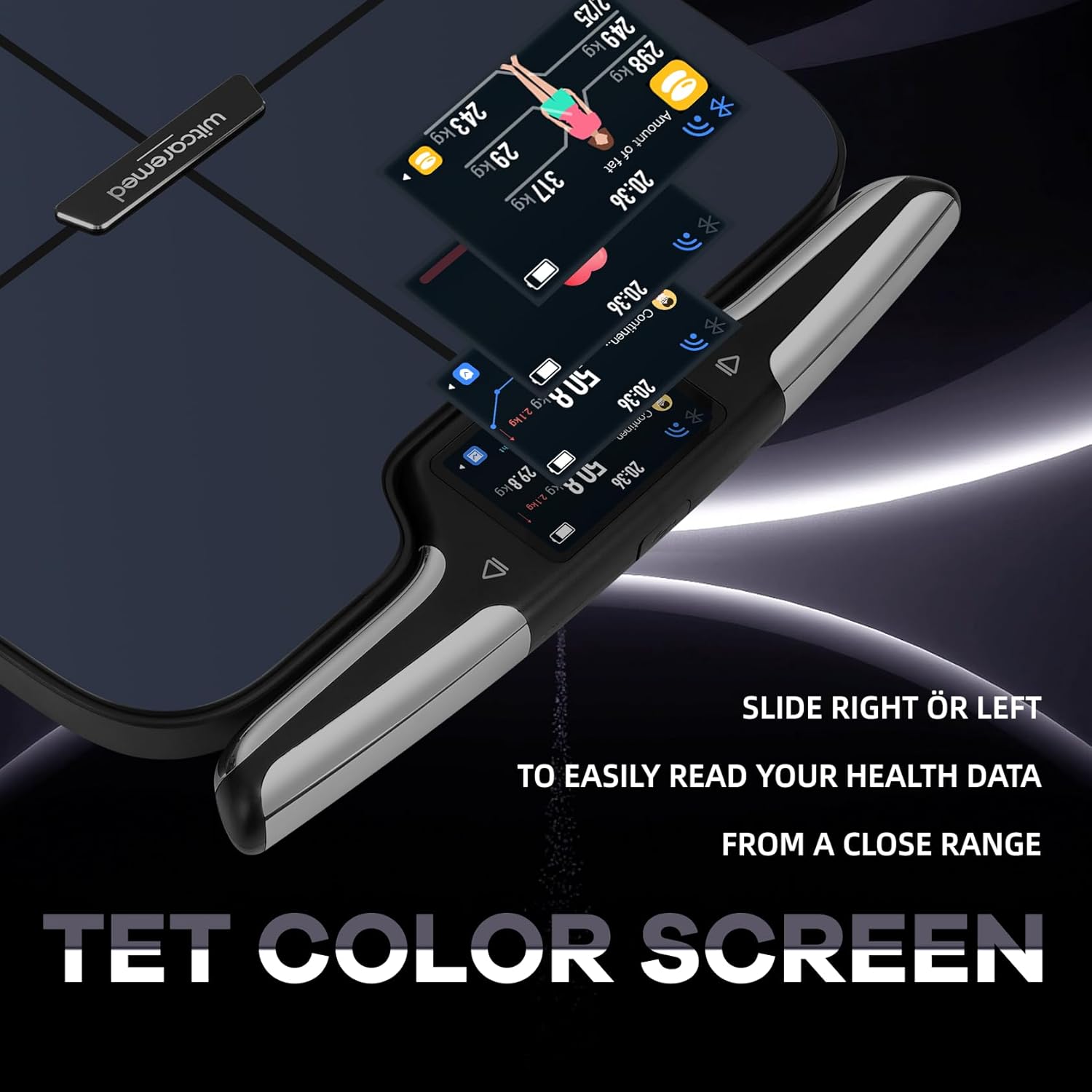
ภาพ: ภาพระยะใกล้ view of the witcaremed Smart Scale's 3.5-inch color display, showing various health metrics.
3. ฟังก์ชันการใช้งานหลายผู้ใช้
The 'Unique Health' app supports up to 10 user profiles, making it convenient for multiple family members or fitness enthusiasts to track their individual progress. Data is automatically synchronized to the correct user profile.

Image: The multi-user interface of the witcaremed Smart Scale's mobile app, allowing effortless data sharing and management for up to 10 users.
การซ่อมบำรุง
1. การทำความสะอาด
ในการทำความสะอาดคราบตะกรัน ให้ใช้ผ้าเนื้อนุ่มและแห้งamp cloth. Avoid abrasive cleaners, harsh chemicals, or submerging the device in water. The ITO tempered glass surface is designed for durability and easy cleaning.
2. การจัดเก็บ
Store the scale in a cool, dry place away from direct sunlight and extreme temperatures. Ensure the retractable handle is properly stowed when not in use.
3. การดูแลแบตเตอรี่
Recharge the built-in battery as needed using the provided USB-C cable. Avoid overcharging or completely draining the battery for extended periods to prolong its lifespan.
การแก้ไขปัญหา
- การอ่านค่าที่ไม่ถูกต้อง: Ensure the scale is placed on a hard, flat surface. Make sure your feet and hands are clean and dry and are making proper contact with all electrodes. Avoid moving during measurement.
- ปัญหาการเชื่อมต่อ: Check if Bluetooth and Wi-Fi are enabled on your smartphone. Ensure the scale is within range of your router for Wi-Fi connection. Restart both the scale and your smartphone if problems persist.
- แอปไม่ซิงค์ข้อมูล: Verify that the scale is connected to Wi-Fi or Bluetooth and that the 'Unique Health' app has the necessary permissions on your device. Ensure you are logged into the correct user profile ในแอป
- จอแสดงผลไม่ทำงาน: Check the battery level and recharge the scale if necessary.
If you encounter persistent issues, please refer to the support information in the 'Warranty and Support' section.
ข้อมูลจำเพาะ
| ยี่ห้อ | witcaremed |
| แบบอย่าง | Smart Scale A |
| ASIN | B0F13HXGBV |
| สี | สีดำ |
| จำกัด น้ำหนัก | 400 ปอนด์ (ประมาณ 181 กก.) |
| ประเภทจอภาพ | Digital (3.5-inch TFT Color Display) |
| คุณสมบัติพิเศษ | Auto Shut Off, 8-Electrode Dual-Frequency Sensor |
| การเชื่อมต่อ | บลูทู ธ Wi-Fi |
| ขนาดแพ็คเกจ | 16.5 x 16 x 2.45 นิ้ว |
| น้ำหนักสินค้า | 6.75 ปอนด์ |
การรับประกันและการสนับสนุน
For any issues encountered during purchase or product usage, please contact witcaremed customer support. We aim to reply promptly within 24-48 hours. In cases of product damage, returns or exchanges are available unconditionally within 7 working days from the date of purchase.
For further assistance, please refer to the contact information provided with your product packaging or visit the official witcaremed webเว็บไซต์.


