การแนะนำ
This manual provides detailed instructions for the operation, maintenance, and troubleshooting of your SOBAST AI Wireless Headset, Model S-G2pro. Please read this manual thoroughly before using the device to ensure proper function and longevity.
The SOBAST AI Wireless Headset is designed to offer a comprehensive audio and communication experience, integrating real-time translation, high-resolution sound, and AI assistant capabilities. Its open-ear design provides comfort for extended wear, making it suitable for various activities including business, travel, learning, and gaming.
เนื้อหาแพ็คเกจ
- SOBAST AI Wireless Headset (S-G2pro)
- เคสชาร์จแบบไร้สาย
- คู่มือการใช้งาน (เอกสารนี้)
- Charging Cable (not explicitly mentioned but implied for charging case)
Ensure all components are present and in good condition upon unboxing.
สินค้าเกินview
The SOBAST S-G2pro features an innovative design that combines audio functionality with smart features, all within a comfortable, open-ear form factor. Key components include:
- เลนส์: Provide vision protection with advanced polarized and anti-blue light technology.
- Temples (Arms): House the electronic components, speakers, and magnetic charging ports.
- พื้นที่ควบคุม: Touch-sensitive area for managing functions.
- ไมโครโฟน: For voice input and communication.

รูปที่ 1 : ด้านหน้า view of the SOBAST AI Wireless Headset, showing the clear lenses and white temples.
การตั้งค่า
1. การชาร์จอุปกรณ์
Before first use, fully charge your SOBAST AI Wireless Headset. The device features dual magnetic temple charging for convenience.
- Connect the charging cable to the wireless charging case.
- Place the headset into the charging case, ensuring the magnetic contacts on the temples align with the charging pins.
- ไฟแสดงสถานะการชาร์จจะสว่างขึ้น การชาร์จเต็มใช้เวลาประมาณ 1.5 ชั่วโมง
- Once fully charged, the headset provides up to 9 hours of battery life.

Figure 2: The headset being charged via its magnetic charging temples.
2. การจับคู่เบื้องต้น (บลูทูธ)
The headset uses Bluetooth 5.0 for wireless connectivity.
- ตรวจสอบให้แน่ใจว่าชุดหูฟังมีการชาร์จแล้ว
- Open the lens legs of the headset. This action automatically powers on the device and puts it into pairing mode.
- บนสมาร์ทโฟนหรืออุปกรณ์อื่นที่เปิดใช้งาน Bluetooth ของคุณ ให้ไปที่การตั้งค่า Bluetooth
- ค้นหา available devices and select "SOBAST S-G2pro" from the list.
- เมื่อเชื่อมต่อแล้ว จะมีเสียงแจ้งเตือนยืนยันการจับคู่สำเร็จ
For subsequent uses, simply opening the lens legs will automatically connect the headset to the last paired device, provided Bluetooth is enabled on that device.

Figure 3: The headset automatically connecting to a smartphone upon opening the lens legs.
คำแนะนำการใช้งาน
การควบคุมพื้นฐาน (การควบคุมแบบสัมผัส)
The SOBAST S-G2pro features intuitive touch controls located on the temples.
| การกระทำ | การทำงาน |
|---|---|
| Single Tap (Left/Right Temple) | เล่น/หยุดเพลง, รับ/วางสาย |
| Double Tap (Left Temple) | เพลงก่อนหน้า |
| Double Tap (Right Temple) | เพลงถัดไป |
| Long Press (Left/Right Temple) | Activate AI Assistant / Voice Assistant |
| Open Lens Legs | Power On / Automatic Reconnection |
| Fold Lens Legs | ปิดเครื่อง |
การแปลตามเวลาจริง
The headset integrates a powerful translation system supporting over 110 languages. This feature requires connection to a compatible application on your smartphone.
- การบันทึกภาพ ณ สถานที่จริง: Record conversations in real-time with transcription and speaker distinction. Transcription accuracy up to 98%.
- การแปลพร้อมกัน: Translate spoken language into your set language quickly and accurately.
- การแปลแบบพบหน้ากัน: Facilitates two-way communication by translating both parties' languages.
Refer to the companion app's instructions for detailed setup and usage of translation features.
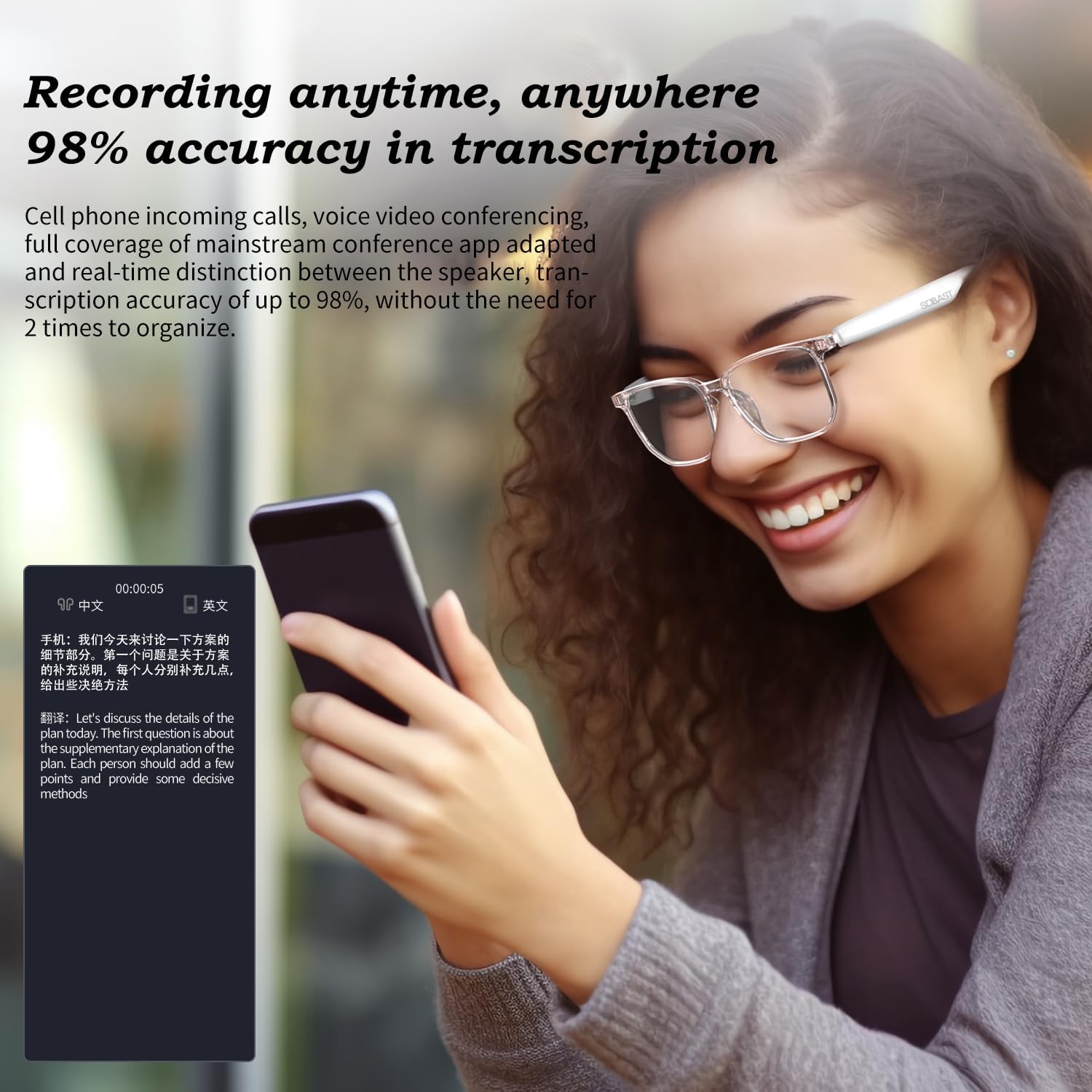
Figure 4: Demonstrating the real-time recording and transcription feature of the headset.
การเล่นเสียง
The headset provides high-resolution sound quality with an open-ear design, reducing ear burden while offering an immersive audio experience.
- Ensure the headset is paired with your audio source.
- Control playback (play, pause, skip tracks) using the touch controls as described above.

Figure 5: A user experiencing immersive stereo sound from the open-ear headset.
AI Assistant & Smart Photography
Access your AI assistant by long-pressing the temple. This allows for voice commands, answering questions, and solving problems. The headset also integrates smart photography capabilities, allowing you to capture moments.
Specific commands and functions for the AI assistant and smart photography will depend on the connected smartphone's operating system and compatible applications.

Figure 6: A user engaging in a silent communication with the AI assistant via the headset.
การซ่อมบำรุง
การทำความสะอาด
- Wipe the lenses and temples with a soft, clean, lint-free cloth.
- สำหรับคราบสกปรกที่ขจัดยาก ให้ใช้น้ำยาทำความสะอาดเลนส์ที่ออกแบบมาสำหรับแว่นตาโดยเฉพาะ
- Do not use abrasive cleaners, alcohol, or solvents, as these can damage the coatings and materials.
พื้นที่จัดเก็บ
- When not in use, store the headset in its wireless charging case to protect it from dust and scratches.
- เก็บในที่เย็นและแห้ง ห่างจากแสงแดดโดยตรงและอุณหภูมิที่สูงเกินไป
การดูแลแบตเตอรี่
- หลีกเลี่ยงการปล่อยแบตเตอรี่จนหมดบ่อยครั้ง
- หากจะเก็บรักษาเป็นเวลานาน ควรชาร์จแบตเตอรี่ให้มีระดับประมาณ 50% ก่อนเก็บรักษา
- Recharge the battery every few months if not in regular use to prevent deep discharge.
การแก้ไขปัญหา
| ปัญหา | สาเหตุที่เป็นไปได้ | สารละลาย |
|---|---|---|
| หูฟังไม่สามารถเปิดเครื่องได้ | Low battery; Lens legs not fully opened. | Charge the headset; Ensure lens legs are fully extended. |
| ไม่สามารถจับคู่กับอุปกรณ์ได้ | ชุดหูฟังไม่ได้อยู่ในโหมดจับคู่; บลูทูธปิดอยู่บนอุปกรณ์; อุปกรณ์อยู่ไกลเกินไป | Ensure headset is powered on and in pairing mode (open legs); Enable Bluetooth on your device; Move device closer to headset (within 10 meters). |
| ไม่มีเสียงหรือเสียงเบา | Volume too low on headset or device; Not properly connected. | Adjust volume on both headset and connected device; Re-pair the headset. |
| การแปลไม่สำเร็จ | App not running; Internet connection issues; Incorrect language settings. | Ensure the companion app is open and configured correctly; Check internet connection; Verify language settings in the app. |
| Intermittent connection/lag. | Interference; Device too far; Outdated firmware. | Move away from sources of interference; Keep device closer; Check for firmware updates via the companion app. |
ข้อมูลจำเพาะ
| คุณสมบัติ | รายละเอียด |
|---|---|
| ชื่อรุ่น | SOBAST S-G2pro |
| เทคโนโลยีการเชื่อมต่อ | Wireless (Bluetooth 5.0, Wi-Fi for translation features) |
| อายุการใช้งานแบตเตอรี่ | นานถึง 9 ชั่วโมง |
| เวลาในการชาร์จ | ประมาณ 1.5 ชั่วโมง |
| วิธีการชาร์จ | Dual Magnetic Temple Charging |
| การควบคุมเสียงรบกวน | ระบบตัดเสียงรบกวนแบบไฮบริด |
| การตอบสนองความถี่ | 20 เฮิรตซ์ - 20,000 เฮิรตซ์ |
| ระดับความต้านทานต่อน้ำ | กันน้ำ |
| ประเภทการควบคุม | การควบคุมแบบสัมผัส |
| ขนาด | 5.58 x 2.35 x 1.97 นิ้ว |
| น้ำหนักสินค้า | 4.8 ออนซ์ |
| วัสดุ | พลาสติก |
| ส่วนประกอบที่รวมอยู่ | เคสชาร์จแบบไร้สาย |

Figure 7: Illustration of the upgraded wireless 5.4 chip, indicating enhanced transmission speed and distance.
ข้อมูลด้านความปลอดภัย
- อย่าให้อุปกรณ์สัมผัสกับอุณหภูมิหรือความชื้นสูง
- หลีกเลี่ยงการทำอุปกรณ์หล่นหรือกระแทกอย่างรุนแรง
- อย่าพยายามถอดประกอบหรือซ่อมแซมอุปกรณ์ด้วยตนเอง โปรดติดต่อช่างผู้ชำนาญการ
- เก็บให้พ้นจากมือเด็ก
- กำจัดอุปกรณ์และส่วนประกอบอย่างมีความรับผิดชอบตามกฎระเบียบท้องถิ่น
การรับประกันและการสนับสนุน
For warranty information and technical support, please refer to the official SOBAST webตรวจสอบรายละเอียดได้ที่เว็บไซต์หรือติดต่อฝ่ายบริการลูกค้าโดยตรง โดยปกติรายละเอียดจะระบุไว้บนบรรจุภัณฑ์ของผลิตภัณฑ์หรือในบัตรรับประกันแยกต่างหาก
ผู้ผลิต: SOBAST S-G2pro
วันที่เข้าใช้งานครั้งแรก: 15 มกราคม 2025
หากต้องการความช่วยเหลือเพิ่มเติม โปรดไปที่ หน้าผลิตภัณฑ์บน Amazon or contact SOBAST customer support.


