1. สินค้าหมดview
The Paiseec S3 Foldable Mobility Scooter is designed for adults and seniors seeking a reliable and portable mobility solution. It features a removable battery, all-terrain navigation capabilities, comfortable seating, and an intuitive control panel with advanced safety systems.
- แบตเตอรี่แบบถอดได้: Allows for flexible charging options, both on-board and off-board.
- All-Terrain Navigation: Equipped with a 250W motor and enlarged air-filled 10-inch rear wheels and 9-inch front wheels for stable riding on various surfaces.
- ที่นั่งที่สะดวกสบาย: Padded seat, adjustable handlebar, and armrests for user comfort.
- พกพาสะดวก: 2-step folding design for compact storage and transport in most car trunks.
- การควบคุมแบบสัญชาตญาณ: 6.1-inch high-definition screen displays speed, battery status, lights, and horn. Features 5 riding modes (reverse, low, medium, high, walk).
- AI Safety System: Includes auto speed control for turns/downhills, a seat detection function, and intelligent voice alerts for dangerous conditions or low battery.

Image: The Paiseec S3 mobility scooter showcasing คุณสมบัติหลักและการออกแบบ
2. การแกะกล่องและการตั้งค่า
Your Paiseec S3 Mobility Scooter comes largely pre-assembled. Follow these steps to prepare it for use.
2.1 การกางสกู๊ตเตอร์
The scooter features a simple 2-step folding mechanism for quick deployment.
- Pull the pole up and lock the pole folding mechanism.
- Lift the seat until you hear a clicking sound, indicating it is securely in place.
Video: Demonstrates the 2-step unfolding process of the Paiseec S3 mobility scooter, showing how to raise the handlebar and secure the seat.
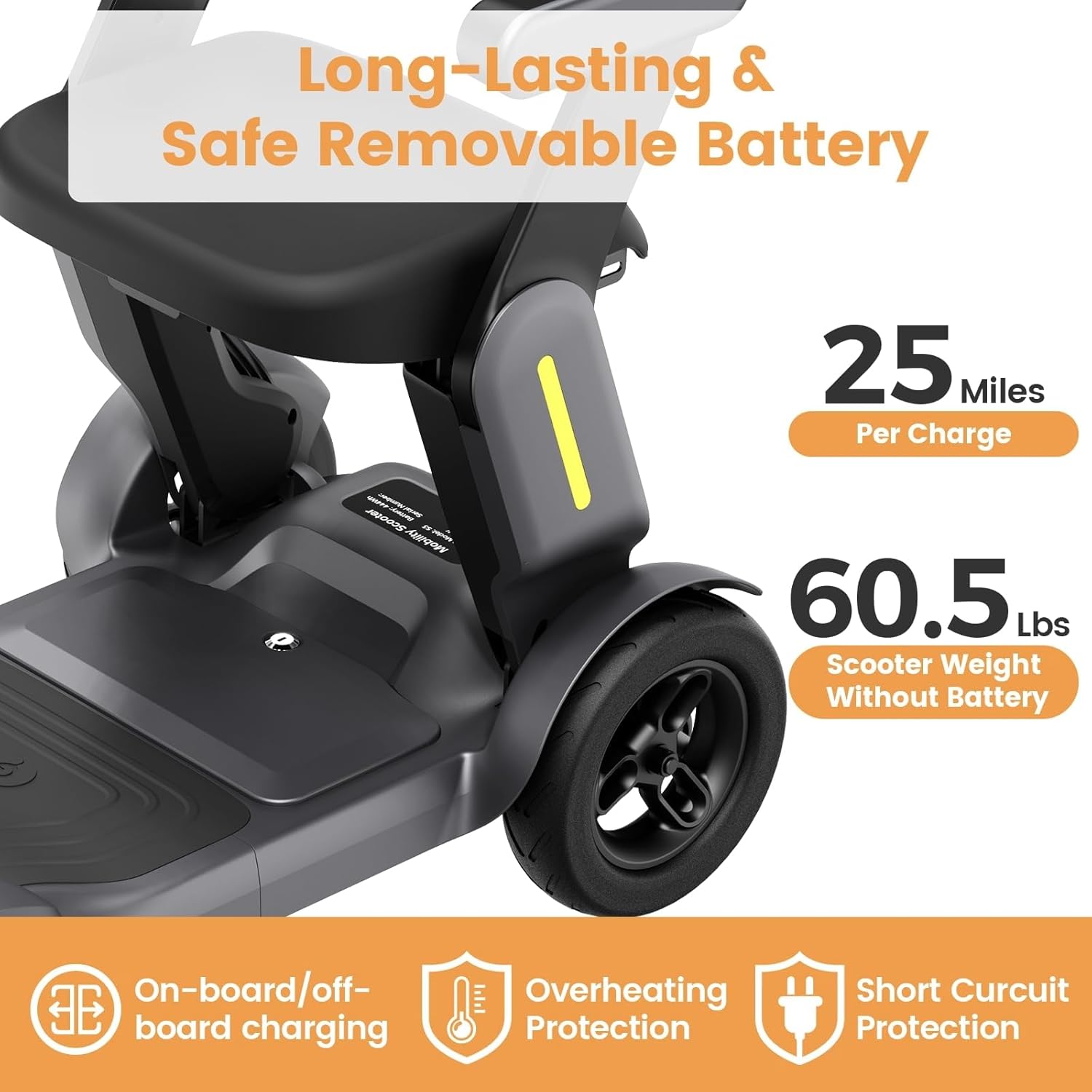
Image: A person unfolding the Paiseec S3 mobility scooter, highlighting the ease of setup from its compact, folded state.
2.2 การติดตะกร้า
The front basket can be easily attached to the tiller for carrying personal items.

Image: The Paiseec S3 mobility scooter with its front basket attached, ready for use.
3. การดำเนินการ
Familiarize yourself with the controls and operating procedures before riding.
3.1 แผงควบคุมโอเวอร์view
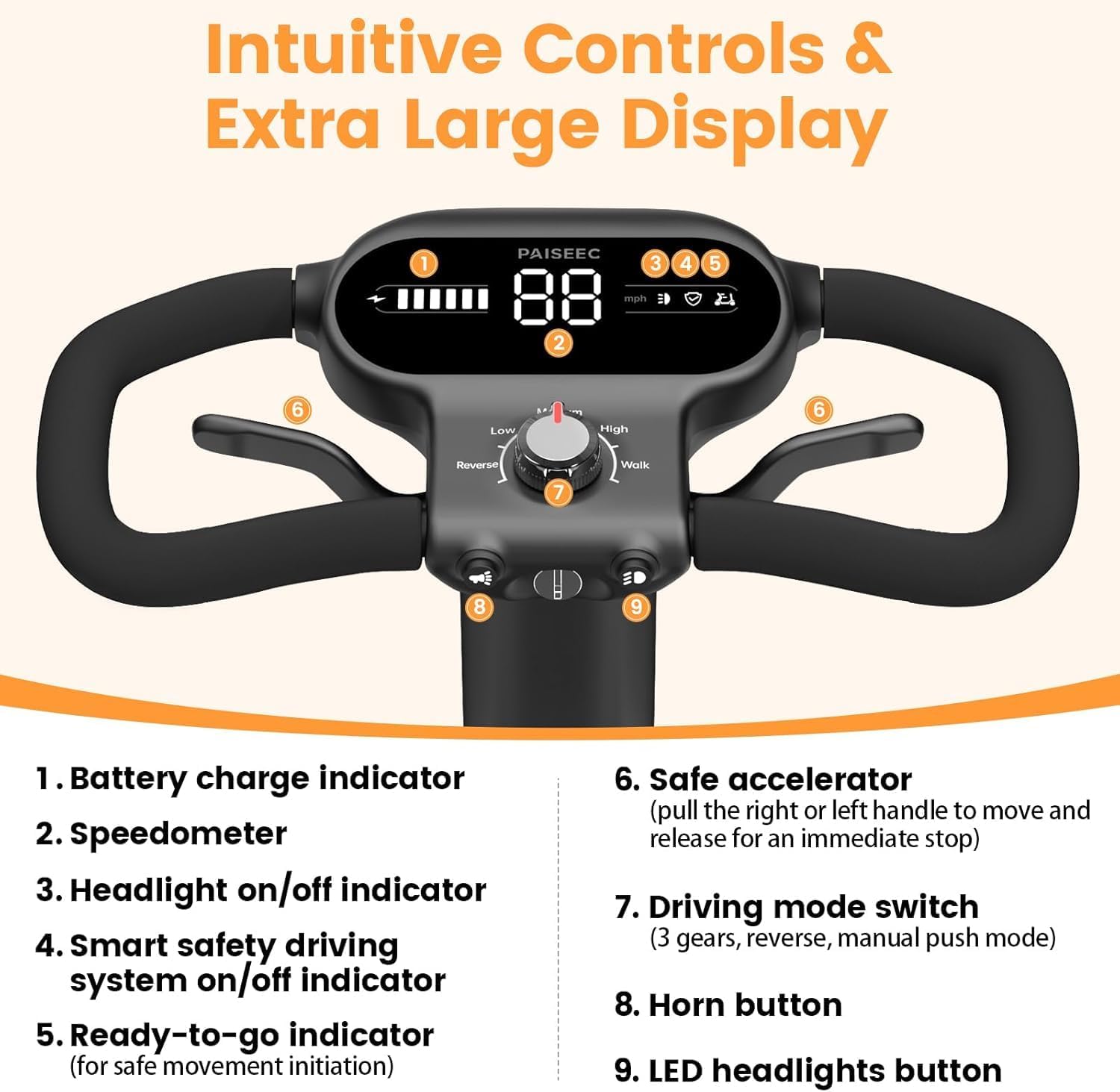
ภาพ: รายละเอียด view of the control panel, showing the display, speed dial, and buttons for headlight and horn.
- ไฟแสดงสถานะการชาร์จแบตเตอรี่: แสดงระดับแบตเตอรี่ปัจจุบัน
- มาตรวัดความเร็ว: แสดงความเร็วปัจจุบันเป็นไมล์ต่อชั่วโมง
- Headlight On/Off Indicator: Lights up when headlights are active.
- Smart Safety Driving System On/Off Indicator: Indicates the status of the AI safety features.
- Ready-to-Go Indication: Confirms the scooter is ready for movement.
- Safe Accelerator: Pull the right or left handle to move; release for immediate stop.
- Driving Mode Switch: Selects between 5 modes: Reverse, Low, Medium, High, and Walk.
- ปุ่มแตร: เปิดใช้งานแตร
- LED Headlights Button: Turns LED headlights on or off.
3.2 การสตาร์ทสกูตเตอร์
- เสียบกุญแจเข้าที่สวิตช์กุญแจ
- Turn the key to the right to power on the scooter.
- Take the seat. The scooter will not move until the on-seat sensor detects a rider. The on-seat sensor indicator will turn white when a rider is detected.
- Select your desired driving mode using the mode knob (Low, Medium, High, Reverse, Walk).
- Press the throttle lever to begin riding.
Video: Instructions on how to install and use the S3 mobility scooter, including starting procedures and basic controls.
3.3 โหมดการขับขี่
The S3 offers various driving modes to suit different environments and user preferences:
- ความเร็วต่ำ: Ideal for indoor use or crowded areas (0-2 mph).
- ความเร็วปานกลาง: Balanced speed for general outdoor use (0-4 mph).
- ความเร็วสูง: Maximum speed for open outdoor areas (0-6.2 mph).
- โหมดย้อนกลับ: Allows backward movement.
- โหมดเดิน: For pushing the scooter manually, useful for rehabilitation training or navigating tight spaces while walking alongside.

Image: Visual representation of the five available driving modes (Low, Medium, High, Reverse, Walk) and their respective speed ranges.
4. คุณสมบัติด้านความปลอดภัย
The Paiseec S3 is equipped with advanced safety features to ensure a secure riding experience.
- AI Auto Speed Control: Automatically adjusts speed on turns and downhills to prevent tipping or rollover.
- On-Seat Safety Sensor: The scooter will not move until you are securely seated, reducing the risk of accidental movement.
- Intelligent AI Voice Alerts: Provides voice notifications for dangerous road conditions, excessive speed, or low battery.
- Electromagnetic Brake System: Provides instant stopping when the throttle is released.
- Anti-Rollover Tires: Designed for enhanced stability.
- ไฟหน้า LED: เพิ่มการมองเห็นที่ดีขึ้นในสภาวะแสงน้อย

Image: Illustrates the AI auto-speed control for turns and the on-seat safety sensor, enhancing rider safety.

Image: Depicts the inclination alarm feature, which warns the user if the slope is too steep, advising dismounting.
5. การชาร์จแบตเตอรี่
The Paiseec S3 features a removable battery for convenient charging. A full charge typically takes 8-10 hours.
- On-board Charging: Plug the charger directly into the scooter's charging port.
- Off-board Charging: Remove the battery and plug it into the charger separately.

Image: Illustrates the two charging methods: directly into the scooter or by removing the battery for separate charging.
6. การบำรุงรักษา
การบำรุงรักษาอย่างสม่ำเสมอจะช่วยให้สกูตเตอร์ของคุณมีอายุการใช้งานยาวนานและทำงานได้อย่างมีประสิทธิภาพสูงสุด
- การดูแลแบตเตอรี่ Charge the battery regularly, even if not in frequent use, to maintain its health. Avoid fully discharging the battery.
- แรงดันลมยาง: Periodically check and maintain the correct tire pressure for optimal ride comfort and safety.
- การทำความสะอาด: เช็ดทำความสะอาดสกูตเตอร์ด้วยน้ำยาทำความสะอาดamp ผ้า. หลีกเลี่ยงการใช้สารเคมีที่รุนแรงหรือน้ำมากเกินไป
- พื้นที่จัดเก็บ: ควรเก็บสกูตเตอร์ไว้ในที่แห้งและเย็นเมื่อไม่ได้ใช้งาน
7 การแก้ไขปัญหา
If you encounter issues with your scooter, refer to these common solutions.
- สกูตเตอร์เปิดไม่ติด:
- Ensure the key is fully inserted and turned to the ON position.
- ตรวจสอบว่าแบตเตอรี่ชาร์จและติดตั้งอย่างถูกต้องหรือไม่
- Scooter does not move when throttle is pressed:
- Verify that you are seated correctly and the on-seat sensor is activated (indicator is white).
- Check if the driving mode is selected and not in "Park" or "Neutral" if applicable.
- เสียงผิดปกติระหว่างการใช้งาน:
- Inspect wheels and motor area for any obstructions.
- ติดต่อฝ่ายสนับสนุนลูกค้าหากยังคงเกิดเสียงอยู่
For further assistance, please contact PAISEEC customer support.
8. ข้อมูลจำเพาะ
| คุณสมบัติ | รายละเอียด |
|---|---|
| แบบอย่าง | S3 |
| ความจุในการรับน้ำหนักสูงสุด | 300 ปอนด์ |
| ความเร็วสูงสุด | 6 mph (6.2 mph) |
| สนามไดร์ฟกอล์ฟ | สูงสุด 25 ไมล์ต่อการชาร์จหนึ่งครั้ง |
| กำลังมอเตอร์ | 250วัตต์ |
| ขนาดล้อ | 10'' rear, 9'' front (air-filled) |
| ขนาดเมื่อพับ | 39"x22"x17" |
| มิติที่ขยาย | 39"x22"x35" |
| Scooter Weight (without battery) | 61 ปอนด์ |
| ประเภทแบตเตอรี่ | Removable Lithium Battery (36V 12Ah) |
| เวลาในการชาร์จ | 8-10 ชั่วโมง |
| วัสดุ | โลหะผสมอลูมิเนียม |

Image: An infographic displaying key specifications and dimensions of the Paiseec S3 mobility scooter, including seat depth, overall length, and width.
9. การรับประกันและการสนับสนุน
PAISEEC is committed to customer satisfaction and provides comprehensive support for your mobility scooter.
- การรับประกันแบตเตอรี่: 18-month coverage.
- การรับประกันเฟรม: 12-month coverage.
- การสนับสนุนลูกค้า:
- Phone Support: 1(833) 612-2678 (Mon-Sun 9:00 AM-6:00 PM EST)
- การสนับสนุนทางอีเมล์: support@paiseec.com (ตอบกลับภายใน 24 ชั่วโมง)
- 7-Day Online Technical Support.
- การสนับสนุนทางเทคนิคตลอดชีพ
- การส่งคืน: 30-day free returns for quality issues with a prepaid return label.
- รับประกันราคาที่ดีที่สุด: Refund for price difference within 30 days.
- Lightning Refund: Refund issued upon item return receipt.


