การแนะนำ
คู่มือนี้ให้คำแนะนำโดยละเอียดเกี่ยวกับการติดตั้งและการใช้งานชุดอุปกรณ์เสริม SwitchBot Lock Ultra สำหรับล็อคแบบ Jimmy Proof และ Mortise ชุดอุปกรณ์เสริมนี้ออกแบบมาเพื่อเพิ่มความเข้ากันได้ของ SwitchBot Lock Ultra กับล็อคประตูบางประเภท เพื่อให้มั่นใจได้ถึงประสบการณ์สมาร์ทโฮมที่ราบรื่น
สำคัญ: ชุดอุปกรณ์เสริมนี้ต้องใช้งานร่วมกับ SwitchBot Lock Ultra (จำหน่ายแยกต่างหาก) จึงจะใช้งานได้
เนื้อหาแพ็คเกจ
โปรดตรวจสอบว่าสินค้าทั้งหมดมีอยู่ในแพ็คเกจของคุณ:
- ส่วนประกอบของชุดอุปกรณ์เสริม SwitchBot Lock Ultra
- สกรูสำหรับติดตั้ง
- คู่มือการใช้งาน (เอกสารนี้)

ภาพนี้แสดงชิ้นส่วนต่างๆ ที่รวมอยู่ในชุดอุปกรณ์เสริม SwitchBot Lock Ultra ซึ่งจำเป็นสำหรับการดัดแปลง Lock Ultra ให้เข้ากับล็อคแบบ Jimmy Proof และล็อคแบบ Mortise
ความเข้ากันได้
ชุดอุปกรณ์เสริม SwitchBot Lock Ultra ออกแบบมาโดยเฉพาะสำหรับใช้กับ:
- จิมมี่ พรูฟ ล็อคส์
- ร่องล็อค
ชุดอุปกรณ์นี้ช่วยให้สามารถติดตั้ง SwitchBot Lock Ultra บนประตูที่มีระบบล็อคประเภทดังกล่าวได้ ทำให้ได้โซลูชันล็อคอัจฉริยะที่ปลอดภัยและสะดวกสบายโดยไม่ต้องเปลี่ยนอุปกรณ์ล็อคที่มีอยู่เดิม

แผนภาพนี้แสดงวิธีการติดตั้ง SwitchBot Lock Ultra กับล็อคประเภทต่างๆ โดยเฉพาะอย่างยิ่งเน้นให้เห็นถึงความจำเป็นของชุดอุปกรณ์เสริมสำหรับล็อคแบบ Jimmy Proof และล็อคแบบ Mortise
การติดตั้งและการตั้งค่า
ก่อนเริ่มการติดตั้ง โปรดตรวจสอบให้แน่ใจว่าคุณได้เตรียม SwitchBot Lock Ultra ไว้พร้อมและชาร์จแบตเตอรี่เรียบร้อยแล้ว อาจจำเป็นต้องใช้ไขควงหัวฟิลิปส์
1. เตรียมอุปกรณ์ล็อคประตูให้พร้อม
ตรวจสอบให้แน่ใจว่าตัวล็อค Jimmy Proof หรือ Mortise ที่คุณมีอยู่ใช้งานได้ดี ชุดอุปกรณ์เสริมจะติดตั้งเข้ากับด้านในของตัวล็อคของคุณ
2. ติดตั้งฐานอะแดปเตอร์
วางฐานอะแดปเตอร์ของชุดอุปกรณ์เสริมไว้เหนือกลไกภายในของล็อค Jimmy Proof หรือ Mortise ของคุณ จัดตำแหน่งรูยึดให้ตรงกับจุดสกรูที่มีอยู่ หรือใช้กาวที่ให้มาหากจำเป็นและแนะนำไว้ในคู่มือหลักของ Lock Ultra

ภาพนี้แสดงรายละเอียดของตัวล็อคแบบปรับได้และฐานยกสูงของชุดอะแดปเตอร์ ซึ่งออกแบบมาเพื่อรองรับความกว้างของลูกบิดล็อคและระดับความสูงของตัวล็อคประตูที่แตกต่างกัน เพื่อให้พอดีอย่างแม่นยำ
3. ยึดอะแดปเตอร์ให้แน่น
ใช้สกรูที่ให้มาเพื่อยึดฐานอะแดปเตอร์เข้ากับประตูให้แน่น ตรวจสอบให้แน่ใจว่ายึดแน่นสนิทและไม่โยกเยก
4. ติดตั้ง SwitchBot Lock Ultra
เมื่อติดตั้งชุดอุปกรณ์เสริมอย่างแน่นหนาแล้ว ให้ทำตามคำแนะนำที่ให้มาพร้อมกับ SwitchBot Lock Ultra เพื่อติดเข้ากับฐานอะแดปเตอร์ที่ติดตั้งใหม่ Lock Ultra ควรจะพอดีกับอะแดปเตอร์อย่างแน่นหนา
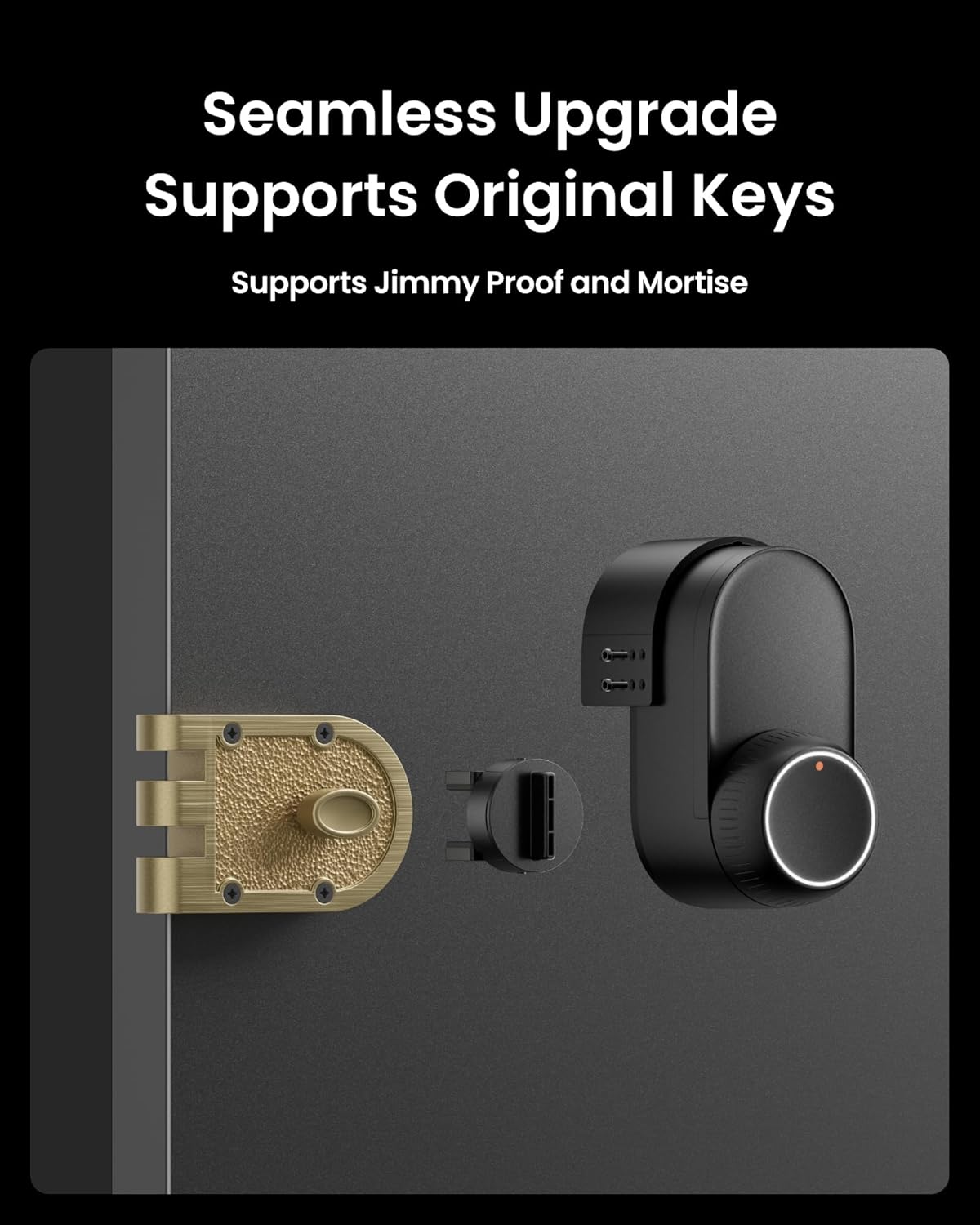
ภาพนี้แสดงให้เห็นถึงการผสานรวมอย่างลงตัวระหว่าง SwitchBot Lock Ultra กับล็อค Jimmy Proof ที่แสดงในภาพasinติดตั้งชุดอุปกรณ์เสริมในตำแหน่งที่ถูกต้อง
5. การสอบเทียบและการทดสอบ
โปรดดูคู่มือผู้ใช้ SwitchBot Lock Ultra สำหรับคำแนะนำในการปรับเทียบตัวล็อคหลังจากติดตั้ง ทดสอบการทำงานของตัวล็อคด้วยตนเองและผ่านแอป SwitchBot เพื่อให้แน่ใจว่าทำงานได้อย่างถูกต้อง
การใช้งานชุดอุปกรณ์เสริม
ชุดอุปกรณ์เสริมนี้ไม่มีปุ่มควบคุมการทำงาน หน้าที่ของมันคือการช่วยให้ SwitchBot Lock Ultra สามารถใช้งานร่วมกับล็อคแบบ Jimmy Proof และล็อคแบบ Mortise ได้ การทำงานทั้งหมด รวมถึงการล็อค การปลดล็อค และฟังก์ชันอัจฉริยะต่างๆ จะถูกควบคุมผ่าน SwitchBot Lock Ultra และแอปพลิเคชันบนมือถือที่เกี่ยวข้อง
สำหรับคำแนะนำการใช้งานโดยละเอียด โปรดดูคู่มือผู้ใช้ SwitchBot Lock Ultra
การซ่อมบำรุง
ชุดอุปกรณ์เสริม SwitchBot Lock Ultra ต้องการการบำรุงรักษาเพียงเล็กน้อย
- การทำความสะอาด: เช็ดพื้นผิวด้วยผ้าแห้งนุ่มๆ หลีกเลี่ยงการใช้สารทำความสะอาดที่มีฤทธิ์กัดกร่อนหรือตัวทำละลาย
- การตรวจสอบ: ตรวจสอบความแน่นของสกรูและการติดตั้งเป็นระยะๆ ตรวจสอบให้แน่ใจว่าอะแดปเตอร์ยังคงติดอยู่กับประตูและตัวล็อคหลักอย่างแน่นหนา
- การหล่อลื่น: ห้ามหล่อลื่นชิ้นส่วนในชุดอุปกรณ์เสริม หากล็อค Jimmy Proof หรือ Mortise เดิมของคุณต้องการการหล่อลื่น โปรดปฏิบัติตามคำแนะนำของผู้ผลิตสำหรับล็อคชนิดนั้นๆ
การแก้ไขปัญหา
หากคุณพบปัญหาเกี่ยวกับชุดอุปกรณ์เสริม โปรดพิจารณาสิ่งต่อไปนี้:
ตัวล็อกไม่ล็อกอย่างถูกต้อง
- ตรวจสอบการจัดตำแหน่ง: ตรวจสอบให้แน่ใจว่าชุดอุปกรณ์เสริมติดตั้งเข้ากับกลไกการล็อคที่มีอยู่ได้อย่างสมบูรณ์ การติดตั้งที่ไม่ตรงกันอาจทำให้การทำงานไม่ราบรื่น
- ขันสกรูให้แน่น: ตรวจสอบให้แน่ใจว่าสกรูยึดทั้งหมดแน่นสนิท สกรูที่หลวมอาจทำให้เกิดการเคลื่อนไหวและส่งผลต่อประสิทธิภาพการทำงาน
- สิ่งกีดขวาง: ตรวจสอบว่ามีสิ่งกีดขวางทางกายภาพใดๆ ที่อาจทำให้ตัวล็อกไม่สามารถล็อกหรือปลดล็อกได้อย่างสมบูรณ์หรือไม่
ชุดอุปกรณ์เสริมดูหลวม
- ขันให้แน่นอีกครั้ง: ขันสกรูยึดทั้งหมดให้แน่นอีกครั้ง
- กาว (ถ้าใช้): หากใช้กาวในการยึดติดครั้งแรก โปรดตรวจสอบให้แน่ใจว่ากาวแห้งสนิทและยึดติดได้ดีเพียงพอ
ปัญหาทั่วไปของโปรแกรมล็อคอัลตร้า
สำหรับปัญหาที่เกี่ยวข้องกับคุณสมบัติอัจฉริยะ อายุการใช้งานแบตเตอรี่ หรือการเชื่อมต่อแอปของ SwitchBot Lock Ultra โปรดดูคู่มือผู้ใช้ SwitchBot Lock Ultra โดยเฉพาะ หรือติดต่อฝ่ายสนับสนุนของ SwitchBot
ข้อมูลจำเพาะ
| คุณสมบัติ | รายละเอียด |
|---|---|
| หมายเลขรุ่น | W5600000 |
| ขนาด (กว้าง x ยาว x สูง) | 3.9 x 2.48 x 2.6 นิ้ว |
| น้ำหนักสินค้า | 3.87 ออนซ์ |
| วัสดุ | โลหะ |
| ความเข้ากันได้ | SwitchBot Lock Ultra, กุญแจกันขโมย Jimmy, กุญแจแบบฝัง |
| ยูพีซี | 810150543896 |
การรับประกันและการสนับสนุน
สำหรับข้อมูลการรับประกันและการบริการลูกค้า โปรดดูที่เว็บไซต์อย่างเป็นทางการของ SwitchBot webคุณสามารถดูข้อมูลเพิ่มเติมได้จากเว็บไซต์หรือเอกสารประกอบที่มาพร้อมกับ SwitchBot Lock Ultra ของคุณ หรือติดต่อฝ่ายบริการลูกค้าของ SwitchBot โดยตรงเพื่อขอความช่วยเหลือเกี่ยวกับชุดอุปกรณ์เสริมนี้
Webเว็บไซต์: www.switch-bot.com
อีเมล: support@switch-bot.com


